


SoftIcon Related Posts – Similar Posts & Internal Linking
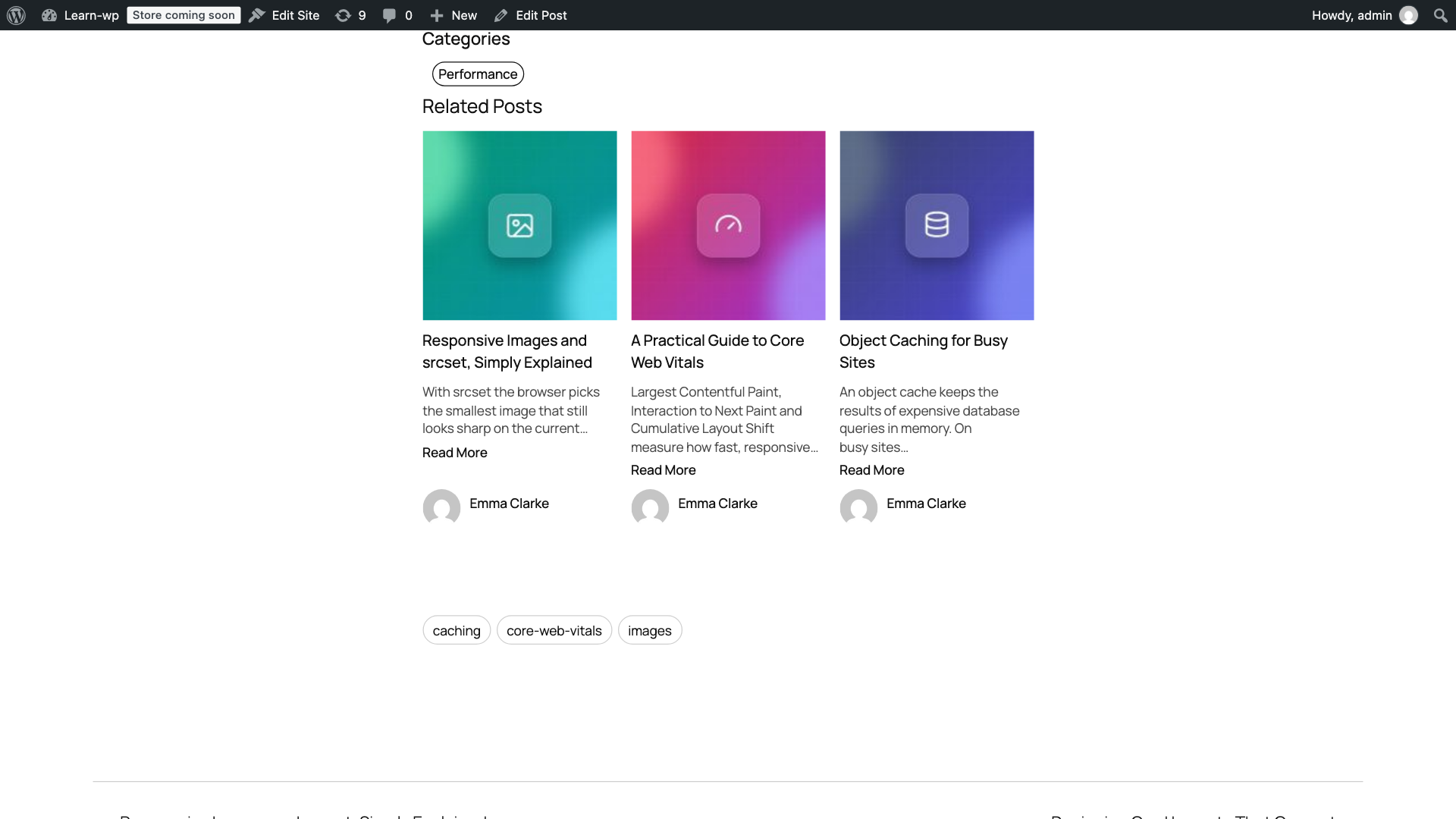
Related posts in a responsive grid below an article, with featured images, excerpts and author.
SoftIcon Related Posts shows your readers what to read next. It finds similar posts that share categories, tags or any custom taxonomy with the current article, ranks them by relevance, and displays them below your content in a clean, responsive grid, list or minimal layout.
Every related post is an internal link. More internal links help visitors discover more of your content, keep them on your site longer and help search engines understand how your articles connect.
It works the moment you activate it: related posts appear below every post with no setup. When you want more control, use the settings page, the Related Posts block, the shortcode or the sidebar widget.
Video overview
More tutorials: setup, the block, layouts and design, smart matching, pages and WooCommerce and every setting explained. Or watch the whole playlist.
Why choose SoftIcon Related Posts?
- Works instantly – activate and related posts appear under every article.
- Actually relevant – “Most relevant” ranks posts by how many tags and categories they share, so the best match comes first.
- You stay in control – hand-pick related posts for any article; the remaining slots fill in automatically.
- Fast and lightweight – built-in caching, responsive lazy-loaded images, and only one small stylesheet on the front end. No JavaScript on the front end.
- Looks like your site – inherits your theme colors and fonts, including dark themes.
- Privacy friendly – no visitor tracking and no cookies. The optional opt-in for update emails is off unless you allow it.
Smart related posts
- Related posts by category, by tag, by both, or by any shared taxonomy
- Order by most relevant, random, latest, recently updated, most commented or title
- Hand-pick related posts per post from the post editor
- Exclude categories or individual posts
- Only show posts from the last N months, so old content does not crowd out new articles
- Hide related posts on any single post
Related posts block, shortcode and widget
- Related Posts block for the block editor with a live preview and sidebar options
- Works in block themes and Full Site Editing: add the block once to the Single Posts template
- Shortcode
[softicon_related_posts]with every option available as an attribute - Classic sidebar widget for classic themes
- Show related posts before the content, after the content, or only where you place them
Layouts and design
- Grid, list (image on the left) and minimal (titles only) layouts
- Responsive columns: 1 to 6 on desktop, automatically fewer on tablets and phones
- Image ratio (16:9, 4:3, 3:2, 1:1 or fixed height), card border or shadow, rounded corners and hover zoom
- Title, text and card background colors, or leave them empty to use your theme colors
- Show or hide the featured image, excerpt, date, author, read more link and categories
- Fallback image from the Media Library for posts without a featured image
Works everywhere
- Posts, pages and custom post types
- WooCommerce related products matched by product categories and tags
- Related post links in your RSS feed (optional)
- Translation ready
Built for speed
- Related posts are cached and refreshed automatically when you publish, update or delete posts, or change categories and tags
- Random order never runs a slow
ORDER BY RAND()query - Images use
srcset, so phones download small images - One 5 KB stylesheet, loaded only where related posts are shown
Perfect for
- Blogs and personal sites
- News, magazine and content sites
- WooCommerce stores that want related products inside the product description
- Documentation, tutorials, recipes and any site with lots of articles
How it works
- Install and activate the plugin.
- Related posts appear below every post right away.
- Open Related Posts Settings to choose how posts are matched, ordered and displayed.
- Optional: add the Related Posts block anywhere, or hand-pick related posts in the post editor.
Shortcode
[softicon_related_posts posts="4" columns="2" relation="tag" orderby="relevance" layout="list" title="You may also like"]
Supported attributes: post_id, posts, columns, relation (category, tag, both, all), orderby (relevance, rand, date, modified, comment_count, title), title, show_categories, show_image, show_excerpt, show_date, show_author, show_read_more, layout (grid, list, minimal), image_ratio (fixed, 16-9, 4-3, 3-2, 1-1), card_style (none, border, shadow), radius, hover_zoom, title_color, text_color, card_bg. Any attribute you leave out uses the value from the settings page.
For developers
The block’s editor script is built from source. The full source code, including src/ and the build setup, is on GitHub: github.com/softiconai/softicon-related-posts. Pull requests are welcome.
Copy templates/posts.php or templates/category.php into yourtheme/softicon-related-posts/ to change the markup.
alrp_related_posts_query_args– filter the related posts queryalrp_related_posts_html– filter the final HTMLalrp_template_path– change which template file is loadedalrp_cache_ttl– cache lifetime in seconds (default one day)alrp_relevance_weights– points per shared term for “Most relevant” (default category 1, tag 2)alrp_related_post_ids– filter or reorder the final list of related post IDsalrp_auto_display– return false to stop the automatic list on a postalrp_wrapper_classes/alrp_wrapper_style_vars– add classes or CSS variables to the wrapperalrp_default_settings,alrp_setting_choices,alrp_sanitize_settings– add your own settingsalrp_block_atts– map extra block attributes to settingsalrp_render_settings– adjust the settings a single list is rendered withalrp_item_after_title/alrp_item_end(actions) – add markup inside each card, e.g. a pricealrp_video_urls– tutorial video URLs shown on the settings page
Settings page (JavaScript, @wordpress/hooks): alrp.settings.tabs adds tabs, alrp.settings.layouts and alrp.settings.layoutArt add layout tiles, alrp.block.inspector adds panels to the block sidebar.
Pro add-on
Everything above is free. SoftIcon Related Posts Pro is an optional add-on with a one-time price. See Related Posts Free vs Pro for the full comparison and Related Posts Pricing for the plans. Pro adds:
- “Read also” boxes inside articles and an “Up next” slide-in
- Carousel, overlay, magazine and numbered layouts, design presets and custom CSS
- Cookieless click analytics, plus “Popular” and “Trending” order
- A Smart order with keyword matching, adjustable weights and cornerstone posts first
- WooCommerce: smarter related products, product cards, “Shop this post”
- Custom field and ACF rules, and a REST endpoint for headless sites
Watch the Pro overview or a tutorial for each Pro feature in the playlist.
Feedback
Missing a feature? Found a bug? Please open a topic in the support forum or an issue on GitHub. We read every message.