

Snelgraveren Product Designer for WooCommerce
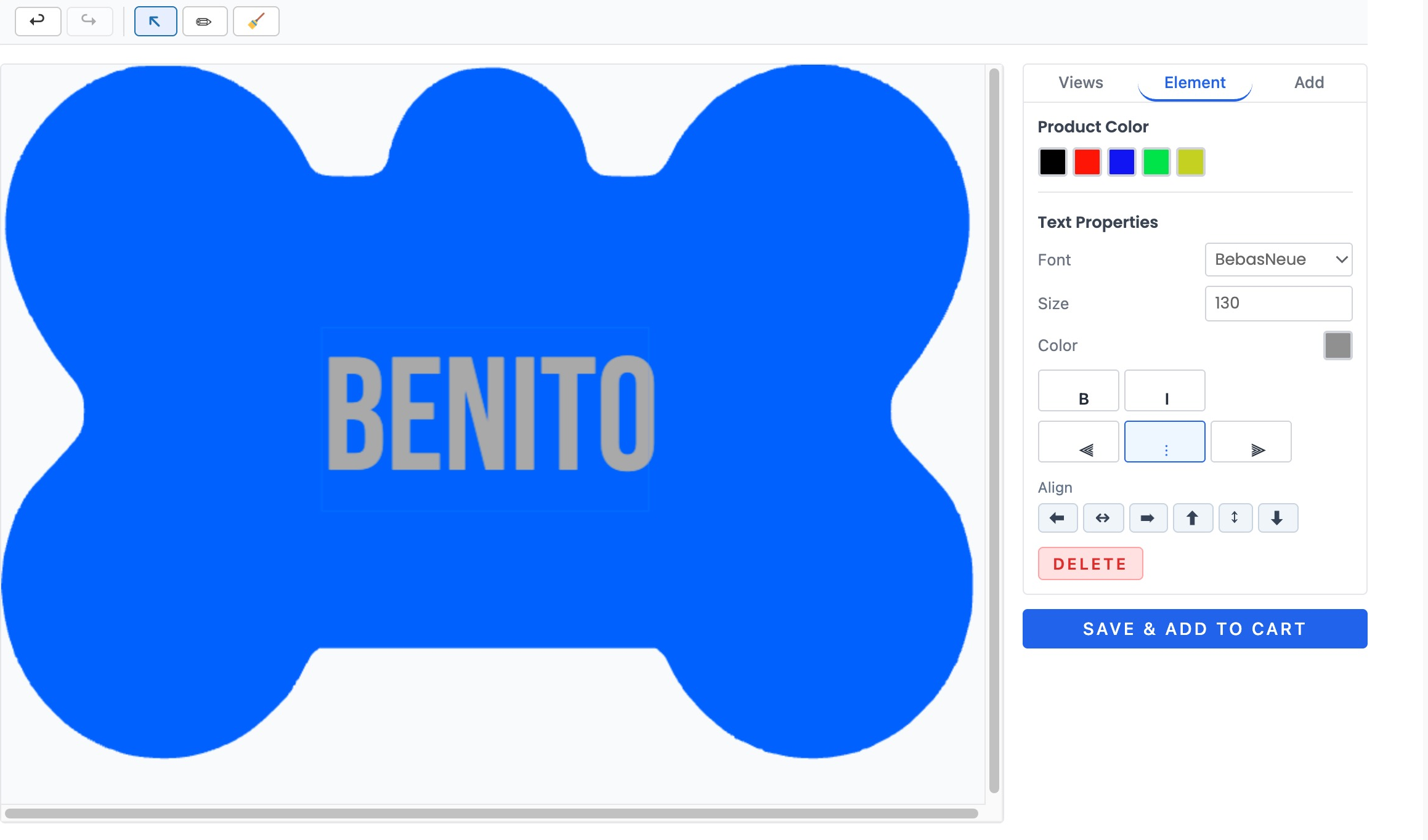
The customer-facing designer: a name engraved on a bone-shaped dog tag, with product colour swatches, font, size, colour and alignment controls, undo/redo, and a Save & add to cart button.
Snelgraveren Product Designer adds a modern, secure product designer to your WooCommerce store. Customers add text, photos, clip art, and SVG artwork onto your products, see a live price, and their design flows straight into your order and production workflow.
Built from the ground up as a secure alternative to legacy product designers, with server-side price calculation, strict file validation, and SVG sanitization on every upload.
Designer
- Drag-and-drop canvas editor (Fabric.js) with multiple product views
- Text, photos, SVG artwork, and curated clip art collections
- Single-stroke engraving fonts for laser/CNC tool paths
- Design zones with boundaries and per-zone permissions
- Live design surcharge preview while the customer edits
- Image resolution warnings before a blurry design reaches production
- Vector-only mode for engraving products (blocks raster photo uploads)
- Works with classic themes (shortcode, auto-render) and block themes (Gutenberg block)
- Mobile-friendly modal designer
Store owner tools
- Ready-made starter templates: import one click from the built-in gallery
- Template builder with views, zones, layers, permissions, and pricing rules
- Production dashboard: all orders with designs, bulk ZIP export for a production run
- Automatic design exports (PDF, PNG, SVG) when an order reaches a chosen status
- Design statistics: saved vs. ordered designs and conversion
- “My designs” tab on the customer account page
- Automatic cleanup of abandoned guest designs (configurable retention)
- System status checks with e-mail alerts when something needs attention
Security first
- All prices calculated server-side — client values are never trusted
- Every SVG sanitized, every upload MIME-validated
- Design links use unguessable random identifiers
- Rate-limited uploads
Free vs Pro
The free plugin is a complete, working product designer. Pro adds the tools that turn it into a full production and pricing workflow.
Free:
- Drag-and-drop designer (text, photos, SVG)
- One template
- Ready-made starter templates
- PNG export
- Shortcode + Gutenberg block
- “My designs” in the customer account
- Mobile designer
- Server-side pricing and SVG sanitization
Pro adds:
- Unlimited templates
- Multiple product views (front, back, …)
- Custom font uploads
- Clip art collections
- Pricing rules (surcharge per element or per tier)
- Per-element and per-zone permissions
- SVG-shape design zones and safe areas
- Product colors and color palettes
- PDF and SVG production export
- Automatic export on order status
- Upload restrictions (vector-only engraving)
- LightBurn (.lbrn2) import
Learn more and compare plans on the product page linked from this listing.
Development
The full source code (including the un-minified JavaScript sources for the compiled files in dist/) and build tooling are publicly available at:
https://github.com/temmink/snelgraveren-product-designer
Build steps: npm install && npm run build (Vite) compiles the designer and admin bundles into dist/; composer install --no-dev installs the PHP dependencies. See the repository README for details.
External Services
This plugin uses the Freemius SDK for license validation, plugin update delivery, and optional usage analytics.
No data is sent anywhere before you act. On activation, Freemius shows an opt-in screen with two choices:
- “Skip” — nothing is sent. The plugin works fully offline; only your Pro license key (if you have one) is validated against Freemius’ servers when you activate a license.
- “Allow & Continue” — you opt in to license validation, update delivery, and anonymized usage analytics. Only then does the plugin share: your site URL, WordPress and PHP versions, the list of active plugins and theme, and the admin e-mail address, with Freemius (freemius.com), a licensing and analytics service used by many WordPress and WooCommerce plugins.
You can review or withdraw this consent at any time from the plugin’s account/opt-in prompts. This service is used for licensing and update delivery — no customer, design, or order data is ever sent to Freemius.
Freemius Privacy Policy: https://freemius.com/privacy/
Freemius Terms of Service: https://freemius.com/terms/
No other external services are used. Design exports (PDF/PNG/SVG) are rendered entirely on your own server — nothing about your customers’ designs, uploads, or orders is ever sent off-site.