

SnapShots
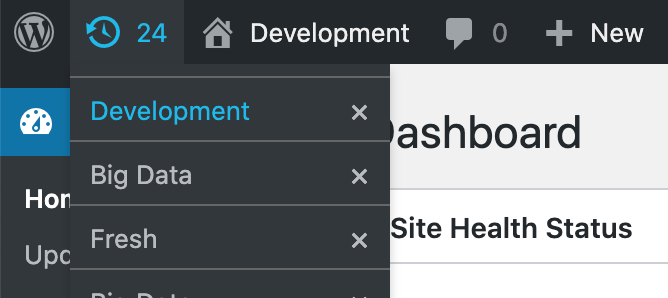
Minimal dropdown UI of SnapShots in the admin bar.
SnapShots saves the current state of a WordPress development site so you can restore it in one click. Each snapshot can include the database and the uploads folder. Create, search, restore, and delete snapshots from the admin bar, from Tools Snapshots, or with WP-CLI.
Use it while you build and test on a local or development site. A restore replaces the current database and, when files were saved, the uploads directory. Plugins, themes, and WordPress core stay as they are. Snapshots are stored on the same server. This is not an off-site backup.
Create and restore a snapshot
- Name each snapshot from the admin bar. The prompt suggests the current snapshot name, or the site title when none is current.
- Search the admin bar list by name. Press Ctrl+S to open the menu and focus search. Press Enter to restore the first match.
- Store the current admin URL and return there after restore, including URL fragments.
- Stay logged in as the same user after a restore started from the admin screen.
- Keep a limited number of copies of the same name. Two copies are kept by default; older ones are removed.
- Confirm before a restore or delete.
Tools screen and settings
Tools Snapshots lists every snapshot with its name, created time, last used time, and saved location. Select several rows and delete them together.
Settings Snapshots controls where snapshots are saved, how many copies to keep, whether uploads and the return URL are included, which database tables to leave out, and whether the list is sorted by last used or by created date. The Plugins screen and the admin bar both link to that settings page.
A PHP constant in wp-config.php overrides the matching setting. Each option can also be changed with the snapshots_{option} filter, for example snapshots_max_shots.
What a snapshot includes
- A database export (
dump.sql) of the site tables, except tables you exclude. - The uploads directory as
data.zip, when Save Files is enabled. It is enabled by default. - A manifest with the name, created time, last used time, and the optional return URL.
On restore, tables that use this site’s database prefix and are not in the snapshot are dropped. If the home URL inside the snapshot differs from the current home URL, WP-CLI runs a search-replace to the current URL.
Zip files are written with PHP’s ZipArchive class, or with PclZip when ZipArchive is unavailable.
WP-CLI
SnapShots adds a wp snapshot command. From the shell:
wp snapshot backup "Before the experiment" --files
wp snapshot restore before-the-experiment
wp snapshot list
wp snapshot delete before-the-experiment

backup accepts `--files` to include uploads, `--location=<path>` to store a return URL such as `wp-admin/plugins.php`, and `--exclude_tables=<tables>` as a comma-separated list.

restore and `delete` accept the snapshot name, its slug, or a folder id such as `before-the-experiment_1587039434`. When you pass a name, the latest copy of that name is used.
Settings reference
These options are on Settings Snapshots. The matching constant in wp-config.php overrides the saved value.
- Snapshots folder (
SNAPSHOTS_FOLDER):wp-content/.snapshots - CLI allow root (
SNAPSHOTS_CLI_ALLOW_ROOT): false - Max shots (
SNAPSHOTS_MAX_SHOTS): 2 - PHP path (
SNAPSHOTS_PHP_PATH): empty, so the server PATH is used - Save files (
SNAPSHOTS_SAVE_FILES): true - Save location (
SNAPSHOTS_SAVE_LOCATION): true - Exclude tables (
SNAPSHOTS_EXCLUDE_TABLES): empty -
List order (
SNAPSHOTS_LIST_ORDER):last_used(orcreated)SNAPSHOTS_PHP_PATH is a directory. Do not include the
phpbinary in that path.SNAPSHOTS_CLI_PATH is also a directory, and it is not a field on the settings screen. Set it in
wp-config.phpto the folder that contains thewpbinary. Do not includewpitself.define( ‘SNAPSHOTS_CLI_PATH’, ‘/usr/local/bin’ );
define( ‘SNAPSHOTS_PHP_PATH’, ‘/usr/local/bin’ );
define( ‘SNAPSHOTS_FOLDER’, WP_CONTENT_DIR . ‘/.snapshots’ );
define( ‘SNAPSHOTS_MAX_SHOTS’, 2 );
define( ‘SNAPSHOTS_LIST_ORDER’, ‘last_used’ );add_filter( ‘snapshots_max_shots’, function ( $value ) {
return 5;
} );