

Slotnest Booking Forms for Bookly
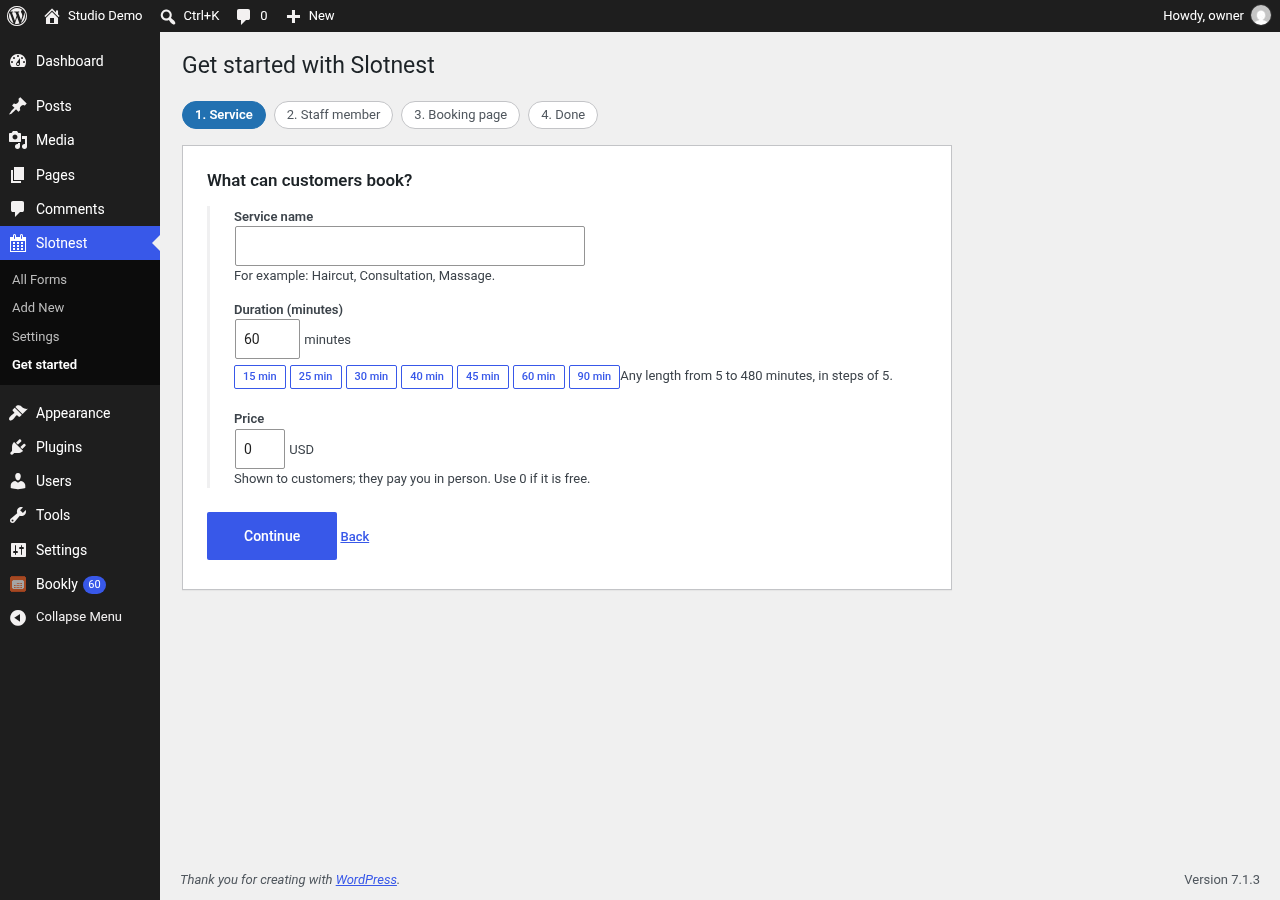
Guided setup: name the service and type its length in minutes, or pick a preset (15, 25, 30, 40, 45, 60 or 90).
Slotnest adds booking forms to Bookly. A guided setup takes a new site from “just activated” to a live booking page in about two minutes: it adds your first service and staff member to Bookly, publishes a form and creates a “Book now” page. Design more forms visually, then place them with the Slotnest booking form block or the [slotnest_booking id="123"] shortcode. Bookings land in Bookly like any other appointment.
Slotnest is an independent add-on. It is not made by or affiliated with the authors of Bookly. The free Bookly plugin must be installed and active. Slotnest is tested with the free Bookly plugin (Bookly 28.5); it has not been tested with Bookly Pro or Bookly’s paid add-ons.
What you get
- Guided first-run setup that works on an empty Bookly install: service (name, length, price), staff member (working days and hours), a published form and a booking page.
- A “Slotnest booking form” block: pick a published form from a dropdown and see a live preview in the editor.
- Saved forms with draft and publish, listed on a familiar WordPress list screen.
- Templates to start from: classic four-step, compact two-step, salon and clinic.
- Visual design: colours, typography, spacing, wizard or single-page layout, button and field labels.
- A live preview that can never create appointments.
- Public booking that rechecks availability and capacity on the server before it saves.
- Unpaid bookings or “pay locally” reservations. Staff collect the payment in Bookly.
- Customer and staff confirmation emails through Bookly’s mail settings and templates, with automatic delivery retries.
- Safe retries: a visitor who loses the connection and submits again does not create a second appointment.
- When Slotnest and Bookly’s own appointment editor save for the same staff member at the same moment, one waits for the other, and the editor’s overlap warning also sees Slotnest bookings. This uses Bookly internals (see “Which parts of Bookly does Slotnest rely on?” below).
- Optional authenticated REST API (
slotnest/v1) for integrations, with per-endpoint read, write and delete switches under Tools Slotnest API.
Privacy and security
- Public forms never receive administrator credentials and cannot read customer lists.
- Public endpoints accept only the fields a published form uses.
- Rate limits per visitor address (IPv6 addresses are grouped by their /64 network): 600 read units a minute per form (a month of availability counts as 10), 10 bookings and 30 rejected attempts per 10 minutes. Per customer email address: 5 bookings a day from one visitor address and 15 a day from all addresses together (filters
slotnest_public_email_ip_limitandslotnest_public_email_limit). Limits use fixed time windows (a “day” is a UTC calendar day, so around a window boundary up to twice a limit can get through) and are counted atomically in the database, so parallel requests cannot exceed them. - Spam protection: a hidden honeypot field; length limits on names (60 characters), email (100), phone (32) and notes (1,000); names cannot contain links, domain names (anything like “name.tld”, also with spaces or look-alike dots), email addresses, markup or four or more digits, and notes cannot contain links or domain names. This makes it hard to use the form to email advertising text, but notes are still free text. A CAPTCHA can be added through the
slotnest_public_book_allowedfilter; none is built in, and the plugin makes no external calls. - Booking receipts are deleted after 48 hours; sent and failed email queue rows after 30 days. Queued emails contain the customer’s name and email address until then.
What Slotnest writes to Bookly
A public booking adds rows to Bookly’s own tables, the same rows Bookly’s booking form adds: a customer (bookly_customers), an order (bookly_orders), an appointment (bookly_appointments), the customer’s booking (bookly_customer_appointments) and, on “pay locally” forms, an unpaid payment (bookly_payments). The guided setup adds a service, a staff member, the link between them and the staff member’s working hours. The optional integration API can create, change and delete Bookly appointments, customers, services and staff when an administrator switches those operations on. Slotnest keeps its own data (booking receipts, the email queue and rate-limit counters) in three tables of its own.
Not included
- Online card or wallet payments.
- Carts, recurring series, waitlists, coupons and gift cards on public forms. Authenticated API routes for these exist and stay off until an administrator enables them.
- SMS and reminder campaigns.
Requirements
The free Bookly plugin (tested with 28.5). Public booking needs InnoDB tables and MySQL 5.7.5+ or MariaDB 10.0.2+ (tested with MariaDB 11.4).
Source code and build
The admin form designer and the public booking form are a React application written in TypeScript. Its full source ships with the plugin in source/. The built file, assets/suite.js, is not minified.
To rebuild it you need Node.js 20 or newer:
cd sourcenpm cinpm run build:wordpress
The build writes assets/suite.js and assets/suite.css into the plugin folder.
The block is built with @wordpress/scripts (not minified):
cd source/blocknpm cinpm run build
The build writes build/booking-form/ (block.json, index.js, index.css, render.php).