

SiteSkite – Secure MCP & AI WebOps. Connect ChatGPT, Claude, or Any AI Agent via MCP

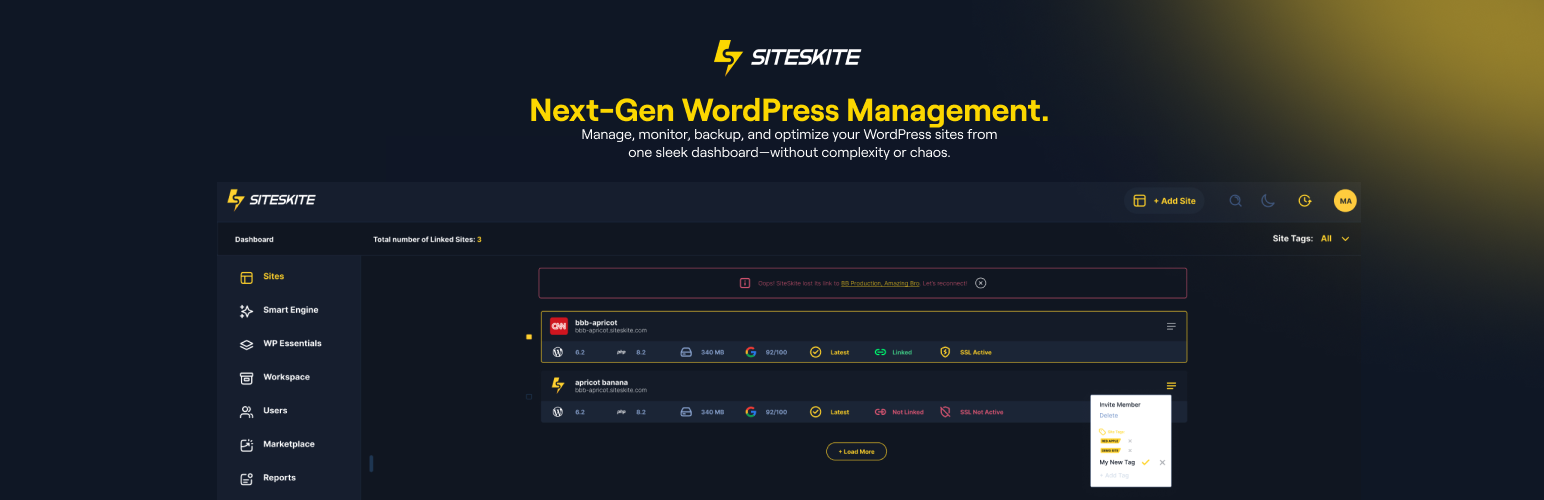
Linked sites dashboard — manage your WordPress fleet from one place
SiteSkite is the WebOps platform for WordPress — built for agencies, developers, and site owners. In one place you get:
- Secure MCP — connect Claude, ChatGPT, Cursor, Gemini, and other AI agents to WordPress
- AI Site Studio — generate full WordPress sites with AI in the SiteSkite portal
- WebOps — backups, sandboxes, monitoring, bulk updates, recovery, and agency workflows for one site or a fleet
Edit live with AI, build new sites with Studio, and operate everything else from one place — so your team spends less time switching tools and more time shipping.
Live on-site edits through WordPress AI / Site MCP do not consume AI Site Studio credits.
Important: Fleet WebOps (backups, restores, sandboxes, monitoring, bulk actions) runs after you connect a site with a secure API key from your SiteSkite account. Site MCP alone is free and works with no account.
Get started free · Website: siteskite.com · Docs: Knowledgebase
Why SiteSkite
- WebOps + AI in one workflow — connect agents, maintain sites, and generate new ones without leaving SiteSkite
- Free Site MCP, no account required — this WordPress install becomes the MCP server; Claude, ChatGPT, or Cursor connect straight to your site over HTTPS; approve and revoke apps in wp-admin
- Platform MCP when you grow — connect at https://mcp.siteskite.com to the SiteSkite platform MCP server for every linked site, plus portal tools (backups, sandboxes, logs, Studio)
- Built for real page builders — Gutenberg queue, Elementor, Divi, and WPBakery abilities with structured, builder-aware edits
- WooCommerce MCP — list and update the product catalog, create draft products in batches, list/create coupons (bulk codes), manage orders and customers — through Woo’s own APIs, not raw post hacks
- Forms & inboxes — list forms, create Contact Form 7 forms, read WPForms entries and CF7/Flamingo messages so AI can work submissions, not just field markup
- ACF, BuddyPress / BuddyBoss, SEO — type-aware Advanced Custom Fields; community members, groups, and activity reads; Yoast / Rank Math / SEOPress / AIOSEO meta when present
- Trust by design — ability allowlists, optional read-only mode, Advanced Power Tools off by default, draft-first workflows, undo tokens, Logs & Roll Back, session undo, and expiring draft preview links
- Skills & playbooks — load Gutenberg / Elementor / WPBakery guidance so agents follow your process
- Agency-scale WebOps — incremental + snapshot backups, BYO cloud storage, sandboxes, rollbacks, uptime, Core Web Vitals, white-label, reports, and team workspaces
Connect Claude to WordPress
Site MCP: open SiteSkite AI MCP Connect — your WordPress site is the MCP server (direct connection to this install).
Platform MCP: Quick Connect via https://mcp.siteskite.com — the SiteSkite platform MCP server for your linked sites and portal capabilities.
- Turn AI MCP on in wp-admin (or link the site in the SiteSkite portal).
- Choose WordPress AI when you want the agent to edit the live site through the on-site MCP server.
- Connect Claude (web, desktop, or Claude Code) with the shown URL / Quick Connect flow and approve access.
Claude can draft pages, reshape Elementor or Gutenberg layouts, tweak Woo products, and more — under the abilities you allow.
Connect ChatGPT to WordPress
- Open SiteSkite AI MCP Connect for Site MCP, or use Platform MCP Quick Connect at https://mcp.siteskite.com.
- Add SiteSkite as a connector in ChatGPT with the MCP URL.
- Approve the app, then ask ChatGPT to edit content, menus, forms, SEO fields, or store data.
Same pattern works for Cursor, Gemini-class clients, and other MCP-compatible agents.
What your AI agent can do on WordPress
Site MCP exposes typed abilities (discoverable tools) so Claude, ChatGPT, Cursor, and other agents can do real WordPress and WooCommerce work — not generic “run PHP” shortcuts.
WooCommerce MCP — catalog, coupons, orders
Turn your store into a WooCommerce MCP endpoint for AI agents:
- Product catalog — list products, read a product, update price / stock / status / descriptions, create simple products in batches (default draft, up to 50 per call) with categories and image sideload
- Bulk coupons — list/get coupons; create discount codes in one batch (explicit codes or generated prefix + count) with percent / fixed cart / fixed product, expiry, usage limits, product restrictions, free shipping
- Orders & customers — list and inspect orders, update order status, list customers
Writes go through WooCommerce CRUD (lookup tables, stock, hooks) so shop pages and filters stay correct. Ideal for prompts like “WooCommerce bulk coupon updater”, “create 25 SUMMER codes at 15%”, or “draft these products from my list.”
Forms & form inboxes
- Forms — list forms on the site; create Contact Form 7 forms from a clear brief
- Form inboxes — detect WPForms / CF7+Flamingo; list and read WPForms entries (Pro) and Flamingo / CF7 messages so agents can summarize leads, find a submission, or draft a reply from real inbox data
Page builders: Gutenberg, Elementor, Divi, WPBakery
- Gutenberg — runtime inspect, content read, batch queue / apply / cancel for safe multi-step block edits
- Elementor — document outline, clone page, find/replace text or images, insert block, apply template, list widget types and templates
- Divi — Divi 4 shortcodes and Divi 5 blocks: status/format detect, compact outline, safe find/replace (dry-run first), clone page as draft
- WPBakery — environment, content read, structured replace
ACF, BuddyPress / BuddyBoss, SEO & analytics
- Advanced Custom Fields (ACF) — list field groups, read fields on a post, update a field by name or key (with undo)
- BuddyPress / BuddyBoss — read-only community surface: members, groups, activity feed (component-gated when available)
- SEO — get/set meta for Yoast, Rank Math, SEOPress, or All in One SEO when installed
- Analytics — MonsterInsights overview, top pages, traffic sources, and search queries when connected
Content, chrome & ops
Create/update pages and posts; menus; media from URL; revisions; comment moderation; Redirection rules; cache purge; Solid Security / Updraft status checks when those plugins are present.
Safer AI writes
Share a draft with an expiring preview link (no publish required); reverse a write with undo.token (~72 hours); review and roll back changes — including a whole AI session — in AI MCP Logs & Roll Back.
Try prompts like:
- “Create a draft Contact page with a CF7 form and give me a preview link.”
- “Replace this headline across the Elementor homepage — dry run first.”
- “Show my WooCommerce coupons and create 20 SPRING codes at 15% off, expiry end of month.”
- “List draft Woo products under $50 and update stock on the ones that are out.”
- “Summarize the latest WPForms / Flamingo form inbox entries and flag spam.”
- “Outline this Divi landing page and clone it as a draft for A/B copy.”
- “List ACF field groups, then update the hero subtitle field on page 42.”
- “Show BuddyPress groups and recent community activity.”
- “List pending comments, approve the safe ones, and undo if I change my mind.”
Stay in control of every AI action
- Toggle each ability on or off in MCP Abilities
- Per linked site, pick one mode: Off, WordPress AI (on-site MCP / live site edits), or Platform AI (SiteSkite platform MCP + portal tools)
- Context notes so agents follow your brand and rules
- Skills playbooks for Gutenberg, Elementor, WPBakery, and more
- Optional read-only mode and Advanced Power Tools (PHP / WP-CLI / files) kept off until you enable them
- OAuth / Connected Apps: approve, review, and revoke AI clients anytime
AI Site Studio
Need a brand-new WordPress site, not a tweak to an existing one? AI Site Studio (in the SiteSkite portal) generates a full site with AI and deploys it for preview and refinement.
- Studio credits apply to full site generation in the portal
- Day-to-day live edits through MCP / WordPress AI stay outside that credit pool
- Bring your own model where the platform supports it, or use SiteSkite AI-powered generation
Studio builds sites. MCP edits the sites you already run. WebOps keeps them healthy.
WordPress WebOps (fleet & single-site)
Compact power for agencies and operators:
- Backups & migrate — on-demand / scheduled; incremental or classic snapshot; restore; clone or migrate between servers; 1GB free backup space to start; BYO storage (Google Drive, Dropbox, AWS S3, Backblaze B2, pCloud)
- Sandboxes & blueprints — launch staging sandboxes; spin sites from backups; rapid deploy presets
- Updates & rollback — bulk plugin / theme / core updates; activate / deactivate / delete; safe version rollbacks
- Recovery & security — Advanced Site Recovery after fatal errors; vulnerability guard; controlled Login As
- Monitor & performance — uptime, BirdEye overview, Core Web Vitals
- WP Canvas — maintenance mode, debug, search & replace, permalinks, indexing, WP Reset, and more
- Teams & clients — workspaces, roles, white-label, automated customer reports, clear error / debug / custom logs
- Marketplace & Essentials — curated presets and digital assets
Who SiteSkite is for
Agencies · freelancers · developers · WordPress site owners · hosts offering WP upkeep — anyone who needs a WebOps platform for WordPress with AI editing and serious operations together.
External services
This plugin connects to external services to perform backups, restores, and operational callbacks. Below is a list of services, what they are used for, what data is sent, and relevant policies.
-
Dropbox
- What it’s used for: Uploading and downloading backup archives to the site owner’s Dropbox.
- What data is sent and when: Backup file contents and related metadata (e.g., file name and size) during backup and restore operations initiated by the administrator.
- Endpoints:
https://content.dropboxapi.com,https://api.dropboxapi.com - Policies: Terms https://www.dropbox.com/terms · Privacy https://www.dropbox.com/privacy
-
Google Drive
- What it’s used for: Uploading and downloading backup archives to the site owner’s Google Drive.
- What data is sent and when: Backup file contents and related metadata during backup and restore operations initiated by the administrator.
- Endpoints:
https://www.googleapis.com/drive/v3/filesand related upload endpoints such ashttps://www.googleapis.com/upload/drive/v3/files(resumable/multipart uploads). - Policies: Terms https://policies.google.com/terms · Privacy https://policies.google.com/privacy
-
Amazon S3
- What it’s used for: Uploading and downloading backup archives to the site owner’s Amazon S3 bucket.
- What data is sent and when: Backup file contents and related metadata during backup and restore operations initiated by the administrator.
- Endpoints: Region-specific S3 REST API (e.g.,
https://s3.<region>.amazonaws.com). - Policies: Service Terms https://aws.amazon.com/service-terms/ · Privacy https://aws.amazon.com/privacy/
-
Backblaze B2
- What it’s used for: Uploading and downloading backup archives to the site owner’s Backblaze B2 bucket.
- What data is sent and when: Backup file contents and related metadata during backup and restore operations initiated by the administrator.
- Endpoints: Backblaze B2 API (e.g.,
https://api.backblazeb2.com). - Policies: Terms https://www.backblaze.com/company/legal/terms.html · Privacy https://www.backblaze.com/company/privacy.html
-
pCloud
- What it’s used for: Uploading and downloading backup archives to the site owner’s pCloud storage.
- What data is sent and when: Backup file contents and related metadata during backup and restore operations initiated by the administrator.
- Endpoints: pCloud API (e.g.,
https://api.pcloud.com) and regional variants such ashttps://eapi.pcloud.com(EU) andhttps://asiaapi.pcloud.com(Asia). OAuth token exchange:https://my.pcloud.com/oauth2_token. - Policies: Terms https://www.pcloud.com/terms.html · Privacy https://www.pcloud.com/privacy-policy.html
-
SiteSkite endpoints (operational callbacks and validation)
- What it’s used for: Validating the plugin API key, linking a site, downloading managed assets, and sending operational status callbacks to SiteSkite services. Some staging endpoints may be used for validation or asset download during testing. When AI / MCP features are used, the SiteSkite platform may coordinate ability requests to this linked site using your Connect API key.
- What data is sent and when: Site identifier and operation status metadata (e.g., backup/restore status) during validation and callbacks. For asset downloads, only the requested asset path is transmitted. Backup contents are never sent to SiteSkite; only selected metadata required to coordinate operations.
- Policies: Terms https://www.siteskite.com/terms-of-service · Privacy https://www.siteskite.com/privacy-policy
-
WordPress.org (downloads)
- What it’s used for: Downloading official WordPress core translation files when requested by an administrator.
- What data is sent and when: The request URL includes the WordPress core version and language code to retrieve the matching translation archive; no personal data is sent.
- Endpoints:
https://downloads.wordpress.org/translation/core/<version>/<locale>.zip - Policies: Terms https://wordpress.org/about/privacy/ · Privacy https://wordpress.org/about/privacy/
Notes:
– Data is transmitted only when you initiate an action that requires it (e.g., starting a backup/restore, validating your API key, or downloading translations).
– You choose and configure the cloud storage provider(s) to be used.