


Site Lockdown Security for MainWP
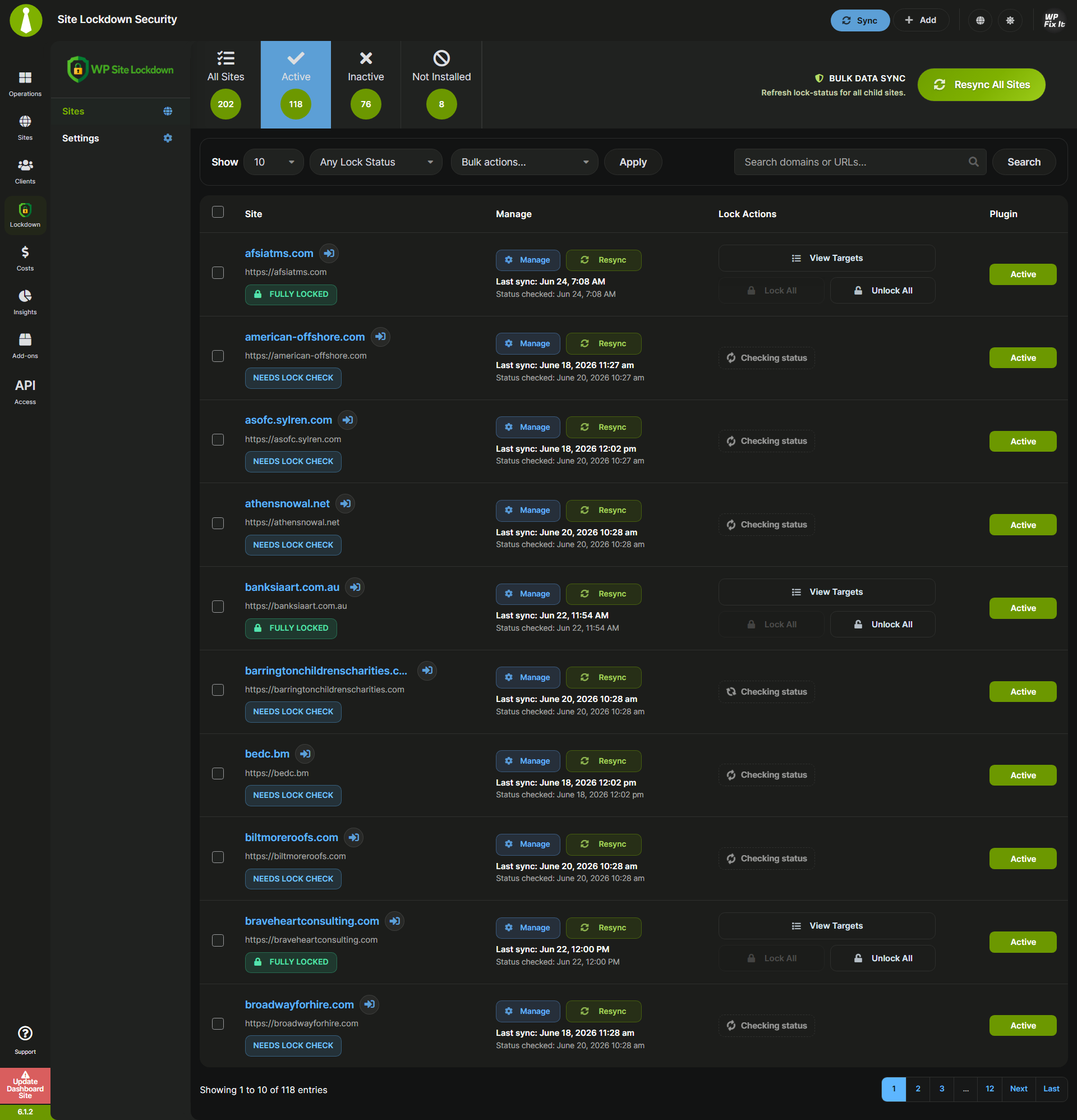
Main dashboard showing active child sites, lock status, quick actions, and plugin state.
Site Lockdown Security for MainWP gives MainWP administrators a centralized control panel for monitoring and managing Site Lockdown Security across connected child sites.
Instead of opening every child dashboard manually, you can quickly see which sites are protected, which targets are locked, which sites need attention, and where the child plugin is inactive or not installed.
Built for agencies, maintenance teams, and security-focused WordPress providers, this extension helps you manage lockdown status at scale from inside your MainWP dashboard.
This extension is developed by WP Fix It and is not officially affiliated with or endorsed by MainWP.
Highlights
- Centralized lock-status dashboard — view lock status across all connected child sites.
- Bulk Data Sync — refresh lock-status for all child sites in controlled batches.
- Per-site Resync — repair and refresh the secure child connection for a single site.
- Target-level controls — view and manage individual lock targets such as
wp-admin,wp-includes, plugins, themes, and uploads. - Lock All / Unlock All actions — quickly lock or unlock all supported targets on a child site.
- Fast live search — search domains and URLs across all sites, not just the current page or tab.
- Smart status cache — show the most recent known lock status while fresh checks run in the background.
- Plugin detection — identify sites where the Site Lockdown Security child plugin is active, inactive, or not installed.
- Failed-site reporting — review failed sites directly inside the Bulk Data Sync progress modal.
- MainWP-friendly UI — dark-mode optimized controls, responsive table layout, and polished progress feedback.
What You Can Manage
The extension is designed to help you monitor and control common WordPress lockdown targets from MainWP, including:
- WordPress admin directory protection
- WordPress includes directory protection
- Plugin directory protection
- Theme directory protection
- Uploads directory protection
- Full-site lock/unlock status summaries
- Per-target lock/unlock state
Available targets depend on the active Site Lockdown Security child plugin configuration.
Secure Child Communication
The extension uses a secure child-site bridge so the MainWP dashboard can request lock status and perform approved lock actions. Recent builds use private child-site pairing instead of relying on a public hard-coded token.
If a child site shows Status Unavailable or Check failed, click Resync for that site to refresh the secure connection and lock-status cache.
Bulk Data Sync
The Bulk Data Sync button refreshes lock-status for all child sites. It runs in controlled batches so large MainWP networks can be refreshed without launching every child-site request at once.
The progress modal shows:
- total sites
- completed sites
- refreshed sites
- failed sites
- live progress log
- a final failed-site list with reasons
Built For MainWP Workflows
This extension is intended for MainWP dashboards managing multiple WordPress installations. It works alongside the Site Lockdown Security child plugin and gives administrators a single place to review and manage lock posture across the network.