


Sheetable – Google Sheets to WP Table
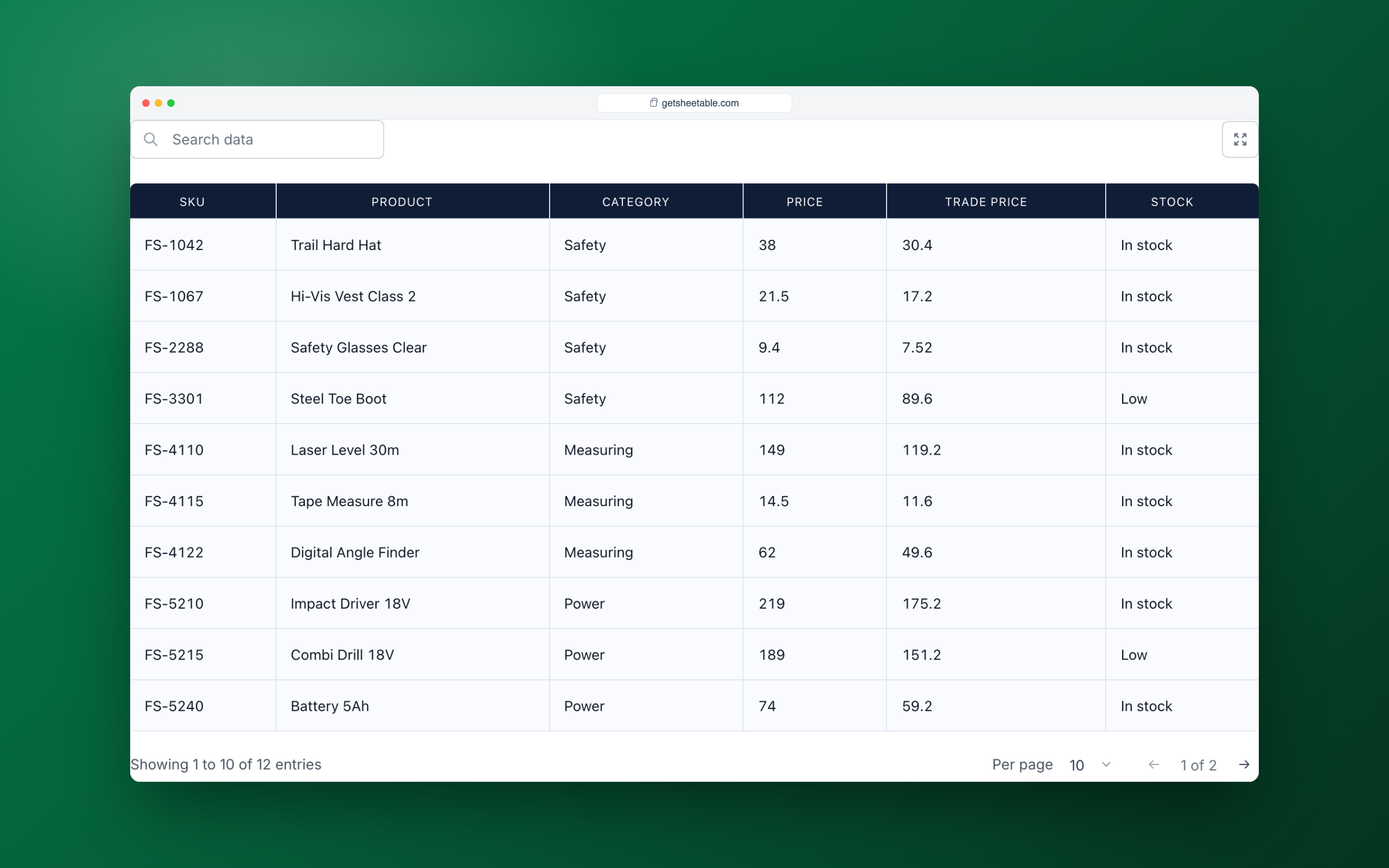
Your Google Sheet shown as a fast, searchable WordPress table
Website | Documentation | Get Sheetable Pro
Sheetable – Google Sheets to WP Table lets you embed and sync Google Sheets data as responsive WordPress tables. Import your spreadsheet, customize the display, and embed it anywhere using shortcode or Gutenberg block. No API key required, no server load, no complex setup.
Paste your Google Sheet link, customize, embed – done.
Why Choose Sheetable?
Sheetable takes a modern approach to embedding Google Sheets in WordPress:
- Ultra-lightweight (only ~10KB footprint on frontend) – Won’t slow down your site
- Client-side caching – Lightning-fast repeat loads
- No API key required – No setup, no limits, no OAuth
- Zero server processing – All rendering happens in browser
- Core Web Vitals optimized – Built for 100/100 Lighthouse scores
- Large spreadsheet support – Handles large datasets smoothly, even millions of rows
- Formatting support – Checkboxes, links, images, email, phone detected automatically
Modern performance without complexity.
Free Features
- Unlimited tables – Create as many as you need
- Unlimited Google Sheets – Connect any public sheet
- Unlimited rows & columns – No artificial limits like others
- Real-time search – Find data instantly
- Pagination – Navigate large datasets easily
- Refresh – Update data on demand without loading page
- Fully responsive – Works on all devices including mobile, tablet, desktop, folding devices
- Rich content support – Links, images, text, numbers, dates, emojis, checkboxes
- Smart links – Auto-detect emails and phone numbers as clickable links
- Text wrapping options – Control how long text displays in cells
- Show/hide title & description – Control what visitors see
- Row numbers display – Easy reference
- Shortcode support – Embed anywhere
- Gutenberg block – Native WordPress editor support
Pro Features
Unlock advanced functionality with Sheetable Pro:
- Show/hide header & footer – Full table control
- Column sorting – Visitors sort by any column header
- Auto-refresh – Set custom intervals for live sync
- Custom CSS editor – Complete styling freedom
- Full styling control – Colors, fonts, borders, spacing
- Row & column offset – Start from any position
- Limit rows & columns – Display exactly what you need
- Range selection – Specify A1:F200 or any range
- Regex search – Advanced pattern matching
- Content protection – Disable text selection & copy
- Responsive column visibility – Hide specific columns on mobile/tablet
- Responsive column wrapping – Show limited columns with expandable rows
- Copy & paste styles – Apply styling from one table to another
- Export options:
- Excel (XLSX)
- CSV
- TSV
- HTML
- Markdown
- JSON
- Copy to clipboard
Ready to do more with your tables? Sheetable Pro unlocks full styling control, auto-refresh for live data, one-click exports (Excel, PDF, CSV & more), advanced display options, and content protection: everything you need for polished, on-brand data tables.
👉 See Sheetable Pro plans & pricing
Have questions? Browse the documentation or ask in the WordPress.org support forum.
How It Works
- Make your Google Sheet public and paste the URL
- Customize your table settings and styles
- Embed using shortcode or Gutenberg block
SEO & Performance Benefits
- Fully indexable HTML output – Search engines can read your data
- Ultra-lightweight – Better Core Web Vitals scores
- Fast mobile performance – Optimized for all devices
- Clean semantic markup – SEO-friendly structure
- Lower bounce rate – Fast loading keeps visitors engaged
Sheetable helps both your site speed and search rankings.
External Services
Sheetable connects to the following external services. Frontend table data goes directly from Google to your visitors.
Google Sheets (Google LLC)
- What it does: Fetches your spreadsheet data directly to the visitor’s browser (client-side)
- Data sent: The visitor’s browser sends a request to your public Google Sheet URL
- Data received: Spreadsheet content (rows, columns, formatting)
- When: Each time a visitor loads a page containing your table
- Terms of Service: Google Terms of Service
- Privacy Policy: Google Privacy Policy
No data is sent to Sheetable servers or any third-party intermediary for table rendering. All visitor data transfer happens directly between the browser and Google’s servers.
PackEdge
Sheetable uses PackEdge for optional usage analytics and, if you use Sheetable Pro, for license management. Nothing is sent to PackEdge unless you opt in to analytics or enter a license key.
- Service URL: https://api.packedge.dev
- Analytics (opt-in only): If you allow analytics, Sheetable sends your site URL, site title, admin email address, the email address of the user who granted consent, server IP address, timezone, locale, WordPress, PHP and MySQL versions, server software, memory limit, debug mode, theme, and the list of installed plugins. This is sent when you opt in and with plugin activation, deactivation and uninstall events. You can withdraw consent at any time.
- Deactivation feedback (opt-in only): If you allowed analytics, a short survey appears when you deactivate the plugin. Your selected reason, any comment you type, and the analytics data above are sent.
- License management (Pro only): When you activate, check or deactivate a Sheetable Pro license, the license key and your site URL are sent to verify the license.
- Privacy Policy: PackEdge Privacy Policy
- Terms of Service: PackEdge Terms of Service
We never sell your data; it is used only to improve the plugin and to manage licenses.
Privacy Policy
Sheetable respects your privacy.
Visitor / table data
- No personal data is collected from your site visitors
- No cookies or tracking are set on the frontend
- Your Google Sheet data is fetched directly from Google’s servers to the visitor’s browser; Sheetable acts only as a display layer
- No visitor data is sent to Sheetable, PackEdge, or any other third party
See the External Services section above for the full list of what is sent, when, and to which service.