

Appointment Booking Plugin for WooCommerce | Online Booking Calendar & Service Manager
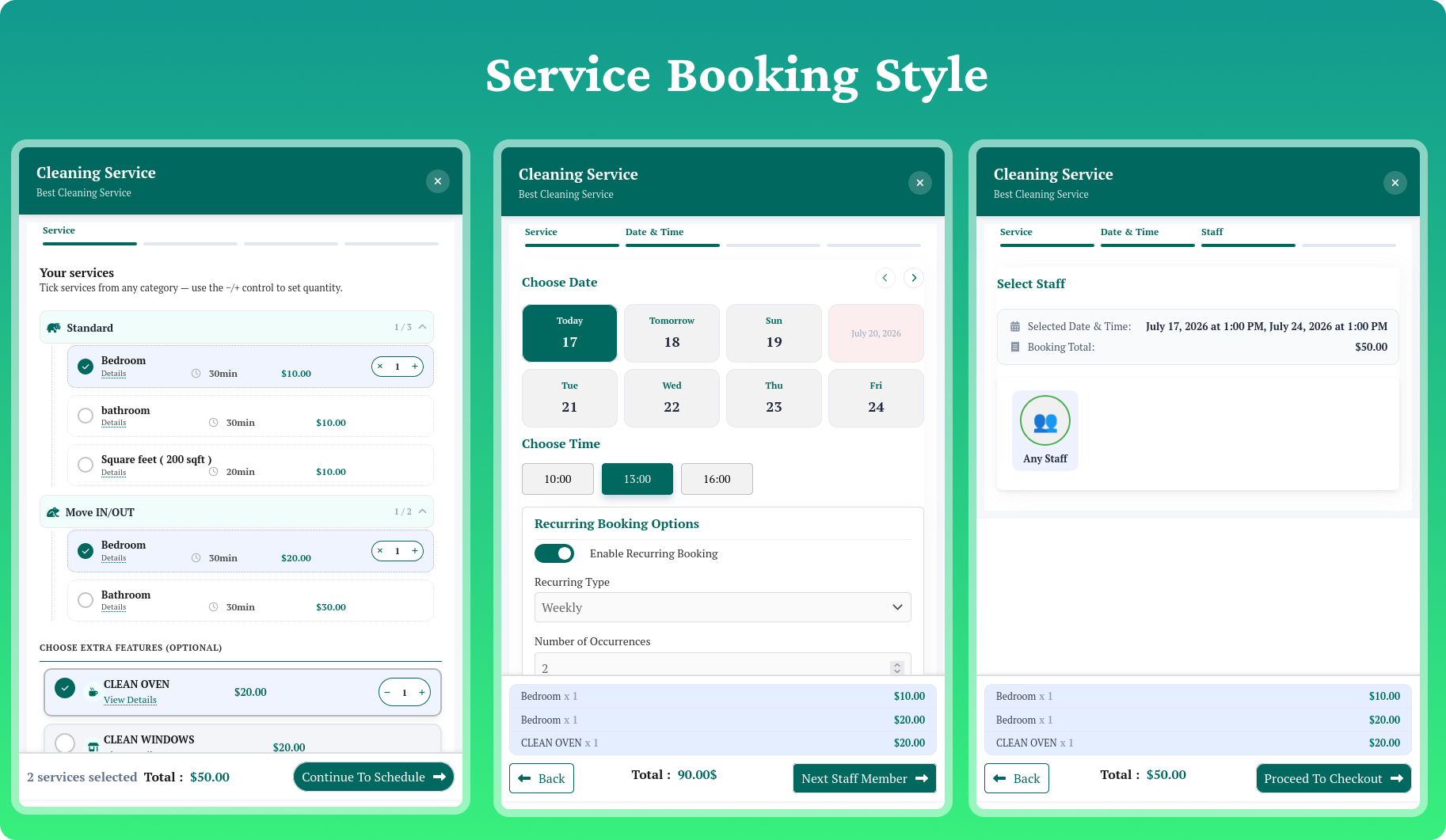
Real-time booking calendar and service selection interface.
WPBookingly is a modern, mobile-ready appointment booking plugin for WordPress that makes it easy to manage services, staff, and customer appointments without writing a single line of code. Whether you run a salon, clinic, consultancy, gym, car rental, or tutoring business, WPBookingly gives you a professional online booking calendar your customers can use from any device.
Customers browse real-time availability, pick a service and time slot, and confirm their appointment instantly — right on your website. With a lightweight codebase, shortcode support, and compatibility with any WordPress theme or page builder, WPBookingly is built to help you organize bookings, cut down on no-shows, and save time every day.
▶️ Watch the Quick Overview Video
🌐 Live Frontend Demo
📘 Full Documentation
⬇️ Free Download on WordPress.org
Why Choose WPBookingly as Your WordPress Booking Plugin?
- No coding required — set up a complete service booking website in minutes
- Works with or without WooCommerce — choose the checkout that fits your business
- Mobile-first design — fast, responsive booking on desktop, tablet, and phone
- Built for every industry — salons, clinics, consultants, rentals, tutors, and more
- SEO-friendly and lightweight — won’t slow your site down
Who Uses WPBookingly?
💇♀️ Salons & Spas — Let clients pick a stylist, service, and time slot online.
🧹 Cleaning & Repair Services — Assign jobs, set availability, confirm bookings instantly.
💼 Consultants & Coaches — Schedule sessions, send reminders, manage payments.
🏥 Clinics & Therapists — Handle multi-staff schedules and patient appointments.
📸 Photographers — Show available dates, manage session types, collect deposits.
🚗 Car Rental & Automotive Services — Display vehicles, set pricing, take instant reservations.
🎓 Tutors & Training Centers — Run recurring classes and accept payments with ease.
Core Features (Free)
Booking & Scheduling
* Real-time calendar sync to prevent double bookings
* Custom staff schedules and working hours
* Configurable service durations and buffer time
* Dynamic time-slot length — pick a preset or set any custom duration in minutes
* Automated time-slot management
* Group booking support
* Recurring appointment controls
Checkout & Payments
* Two full checkout modes: WooCommerce mode (taxes, coupons, gateways, emails, orders) or Custom/Native mode (WPBookingly’s own cart, checkout, and orders — no WooCommerce required)
* Free Offline payment gateway in Custom/Native mode — take bookings without WooCommerce and without a paid upgrade
* Inline checkout inside the booking drawer in both modes, with gateway redirects and automatic retry on temporary failures
* Advanced booking coupons with service, price, quantity, date, staff, and usage restrictions
* Partial-payment support across native and WooCommerce checkout flows
Customer Experience
* Modern customer account dashboard (native mode) or enhanced WooCommerce My Account (WooCommerce mode)
* View, reorder, reschedule, and request cancellation of bookings
* Recurring-series management for repeat appointments
* Customizable input fields to collect extra client details
Admin Tools
* Modern service editor: categories, extras, pricing, schedules, staff, taxes, waiting lists, FAQs, galleries
* One-Click Business Templates to launch a ready-to-book service in seconds
* Booking administration, staff dashboard, reviews, and cancellation-request management
* Analytics and reporting overview
Security & Compliance
* Server-side validation, nonces, rate limiting, and capability/ownership checks
* Protected booking and account access with verified payment references
* GDPR consent and data export/erasure tools
Shortcodes
Shortcode
Purpose
[service-booking post_id="123"]
Display the booking interface for a specific service
[mpwpb-user-dashboard]
Display the customer booking dashboard
[custom_payment_my_account]
Display the Custom/Native payment My Account area
[mpwpb_booking_confirmation]
Display a protected order confirmation screen
Every Booking Website Needs These Features
📅 Real-time calendar sync.
🔁 Recurring & group bookings·
💳 Secure online payments (Stripe, PayPal, and more)·
📨 Automated email/SMS notifications·
🧩 Flexible booking-form placement via shortcode ·
🌍 Multilingual & theme compatibility·
📊 CSV data export and reporting
Upgrade to WPBookingly Pro
Take your booking system further with:
- Real-time Google Calendar sync
- Advanced staff management and multi-staff assignment
- Recurring appointments and automated SMS reminders
- PDF invoices and downloadable booking tickets
- CSV data export
- Custom client forms
- Group & multi-service booking
- Advanced analytics and reporting
- Online Stripe and PayPal gateways for Custom/Native mode
- Extended WooCommerce payment gateways
👉 Try the WPBookingly Pro Demo
Step-by-Step Industry Guides
Setting up a booking site for your industry takes just a few steps: install WordPress, pick a compatible theme, install WPBookingly, configure WooCommerce (optional), add your services, publish the booking shortcode, and start accepting appointments. Detailed walkthroughs are available for: