

Seeb Abilities – 100 New Abilities, Infinite Possibilities for AI Agents
Seeb Abilities adds 100 new abilities to WordPress, so AI agents can write and edit posts, build pages block by block, manage patterns, templates, menus and users, moderate comments, audit your content and more, instead of only reading information about your site.
WordPress 6.9 introduced the Abilities API: a standard way for plugins to describe what they can do, with typed inputs and outputs and permission checks, so that AI assistants, Model Context Protocol (MCP) clients and automation tools can discover and use them. Core registers only a few read-only abilities, such as site and environment information. Seeb Abilities fills the gap with the everyday content-management tasks.
Seeb Abilities is best used with the free MCP Adapter plugin, which turns these abilities into MCP tools that Claude, ChatGPT, Cursor, VS Code and other MCP clients can use directly.
Every ability:
- Uses WordPress’s own functions (
wp_insert_post(),wp_update_post(),wp_set_object_terms()and so on), so hooks, caches, revisions and other plugins behave exactly as they do in the admin. - Checks the current user’s capabilities for that specific object. An agent connected as an Author can edit their own posts, but not someone else’s and not the site settings.
- Declares input and output schemas, and annotations (read-only, destructive, idempotent) that clients use to decide when to ask before acting.
- Is available through the WordPress REST API (
/wp-json/wp-abilities/v1/) and, when the MCP Adapter plugin is active, as MCP tools.
100 new abilities
All abilities use the seeb-abilities/ namespace and are grouped into categories.
Content (posts, pages and public custom post types)
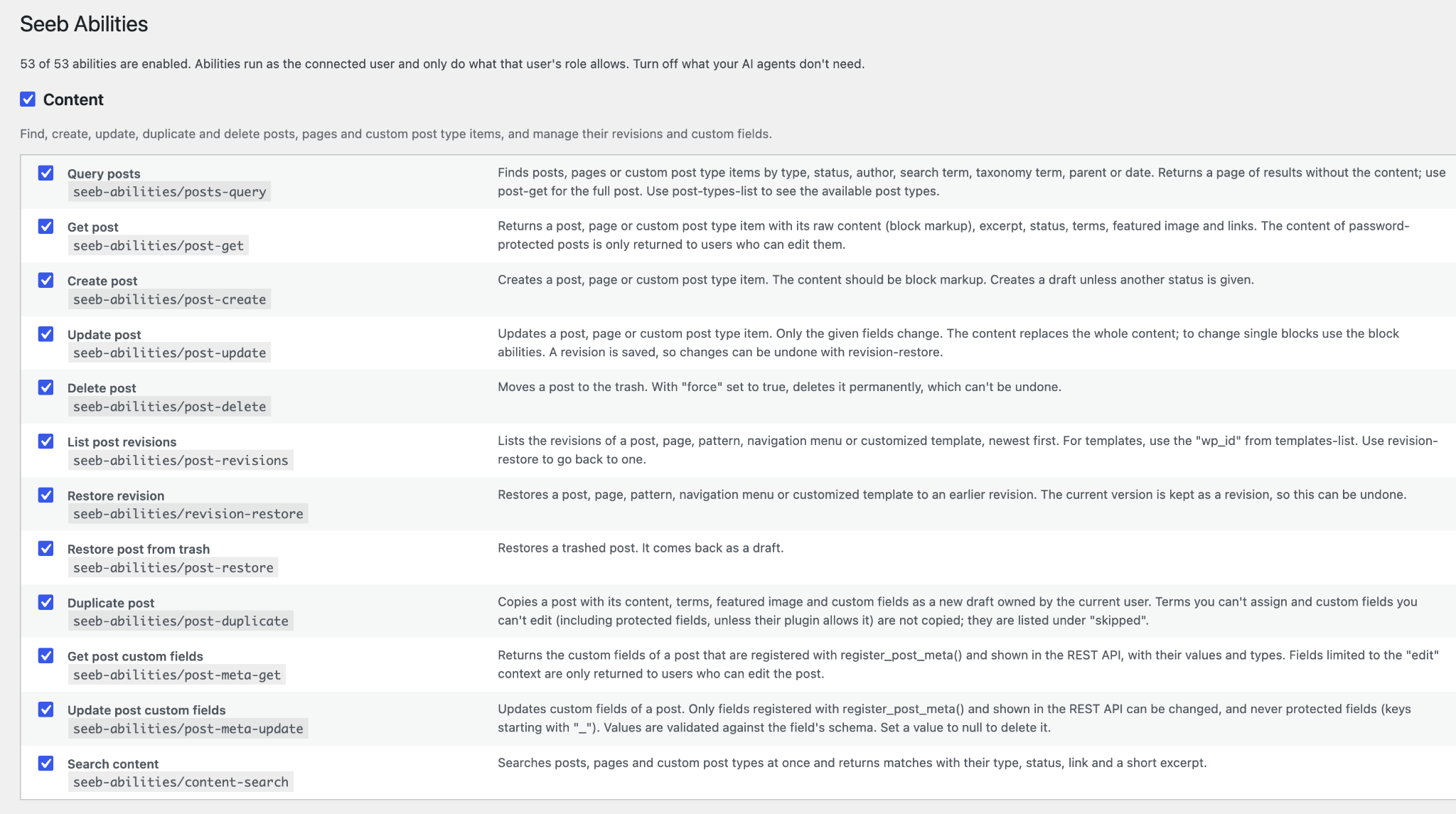
posts-query: find posts by type, status, author, search term, taxonomy term or datepost-get: get a post with its content, terms and featured imagepost-create: create a post, page or custom post type itempost-update: update title, content, excerpt, status, slug, author, date or featured imagepost-delete: move a post to the trash, or delete it permanently withforcepost-revisions: list the revisions of a post, pattern, navigation menu or customized templaterevision-restore: restore any of these to an earlier revisionpost-restore: restore a post from the trashpost-duplicate: copy a post, with its terms, featured image and the custom fields you’re allowed to edit, as a new draftpost-meta-get: read a post’s custom fields registered withregister_post_meta()post-meta-update: update a post’s registered custom fieldscontent-search: search across all public post types at onceposts-bulk-update: change the status, author, comments, stickiness or terms of up to 100 posts at oncecontent-replace: find and replace text across the site (for example an old phone number or domain), as a dry run firstrevision-diff: see what changed between two revisionspage-tree-get: get all pages as a nested tree of parents and childrenpost-lock-check: check whether someone else is editing a post right nowtrash-empty: permanently delete trashed items, optionally only those trashed a while ago
Taxonomies
terms-query: find categories, tags or custom taxonomy termsterm-create: create a termterm-update: rename a term or change its slug, description or parentpost-set-terms: set or append a post’s termsterm-delete: delete a termterms-merge: merge duplicate terms into one, moving their posts
Blocks and patterns (block editor)
block-types-list: list the registered blocks, with their category, title and descriptionblock-type-get: get one block’s attributes, supports, styles and variations, so an agent can write valid block markuppost-blocks-get: get a post’s content as a tree of blocks, each with its path (for example2.0for the first block inside the third)block-insert: insert one or more blocks at a path, or before or after a blockblock-update: change a block’s attributes or inner content without touching the rest of the postblock-move: move a block to another positionblock-duplicate: copy a block, with its inner blocks, right after itembed-check: check whether a YouTube, Vimeo, Spotify or other URL can be embedded, and get the embed block markupblock-remove: remove a block and its inner blocksblocks-replace: replace every block of one type, or with a given attribute value, across a post (for example turn allcore/quoteblocks intocore/pullquote)blocks-validate: check block markup before saving and report unknown blocks, invalid attributes and broken nestingblock-usage-find: find the posts, pages, templates and patterns that use a block typepatterns-list: list registered and synced patterns, with their categoriespattern-insert: insert a pattern into a post, either as a synced reference or as a copy of its blockspattern-create: save blocks as a new synced or unsynced patternpattern-update: update a synced pattern, which changes it everywhere it is usedpattern-delete: move a pattern to the trash, or delete it permanently
All block edits are saved as revisions, so any change can be undone with revision-restore. The first change to a theme template creates a customized copy, which template-reset removes again.
Site editor (block themes)
templates-list: list templates and template parts, and whether they are customizedtemplate-get: get a template or template part as blockstemplate-update: edit a template or template part with the same block abilities as poststemplate-reset: remove customizations and go back to the theme’s versionglobal-styles-get: read the site’s global styles: colors, typography and spacing presets, so new blocks match the themeglobal-styles-update: change the palette, fonts, link colors or block styles, with a revision to undo itcustom-css-get: read the Additional CSS (block and classic themes)custom-css-update: replace or add to the Additional CSS, with a revision to undo it
Navigation
menus-list: list menus and their locationsmenu-items-query: list the items of a menumenu-item-add: add a page, post, term or custom link to a menumenu-item-update: change a menu item’s label, URL, parent, position or link targetmenu-item-delete: remove a menu itemmenu-create: create a menumenu-delete: delete a menumenu-location-assign: show a menu in a theme location, such as the header or footer
Media
media-query: find media library itemsmedia-sideload: import an image or file from a URL into the media librarymedia-update: update alt text, caption, title or descriptionmedia-get: get a media item with its file size and image sizesmedia-delete: delete a media itemmedia-thumbnails-regenerate: generate the image sizes again, e.g. after switching themes
Comments
comments-query: find comments by post, status or authorcomment-moderate: approve, unapprove, mark as spam or trash a commentcomment-reply: reply to a comment as the current usercomment-create: add a new comment to a post as the current usercomment-update: edit a comment’s text or author detailscomments-bulk-moderate: approve, spam or trash up to 100 comments at oncecomments-empty: empty the spam folder or the comment trashcomment-blocklist-update: add or remove words, emails and IP addresses on the disallowed and moderation lists
Users
users-query: list users with their roles (read-only, requires thelist_userscapability, never returns passwords)current-user-get: get the connected user’s role and capabilities, so an agent knows what it is allowed to douser-get: get a user’s profileuser-create: create a user, who gets an email to set their own password (passwords are never returned)user-update: change a user’s name, email, bio or role (only roles you are allowed to assign, and never your own)user-password-reset-send: email a user a password reset linkuser-delete: delete a user and give their content to another user (refuses to delete content unless asked to)user-sessions-destroy: log a user out of all browsers and devicesroles-list: list roles with their number of users and capabilitiesprivacy-requests-list: list personal data export and erasure requestsprivacy-request-create: add a personal data export or erasure request
Site
settings-get: read general and reading settingssettings-update: change site title, tagline, timezone, date format and other allowlisted settingsplugins-list: list installed plugins and whether they are activepost-types-list: list registered post types and taxonomiessite-health-get: get the Site Health status and the tests that need attentioncron-events-list: list scheduled (cron) events and when they run nextthemes-list: list installed themes and which one is activeupdates-get: list available WordPress, plugin, theme and translation updates (nothing is installed)permalinks-flush: regenerate the permalinks to fix “page not found” errorscache-flush: clear the object cache and the page cache of WP Rocket, LiteSpeed Cache, W3 Total Cache, WP Super Cache, WP Fastest Cache or SiteGround Speed Optimizerdebug-log-get: read the last lines of the PHP error logsite-identity-update: set the site logo and site icon
Audit
content-analyze: word count, reading time, heading outline and problems, links and images without alt text of a postinternal-links-check: find links to drafts, trashed posts, missing uploads and pages that return “not found”images-missing-alt-find: find media library images without alt textcontent-counts-get: overview of posts, comments, media and users by status, type and rolestale-content-find: find published content that hasn’t been updated for a long timeunused-terms-find: find categories and tags that aren’t assigned to any post
Safe by default
- Deleting moves to the trash. Permanent deletion needs
force: trueand is marked as destructive. - Settings can only be read and changed from a fixed allowlist. Arbitrary options are never touched.
- Protected post meta (keys starting with
_) cannot be written. - Password-protected content is only returned to users who can edit it.
- No ability runs PHP or SQL, edits files, or installs, updates or activates plugins.
- Users are created with a random password that is never returned; they set their own via email. Roles can only be given if the connected user may assign them, and nobody can change their own role.
- Find and replace runs as a dry run unless told otherwise, saves a revision of each changed post, and skips posts whose block structure would break.
- Query results are paginated with a maximum page size.
- Site owners can turn off any ability, or a whole category, under Settings Seeb Abilities.
For developers
- Filter
seeb_abilities_ability_argsto change an ability’s arguments before it is registered. - Filter
seeb_abilities_enabledto enable or disable abilities in code. - Filter
seeb_abilities_allowed_settingsto change which settingssettings-getandsettings-updatecan access.