

SDAweb Channels for YouTube
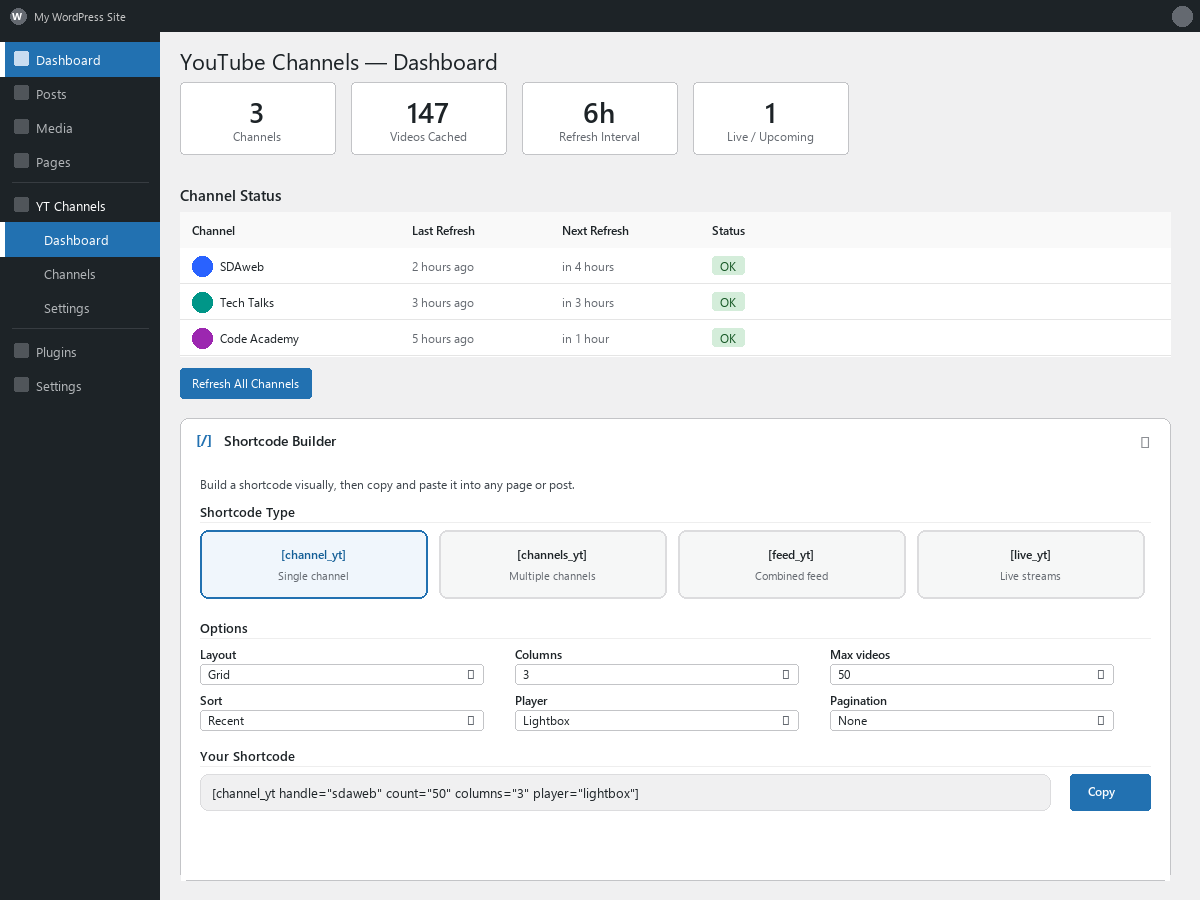
Dashboard with shortcode builder and channel status overview
SDAweb Channels for YouTube is a lightweight, privacy-friendly way to showcase YouTube content on your WordPress site. Add any number of public YouTube channels and display their videos using shortcodes or a Gutenberg block. Videos are cached locally so visitor page views consume zero API quota.
Layouts & Playback
- Grid — Responsive multi-column grid (1–4 columns)
- Tabs — Channel-tabbed interface with 3 navigation modes: scroll, wrapping pills, and avatar strip
- Slider — Horizontal carousel with arrow navigation
- Auto player (default) — Adapts to screen size: lightbox on desktop and tablet, inline on mobile phones
- Lightbox player — Fullscreen overlay with keyboard shortcuts (arrow keys, Escape), swipe gestures, and prev/next navigation
- Inline player — Play directly inside the video card with expand-to-lightbox
- Link mode — Opens videos on YouTube in a new tab
- Avatar strip — Compact row of channel avatars with labeled names and smart truncation
- Mobile bottom sheet — Touch-optimized player with swipe-to-dismiss
- Landscape mobile — Optimized layouts: horizontal cards for live streams, 2-column grid for regular content
Live & Upcoming Streams
- Automatic detection of live broadcasts and scheduled upcoming streams
- Smart sort order: live streams first, then all streams sorted by proximity to the current time — the most relevant broadcasts always appear first
- Dedicated
[sdawchfo_live]shortcode for live and upcoming content - Live badge with concurrent viewer count and pulse animation
- Upcoming badge with scheduled start time countdown
- Toggleable “Live now” and “Coming up” section headings
- Stale guard: upcoming streams auto-expire 1 hour after their scheduled start, live after 24 hours — no stuck statuses
- 5-minute background polling keeps live status current (1-minute with Broadcast Boost)
- Live Broadcast Boost — configurable day/time window for 1-minute polling during scheduled broadcasts
- Zero-quota RSS feed discovery catches scheduled broadcasts not in the uploads playlist
- Live and upcoming streams are automatically excluded from regular shortcodes
Channel Management
- Add channels by URL, handle (@username), or channel ID
- Drag-and-drop reordering controls tab and section display order
- Custom labels per channel for friendly display names
- Automatic video caching with configurable 1–24 hour refresh intervals (up to 3 channels per cron run)
- Manual refresh per channel or all channels at once
- Import and export channels and settings as JSON
Shortcodes
Four shortcodes cover every use case:
[sdawchfo_channel]— Videos from a single channel (by id, handle, or label)[sdawchfo_channels]— Multiple channels in grid, tabs, or slider layout[sdawchfo_feed]— Combined feed mixing videos from all channels[sdawchfo_live]— Live and upcoming streams with empty-state message
All shortcodes support these attributes: count, columns, layout, sort, player, pagination, per_page, show_stats, show_duration, show_channel, and live_only.
Additional Features
- Gutenberg block with live preview and inspector controls
- Shortcode builder in the admin dashboard — no coding required
- Customizable frontend labels (26 strings) for full translation support
- Customizable appearance: badge styles, button styles, tab colors, and time text colors with color pickers
- Load More pagination with configurable batch size
- Video stats: views, likes, duration, publish date
- Detects and labels YouTube Shorts using the channel’s own Shorts list (covers up-to-3-minute Shorts)
- Up to 100 videos per channel with automatic API pagination
- Import/export for easy migration between sites
- Tab navigation modes: scroll, wrapping pills, or avatar strip
- REST API endpoints for custom and headless integrations
- Server cron setup guidance in the admin settings
- Channel name truncation setting for the avatar strip
- Automatic cleanup of private and deleted videos from cache
- Dark theme support via CSS custom property (–sdawchfo-card-bg)
- Admin settings: tabbed Plugin Overview with 7 sections, quick-access links, and info tooltips explaining technical terms
Privacy & Performance
- All video data is cached in your local database
- Visitor page views make zero external API calls
- No cookies are set and no visitor data is sent to third parties
- YouTube embeds use the privacy-enhanced
youtube-nocookie.comdomain - YouTube embeds load only when a visitor clicks play
- Lazy loading: thumbnail images load only when they scroll into view
Third-Party Services
YouTube Data API v3
This plugin connects to the YouTube Data API v3 to fetch channel information and video data. API calls are made server-side only when:
- An admin adds or refreshes a channel
- The scheduled cron refresh runs (configurable interval, default 6 hours)
- The live status cron runs (every 5 minutes, or every 1 minute during a configured Broadcast Boost window)
No API calls are made during normal visitor page views — all data is served from the local cache.
- Service provider: Google LLC
- API endpoint:
https://www.googleapis.com/youtube/v3 - YouTube API Terms of Service
- Google Privacy Policy
A YouTube Data API v3 key is required. You can obtain one for free from the Google Cloud Console.
YouTube RSS Feeds
This plugin fetches public YouTube RSS feeds (https://www.youtube.com/feeds/videos.xml) to discover recently published and scheduled videos. These requests are read-only, use no API quota, and contain only publicly available video IDs.
- Service provider: Google LLC (YouTube)
- YouTube Terms of Service
- Google Privacy Policy
YouTube Embeds
When a visitor clicks play on a video, an iframe loads from YouTube’s privacy-enhanced domain (youtube-nocookie.com). No embed loads until the visitor initiates playback. No cookies are set by this domain.
- Service provider: Google LLC (YouTube)
- YouTube Terms of Service
- Google Privacy Policy