

Scout Reimbursement Pro
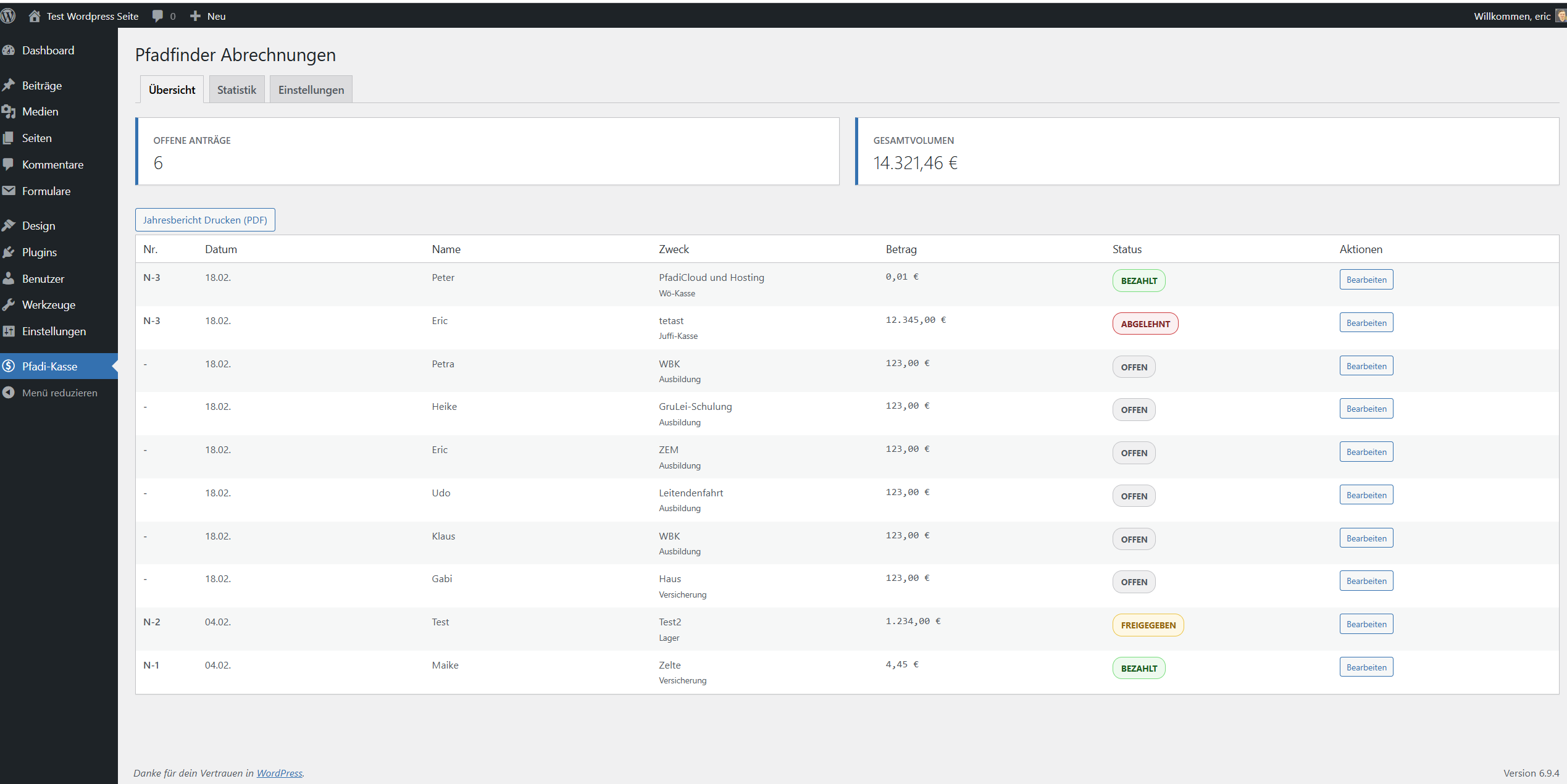
<strong>Submissions overview</strong> — All submitted reimbursements at a glance with status badge and quick access.
Scout Reimbursement Pro is a complete expense reimbursement system built specifically for scout groups, youth organizations, and non-profit associations. It solves a common problem in volunteer work: members advance money out of pocket — for camp supplies, craft materials, or travel costs — and then have to submit receipts manually via email. This plugin makes the entire process digital, transparent, and secure.
How it works
- A member fills out the Contact Form 7 form on your website and uploads receipts (photos or PDFs) directly from their phone.
- The board receives an email with all details and a one-click approval link.
- After approval, the treasurer automatically receives a structured payment email with IBAN suffix, amount, and receipt files.
- Once the treasurer has processed the payment, they mark it as “Paid” via a link — the applicant is notified automatically.
- The WordPress admin can monitor all submissions, status changes, and annual summaries in the backend at any time.
Key Features
Mobile-optimised file upload
The upload area is optimised for smartphone use. Members can take a photo of a receipt with their camera or upload an existing file (JPG, PNG, PDF). Multiple receipts per submission are supported.
Client-side image compression
Before uploading, photos are automatically compressed in the browser to a maximum of 1600×1600 pixels at 80% quality. This saves server capacity and speeds up uploads significantly — especially important with poor mobile connections at camps.
Secure file storage
Receipts are stored in a dedicated directory inside the uploads folder that is closed off with .htaccess and web.config, and they are never linked directly. Every receipt is delivered by a PHP endpoint that first checks permission: administrators get access through their login, while board members and the treasurer follow signed links from their notification e-mails that carry an expiry date. Uploaded files also get a random name component, so a receipt cannot be guessed even on servers that ignore .htaccess.
If your site runs on Nginx, .htaccess has no effect and the protection is incomplete: a receipt link contains the file path, so anyone holding a legitimate link can derive the plain uploads URL and keep using it after the signed link has expired. The plugin checks whether the directory is still reachable and, if it is, shows a warning on every plugin page together with the location block you need to add. Please do add it — on Nginx the endpoint alone is not enough.
Email-based approval workflow
The board approves with a single click from the e-mail — no WordPress login needed. Each stage has its own single-use token: the approval link cannot confirm a payment, and the payment link is only created once approval has happened. Only a hash of each token is stored, the token itself exists solely in the e-mail, and it stops working as soon as it has been used or its 60 days are up. If a link expires or the mail gets lost, the backend can send a fresh one.
Clicking the link opens a short confirmation page that submits the action itself, so the click still feels like one step. Because the change now happens over POST from that page, ordinary link scanners in mail gateways, link previews and browser prefetching no longer trigger an approval — they fetch the link but never run the page.
A scanner that fully renders pages including JavaScript could still complete the step. If your mail is filtered by a sandbox of that kind, switch the setting to two clicks: the link then shows the booking and waits for the button. One click stays the default because it is what most groups want from a volunteer board.
Three-stage status system
Each submission passes through the stages “Open” “Approved” “Paid”. Backward status changes are blocked — an already approved submission cannot be reversed via the email links. Administrators can reject any non-paid submission directly from the WordPress backend, even after approval (e.g. for duplicate receipts), with an optional reason sent to the applicant.
Automatic receipt numbers
Every approved submission automatically receives a sequential receipt number (N-1, N-2, …). A unique index in the database prevents the same number from being handed out twice, and numbers are never reused — a submission that is rejected after approval keeps its number, so the sequence stays auditable.
Audit report as a single PDF
Choose any period — freely selectable start and end date — and the plugin builds one complete PDF: a cover sheet with totals and signature lines for the auditors, an index of all receipts with page numbers, and a data sheet per receipt carrying the digital stamp (PAID / APPROVED). The uploaded receipt files follow immediately after each data sheet: images get their own page, and uploaded PDFs are taken over page by page in their original form — no more “print separately” notes. Every page carries a footer with the receipt number and page count, so nothing can be swapped or lost unnoticed.
The report is assembled in the browser. No PDF library has to be installed on the server, and the receipt files never leave your website.
Selectable reference date
The period filter can be based on the submission date, the approval date, the payment date, or the receipt date. Treasurers usually audit by payment date; the tax adviser may want the receipt date. The plugin warns you when receipts are missing the chosen date and would silently drop out of the report.
Emails that match the task
The board receives the amount, the key details, the receipts and two buttons — approve or reject. The treasurer receives everything needed to make the transfer, with the payment reference in its own box ready to be copied into a banking app. That reference starts with the receipt number, and that is not cosmetic: it is what the bank reconciliation looks for later when matching the statement against the receipts. Emails are sent by the plugin itself rather than through the Contact Form 7 template, so a hand-edited template can no longer break the approval links. Set the scout_send_own_emails filter to false to go back to the Contact Form 7 mail.
Bank statement reconciliation
Upload your bank export as CSV and the plugin answers the central audit question: is every debit backed by a receipt? Matching runs on amount, receipt number in the payment reference, name, IBAN suffix, and date proximity; split transfers covering two receipts are detected as well. Anything ambiguous is offered as a choice instead of being guessed. The result can be exported as a CSV that keeps all original columns and adds a Belegnummer (receipt number) column, so every line of the bank statement is traceable during the audit. A printable reconciliation protocol with signature lines is included.
The CSV is read and processed entirely in your browser — it is never uploaded to the server or sent anywhere. Common German bank exports work out of the box (semicolon or comma, UTF-8 or ISO-8859-1, German or English number and date formats, preamble lines before the header), and every column can be remapped by hand if a format is unusual.
Category statistics
The backend includes a statistics view that breaks down expenses by category (e.g. “Travel”, “Materials”, “Camp costs”) and shows the annual total. Data is cached to keep database load minimal.
Retrospective file upload
Administrators can add further receipts to an existing submission via the backend — for example when a paper receipt arrives by post.
Security
- All form inputs are sanitized before database storage
- All output is context-appropriately escaped (
esc_html,esc_attr,esc_url) - Admin actions are protected with WordPress nonces
- Separate single-use tokens per stage, stored as HMAC-SHA-256 hashes, valid for 60 days
- State changes only via POST; automated GET requests cannot trigger an approval
- Receipts delivered through a permission-checked endpoint, never by direct URL
- Signed receipt links with an expiry date for board and treasurer e-mails
- Form input is validated for plausibility, not just sanitized (amount, dates, participants, IBAN suffix)
- Uploads are all-or-nothing: if one file fails, no orphans are left behind
- File content is checked against the file extension
- CSV exports neutralize spreadsheet formulas without altering amounts
- Database queries exclusively via
$wpdb->prepare() - File upload exclusively via
wp_handle_upload()— no direct use ofmove_uploaded_file() - Allowed file types are server-side restricted to JPG, PNG, GIF, and PDF
- Maximum file size: 10 MB per file
Requirements
- WordPress 6.5 or later (this is when core started enforcing the
Requires Pluginsdependency on Contact Form 7) - PHP 7.4 or later
- Contact Form 7 (must be installed and active)
- A configured reimbursement form in Contact Form 7 with the correct field names
Supported Languages
Interface strings run through __() and _e() with the text domain scout-reimbursement-pro. The source language is German; a complete English (en_US) translation is included and covers all 363 strings, including the report tab, the bank reconciliation and the security notices. A .pot file ships alongside it for further translations.
The Contact Form 7 form created on first activation is generated in the language active at that moment; changing the site language later does not rewrite an existing form. Use “Reset the form to the template” in the settings if you want it regenerated.
Privacy
The plugin stores the submitter’s name, e-mail address, purpose and period of the expense, the amount, the last four digits of the IBAN, and the uploaded receipts.
It hooks into the WordPress privacy tools: a suggested paragraph is offered for your privacy policy, and the personal data exporter and eraser both cover reimbursement records. Paid submissions are reported as retained rather than deleted, because they are accounting records subject to statutory retention periods. How long those periods run depends on the legal classification of the record, so the plugin does not name a fixed number of years. If you want paid submissions erased automatically once a period you define has passed, set it with the scout_retention_years filter. Submissions that are still open or were rejected are erased along with their receipt files.
The plugin does not send data to any external service of its own. It has no telemetry, no CDN calls and no external API. Notification emails go out through whatever mail infrastructure your WordPress is configured to use, so if you have an SMTP or transactional mail plugin in place, reimbursement details pass through that provider — worth listing in your processing records. The audit report and the bank reconciliation are built inside your browser; the bank CSV is never uploaded anywhere.
Third Party Libraries
This plugin bundles pdf-lib 1.17.1 (https://github.com/Hopding/pdf-lib), used in the browser to build the audit report and to embed uploaded receipt PDFs. pdf-lib is released under the MIT License; the full licence text is included in assets/vendor/pdf-lib-LICENSE.md. The library is loaded from your own server — no external CDN is used and no data is sent anywhere.