


ScanForge Database Security
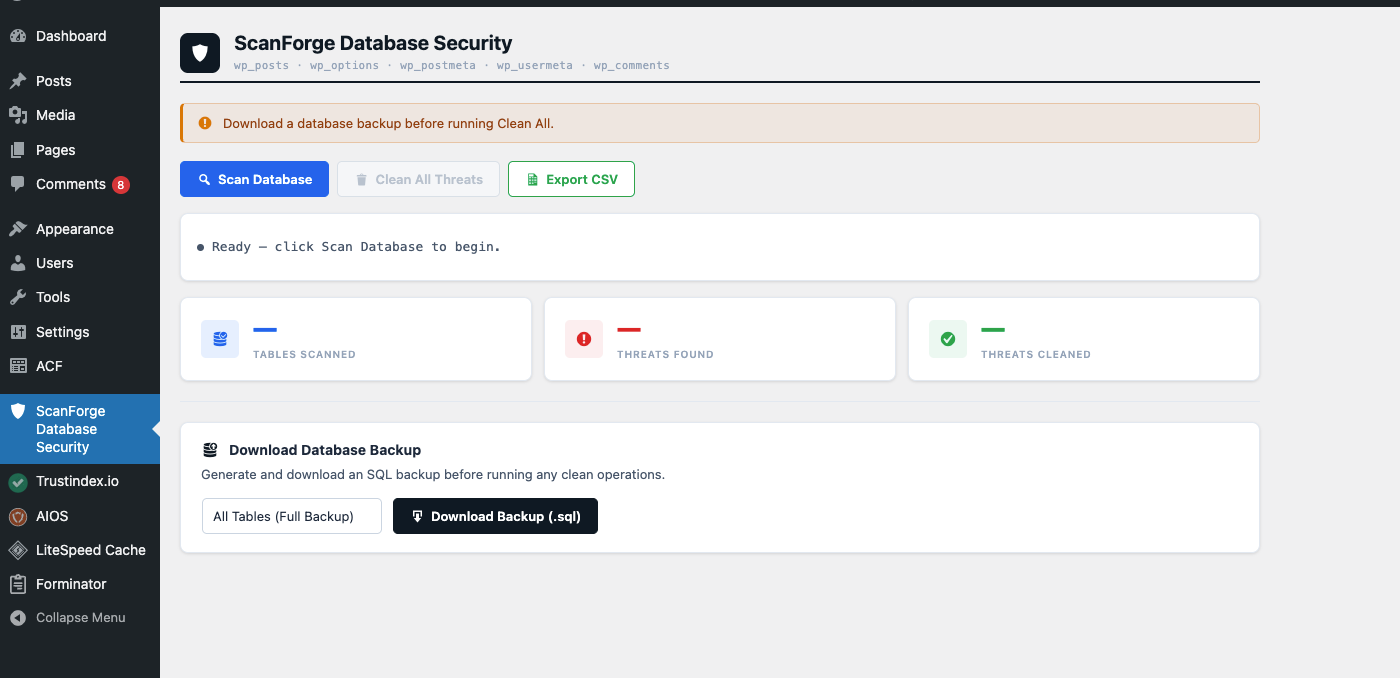
ScanForge Database Security is a WordPress database scanner. It finds malware and spam hidden in your posts, options, post meta, user meta and comments, cleans the malware, and lets you review the spam and delete only what you choose.
Use it as a malware cleaner and a spam cleaner for your database: it handles malware removal for infected rows, and gives you a separate page to review and remove spam.
Many hacks live only in the database: a redirect script inside an option, a spam link inside an old post, an obfuscated payload in a custom field. A file scanner cannot see these. ScanForge looks at the database tables directly, and it runs entirely on your server with no external service.
Who is this plugin for?
- Site owners whose file scanner says “clean” but whose site still redirects visitors or shows spam
- Freelancers and agencies cleaning up hacked client sites
- Hosting support staff who need a quick database check after a hack
- Anyone who wants to check the database after removing a nulled plugin or theme
What does it work with?
- WordPress 5.0 or newer and PHP 7.4 or newer
- The five tables attackers use most: wp_posts, wp_options, wp_postmeta, wp_usermeta and wp_comments
- Custom table prefixes, because it uses the WordPress database object
- Data stored by other plugins in those tables. It is designed to avoid false alarms on plugins such as Wordfence, Elementor and Gravity Forms
- It scans the database only. To audit plugin and theme files, use the companion plugin ScanForge File & Theme Security
Two pages, two jobs
Malware Scanner finds known malware signatures and cleans them.
- Traffic hijacking scripts and nulled plugin backdoors
- Obfuscated PHP injections that use encoded or compressed payloads
- Dynamic script injections and tracking cookie injections
- Known malware loader functions
- Shell command execution attempts and known web shell signatures
- Clean one row or all threats at once
- Download a database backup (.sql) before cleaning
- Export the results as a CSV report
Spam Detection lists spam content so you can decide what to do with it.
- Gambling and casino spam
- Pharmaceutical spam
- Adult spam
- Cryptocurrency spam
- Financial and loan spam
- SEO and backlink spam
- Nothing is deleted automatically. Delete one item, or tick several and use Delete Selected
- Posts go to the Trash so you can restore them. Comments, post meta, user meta and options are deleted permanently
- Core WordPress options, such as the site URL, can never be deleted from this page
- Each item is checked again just before deletion, and skipped if it no longer matches
How to use it
- Go to ScanForge Database Security > Malware Scanner
- Click Download Backup to save a copy of your database
- Click Scan Database and review the threats found
- Click Clean All Threats, or clean rows one at a time
- Scan again to confirm the database is clean
- Open ScanForge Database Security > Spam Detection, click Scan for Spam, and delete only the items you want removed
Want to scan files too?
ScanForge Database Security checks the database only. Our second plugin, ScanForge File & Theme Security, audits your plugin and theme files. It compares them with the official WordPress.org checksums and looks for web shells and modified code.
A card at the bottom of the Malware Scanner and Spam Detection pages shows whether it is installed:
- Not installed: click Install & Activate to download it from WordPress.org and turn it on
- Installed but off: click Activate
- Already active: the card turns green, says “Full stack covered”, and shows an Open File Scanner button that takes you straight to it
Nothing is installed unless an administrator clicks the button.
Important Notice
This plugin helps clean database infections but it does NOT prevent reinfection if the source of the malware (such as nulled or pirated plugins or themes) is still installed. Remove nulled software and keep everything updated to fix the cause.
Spam detection is based on phrases, so a genuine post that uses one of them (for example an article about online casinos) can be listed. Always review each result and take a backup first.
External Services
The scanner itself runs entirely on your server and sends no data anywhere.
The only external connection is optional and happens when you click Install & Activate on the companion plugin card:
- Service: the WordPress.org plugin directory (api.wordpress.org and downloads.wordpress.org)
- Purpose: to find and download the ScanForge File & Theme Security plugin
- Data sent: the plugin slug, using the standard WordPress plugin installer. No personal data, visitor data, site content or credentials are sent
- Privacy policy: https://wordpress.org/about/privacy/