


Sarcio – AI Assistant with Preview and Undo, works with WooCommerce
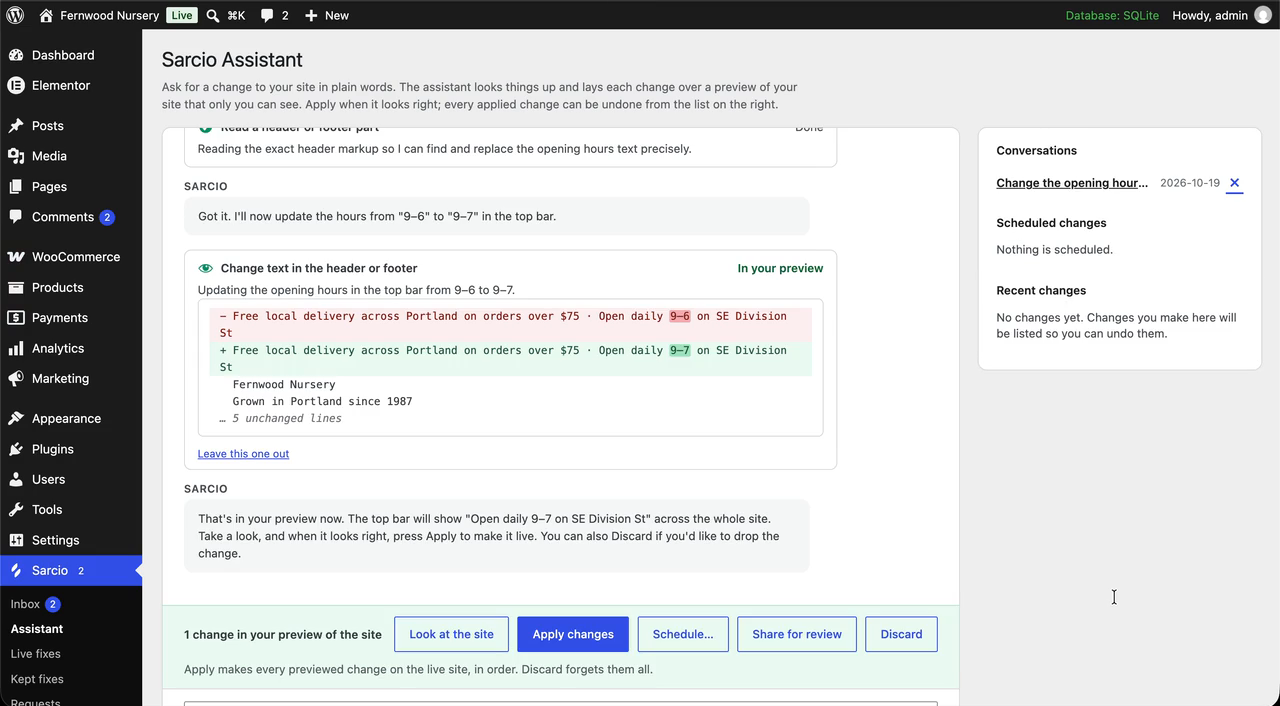
Ask for a change in plain words. The assistant shows exactly what will change and puts it on a preview that only you can see.
Sarcio is an AI assistant for your WordPress site. Ask for a change the way you’d ask a person, like new opening hours, a sale on the maples, or a Contact link in the menu. Sarcio makes it through the theme, builder and plugins you already have, on a private preview of your real site that only you see. Apply it when it looks right, or don’t. Undo it later.
Everything is on one Sarcio page: the chat, and beside it Waiting for you with fixes, requests, site checks, alerts, changes and a monthly summary.
The AI is included: there is no ChatGPT or Claude account to connect and no API key to paste.
Ask, see it, decide
Every change shows on a private preview of your own pages first. Apply it, discard it, save it as a named draft or share it for review. After you apply, Sarcio reads each change back on the live page. Changes lists what it applied, each with Undo, and one click undoes a whole Apply. Turn on Look only and the assistant answers without changing anything.
Show it what you mean
Draw on the page itself to point at what you mean, or on a blank canvas. Attach a spreadsheet, document, PDF or image; it stays on your site for 24 hours.
Ask where you edit
Ask Sarcio from the block editor’s ⋮ menu, from WordPress’s command palette, or from a button on your live site (off until you turn it on).
What you can ask for
- Pages, posts and products, including the words on Elementor, Divi, Bricks and Beaver Builder pages, and Advanced Custom Fields
- Menus, header and footer text, page layouts such as how many products a row shows, and colours and fonts through the site styles or your theme’s own options
- Your phone number, address or opening hours everywhere at once, and holiday hours that put themselves back
- WooCommerce: find orders and move them along, see what sold, change prices and stock across many products, coupons, shipping, tax, store settings, and a whole sale in one ask
- Comments, redirects, alt text and SEO titles (Yoast SEO, Rank Math, All in One SEO)
- Form recipients and spam protection (Contact Form 7, WPForms, Gravity Forms), and why form emails aren’t arriving
Works with the plugins you run
Tested ask by ask, on a fresh site each release, with Amelia, Bookly, Contact Form 7, Directorist, Event Tickets, Five Star Restaurant Reservations, GiveWP, Gravity Forms, LatePoint, MemberPress, Paid Memberships Pro, Polylang, Rank Math, Redirection, The Events Calendar, Tutor LMS, Ultimate Member, WooCommerce, WooCommerce Subscriptions, Yoast SEO.
Sarcio uses your plugins’ own tools: builders, SEO, forms, cache, backup, mail, bookings, events and more, each previewed with undo where it can be. Through another plugin’s tools it never refunds, sends a campaign, deletes anything for good or changes code. If a plugin update changes something Sarcio relies on, only that plugin’s support pauses.
Safe updates
Ask it to update a plugin or theme from WordPress.org. It checks your key pages before and after, and puts the earlier version back if one broke. Update night does the same overnight, one at a time, if you turn it on. It checks that your pages work, not what an update contains.
Site checks and bots
One list that starts with what needs you: updates, backups, email, speed, accessibility and known security holes. Watch my site, off until you turn it on, looks at your padlock and domain dates, forms, checkout and WordPress’s own files. Bots and sign-ins shows what bots tried and offers simple fixes you can undo: limit sign-in attempts, hide usernames, turn off XML-RPC. It is not a firewall.
When something breaks
A Report a problem button lets people say what is wrong on the page; you choose who sees it. Sarcio drafts a small fix in plain words under Waiting for you. Preview it, approve it with your Sarcio password or an authenticator code, and keep it if you like: a kept fix works even without Sarcio.
Use your own AI
Already use Claude, Cursor or another AI app? Connect it to one site through the free MCP Adapter plugin, or to every site you look after through Sarcio’s remote connection. It can do only what the assistant could do for you, and its changes wait under Waiting for you. See https://www.sarcio.io/docs/use-your-own-ai
What it will not do
It works as you, so it can only do what your WordPress role allows. It never edits theme or plugin files, never runs code the AI wrote, and installs plugins only from WordPress.org, only when you say yes.
Looking after client sites?
One Sarcio account covers your client sites. Turn on Clients under Sarcio Settings and a client’s changes wait for an administrator to apply, limited to words and pictures; clients can approve a preview you share. Your Sarcio dashboard lists requests from every site, your agency’s name, logo and colour replace ours on client screens, and the monthly summary shows what the work was worth. See https://www.sarcio.io/wordpress/agencies
Set up in a minute
Install, open Sarcio in the left-hand menu and click Start free. Free for one site; paid plans from $19 a month, with 14 days free and no card: https://www.sarcio.io/wordpress
What the plugin sends to Sarcio and other services, and when, is listed in the FAQ under “External services”.