


Safkit Fixed Bundles for WooCommerce
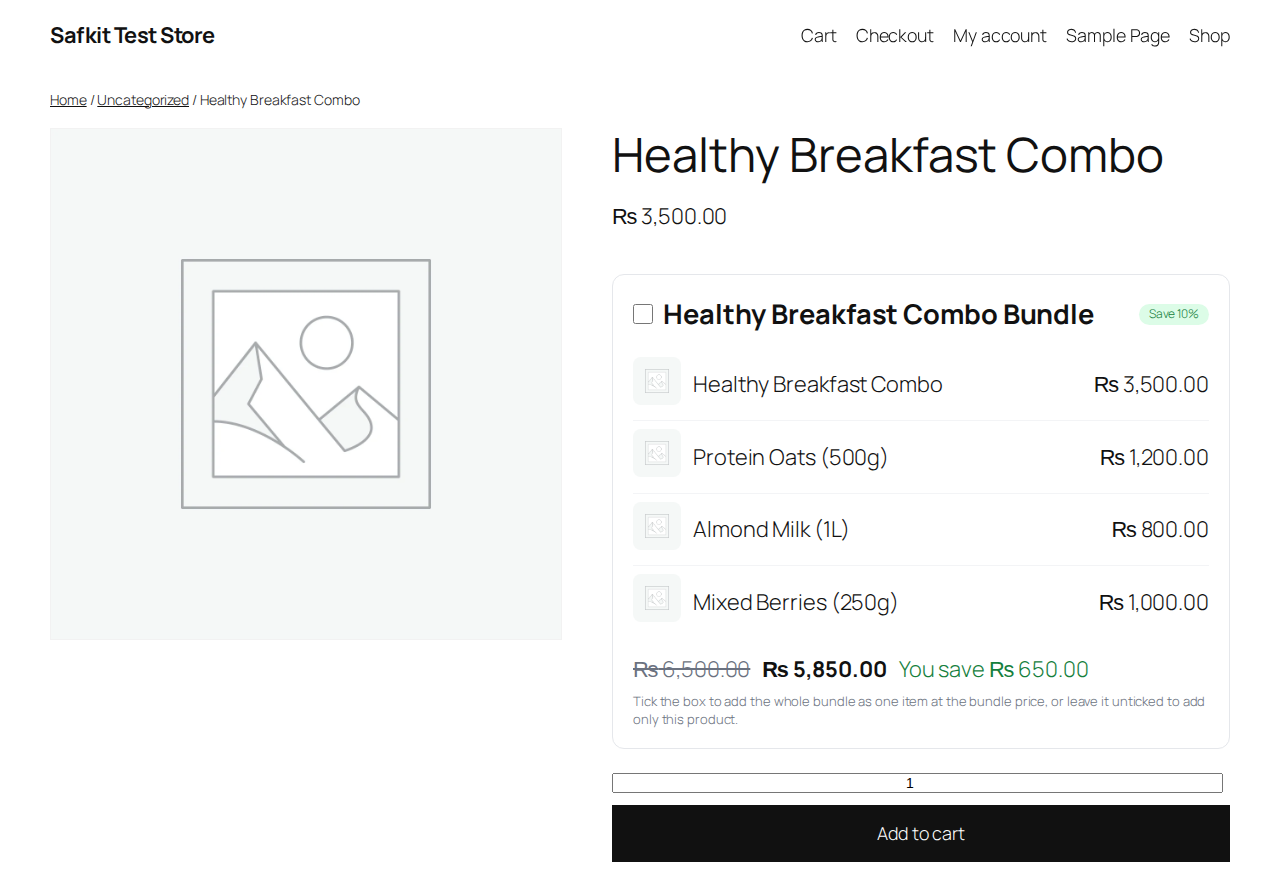
Safkit Fixed Bundles for WooCommerce sells a fixed group of products as one kit — at a fixed total price or with a percentage discount off the combined price.
On the product page the bundle appears as a tick-box inside the add-to-cart form. Ticked, the normal Add to cart button adds the whole bundle as ONE cart line at the bundle price, showing the bundle name and the included products. Unticked, only the single product is added. Removing the bundle line removes the whole bundle.
Set it up in the product editor’s Safkit tab (simple products): pick the bundle products, set the price or discount, and customize the title, cart name, and badge text.
Pick one of two layouts — Style 1, a classic list, or Style 2, a card with “What’s included” and a Breakdown popup listing each item’s price, the total value, and what the customer pays. Style everything globally in Styling Controls with a live preview, show or hide any part of the box in the Display tab, and use the Settings on/off switch to hide all bundles site-wide without losing your setup.
Requires WooCommerce. The Safkit framework is built in — nothing else to install.