


Taxonomy Tags to Checkboxes
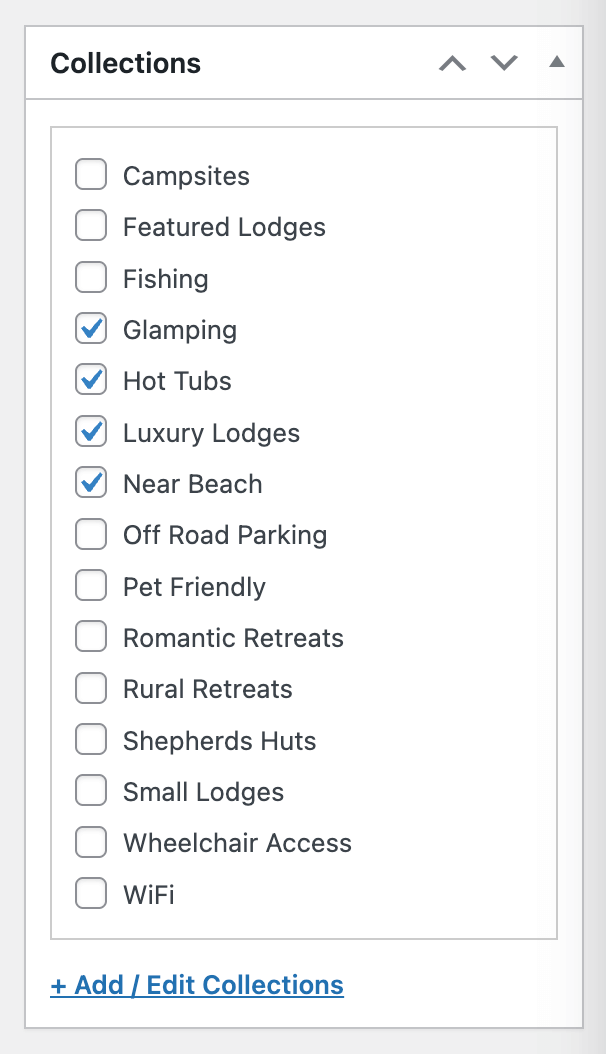
Example taxonomy with the checklist ui enabled and an edit link
This plugin lets you swap the auto-complete / search style interface for a checkbox list, without changing any underlying data.
It allows you to pick from a list of the existing tags, so that admin users do not need to remember each tag.
It can optionally allow new terms to be added directly from the post editing UI, while still letting you keep this disabled by default.
Features
- Replace the tags ui with a checkbox list
- No alteration to front end functionality, or the underlying data / terms
- Option to control the height of the taxonomy metabox, between default (200px max), full, and custom (px)
- Optional inline add control for new terms, enabled per taxonomy
- Optional link to the taxonomy edit screen via an “+ Add / Edit {taxonomy}” style link
- Optional per-taxonomy search box with Off, Always, and Min Terms modes
- Customization via filters
Filters
For detailed documentation and examples, see the full documentation on GitHub.
runthings_ttc_selected_taxonomies
This filter allows developers to modify the array of taxonomies selected for the custom checkbox interface.
Parameters:
$selected_taxonomies(array): An array of taxonomy slugs. Remove a slug value from the array to disable the checkbox list override.
runthings_ttc_search_settings
This filter allows developers to override per-taxonomy search UI behavior.
Parameters:
$search_settings(array): A map of taxonomy slugs to search config arrays (mode,threshold).
License
This program is free software; you can redistribute it and/or modify it under the terms of the GNU General Public License as published by the Free Software Foundation; either version 3 of the License, or (at your option) any later version.
This program is distributed in the hope that it will be useful, but WITHOUT ANY WARRANTY; without even the implied warranty of MERCHANTABILITY or FITNESS FOR A PARTICULAR PURPOSE. See the GNU General Public License for more details.
You should have received a copy of the GNU General Public License along with this program; if not, see http://www.gnu.org/licenses/gpl-3.0.html.
Icon – Check Box List by unlimicon from Noun Project, https://thenounproject.com/browse/icons/term/check-box-list/ (CC BY 3.0)