

Royal MCP – Secure AI Connector for Claude, ChatGPT & any LLM via MCP
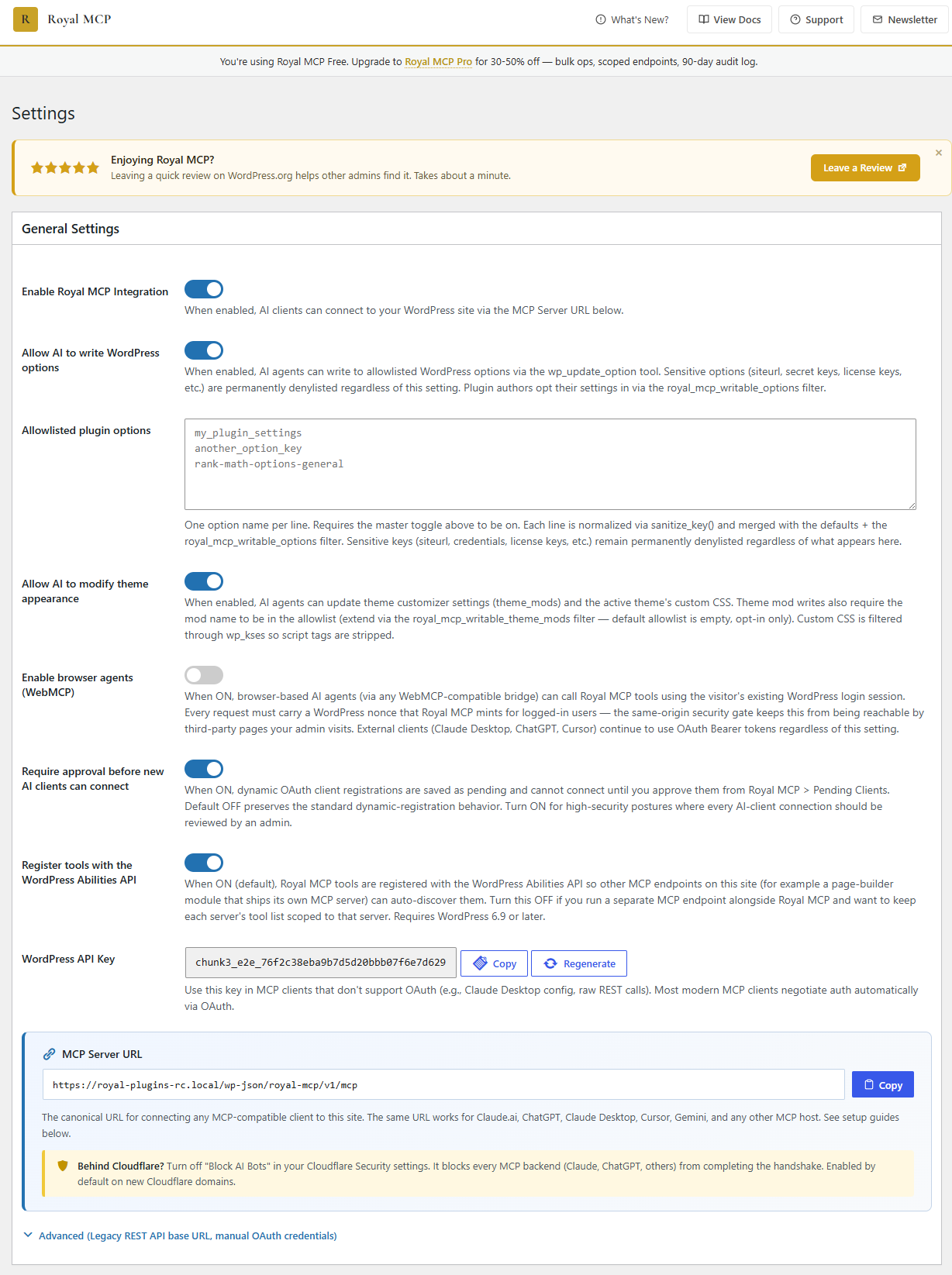
Main settings page with API key and platform overview
The most complete WordPress MCP server — 200+ tools, OAuth 2.0, WebMCP-ready, and nothing leaves your site.
Royal MCP gives Claude, ChatGPT, Google Gemini, Perplexity, DeepSeek, Mistral, and every other MCP-compatible AI structured access to your WordPress site: 85 WordPress core tools plus 124 integration tools that auto-load for WooCommerce, Elementor, Divi, ACF, Yoast SEO, UpdraftPlus, WPForms, Solid Security, Contact Form 7, MonsterInsights, W3 Total Cache, Duplicator, BuddyPress, and more.
Connect Claude to WordPress
Royal MCP connects your WordPress site directly to Claude Code, Claude Desktop, or Claude.ai. Setup takes a minute or less: install the connector, authorize, and start your chat.
Edit Elementor with Claude
First-time setup walkthrough: royalplugins.com/support/royal-mcp/connecting-to-claude/
Plugins with dedicated MCP tools
WooCommerce, Elementor, Divi, Advanced Custom Fields, Yoast SEO, UpdraftPlus, WPForms, Solid Security, Contact Form 7, MonsterInsights, W3 Total Cache, Duplicator, BuddyPress, Redirection — plus every Royal Plugin (Royal AI Firewall, GuardPress, SiteVault, ForgeCache, Royal Ledger, Royal Links).
Not seeing yours? MCP still works. WordPress core operations (posts, pages, media, users, taxonomies, custom fields, menus, options) cover most day-to-day AI workflows for any plugin — read/write ACF via wp_get_post_meta even without ACF-specific tools, edit posts on any custom post type, moderate any plugin’s comments. Shared SEO meta tools automatically work with Rank Math, AIOSEO, SEOPress, and SEObolt. A dedicated integration layers specialized tools on top when that plugin exposes its own data model, request features/plugins support here on the wp.org support forum.
Connect ChatGPT to WordPress
ChatGPT on the web, desktop, and iOS supports MCP servers natively. Add Royal MCP in ChatGPT’s Plugins panel, authorize once, and ChatGPT can read your posts, publish drafts, update product prices, moderate comments, and audit SEO across your site — all through ordinary conversation.
First-time setup walkthrough: royalplugins.com/support/royal-mcp/connecting-to-chatgpt/
Works with every MCP-compatible AI client
Royal MCP is not vendor-locked. Claude/Anthropic, ChatGPT/OpenAI, Gemini/Google, Grok/xAI, Llama/Meta, Mistral, DeepSeek, Qwen/Alibaba, Cohere, and Perplexity all work through MCP-compatible clients like Cursor, Windsurf, Cline, Continue, Zed, JetBrains AI Assistant, OpenCode, Warp, Ollama, and LM Studio, all connecting through the same endpoint. Switch AI vendors without rewriting a single connection.
Ready for browser-based AI agents (WebMCP)
Royal MCP supports the W3C WebMCP browser-agent standard on the server side. When a visitor is signed into your site, browser-based AI agents from any WebMCP-compatible bridge (Cloudflare’s WebMCP is the first shipping today) can call the same MCP tools that Claude Desktop and ChatGPT already use, authenticated with the visitor’s existing WordPress login. Turn it on with one toggle in the Browser Agents section of the Royal MCP settings. External clients like Claude Desktop, ChatGPT, and Cursor continue to use OAuth Bearer tokens as before.
How Royal MCP handles authorization
Royal MCP speaks full OAuth 2.0 with PKCE and Dynamic Client Registration (RFC 7591) for Claude Desktop, Claude Code, ChatGPT web, and every modern MCP client. Sessions expire, refresh automatically, and can be revoked globally with one button in wp-admin. Clients that don’t speak OAuth get timing-safe API-key auth, per-IP rate limits (60 requests per minute), and the same activity log for every tool call.
Where do my credentials go?
Nowhere. Your AI client authenticates straight to your WordPress site, and every API key, OAuth token, session, and audit-log entry stays inside your own database. There’s no hosted server sitting between your chat and your site, and no license check or telemetry reaching out on activation. Ollama and LM Studio are first-class platforms alongside Claude, ChatGPT, and Gemini if you want to keep AI inference local too.
Can I undo what the AI does?
Yes. Every MCP client (Claude Desktop, ChatGPT, and the rest) asks you to approve or deny each destructive tool call by default, until you flip that setting in your connector. On top of that, Royal MCP captures a reverse-state snapshot before every destructive write and hands back a 72-hour undo token. One mcp_undo_last_operation call reverses the change — whether Claude deleted a post, replaced text on an Elementor page, updated a WooCommerce product, or reordered menu items. New posts and pages start as drafts, so nothing the AI writes appears on your live site until you approve publishing. Every tool call also lands in an activity log you can review from wp-admin.
Does Royal MCP work with the WordPress Abilities API?
Yes. Royal MCP surfaces every AI-callable operation through one endpoint, from three sources: the 85 native tools Royal MCP ships, the 124 integration tools that auto-load when WooCommerce, Elementor, Divi, ACF, Yoast SEO, UpdraftPlus, WPForms, Solid Security, Contact Form 7, MonsterInsights, W3 Total Cache, Duplicator, BuddyPress, and other supported plugins activate, and every ability any plugin registers through WordPress 6.9’s Abilities API. Your AI sees them all as MCP tools — one connector, no per-plugin setup, no per-vendor rewrite.
See what AI agents do to your site
The free Royal AI Firewall companion shows every AI agent hitting your site at the HTTP layer (training crawlers, retrieval bots, AI search engines), not just the ones connected through Royal MCP. Install both for a unified view across MCP tool calls and HTTP-layer bot hits.
Discoverable by every AI agent scanner (Agent Readiness)
Royal MCP publishes machine-readable MCP Server Card, Skills Index, and OAuth Protected Resource metadata at the standard well-known locations. Cloudflare’s Agent Readiness scanner, Vercel’s is-agentic, and Chrome Lighthouse’s Agentic Browsing audit all recognize your site as agent-ready with zero configuration. Every request to your MCP endpoint carries a Link header pointing agent runtimes at these discovery documents.
85 Core Tools + 124 Integration Tools
WordPress Core (85 tools):
- Posts – create, read, update, delete, search, count (any registered public post type, featured images supported)
- Pages – full CRUD with parent page support
- Post Types – discover all registered public post types on the site
- Post Revisions – list revision history and roll a post back to any prior version
- Media – browse, upload from URL or base64, update alt text/caption/title/description, set as featured image, delete
- Comments – create, read, delete; full moderation suite (list pending, approve, mark spam, trash)
- Users – display names and roles (emails and usernames are not exposed)
- Categories, Tags & Custom Taxonomies – full CRUD, assign, count, discover registered taxonomies
- Term Meta – read/update/delete (most useful for term-level SEO fields on categories and tags)
- Menus – create menus, list, and full CRUD + reorder on menu items
- Publish and Promote – publish a draft and insert into a menu in one call
- Preview Links – generate a shareable draft-preview URL without a WP login
- Post Meta – read/update/delete custom fields (works with ACF, MetaBox, JetEngine, Pods, CPT UI)
- SEO Meta – read/write Yoast, Rank Math, AIOSEO, or SEObolt title/description/focus keyword/robots/OG (auto-detects active plugin)
- SEO Audit – fetch a post’s rendered HTML and report title, meta description, canonical, viewport, OG, Twitter Card
- Widgets – list, list sidebars, update content (writes gated by theme-appearance admin toggle)
- Find and Replace – literal replace with dry-run preview, expected-count safety, read-after-write verification
- Undo – reverse the previous delete or reorder within 72 hours via mcp_undo_last_operation
- Site Info + Site Status – name, WP/PHP versions, active theme + plugins, cron activity — for AI-driven pre-write validation
- Error Log + Cron Schedule – read recent PHP errors and scheduled WP cron events
- Connection Health – MCP session diagnostic (route, auth method, session ID, plugin version)
- Plugins & Themes – list installed with active status
- Theme Appearance – get theme, read/write theme mods (gated), read/write Custom CSS
- Search + Permalink Structure – full-text content search; read/write permalinks (gated)
- Options – read allowlisted core options, read plugin settings (sensitive keys redacted), write to allowlisted options when enabled
Third-Party Plugin Integrations (auto-detected)
If the plugin is active on your WordPress site, it’s tools auto-register with no additional configuration needed.
- WooCommerce (29 tools) — full store CRUD: products (simple + variable), variations, global attributes (
pa_*), coupons with bulk-trash purge, orders + notes, customers, and store statistics - Elementor (11 tools, free + Pro) — clone a page with fresh element IDs, bulk text/image replacement across 12+ widget types, compact page outlines, widget-level settings reads, template library import/insert,
post_contentrestoration on damaged pages (72-hour undo per write) - Divi (9 tools, Divi 4 + Divi 5) — format detection, page outlines, layout validation, library reads, dry-run find-and-replace with active-editor-session detection, page cloning (D5
clientIdsregenerated), image swaps, library-to-page apply in merge or replace mode (72-hour undo per write) - Advanced Custom Fields (4 tools, free + Pro) — type-aware field reads (each field’s Return Format respected: hydrated post objects, parsed repeater rows, image arrays), bulk-read all fields on a post, type-aware writes, field-group enumeration
- Yoast SEO (5 tools) — read/write Yoast meta (raw + resolved), capture the JSON-LD schema graph, list indexed internal links, list Yoast Premium redirects
- UpdraftPlus (4 tools) — list backups, read status, trigger async backups with per-entity filtering (DB, plugins, themes, uploads), read the backup schedule
- WPForms (4 tools, free + Pro) — list forms, read a form’s field schema; submission access (list + read) requires WPForms Pro
- Solid Security (4 tools) — read the security dashboard, list currently locked-out IPs, read the security event log, add an IP to the ban list (also detects iThemes Security and Kadence Security Basic)
- Contact Form 7 (3 tools) — list forms, read a single form’s parsed field schema; submission access requires the Flamingo companion plugin
- MonsterInsights (4 tools) — read the analytics overview, top pages, traffic sources, and top Search Console queries
- W3 Total Cache (3 tools) — read cache config across every module, purge (all / by URL / by post), read cache usage stats
- Duplicator (3 tools) — list migration packages, read per-package status, get the installer URL for any completed package
- BuddyPress (4 tools) — list community members, read a single member profile, list groups, read the activity feed
- Redirection (4 tools) — list/create/update 301/302/307 redirects (with regex + group + status), list redirect groups
Royal Plugins Integrations (auto-detected)
Every Royal Plugin auto-exposes MCP tools alongside Royal MCP:
- Royal AI Firewall (6 tools) — review AI bot traffic, dashboard stats, and set allow/block/challenge policies per bot signature
- GuardPress (7 tools) — review your security score, run vulnerability scans, inspect failed logins and blocked IPs
- SiteVault (6 tools) — list backups, trigger new ones, check progress, review schedules
- ForgeCache (3 tools) — purge and inspect your page cache
- Royal Ledger (4 tools) — review recurring software costs and masked license entries
- Royal Links (3 tools) — manage branded short links and click stats
Supported AI Platforms
- Claude (Anthropic) – Full MCP support via Claude Desktop, Claude Code, and VS Code
- OpenAI / ChatGPT – GPT-5.5, GPT-5, GPT-5 Mini, o3
- Google Gemini – Gemini 3.5 Flash, 3.1 Flash-Lite
- Groq – Llama 3.3, Llama 3.1, GPT-OSS
- Azure OpenAI – Azure-hosted OpenAI deployments
- AWS Bedrock – Claude, Llama, Titan models
- Ollama / LM Studio – Local self-hosted models (no external data transmission)
- Custom MCP Servers – Connect to any MCP-compatible endpoint
Compatible Clients & Frameworks
Royal MCP works with any MCP-compliant client, IDE, or AI agent framework — no per-tool configuration required. Each entry below describes the specific integration path Royal MCP provides for that target, so customers can answer “will this work with the tool I already use?”:
- Desktop AI apps – Claude Desktop (native MCP connector via OAuth 2.0), ChatGPT Desktop, Gemini Advanced.
- AI code IDEs – Claude Code, VS Code (with MCP extension), Cursor, Windsurf, Continue, Cline, Zed, JetBrains AI Assistant.
- API testing tools – Postman, Bruno, Insomnia (use the API key in the
X-Royal-MCP-API-Keyheader). - Custom field plugins – Advanced Custom Fields (ACF) has dedicated
acf_*tools that return values formatted per each field’s Return Format setting (the same way the ACF UI shows them). MetaBox, JetEngine, Pods, CPT UI, and Custom Field Suite are supported through thewp_get_post_meta/wp_update_post_metatools, so AI agents can populate custom fields just like a human editor. - Page builders – Elementor and Divi have dedicated tools for safe clone-and-customize workflows (Elementor: clone a page, find/replace text, swap images, get an outline, import templates; Divi: format detection, layout validation, page outline, library read, find/replace with builder-format awareness) – see the Tools list. Widget-level creation from scratch is intentionally out of scope. Beaver Builder, Bricks, Gutenberg, Spectra, and Stackable store standard post content that is readable and writable by AI; page-builder-specific JSON storage is opaque unless covered by a dedicated tool.
- Multilingual – WPML, Polylang, TranslatePress: translated posts appear as separate posts and can be read/written via the standard post tools.
- AI agent frameworks – Any MCP-compatible framework (LangChain, AutoGen, CrewAI, LlamaIndex, Haystack, etc.).
MCP Spec Compliance
Royal MCP implements the MCP Streamable HTTP transport across every published spec revision — 2024-11-05, 2025-06-18, 2025-11-25, and 2026-07-28 — negotiated on the initialize handshake so every client gets the wire behavior it expects:
- Single
/mcpendpoint for all JSON-RPC communication - POST for client messages, GET for server-sent events, DELETE for session termination
- Stateless per-request transport — sessions still supported for backwards compatibility but not required
- Cryptographically secure session IDs with transient-based storage when clients do use them
- Origin header validation to prevent DNS rebinding attacks
- Proper CORS handling for browser-based MCP clients
- W3C WebMCP browser-agent standard supported on the server side
- Machine-readable Agent Readiness signals published at the standard well-known paths
- RFC 8288 Link headers on every MCP response pointing agent runtimes at the discovery documents
External Services
Royal MCP makes no outbound calls of its own — no telemetry, no license check, no update ping. The MCP protocol is inbound: your AI client authenticates and calls your site, and any data the AI sees is sent under whatever terms you’ve agreed to with that AI provider.