


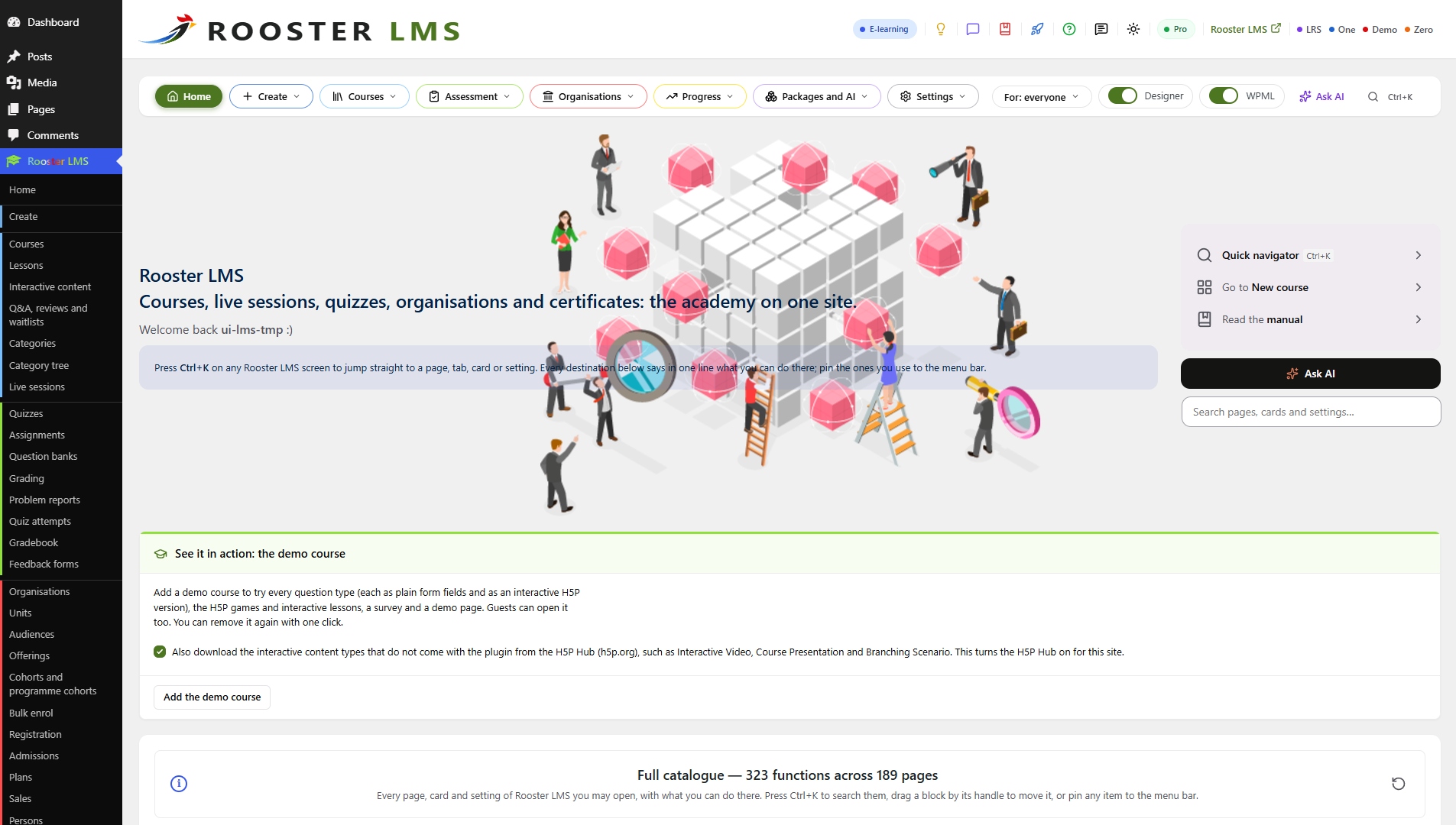
The Home page: every function in colour-coded sections, with Ctrl+K search, pins and the demo course.
Rooster LMS is the free WordPress LMS for training many organisations from one site. One common pool of courses serves every organisation, and every division, hotel, school or department inside it runs its own programmes and people. Without organisations, it is a complete LMS for one school, company or course creator.
Website · Rooster LMS Pro · Rooster Adaptive LMS · Rooster LRS
Free, with nothing to buy
Rooster LMS is complete on its own: unlimited organisations, courses and learners, and no feature waits for a licence. Much of what WordPress LMS plugins usually sell as add-ons is in the free plugin:
- Interactive content and games from its own H5P engine, with no H5P plugin: memory games, crosswords, flashcards, branching scenarios and interactive video.
- More than 30 question types: ten native graded types, seventeen interactive H5P types and four survey types.
- Exams you can trust: one question at a time from the server, timers a reload cannot reset, extra time, withheld results, question banks and regrading.
- The Rooster LMS Designer: a whole course on one screen, saved as you type with Undo, beside the block editor.
- Several instructors per course: a principal, instructors who edit, assistants and graders, and public profiles of lecturers and committees.
- Points and a leaderboard, star ratings, and certificates anyone can verify.
- Assignments, a grading queue and a gradebook with your own grade scales.
- Live lessons on Zoom, Google Meet, Microsoft Teams or Webex: Zoom meetings created for you, any meeting link, a live stream or a room at a venue, with protected recordings on your server.
- QR codes in class: tickets that staff scan at the door, and a class QR that opens the lesson and its materials on learners’ phones and marks them present.
- New lessons announced to earlier learners, only those who agreed, in their language, and reminders before every live lesson.
- A public events calendar and invitations with one-click RSVP, with a funnel from invited to attended.
- Cohorts and course runs: intakes, and programme cohorts that follow a programme over several courses and years.
- Course packages (plans) for an organisation’s seats or one person: chosen courses or whole categories, for a term, with renewal reminders.
- Course sales with WooCommerce, enrolment on approval and a front-end registration form.
- Mass registration: one Excel sheet registers hundreds of people at their units, and bulk enrolment by role, unit or category.
- Reports per organisation and unit, rolled up level by level, with Excel and CSV exports.
- One course in every language with WPML or Polylang.
- More than 60 blocks for the block editor, the site editor and Elementor, and WP-CLI commands.
- Fast at scale: learning records in its own database tables, never in post or user meta.
- Importers from MasterStudy LMS (in one click), LearnDash, LearnPress, Tutor LMS, Amelia, eRoom and the H5P plugin, with a preview and Undo.
- An AI Insights chat (optional, with Rooster One Pro): ask about enrolments, progress, quiz results and live sessions in plain words.
Built for many organisations
Each organisation is a tree with as many levels as it needs, named your way: group, hotel and department, or university, faculty and class. The courses come from your common pool; managers, instructors and reporters at any level run only their part: its people, programmes, catalogue, front-end portal, branding and reports. A live structure builder shapes the tree with Undo, and people can belong to several organisations.
Rooster LMS Pro
Rooster LMS Pro adds to the free plugin; nothing in the free plugin needs it. It brings SCORM and cmi5 packages with a built-in xAPI learning record store, SCORM to cmi5 conversion, Google Meet and Microsoft Teams meetings created for you, automatic attendance from Zoom, Meet and Teams and recordings from Zoom and Teams, new lessons announced to earlier learners automatically, twenty-two structure templates, single lessons and instalments for sale, plans as subscriptions, admissions, engagement reports, and AI agents through Rooster LTI, included. Try it free for 14 days from the Rooster LMS Home page, then from $99 a year.
Rooster Adaptive LMS
Rooster Adaptive LMS puts every question at the right level for each learner. Rooster LMS Pro picks each next question of an adaptive quiz from the answers so far; the service measures how hard each of your questions really is from your learners’ answers, estimates each learner’s ability per skill, and suggests improvements for your staff to approve. No names, e-mail addresses or user IDs leave your site. From $19 a month.
Rooster LRS
Rooster LRS is a free xAPI Learning Record Store inside WordPress, in a plugin of its own: xAPI 1.0.3 and 2.0 statements from any learning tool, kept in its own database tables, with a credential per client, erasure and retention. Pro carries its own store; Rooster LRS is for any site that needs one.
External services
Rooster LMS works fully without any external service. Your site contacts one only when someone chooses to, as listed below, and never sends anything about learners except the one count named under rooster.systems. Links open in the browser only when someone clicks them; nothing is sent before.
rooster.systems: Rooster account, Pro trial and feedback (optional)
The service of Oxford Metadata Ltd, the makers of Rooster LMS, behind Rooster accounts, the Pro trial and feedback. Terms and conditions · Privacy policy
- Rooster account: when an administrator saves an account key on the Rooster LMS Home page, and when they press “Refresh balance”, the site sends the key (as a request header), its address and host name, an install fingerprint (a hash that reveals nothing about the site) and one number, the learner count of its largest organisation (counted at most once a day), to
https://rooster.systems/wp-json/om-portal/v1/cmi5/status. The answer is the account’s balance, top-up link and plan. The key is stored encrypted; “Disconnect” removes it. - Pro trial: only when an administrator submits the trial form, the e-mail address, names and company entered, the site’s address and host name, the install fingerprint and the Rooster LMS version go to
https://rooster.systems/wp-json/om-portal/v1/rooster-lms-install/signup. Until the e-mailed link is confirmed, the site askshttps://rooster.systems/wp-json/om-portal/v1/rooster-lms-install/signup/pollfor the new key. - Feedback (no account needed): only when a user presses Send in the “Send feedback” window, the message, its category and rating, the reply address (unless “Send anonymously” is ticked), the Rooster LMS screen, the site’s address, the install fingerprint, the language and the Rooster LMS, WordPress and PHP versions go to
https://rooster.systems/wp-json/om-portal/v1/rooster-lms-install/feedback. Before its first message the site enrols once athttps://rooster.systems/wp-json/om-portal/v1/rooster-lms-install/enrol(and.../enrol/complete), and rooster.systems reads/wp-json/rooster-lms/v1/install-echoon the site to confirm its address.
rooster.systems: the H5P quiz set download (optional)
A free file of seven H5P question types that Oxford Metadata Ltd publishes on rooster.systems. Only when an administrator presses “Install the quiz set” under Rooster LMS > Settings > Integrations, or runs wp rooster-lms h5p quiz-set, the site downloads it from https://rooster.systems/wp-content/uploads/rooster-demo-content/rooster-h5p-quiz-set-1.h5p (1.3 MB). No account is needed and nothing is sent but the request itself (the site’s server address and the time, as with any download). The file is checked against the SHA-256 fingerprint built into Rooster LMS before anything is installed. Terms and conditions · Privacy policy
rooster.systems: links (on click only)
The manual (https://rooster.systems/category/<language>/documentation/rooster-lms/), help, feedback, the product pages (Rooster LMS, SCORM to cmi5 converter, rooster.systems) and your account’s downloads. Rooster LMS never downloads, installs or updates plugins itself.
H5P Hub (optional: interactive content types)
Operated by Joubel AS for the H5P Group. Rooster LMS ships its own H5P engine and content types; it contacts the Hub (https://hub-api.h5p.org/) only after an administrator turns the Hub on under Rooster LMS > Settings > Integrations, and then only when an administrator registers the site, refreshes the list of content types or installs one: a random site id, “Rooster LMS” with its version, the H5P core version and, with “Usage statistics” on, how many contents use each type. Installed types are downloaded from the same service. While the Hub screen is open, the administrator’s browser reads the types’ licence texts from https://api.h5p.org/. H5P publishes no separate terms of use; its licensing page states the terms of its software and content types: Licensing · What the Hub collects · Privacy
Zoom (optional: live sessions)
Operated by Zoom Communications, Inc. Rooster LMS calls Zoom only when an administrator has entered Zoom Server-to-Server OAuth credentials under Rooster LMS > Live sessions > Settings and an editor saves, changes, cancels or deletes a Zoom live session. The account ID, client ID and client secret go to https://zoom.us/oauth/token for an access token (about once an hour at most); the meeting’s topic, start, time zone, duration, recurrence, passcode, agenda and settings go to https://api.zoom.us/v2/. No learner data is sent. Learners join through the meeting’s own link (https://zoom.us/j/...) when they click it. The client secret is stored encrypted. Terms · Privacy
Google Meet, Microsoft Teams and Webex meetings are links you paste: the learner’s browser opens them on click, and Rooster LMS sends those services nothing; nor do meetings imported from eRoom. Rooster LMS Pro creates Meet and Teams meetings; its readme lists what it sends.
Video players: YouTube, Vimeo, Bunny Stream, Cloudflare Stream (optional)
When a lesson’s video or a live session’s stream comes from one of these services, its page shows the service’s player in a frame. The visitor’s browser loads it directly from the service, which receives the video’s ID, the page’s address, the visitor’s IP address and browser details, and may set cookies. A live stream loads only while its lesson is live, for the people who may attend. Your server sends nothing to these services. Hosts added with the rooster_lms_live_stream_hosts filter load under their own terms.
- YouTube (
https://www.youtube-nocookie.com/embed/, linkshttps://www.youtube.com/): terms · privacy - Vimeo (
https://player.vimeo.com/video/,https://vimeo.com/event/): terms · privacy - Bunny Stream (
https://iframe.mediadelivery.net/): terms · privacy - Cloudflare Stream (
cloudflarestream.com,videodelivery.net): terms · privacy
“Add to calendar” and “Subscribe” links (on click only)
Live lessons, course pages and the events showcase link to Google Calendar (https://calendar.google.com/calendar/render, https://calendar.google.com/calendar/r), Outlook.com (https://outlook.live.com/calendar/0/deeplink/compose, .../action/compose, .../addfromweb) and Microsoft 365 (https://outlook.office.com/calendar/0/deeplink/compose, .../addfromweb). On click the data travels in the link: the lesson’s title, times, place and public page address, or for “Subscribe” the address of the course’s calendar feed (a visitor’s own signed address for a course that is not public), which the calendar service then reads.
wordpress.org and Viber links (on click only)
The Rooster LMS header links to this plugin’s page and review form on wordpress.org, to the eRoom and Rooster One plugins there, and to the Rooster community’s chat on Viber (https://invite.viber.com/). WordPress.org privacy · Viber terms · Viber privacy
Gravatar (optional, off by default)
Operated by Automattic Inc. Rooster LMS shows a person’s own photo or initials and never asks Gravatar unless an administrator turns on “Show Gravatar pictures” under Rooster LMS > Settings > Appearance; then visitors’ browsers load pictures from gravatar.com, which receives a hash of the person’s e-mail address and the visitor’s IP address. Terms · Privacy
Plugins on your own site
WooCommerce, the Newsletter plugin and the importers’ sources (MasterStudy LMS, Amelia, eRoom) are plugins on your own site: Rooster LMS works with them locally, without any external request. With Rooster One’s chats, Rooster LMS answers their questions on your site (learners pseudonymised in the Insights chat); what Rooster One sends to its AI service is in Rooster One’s readme.
Blocks and shortcodes
Every Rooster LMS block works in the block editor and the site editor (Gutenberg and full site editing), nearly all also as Elementor widgets when Elementor is active, and most have a shortcode for other page builders. The alphabetical list is under Installation.