


Responsive Filterable Portfolio Gallery – Media Grid & Video Portfolio
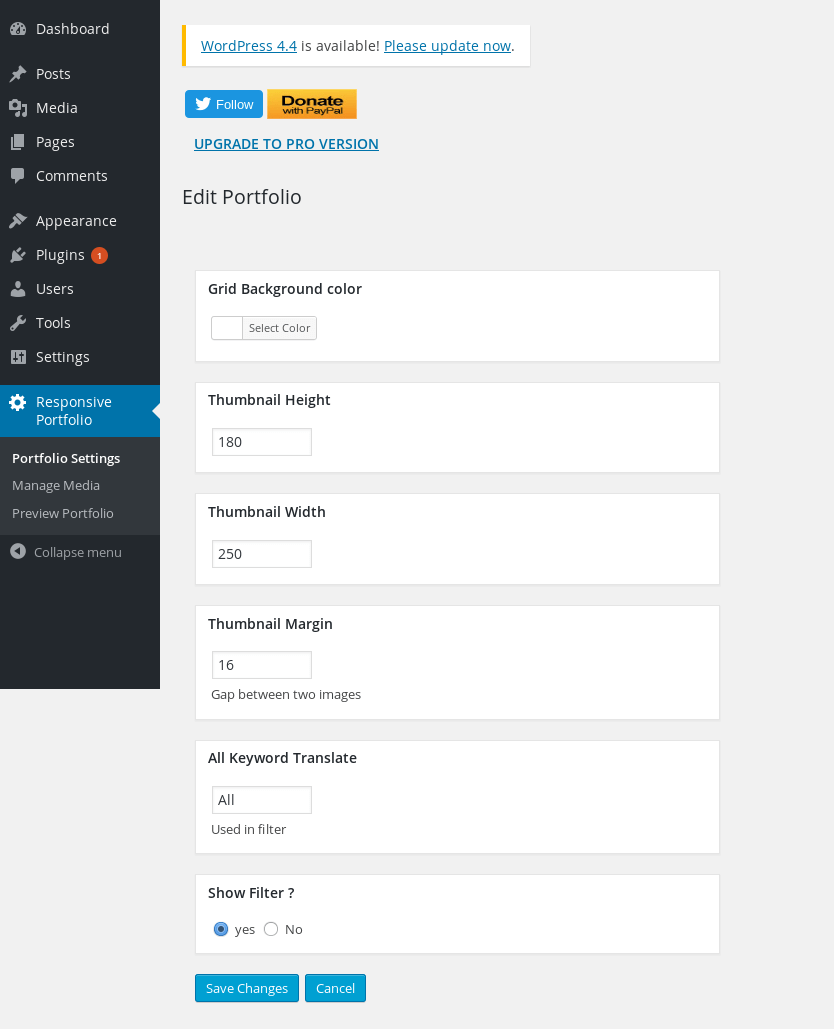
Portfolio Settings – Easily change thumbnail dimensions and grid colors.
Need a clean, professional way to showcase your work without slowing down your website or writing a single line of code?
Responsive Filterable Portfolio lets you create stunning, mobile-friendly media grids that your visitors can filter by category instantly. Whether you want to showcase photography, client case studies, design concepts, or video showreels, this plugin handles it automatically.
Simply add your images, YouTube videos, Dailymotion videos, or custom links, assign your tags, and watch your portfolio build itself with ultra-smooth filtering transitions and a built-in responsive lightbox popup.
It works flawlessly out of the box with any WordPress theme via a simple shortcode or our dedicated, lightweight Gutenberg block.
🚀 Key Links
Why WordPress Creators Love It
- Instant One-Click Tag Filtering — Seamless category filtering without frustrating page reloads.
- Mixed Media Freedom — Blend images, YouTube/Dailymotion videos, and external clickable links inside a single cohesive grid.
- Smart Video Thumbnail Fetching — Simply paste a video URL; the plugin automatically pulls the thumbnail, title, and description for you.
- Optimized Responsive Lightbox — Media opens in an elegant, modern popup modal that scales flawlessly from large 4K monitors down to mobile screens.
- 100% No-Code Customization — Tweak thumbnail heights, widths, spacing, and background colors straight from your dashboard settings.
- Blazing-Fast WebP Support — Fully compatible with lightweight, next-gen image formats to keep your Core Web Vitals score high.
- Native Gutenberg Block Included — Drag, drop, and configure your portfolio visually right within the block editor.
Perfect For:
Photographers, UX/UI Designers, Creative Agencies, Freelancers, Videographers, Architects, and Web Developers who need a beautiful gallery that “just works.”
Free vs Pro Comparison
- Portfolio Grids – Free version includes 1 grid. Pro version unlocks UNLIMITED separate grids for different pages.
- Layout Styles – Free version includes standard grid layout. Pro version adds beautiful Masonry & Justified layout styles.
- Media Sources – Free version supports Images, YouTube, and Dailymotion. Pro version adds Vimeo, Metacafe, and self-hosted HTML5 video.
- Image Uploading – Free version requires single image uploading. Pro version introduces Mass Image Bulk Uploading to save you time.
- Sorting Controls – Free version has basic sorting. Pro version features an advanced drag-and-drop Mass Order Update UI.
- Pagination Controls – Free version displays all items at once. Pro version includes pagination controls for large, heavy portfolios.
- Lightbox Extensions – Free version uses a standard lightbox. Pro version adds media descriptions and custom thumbnail captions right inside the popup.
- Click Behavior – Free version opens items in a lightbox only. Pro version lets you choose between opening in a lightbox OR redirecting directly to a custom link.
- Multisite Support – Free version is for single-site use. Pro version includes full WordPress Multisite compatibility.
- Support & Ads – Free version relies on community forums. Pro version offers priority developer support and is 100% ad-free.
👉 Unlock All Pro Features Now – Lifetime Access with One-Time Payment
Usage
- Add Media: Go to Responsive Portfolio > Manage Media to add your images, links, or videos. Don’t forget to add tags for your filter categories!
- Style It: Tweak your grid alignment, thumbnail sizes, margins, and colors in Portfolio Settings.
- Display It: * Gutenberg Editor: Search for the “Responsive Filterable Portfolio” block and add it to your page.
- Shortcode: Paste
[print_responsive_portfolio_plus_lightbox]into any page, post, or widget area. - PHP Template: Use
<?php echo do_shortcode('[print_responsive_portfolio_plus_lightbox]'); ?>directly in your theme files.
- Shortcode: Paste
License
This plugin is free and open-source software, released under the GPLv2 or later license. You are fully welcome to use it on personal, freelance, or commercial client websites free of charge.