


Resovu Booking – Appointment and Accommodation Booking Form
0/5 (0 ratings) — active installs Updated Nov 3, 2026
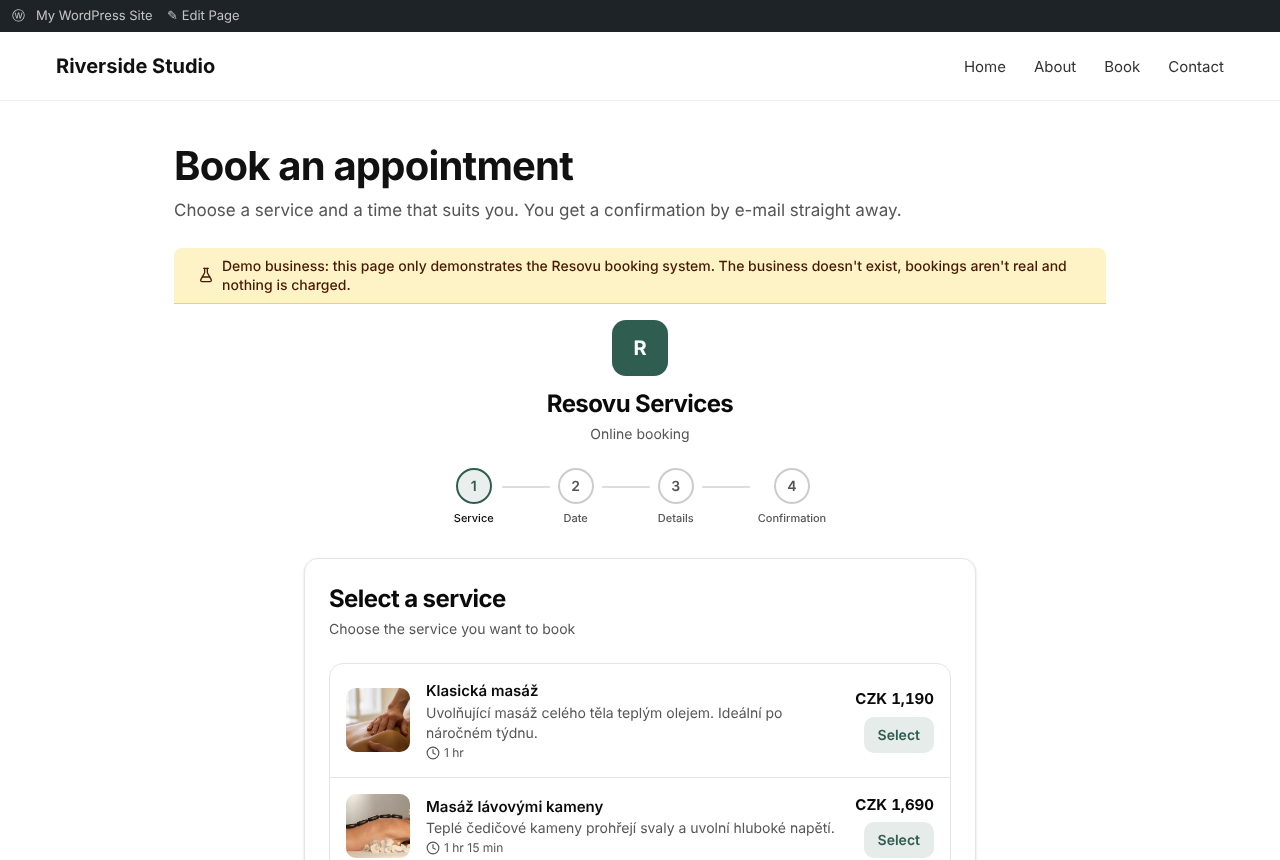
Appointment booking inside a page with [resovu_booking] (demo business).
Let customers book you directly on your own WordPress site. Resovu Booking puts your Resovu booking page into any post or page – as a booking form inside the page or as a button that opens the booking in a window, so visitors stay on your site.
Resovu is an online booking system for small businesses. A free plan is available.
Who it is for
- Appointments – salons, barbers, massage and beauty studios, clinics and therapists, tutors and coaches, shops with in-store appointments. Visitors pick a service, a time and, optionally, a staff member.
- Accommodation (stays) – holiday homes, apartments, cottages and guesthouses. Visitors pick a unit and dates in a calendar with nightly prices and see the total price before booking.
The plugin shows the right booking form automatically, based on how your business is set up in Resovu.
Features
- Block for the block editor – add the “Resovu Booking” block and choose a booking form or a button in the block settings (WordPress 6.3 or newer).
- Choose the service from a list – the block and the shortcode generator load your services or accommodation units from Resovu, so you don’t need to look up IDs.
- Shortcode generator – build a shortcode in Settings Resovu Booking and copy it into Elementor, Divi or any other page builder.
- Accommodation search box –
[resovu_search]or the “Resovu Accommodation Search” block: check-in, check-out and guests open the booking with these dates, in a window or on your booking page. - Block patterns – ready-made sections “Booking page”, “Service with a button” and “Accommodation with search” under Patterns Resovu.
- Booking form in the page –
[resovu_booking]places the whole booking inside the page. It loads only when the visitor scrolls to it, so your page stays fast. - Booking button –
[resovu_button]adds a button that opens the booking in a window on top of your page. Use it as many times as you like. - Floating button on the whole site – one setting shows a booking button in the bottom corner of every page, with your own text and color.
- WooCommerce product pages – optionally adds a booking button to every product page; the booking includes the product name, its page address and its SKU.
- 9 booking languages – Czech, Slovak, English, German, Polish, Hungarian, Spanish, Norwegian and French. By default the booking follows the language of the page, also on multilingual sites with WPML, Polylang or TranslatePress; you can also set one language for the site or for each shortcode or block.
- Privacy-friendly – optionally loads the booking only after a click, and works with the WP Consent API (Complianz, CookieYes and other cookie banners). The embedded booking sets only necessary cookies and shows no cookie banner of its own.
- Thank-you page – after a finished booking the visitor can go to a page of your choice, for example to count conversions.
- Preselect a service – link a button straight to one service with
service="…". - Know where the booking came from –
context="auto"sends the title and address of the current page with the booking (for example the product or room page the visitor was on);context_code="…"adds your own short code such as a SKU. - Fits your theme – the button uses your theme’s button style and accepts your own CSS class.
- Address check and Site Health – when you save the settings, the plugin checks that your business address exists in Resovu; Tools Site Health shows whether the booking page and the booking script are reachable.
- Works with cache and optimisation plugins – WP Rocket, Autoptimize, LiteSpeed Cache, SiteGround Optimizer and Cloudflare Rocket Loader leave the booking script alone.
- For developers – PHP filters and JavaScript events for your own tracking (see the FAQ).
- Lightweight – the booking script loads only on pages that need it. No database tables and no scheduled tasks; the settings are removed when you delete the plugin.
- Admin in your language – the plugin’s settings and block are translated into Czech, Slovak, German, Polish, Hungarian, Spanish, Norwegian and French.
How it works
- Create your business in Resovu (a free plan is available) and set up your services or accommodation units.
- Install and activate this plugin.
- Go to Settings Resovu Booking and enter your business address in Resovu (the part after resovu.com/).
- Add the Resovu Booking block,
[resovu_booking]or[resovu_button]to any page or post – or switch on the floating button.
Shortcodes
[resovu_booking] – the booking form inside the page.

[resovu_button] – a button that opens the booking in a window.

[resovu_search] – the accommodation search box (check-in, check-out, guests).
Optional attributes (for all shortcodes unless noted):
text="Book a visit"– button text ([resovu_button]only). Without it the button says “Book now” in the booking language.class="my-class"– an extra CSS class for the button ([resovu_button]only).service="…"– the ID of a service to preselect. You find it in the address of the service on your Resovu booking page, afterserviceId=.context="auto"– sends the title and address of this page with the booking;context="Any name"sends a name of your own instead.context_code="SKU-123"– a short code (SKU, product or room code) sent with the booking.lang="de"– the booking language for this shortcode: cs, sk, en, de, pl, hu, es, no or fr.tenant="other-business"– shows a different Resovu business than the one in Settings.lang="auto"– the language of the page (also with WPML, Polylang or TranslatePress).lazy="false"– loads the booking form at once instead of when the visitor scrolls to it ([resovu_booking]only).consent="click"– loads the booking form only after a click;consent_text="…"sets your own text ([resovu_booking]only).redirect="…"– the address or page ID of a thank-you page shown after a finished booking.target="page"andurl="…"– the search box opens the booking on your page with[resovu_booking](address or page ID) instead of in a window ([resovu_search]only).guests="2"– the preset number of guests ([resovu_search]only).
Example: [resovu_button text="Book this massage" context="auto"]
Useful links
External services
This plugin connects to Resovu, the booking service it embeds.
- What is loaded: the script https://www.resovu.com/widget.js and, inside it, your booking page from https://www.resovu.com.
- When: only on pages that contain a Resovu block, the
[resovu_booking],[resovu_button]or[resovu_search]shortcode, or the WooCommerce booking button – and on every page when the floating button is switched on. With “Load after a click” the booking page is loaded only after the visitor clicks. - What is sent: the visitor’s browser requests these files from Resovu, as with any embedded content. With
context="auto"(and on WooCommerce product pages) the page title, address and product code are sent with the booking. The data a visitor enters into the booking form goes to Resovu and to the business that runs the booking page. - Address check: when you save the settings and when an administrator opens Tools Site Health, your server requests your public booking page https://www.resovu.com/your-address/embed (and, in Site Health, https://www.resovu.com/widget.js) to check that they are reachable. Only the address is sent.
- Service list: in the block editor and on the settings page, your server requests the public list of your services or units from https://www.resovu.com/api/public/v1/catalog/your-address (names, categories and durations, no personal data) for users who can edit posts. The answer is kept for 10 minutes.
- No other data is sent: the plugin has no tracking or usage statistics.
- Service provider: Resovu – Terms: https://www.resovu.com/en/terms – Privacy: https://www.resovu.com/en/privacy