

Repeaterly – ACF Repeater, Flexible Content & Dynamic Tags for Elementor
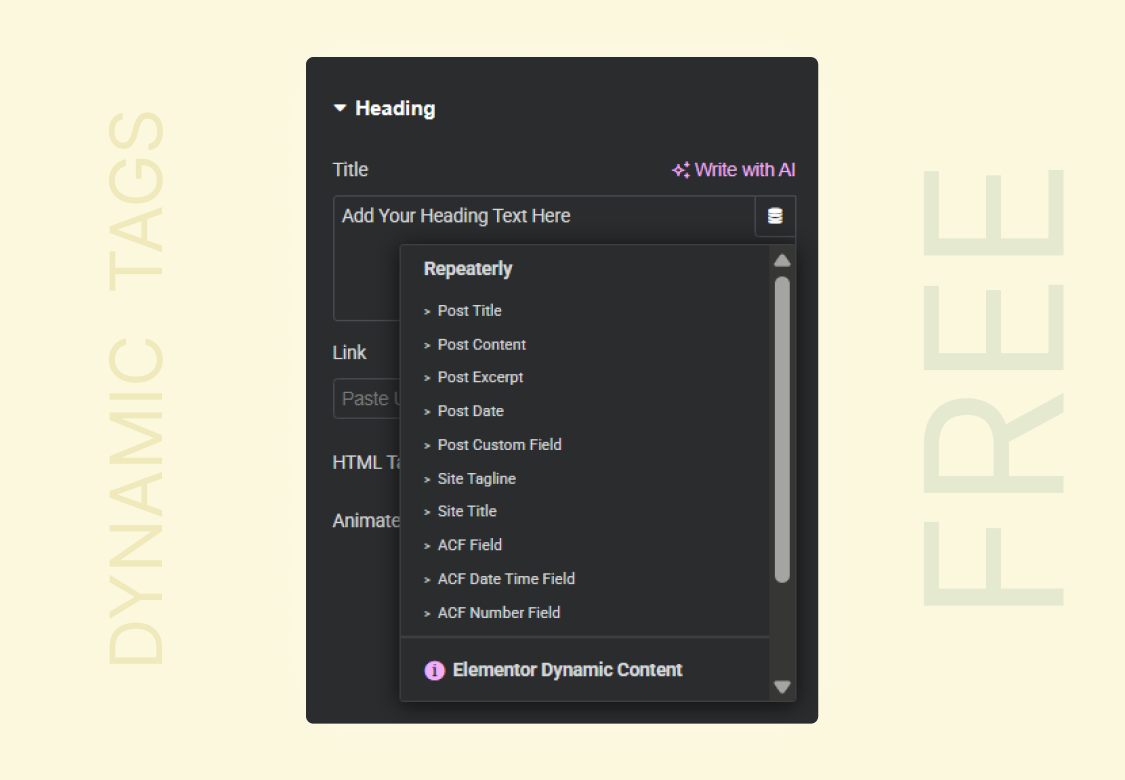
Dynamic Tags — connect any Elementor widget to ACF fields for free
Are you struggling to use ACF repeater fields, Relationship fields or Flexible content fields in Elementor? Tired of slow sites from duplicated sections? You’re not alone!
Here’s the frustrating truth: Elementor doesn’t natively support ACF Repeater, Relationship or Flexible content fields. Not even Elementor Pro fully solves this. So most people end up with bloated pages, slow load times, and a site that’s a nightmare to maintain.
That’s why we built Repeaterly. It connects ACF and Elementor the way they always should have worked — so you can use ACF Repeater fields, Relationship fields, Flexible Content, and Dynamic Tags directly inside Elementor, without writing a single line of code. No Elementor Pro needed.
Repeaterly is the ultimate bridge between Advanced Custom Fields (ACF) and Elementor.
👉 Get Repeaterly Pro · 📖 Documentation
What You Get for Free
Dynamic Tags — Use ACF Fields Inside Any Elementor Widget
Normally, connecting your ACF field data to an Elementor widget (like a heading, button, or image) requires Elementor Pro. Repeaterly gives you this for free.
Once installed, every Elementor widget gets a dynamic tag option. Click it, pick your ACF field, and the widget shows that field’s value automatically — no static text, no manual updates.
Works with:
- Any ACF field or subfield, including fields inside Repeater and Relationship fields
- ACF Options Page fields — pull site-wide (global) content into any widget
- Post title, content, excerpt, URL, featured image, and more
No other free plugin supports ACF subfields in dynamic tags. That’s what makes this special.
ACF Options Page Support — Global Content, Everywhere
Store your site-wide content — phone number, address, social links, opening hours, footer text — once on an ACF Options Page, and display it anywhere with Repeaterly. Every dynamic tag and dynamic widget has a Data Source option: switch it to your Options Page and the field value appears. Update it in ACF and it changes across your entire site instantly. This is normally an Elementor Pro feature — Repeaterly gives you it for free.
Dynamic Icon List
Have a list of features, steps, or perks stored as an ACF Repeater? Turn it into a styled icon list in Elementor automatically. Add a new row in ACF — it appears on the page instantly. No Elementor edits needed.
Dynamic Accordion
Store FAQ items or expandable content in ACF. Repeaterly turns them into a working accordion in Elementor automatically. Add more items in ACF and the accordion grows with them.
Dynamic Gallery
Have an ACF Gallery field full of images? The Dynamic Gallery widget pulls all those images into Elementor and displays them however you style it.
What You Get with Pro
ACF Repeater Loop Grid & Carousel
This is for when you want full control over how repeated content looks.
Say you have a Repeater field with 12 team members. Design one “team card” template in Elementor. Repeaterly loops through all 12 rows and applies your template to each one automatically. Change the template once — all 12 cards update. Works as a grid or a carousel slider just like Elementor Pro’s native Loop Builder but for ACF Repeater Fields.
Dynamic Styles & Elementor Atomic Widgets
Build loop templates with Elementor’s classic widgets or its newer Atomic Widgets (Editor V4). Repeaterly Pro makes dynamic colors, backgrounds, borders, overlays, responsive values, and other style controls resolve separately for every repeater row or related post — so each item can have its own data-driven design instead of inheriting the first item’s styling.
This works across Repeater Loop Grid and Carousel, Relationship Loop Grid and Carousel, Repeater Tabs, and Flexible Content templates.
ACF Repeater Tabs
Turn an ACF Repeater into a tabbed layout — one tab per row. Point it at a Repeater (or a nested sub-repeater), name the sub-field to use as the tab label, and design one Elementor template for the tab panel. Repeaterly renders that template once per row, so a single template drives every tab using that row’s own data. Built on Elementor’s own Tabs widget, so all of Elementor’s Tabs styling, keyboard navigation, and mobile behavior come included automatically.
ACF Relationship Loop Grid & Carousel
ACF Relationship fields let you link posts together — like “related products” or “similar articles.” Repeaterly can display those linked posts in a fully custom Elementor grid or carousel using any template you design.
Nested Repeater Support
A nested Repeater is a Repeater inside another Repeater. Picture a list of pricing plans where each plan has its own list of included features. This is notoriously difficult to display in Elementor. Repeaterly Pro handles it cleanly — drag, drop, done. No code required.
ACF Flexible Content Loop Builder
ACF Flexible Content fields let you create different types of content blocks in ACF — kind of like a mini page builder inside your field group. Repeaterly Pro renders each of those blocks dynamically in Elementor, using your own custom templates for each layout type. You can also reorder the sections directly from the Flexible Content widget’s Elementor control with simple drag and drop — arrange the layouts in whatever order you like, right from the widget settings.
ACF Clone Field Support
If you reuse a Repeater field via an ACF Clone field set to “seamless” display mode, Repeaterly Pro detects it automatically inside your Repeater and Flexible Content templates. No extra setup needed — it just works. (This applies specifically to seamlessly cloned Repeater fields)
Dynamic Image Carousel
A dedicated carousel widget that pulls images from ACF fields. Connect it to your ACF image field and it populates automatically with full styling control.
ACF Checkbox, Radio, Select & Button Group Lists
Turn an ACF Checkbox, Radio Button, Select or Button Group field into a polished feature list, comparison list, checklist, or plan summary. Repeaterly Pro includes four widgets, one named after each field type: ACF Checkbox List, ACF Radio List, ACF Select List and ACF Button Group List. They share the same features, and each one accepts any of the four field types.
Every choice is displayed with separate icons for selected and unselected choices. You can show all choices, selected choices only, or unselected choices only. Keep the field’s original order or group selected or unselected items first. Single and multiple Select fields, option groups, and a Radio field’s “Other” value are all supported.
Use the ACF choice label or stored value as the item text, style selected and unselected states independently with Elementor’s full Icon List controls, and pull the field from the current post, another post, or an ACF Options Page. Inside a Repeaterly loop template, the widgets can also read a sub-field from the current repeater row.
Load Content from Any Post or ACF Options Page
Want to show ACF data from a different post on the current page? With Repeaterly Pro you can pull Repeater or Relationship data from any post using its ID — great for shared sections that reference global content.
It goes further: every Pro loop widget — Repeater Loop Grid and Carousel, Relationship Loop Grid and Carousel, Flexible Content, and the Dynamic Image Carousel — can also use an ACF Options Page as its data source. Keep a global Repeater (say, testimonials or partner logos) on an Options Page, loop it on any page with your own template, and manage the rows in one place. The Elementor editor preview supports Options Page data too, so you see real rows while designing your loop template.
Pagination & Load More
If your Repeater or Relationship field has dozens of rows, you don’t have to show them all at once. Add pagination or a “Load More” button to your loop and Repeaterly handles the rest.
Why Copying Sections Is Hurting You
When you manually duplicate Elementor sections to repeat content, here is what is happening in the background:
- Every copy is saved separately in your database — 10 items means 10 full copies of your layout stored individually
- If you update the design, you have to edit every single copy by hand
- All that extra saved data adds weight to every page load and slows your site down
With Repeaterly, there is one template and one data source. The template lives in Elementor. The content lives in ACF. They connect automatically. Update the layout once. Update content in ACF. Everything stays in sync without touching Elementor again.
Who Is Repeaterly For?
Designers — Build dynamic, professional layouts in Elementor without touching code or doing repetitive work.
Developers — Stop wrestling with ACF and Elementor separately. Repeaterly integrates them so you can ship faster.
Agencies and freelancers — Build sites where clients update content in ACF without ever needing to open Elementor.
Anyone using both ACF and Elementor — If you have both plugins installed and you are not using Repeaterly, you are doing things the hard way.
Getting Started
- Install and activate Repeaterly (free)
- Make sure ACF is installed and you have at least one field set up
- Open any page in Elementor — Dynamic Tags are ready to use straight away
- To build a loop layout, add a Loop Builder widget (Pro) and connect it to your ACF Repeater or Relationship field
- That is it. No code. Content updates automatically from ACF.
Source Code: github.com/Techimium/repeaterly