


Rapls Sitemap – HTML Sitemap & Post List
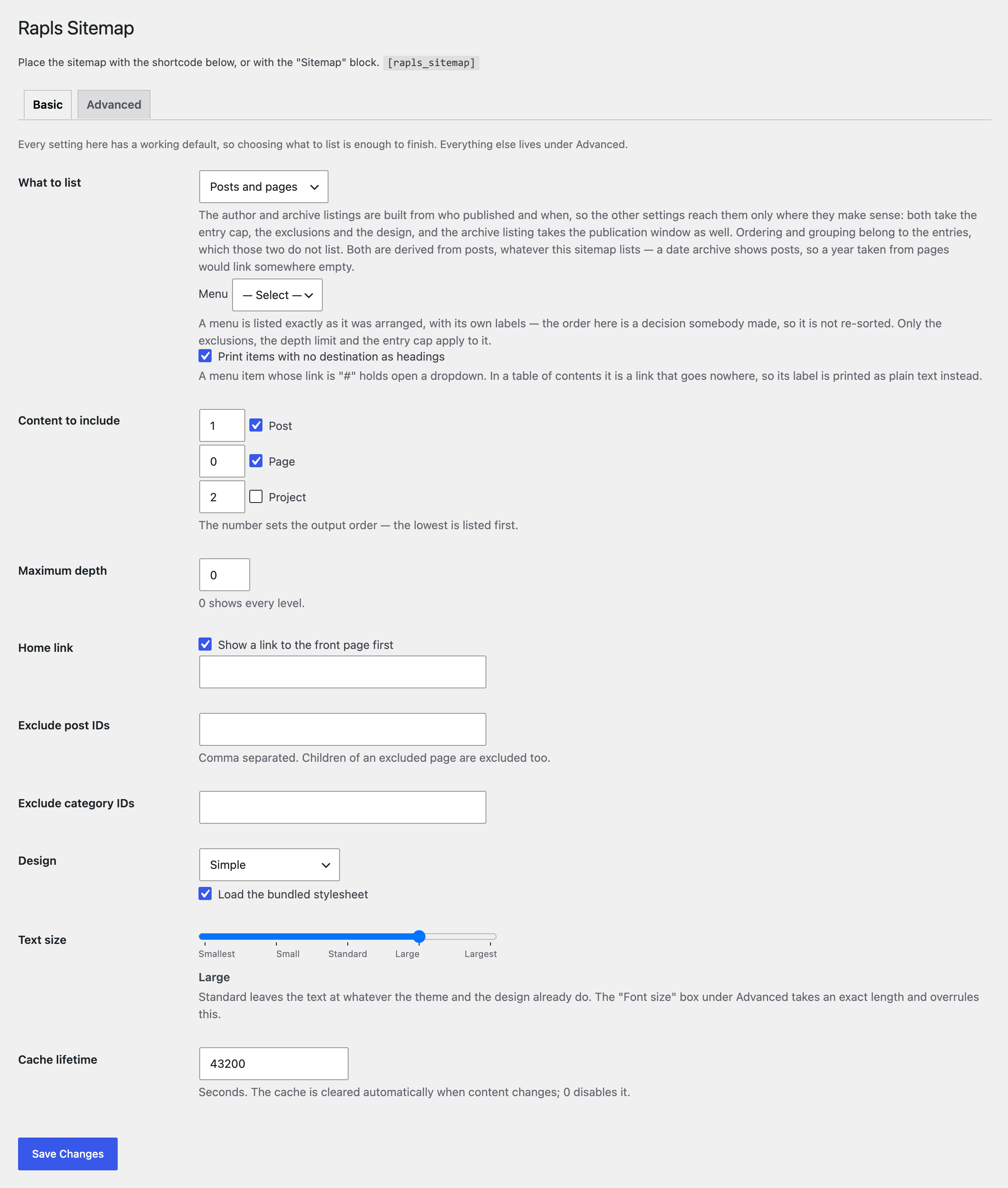
The Basic tab: what to list, how deep, what to leave out, and which design.
Rapls Sitemap puts a readable sitemap on a page of your site: a list of your posts and pages that visitors can browse. Add the [rapls_sitemap] shortcode or the Sitemap block, and it stays up to date as you publish.
It is an HTML sitemap for people, not an XML sitemap for search engines. WordPress already generates wp-sitemap.xml; this plugin leaves it alone.
Why site owners pick Rapls Sitemap
- Moving from PS Auto Sitemap or WP Sitemap Page? Turn on compatibility and the sitemap page you already have keeps working, without rewriting it. (Off by default.)
- One placement, the whole page. Pages, posts, categories, authors and date archives, one after another under their own headings, from a single shortcode.
- Simple to start, deep when you need it. The settings screen opens on a Basic tab holding the nine decisions a sitemap cannot be built without. The rest is one tab away, in panels that open themselves when they hold anything but a default.
- Built for large sites. One query per post type, a cap on every query, and a cache that clears itself when content changes. A list the cap cuts short says so.
- Japanese UI included. Fully translated, delivered by WordPress.org as a language pack.
- Free. No Pro version, no upsell, no account, and no credit link on your site.
What it lists
- Pages in their parent/child hierarchy, to any depth you choose.
- Posts, optionally grouped under their categories, with child categories nested.
- Categories, tags and taxonomies, with or without the entries under them.
- Authors, filtered by user ID and role, and date archives by year and month.
- Navigation menus, with
#placeholder items printed as headings rather than dead links. - Custom post types and taxonomies, as long as they are viewable on the front end. One that is not publicly queryable is never listed, whatever asks for it, because its pages would 404.
Choosing what appears
- Depth limit, and a “list only what is under this page” scope, which a shortcode can resolve to the current page or the one above.
- Exclude posts, categories or users by ID, or whole post types and taxonomies. Excluding a parent page takes its children with it, or leaves them listed a level up — your choice.
- Leave out the sitemap’s own page, password-protected entries, and entries individually marked noindex.
- Limit by publication date, for a sitemap of one school year. A category holding nothing from that year drops out with it.
- Entry caps: per list, per category, and a starting offset.
Ordering and design
- Entries by date, title, ID, menu order, last modified, comment count, at random, or by a custom field — which is how you get a true kana order for Japanese titles. Category headings by name, count, slug or ID.
- 27 CSS presets plus “no styling at all”, for themes that would rather do it themselves.
- A five-step text size slider on the Basic tab, for the one appearance question every site has.
- Font size, line height, indent, link colour, underline and column count on top of the preset; an exact font size overrules the slider.
- Bullets as discs, circles, squares, emoji or an icon class, separately for top and nested items.
- Section and category labels as real
h2–h6headings, which screen-reader users navigate by. - A class reference on the settings screen, for your own CSS.
Migrating from PS Auto Sitemap or WP Sitemap Page
Only their documented interfaces are reproduced; none of their code is used. Both options are off by default.
- WP Sitemap Page —
[wp_sitemap_page]and itsonlyvalues. Not claimed while WP Sitemap Page itself is active. - PS Auto Sitemap — the
<!-- SITEMAP CONTENT REPLACE POINT -->comment, plus a one-button import of its stored settings, which are read and never written.
noindex integrations
Entries individually marked noindex can be left out, reading these with no setup: Yoast SEO, Rank Math, SEO SIMPLE PACK, SEOPress, The SEO Framework, All in One SEO and the Cocoon and Avada themes. Categories, tags and authors are read too, where the term or author is what is listed.
A default applying to a whole post type, taxonomy or archive is not read. Those listings appear only because you chose them, and an SEO plugin’s default — Yoast noindexes date archives out of the box — would otherwise empty a list you asked for.
Extending it
Developer filters cover what the settings cannot reach, including rapls_sitemap/query_args, which hands you the query for one post type before it runs. Worked examples are on the plugin page.
Multilingual
WPML and Polylang work with no configuration. Both narrow the queries to the current language, and this plugin does not switch those filters off. The render cache keys on the locale, so one language is never served another’s.
Learn more: Plugin details and developer reference | Source code (GitHub)