


RapidQuizMaker
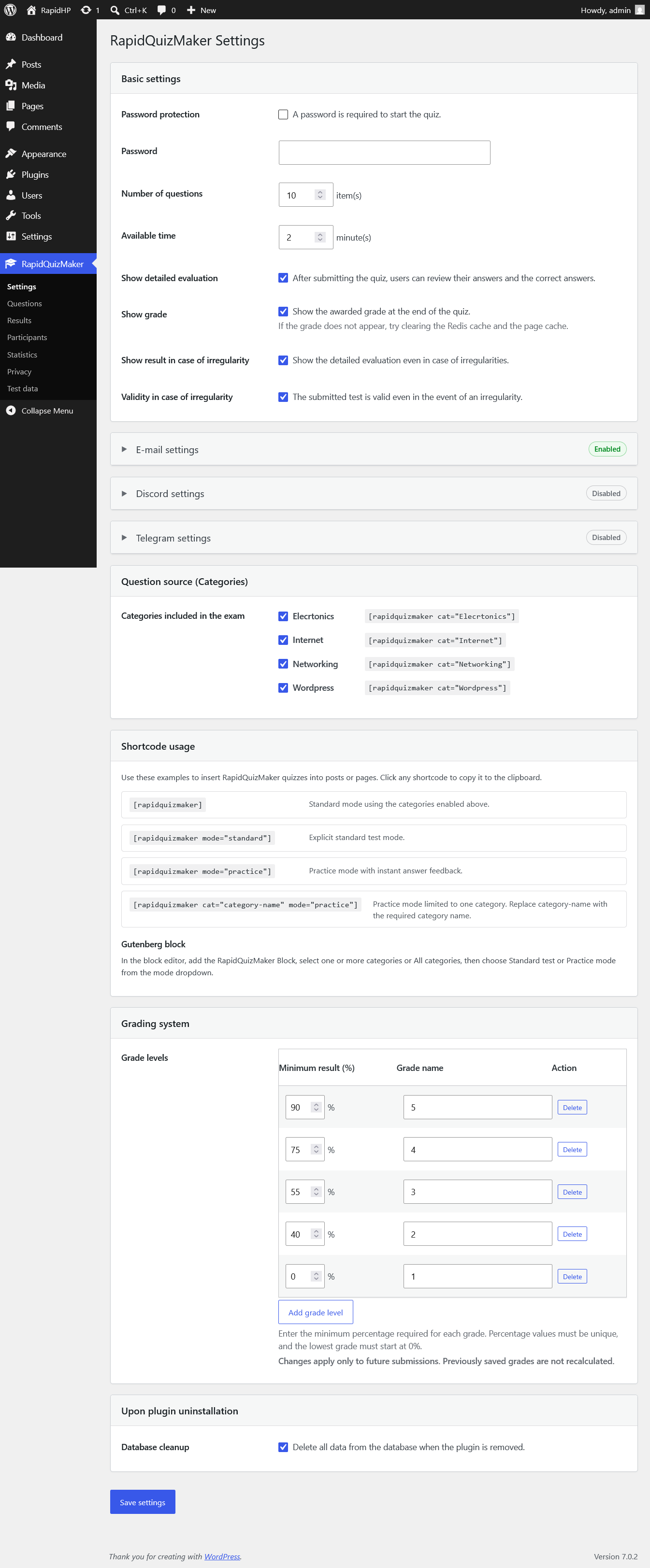
RapidQuizMaker basic settings.
Support contact: [email protected]
RapidQuizMaker helps you create and manage quiz questions in WordPress, then display tests on the frontend with a shortcode or Gutenberg block that can use one, multiple or all question categories.
Frontend online test: https://rapidplugins.dev/rapid-quiz/
Main features:
- Database-based question bank.
- Question categories.
- Optional Media Library image for each question with accessible click-to-enlarge viewing.
- Frontend quiz form with optional access password.
- Standard test mode and practice mode with instant answer feedback.
- Configurable question count and time limit.
- Configurable grading system with custom percentage thresholds and grade names.
- Results storage for submitted tests.
- Participant results page in the WordPress admin area.
- Statistics page.
- Selectable CSV, XLSX and PDF export for results.
- Scheduled e-mail summaries for submitted quizzes with optional CSV/XLSX/PDF result attachments.
- Optional Discord webhook notifications for quiz submission summaries.
- Optional Telegram bot notifications for quiz submission summaries.
- JSON import for questions.
- Portable ZIP export and resumable, batched import for selected questions with their Media Library images.
- Privacy information page with a ready-to-adapt privacy policy suggestion.
- Optional translations included.
Use the [rapidquizmaker] shortcode to display a quiz with a frontend category selector based on the categories enabled in the settings. Participants can choose one or more categories, or select All. You can also display a fixed category with [rapidquizmaker cat="category-name"]. The default mode is standard test mode. To use instant feedback practice mode, add [rapidquizmaker mode="practice"] or [rapidquizmaker cat="category-name" mode="practice"].
Third-party services
The Discord notification feature sends summary messages to the Discord webhook URL configured by the site administrator. This feature is disabled by default. When enabled, RapidQuizMaker sends the site name, reporting period, submitted quiz count, average result when available, and irregularity event count when available to Discord. Detailed personal quiz result rows are not sent to Discord.
Discord webhook delivery is provided by Discord Inc. Discord webhook documentation: https://discord.com/developers/docs/resources/webhook Terms: https://discord.com/terms Privacy Policy: https://discord.com/privacy
The Telegram notification feature sends summary messages through the Telegram Bot API using the bot token and chat ID configured by the site administrator. This feature is disabled by default. When enabled, RapidQuizMaker sends the site name, reporting period, submitted quiz count, average result when available, and irregularity event count when available to Telegram. Detailed personal quiz result rows are not sent to Telegram.
Telegram delivery is provided by Telegram Messenger Inc. Telegram Bot API documentation: https://core.telegram.org/bots/api Terms: https://telegram.org/tos Privacy Policy: https://telegram.org/privacy