

Pure Metafields
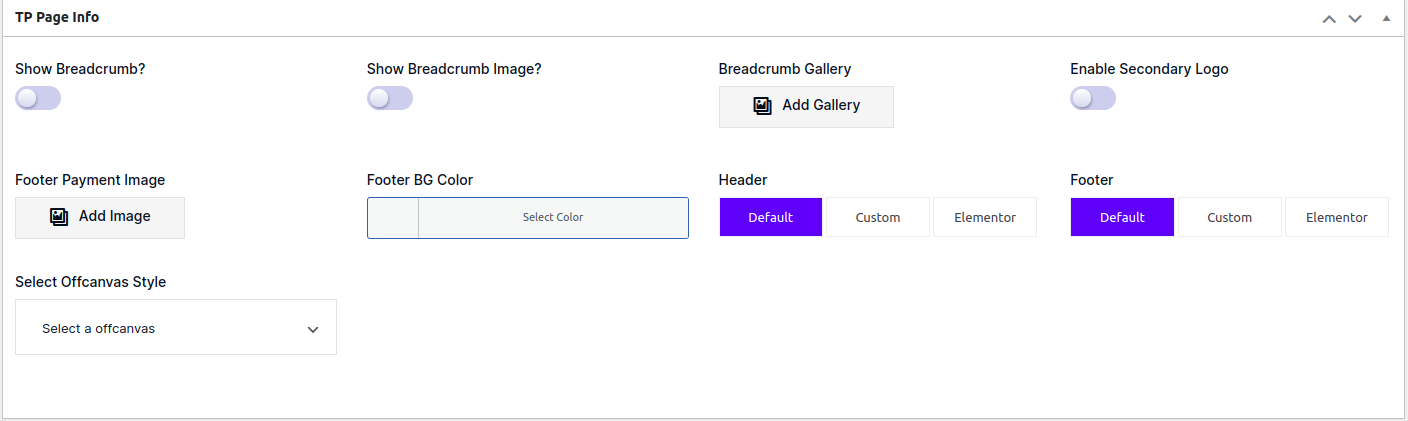
Metafields With Page
The Pure Metafields Plugin is a powerful tool designed to enhance the functionality and flexibility of your WordPress website. With this plugin, you can easily create and manage custom meta boxes, adding extra fields and data to your posts, pages, and custom post types.
Key Features
✅ Custom Meta Boxes: Create unlimited custom meta boxes with ease. Define the title, placement, and priority of each meta box to suit your needs.
✅ Flexible Field Types: The plugin offers a wide range of field types to choose from, including text, textarea, select, checkbox, radio buttons, date picker, color picker, gradient, image, gallery, editor, and more.
✅ Repeatable Fields: Enable the ability to repeat fields, allowing users to add multiple instances of the same field dynamically. Perfect for scenarios where you need to capture multiple sets of data.
✅ Conditional Logic: Set up conditional logic to show or hide fields based on the value of other fields. This feature adds versatility and improves the user experience of your forms.
✅ Theme Options Panel: Register unlimited theme option panels with a clean admin UI. Values are stored as WordPress theme_mods and readable with the standard get_theme_mod() API.
✅ Visual Options Builder: Build and manage option panels from a drag-and-drop admin interface — no PHP required. Supports all field types and row/column layouts.
✅ Bake to PHP: Export any builder panel to a standalone PHP file for clean deployment in themes or plugins.
✅ WordPress Customizer Integration: Mirror any option panel into Appearance Customize with one checkbox. All field types are supported with full sidebar UI.
✅ Save and Retrieve Meta Data: The plugin provides simple functions to save and retrieve meta data, allowing you to access and utilize the stored information in your themes or plugins.
✅ Integration with WordPress API: Seamlessly integrate with the WordPress API and extend its functionalities. Hook into actions and filters to manipulate meta data and create dynamic interactions.
Theme Options Panel
The Options Panel framework lets you register admin option pages that store values as WordPress theme_mods. Read values anywhere with tpmeta_get_option() or the standard get_theme_mod().
Create an Options Panel
Register a panel and its sections inside an init action. Each section holds an array of fields.
<?php
add_action( 'init', function () {

    $opt_name = 'my_theme_options'; // unique panel ID

    TPMeta_Options::set_args( $opt_name, array(
        'menu_title'             => 'Theme Options',
        'page_title'             => 'Theme Options',
        'menu_slug'              => 'my-theme-options',
        'menu_icon'              => 'dashicons-admin-appearance',
        'menu_position'          => 60,
        'capability'             => 'manage_options',
        'output_css'             => true,   // auto-print CSS from fields that have 'output'
        'customizer_integration' => false,  // set true to mirror into Appearance → Customize
    ) );

    TPMeta_Options::set_section( $opt_name, array(
        'id'     => 'general',
        'title'  => 'General',
        'icon'   => 'dashicons-admin-generic',
        'fields' => array(
            // add field arrays here (see field types below)
        ),
    ) );

} );
?>
Options Panel — Text Field
<?php
array(
    'id'          => 'site_tagline',
    'type'        => 'text',
    'label'       => 'Site Tagline',
    'placeholder' => 'Enter tagline...',
    'default'     => '',
)
?>
Options Panel — Textarea Field
<?php
array(
    'id'          => 'footer_text',
    'type'        => 'textarea',
    'label'       => 'Footer Text',
    'placeholder' => 'Type footer content...',
    'default'     => '',
)
?>
Options Panel — Colorpicker
<?php
array(
    'id'      => 'primary_color',
    'type'    => 'colorpicker',
    'label'   => 'Primary Color',
    'default' => '#3362FF',
    'output'  => array(
        // optional: auto-print CSS when output_css is true
        'a, .btn-primary' => 'color',
    ),
)
?>
Options Panel — Select Field
<?php
array(
    'id'          => 'layout_style',
    'type'        => 'select',
    'label'       => 'Layout Style',
    'placeholder' => 'Choose layout',
    'default'     => 'boxed',
    'options'     => array(
        'boxed'  => 'Boxed',
        'fluid'  => 'Fluid',
        'framed' => 'Framed',
    ),
)
?>
Options Panel — Switch Field
<?php
array(
    'id'        => 'show_breadcrumb',
    'type'      => 'switch',
    'label'     => 'Show Breadcrumb',
    'default'   => 'on',   // 'on' or 'off'
    'data_type' => 'onoff', // 'onoff' (on/off) or 'truefalse' (1/0)
)
?>
Options Panel — Checkbox Field
<?php
array(
    'id'      => 'included_features',
    'type'    => 'checkbox',
    'label'   => 'Included Features',
    'default' => array( 'dark_mode', 'sticky_header' ),
    'options' => array(
        'dark_mode'      => 'Dark Mode',
        'sticky_header'  => 'Sticky Header',
        'back_to_top'    => 'Back to Top Button',
        'preloader'      => 'Page Preloader',
    ),
)
?>
Options Panel — Tabs (Group Buttons)
<?php
array(
    'id'      => 'header_style',
    'type'    => 'tabs',
    'label'   => 'Header Style',
    'default' => 'style_1',
    'choices' => array(
        'style_1' => 'Style 1',
        'style_2' => 'Style 2',
        'style_3' => 'Style 3',
    ),
)
?>
Options Panel — Datepicker
<?php
array(
    'id'          => 'launch_date',
    'type'        => 'datepicker',
    'label'       => 'Launch Date',
    'placeholder' => 'Select date',
    'default'     => '',
)
?>
Options Panel — Image Field
<?php
array(
    'id'      => 'custom_logo',
    'type'    => 'image',
    'label'   => 'Custom Logo',
    'default' => '',
)
?>
Options Panel — Gallery Field
<?php
array(
    'id'      => 'slider_images',
    'type'    => 'gallery',
    'label'   => 'Slider Images',
    'default' => '',
)
?>
Options Panel — Editor Field
<?php
array(
    'id'      => 'about_content',
    'type'    => 'editor',
    'label'   => 'About Page Content',
    'default' => '',
)
?>
Options Panel — Color Gradient
<?php
array(
    'id'      => 'hero_gradient',
    'type'    => 'color_gradient',
    'label'   => 'Hero Background Gradient',
    'default' => '',
)
?>
Options Panel — Multicolor
<?php
array(
    'id'      => 'brand_colors',
    'type'    => 'multicolor',
    'label'   => 'Brand Colors',
    'options' => array(
        'primary'   => 'Primary',
        'secondary' => 'Secondary',
        'accent'    => 'Accent',
    ),
    'default' => array(
        'primary'   => '#3362FF',
        'secondary' => '#FF6633',
        'accent'    => '#33FF99',
    ),
)
?>
Options Panel — Post Select
<?php
array(
    'id'          => 'featured_page',
    'type'        => 'post_select',
    'label'       => 'Featured Page',
    'placeholder' => 'Search pages...',
    'post_type'   => 'page',       // any registered post type
    'save_format' => 'id',         // 'id' or 'slug'
    'default'     => '',
)
?>
Options Panel — Repeater Field
<?php
array(
    'id'      => 'social_links',
    'type'    => 'repeater',
    'label'   => 'Social Links',
    'columns' => 2,
    'default' => array(),
    'fields'  => array(
        array(
            'id'          => 'platform',
            'type'        => 'select',
            'label'       => 'Platform',
            'default'     => 'facebook',
            'options'     => array(
                'facebook'  => 'Facebook',
                'twitter'   => 'Twitter / X',
                'instagram' => 'Instagram',
                'linkedin'  => 'LinkedIn',
            ),
        ),
        array(
            'id'          => 'url',
            'type'        => 'text',
            'label'       => 'Profile URL',
            'placeholder' => 'https://',
            'default'     => '',
        ),
    ),
)
?>
Options Panel — Conditional Logic
Show or hide a field based on the value of another field in the same section.
<?php
// Field that controls visibility
array(
    'id'      => 'enable_custom_footer',
    'type'    => 'switch',
    'label'   => 'Enable Custom Footer',
    'default' => 'off',
),

// Field shown only when switch is 'on'
array(
    'id'          => 'custom_footer_text',
    'type'        => 'textarea',
    'label'       => 'Footer Text',
    'default'     => '',
    'conditional' => array( 'enable_custom_footer', '==', 'on' ),
)
?>
Get Option Panel Value
<?php
// Recommended helper (returns default if not set):
$value = tpmeta_get_option( 'field_id', $default );

// Or standard WordPress API:
$value = get_theme_mod( 'field_id', $default );
?>
Get Repeater Rows from Options Panel
<?php
$rows = tpmeta_get_repeater_rows( 'social_links' );

foreach ( $rows as $row ) {
    echo esc_url( $row['url'] );
    echo esc_html( $row['platform'] );
}
?>
Visual Options Builder
The Visual Builder lets you create and manage option panels from a drag-and-drop admin interface — no PHP required.
How to Use the Builder
- In the WordPress admin sidebar go to Options Builder.
- Click Add New Panel and fill in the panel name, slug, icon, and position.
- Add sections and drag fields into rows. Configure each field’s ID, label, type, default value, and options.
- Click Save Panel — the panel appears immediately as a live admin menu page.
- Tick the Customizer Integration checkbox to mirror the panel into Appearance Customize.
Bake to PHP
The Bake to PHP button exports any builder panel to a standalone PHP file you can commit to your theme.
- Open any panel in the builder.
- Click Bake to PHP in the top toolbar.
- Copy the generated code into your theme’s
functions.phpor a dedicated options file.
The exported file is self-contained and has no dependency on the builder — it uses TPMeta_Options::set_args() and set_section() directly, so it works even if the builder is later deactivated.
WordPress Customizer Integration
Any option panel (PHP-registered or builder-created) can be mirrored into Appearance Customize.
Enable via PHP
<?php
TPMeta_Options::set_args( 'my_theme_options', array(
    'menu_title'             => 'Theme Options',
    'customizer_integration' => true,  // ← enables Customizer mirroring
) );
?>
Enable via the Visual Builder
Open the panel in the builder, check the Customizer Integration checkbox, and save.
Reading Values
Values saved through the Customizer and the admin panel use the same storage (theme_mod). Read them identically:
<?php
$color = tpmeta_get_option( 'primary_color', '#3362FF' );
// or
$color = get_theme_mod( 'primary_color', '#3362FF' );
?>