
Social Share for WooCommerce
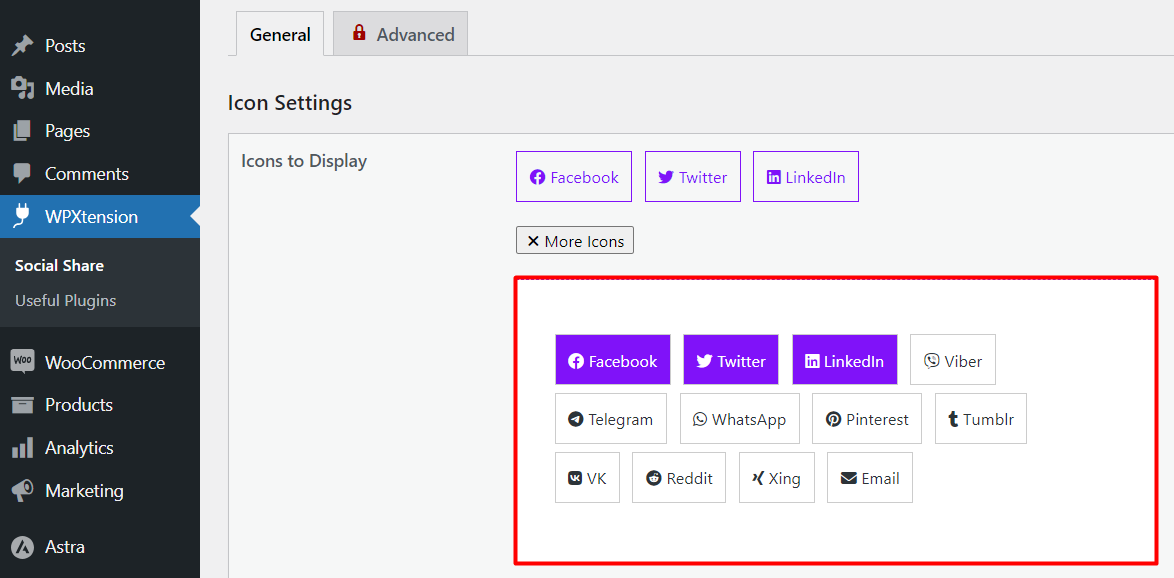
Available Social Icons.
Social Share for WooCommerce allows you to add actionable social icons on WooCommerce single product pages. This WooCommerce extension gives you a quick single-click solution to share your products on various social media platforms.
Social media has a great influence on our everyday life. They have become an inseparable part of our modern life. As a result, social media gained the ability to influence sectors like eCommerce. Top and successful marketers understand the importance of social presence and social media marketing to boost a business, especially in the eCommerce sector. Why should you miss out!
WooCommerce comes with tons of features, but it does not offer a default option to add actionable social media icons. With Social Share for WooCommerce, you can add social media icons to the product page. Additionally, you can add a copy to the clipboard button along with the social media platforms. This will allow everyone to copy the product link into the clipboard.
View Demo | Documentation | Support | Pro Version
Features of this plugin
🥳 One-click social share for WooCommerce products
Give your customers the ability to share your products on various social media sites with just a single click.
🥳 Select your desired social media icons
You can select your desired social media icons from a given list. So, you can precisely choose your desired social media platforms.
🥳 Customize the order of the social media icons
Additionally, you can drag and drop the icons to customize their order on the product page. Thus, you can effortlessly put your most desired social channel in the first position and so on.
🥳 Control the social media icon’s display position
This WooCommerce extension also allows you to select the desired position of the social media icons on the product pages. Currently, there are three spots to choose from. You can either display the social media icons with the product category name, after the product title, or after the product price.
Additionally, there is an option to hide the icon. The premium module offers an option to display floating social share icons on the left or right side of the browser window. When activating that option, you may want to hide the icons from other places.
🥳 Control the content of the icons
The plugin offers customization options for social media icons. Here you also have three different options to choose from. You can select between only icon, only text, and both icon and text at the same time.
🥳 Customize the social media icon’s appearance
The plugin is simple but when it comes to enriching the features, there is no compromise. Based on your theme and product page appearance, you can choose the best icon shape for your WooCommerce store. You can choose between Round and Square shapes at this moment.
🥳 Copy product link to Clipboard made easy
Moreover, the plugins also add an option to enable a “Copy to Clipboard” option along with the social media icons. As a result, your customers will be able to copy the product link to the clipboard while they are also able to share the products on the included social networks.
🥳 Display title before social icons
The plugin lets you enable title text before social icons. By default, the text will appear as ‘Share On.’
🥳 Shortcode
Using a page builder like- Elementor, Divi, Beaver Builder, etc? The plugin gives you a facility of a shortcode. Using [psfw_basic_share] you can display social icons in any spot on the page.
🥳 Pop-up modal with all social icons
Keep your product page clean by displaying icons of the most popular social platform. Enjoy peace of mind knowing that your customers can still access all available platforms on the pop-up modal.
Feature Highlights of Social Share for WooCommerce PRO
✔️ Set floating social share icons on the left or right side of the browser window
✔️ Love tooltips! advanced version of Social Share for WooCommerce have you covered
✔️ Let your customers share specific variation links to their desired social platforms (even it will work for the pop-up modal with all social icons )
🎨️ Color customization to sync social share icons with your brand is at your fingertips
🎨️ Font size customization that matches your store’s existing design is a breeze
🎨️ Additionally, it also allows you to change font weight to normal(Regular), lighter, or bold
🎨️ Most importantly, you will be able to tweak the size of the social platform icons
🎨️ On top of that, there are ample options to customize the hover style of the items
🎨️ Finally, the tooltip text color and background color are also easily customizable
🎨️ Display a social share icon on the shop/archive page to share it from the product listing
Our Popular Addons for WooCommerce
👉 Variation Price Display Range for WooCommerce
👉 Fast Cart for WooCommerce
👉 Product Variation Table for WooCommerce – PVT
👉 VariationX – Variations as Radio Buttons for WooCommerce