

PriceWise – Measurement Price Calculator for WooCommerce
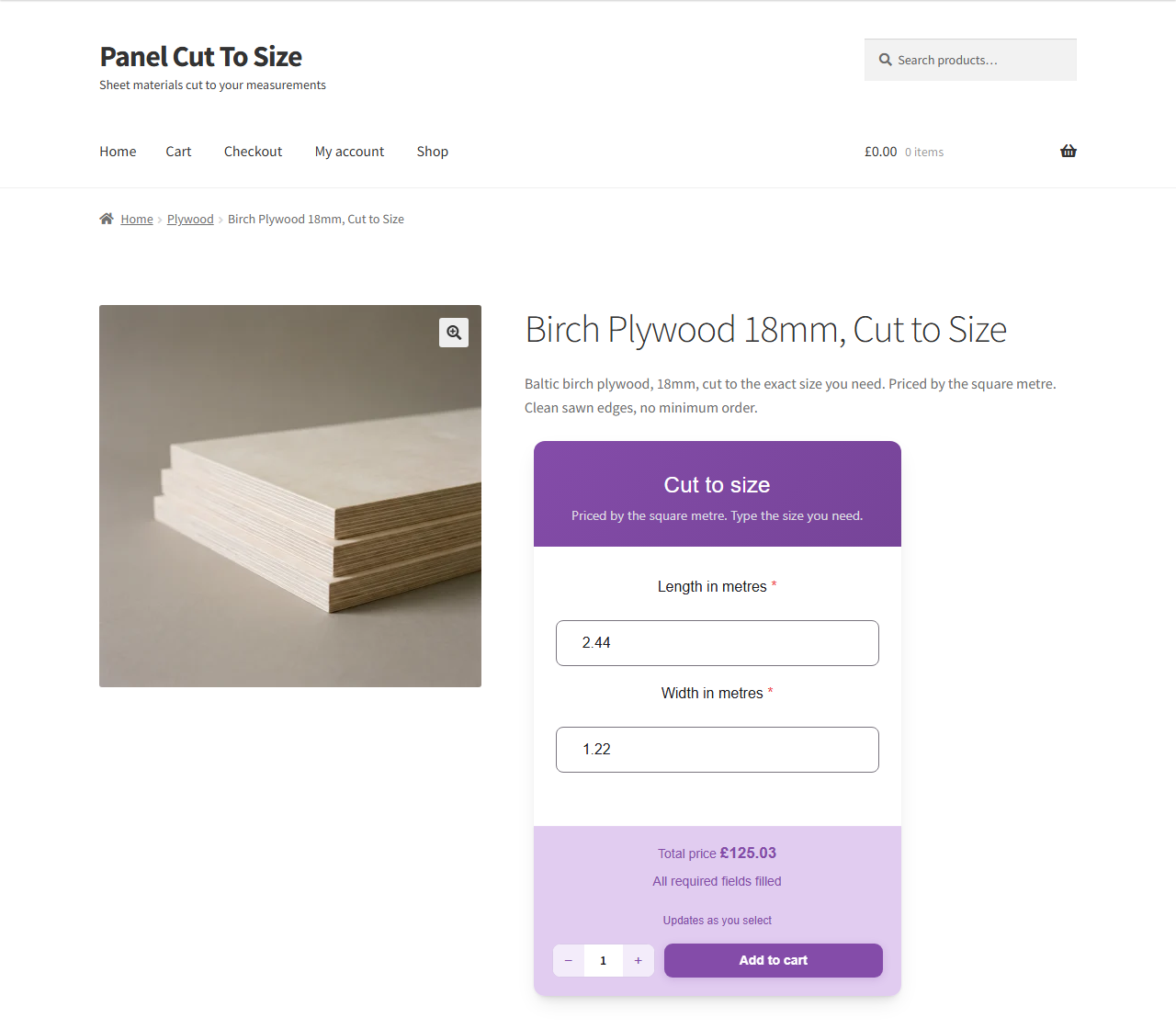
A customer types the length and width they need, and the price updates on the product page.
Some products do not have one price. Flooring goes by the square metre, fabric by the metre, glass by its size, topsoil by weight. So the product page says “contact us for a quote”, and then you spend your evening answering emails about a 2 metre by 3 metre piece of ply.
PriceWise puts the calculator on the product page instead. The customer types in their measurements, length and width for example, and the price works out live from a formula you write once, like length * width * 12. They add it to the cart themselves.
The price is worked out again on your server when the item is added to the cart, so nobody can change it in the browser. It carries into the cart, the checkout and the order with the customer’s numbers saved on the line, which is what your workshop actually needs to cut the job.
You write the formula one time. The plugin does the maths every time someone fills in the boxes.
The free version is the full price by formula calculator: number fields, your formula, a live price, and the WooCommerce cart. That covers pricing by area, by length, by weight, by quantity, or by any rule you can write down. PriceWise Pro adds measurement fields with real units and the product add ons side of it, which is dropdowns, checkboxes, swatches, file upload and the rest.
What the free version does
- Price by measurement with a formula. Ask for length and width and charge by area with
length * width * 12. Ask for metres and charge per metre. Ask for kilos and charge per kilo. If you can write the rule down, the calculator can price it. - Number fields. Ask the customer for length, width, quantity, guests, or any number you need.
- Write the formula once. Use your own field names with
+ - * / ( )and the functionsround,ceil,floor,min,max,absandif. Somax(length * width * 12, 30)charges by area but never drops below 30. Andceil(length / 10) * 10rounds up to whole units. - Live price. The total moves as the customer types. No reload, no button to press.
- Checked on your server. The final price is worked out again at add to cart, so a customer cannot edit it in the browser dev tools.
- Into the cart and the order. The price and the numbers the customer entered are saved on the cart line, the checkout and the order.
- Any currency. The live price follows your WooCommerce currency settings, symbol on the left or the right, comma or dot separators, so it reads properly anywhere: Rs 1,234.50, 1.234,50 EUR, or $1,234.50.
- Your own words. Set the Add to Cart text, the Price label and the on screen messages in your language from Settings > Text & Labels. A .pot file is included for a full translation.
- Two layouts. Show every field together, or inline with no card so it blends into your theme.
- Colour controls, so it matches your store.
- Import and export, to move your calculators between sites as a file.
- Shows on all your products. One calculator, applied across the store.
What you sell, and what goes in the boxes
Underneath, all of these are the same thing: the number fields you decide to ask for, and one formula. None of it needs code. Find the one closest to your shop.
Panel and sheet material. Plywood, birch ply, hardwood faced ply, MDF, moisture resistant MDF, melamine faced chipboard, OSB, acrylic, perspex and polycarbonate, cut to size. Ask for a length and a width in millimetres, and a thickness, because 18mm board does not cost what 12mm costs. length / 1000 * width / 1000 * 42 gives you the square metre price at 42 a metre, and the thickness sits on the same line with its own number.
Glass, mirrors, worktops and countertops. Width and height, plus thickness in mm, since 4mm float and 10mm toughened are not the same product. max(width * height * 180, 45) charges by the size but never goes below 45, so a small shelf does not come out at two pounds. Splashbacks and worksurfaces price the same way.
Flooring and tiling. Room width and room length, and however much waste you allow. ceil(length * width * 1.1 / 2.2) * 38 turns a room into whole packs, at 2.2 square metres a pack, 38 a pack, with ten per cent spare. Laminate, vinyl, carpet, wall and floor tiles, resin and epoxy all work off the same shape.
Wallpaper and wall murals. Wall width and wall height, and the roll size you stock. ceil(width / 0.52) * ceil(height / 10.05) works out how many drops you get out of a standard roll and how many rolls that is, and a mural priced by the square metre is just width times height times your rate.
Roofing, cladding, decking and insulation. Sheets and boards by the square metre, where the thickness or the profile changes the rate. Decking goes by the board or by the area, whichever way you quote it. Roofing felt and membrane go by the roll, so ask for the run in metres and let the formula work out how many rolls that is.
Fabric, upholstery, curtains and blinds. Metres off the roll, or width by drop for a blind, a curtain or a shutter. Roll width matters, so ask for it and let the formula work out how many drops come out of a roll. Leather goes by the hide or the square foot on the same principle.
Rope, cable, tube, timber and trim. Anything off a reel or by the linear metre. One box in metres, one rate, done. Skirting, architrave, mouldings, guttering, garden edging and LED strip all take that same shape.
Rubber, mesh and netting. Sold by the metre off a roll, or by length and width for a cut sheet, with the grade or the gauge changing the rate.
Covers and outdoor. Tarpaulins, awnings and canopies, priced by width and drop with eyelets and hems added on top. Same maths as a banner, different trade.
Topsoil, gravel, bark and firewood. Bulk goods by weight or volume. A cubic metre figure or a kilo figure times your rate, with a minimum load written into the formula so a single bag is not worth the delivery. Sand, ballast, aggregate, ready mix concrete, compost and mulch all sit here.
Signs, banners, print and graphics. Width and height for the material, a quantity for the run, and the finishing on top: hemming, eyelets, lamination. Vinyl banners, canvas prints, stickers, labels, posters, business cards, vehicle graphics and vinyl wrap all price this way. Window film and tinting too.
Steel, aluminium and foam. Cut to size by length, or by length and width for a sheet, with a thickness or a gauge changing the rate.
Bricks, blocks and paving. Area in, packs or pallets out. The round up function does the awkward part, so you never sell three quarters of a pack.
Fencing and gates. Run length in metres, panel height, and whether posts and gravel boards are in the price. Railings and garden gates follow the same line.
Work measured on site. Cleaning by the room or the square metre. Painting and decorating by wall area. Rendering and plastering by the square metre. Landscaping and lawn care by area. Window cleaning by the window. Removals by item or van load.
Per person and per day. Catering and buffets by the head. Marquee, event and equipment hire by the day. Party packages by the guest. Coach and minibus hire. Workshops and classes by the seat.
Food and dry goods by weight. Coffee beans, loose tea, spices, bulk nuts, grains, animal feed. Paint and liquids by the litre.
If your product page currently says “contact us for a quote”, this is the part that replaces it.
Product add ons and extra product options
People call this kind of thing different names depending on where they came from. Product add ons, product addons, extra product options, a product configurator. They all mean the same job: let the customer choose something on the product page, and have that choice change the price.
The free version does the calculator half. Number fields, your formula, a live price that the server checks. If the price depends on a measurement or a number the customer types in, free does that on its own and you do not need to buy anything.
PriceWise Pro does the options half. Dropdowns, radio buttons, checkboxes, colour and image swatches, sliders, file upload for artwork, date and booking fields, and optional paid add ons. Every option can carry its own price, a percentage, or its own line in the formula. That is the part that turns a calculator into a full product configurator.
Most shops end up needing both. A sign shop asks for a width and a height, and then asks what material, whether you want eyelets, and would you like to upload your artwork. The first part is free. The rest is Pro.
Free vs Premium
The free version is the formula based price calculator, applied to all your products. The premium version adds:
- Measurement fields with real units. Pick square metres, square feet, metres, kilos or litres instead of writing the formula yourself, with a waste percentage and round up to whole boxes or rolls.
- More field types. Dropdown, radio, checkbox, slider, file upload, date and booking, and optional add ons.
- Price tables. Price by a size band, or a size against quantity grid, which is the classic print shop pricing table.
- PDF quotes. A clean, branded PDF on every order, attached to the order email if you want it.
- More control. Show and hide field rules, colour and image swatches, the step by step layout, per product and per category targeting, editing a configured item from the cart, and order email alerts.
See what PriceWise Pro adds, or open the live calculators and use them yourself. They are working calculators on a real shop, not screenshots.
How it works
- Install and activate PriceWise.
- Go to PriceWise > Add Calculator.
- Add your number fields, length and width for example, and write the formula,
length * width * 12for example. - Save. The calculator shows on your WooCommerce products and the price moves as customers type.
Privacy
PriceWise does not send any data to outside services. Every calculation runs on your own server, and the free plugin makes no external connections.