

Powie’s WHOIS Domain Check
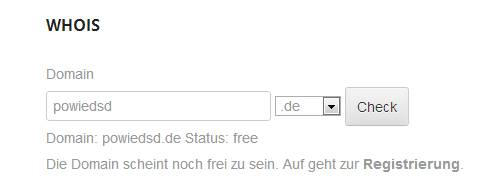
Usage on a page
The plugin checks domain availability through the io-developer/php-whois library. Availability depends on the WHOIS service and response format used by each registry.
The settings page contains the result and reCAPTCHA options first, followed by the domain extension settings. Only active extensions are shown in the table. Activate another supported extension from the dropdown to add it to the table; deactivate an extension with its status checkbox. Set a priority for each active extension (higher values appear earlier) and select exactly one default extension. New installations start with .com active as the default; all other supported extensions are inactive until enabled. Save Changes stores the settings and table changes together.
The plugin uses the WHOIS servers and availability parsers provided by the library. It does not provide settings for custom WHOIS servers or custom availability strings.
Demos
Demo 1 – at our own page.
Demo 2 – live version at a hosting providers webpage.
Requires
- PHP 8.0 or newer
- PHP cURL and mbstring extensions
- Outbound network access from the WordPress server to WHOIS services on port 43
- If reCAPTCHA is enabled, outbound HTTPS access to Google
Including:
[pwhois]shortcode with an extension selector- Per-extension activation and deactivation, display priority, and one default selection
- Optional raw WHOIS response in the result
- Optional Google reCAPTCHA protection
- Custom messages for available, registered, and invalid domains; optional
www.prefix and HTML around raw WHOIS output - Result messages with
##DOMAIN##and##TLD##placeholders - German, Spanish, and Russian translations
Support
Join the community on Discord or explore the project on GitHub.
You get faster feedback if you post in our forum, rather than on wordpress.org!
Remove plugin
- Deactivate plugin through the ‘Plugins’ menu in WordPress
- Delete plugin through the ‘Plugins’ menu in WordPress