

Postloom – AI Post Generator and Publisher | Autonomous Post Publishing Engine
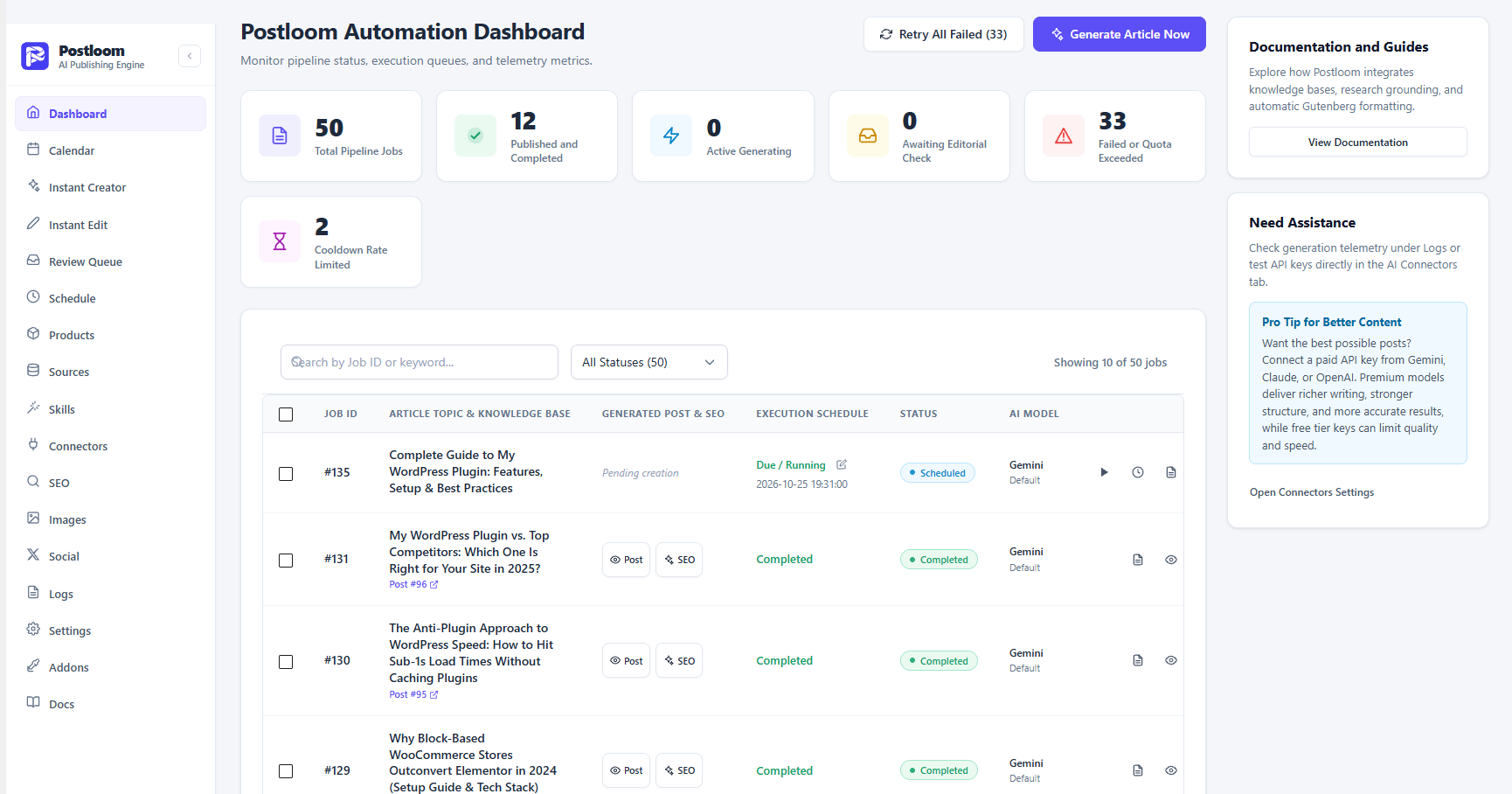
Postloom dashboard with job status, live countdown timers and bulk actions for the auto post publish pipeline.
Postloom is an auto post creator and auto post publish plugin for WordPress. Give it a keyword, a topic list or a product document, and it researches the subject, writes the article with your own AI key, fills in the SEO fields, adds a featured image, and then saves the post as a draft, publishes it immediately or schedules it on a visual calendar. When the post goes live, Postloom shares it to your connected social accounts.
Most auto post plugins start after the post already exists. Schedule Press, Social Post Flow schedule or share finished posts. AI writers AutoPost AI create drafts and leave the publishing to you. Postloom covers both halves in one plugin: it creates the post, then handles the auto post publish side with an editorial calendar, a weekly slot scheduler and a missed schedule watchdog. You bring your own API key from Google Gemini, OpenAI, Anthropic Claude, DeepSeek, X.AI Grok or OpenRouter, so there are no article credits and no monthly content subscription.
The includes AI post creation, the Instant Creator Studio, the editorial calendar, the review queue, the weekly slot scheduler, the missed schedule watchdog, SEO field filling, AI and stock images, and auto publishing to X (Twitter), Facebook with eight more social networks, custom platform templates, instant multi channel sharing and editable AI skills.
Auto Post Creator: Write WordPress Posts With AI
Postloom turns a keyword or a rough note into a finished article without leaving the WordPress dashboard.
- Instant Creator Studio: type a focus keyword, a headline or raw notes and generate a full article. The topic is optional. Leave it empty and Postloom proposes topics from your product knowledge.
- Topic strategies: new angle, comparison, refresh stale content and long tail. Postloom checks your published posts so it does not repeat a focus keyword or a URL slug.
- Native Gutenberg output: headings, lists and paragraphs are saved as real blocks, with an automatic table of contents built from your H2 and H3 headings.
- Content length options: choose short, medium or long output per post or as a default.
- Instant AI Post Editor: refine a generated article with a formatting toolbar and switch between the Gutenberg view and visual HTML without losing the markup.
- Knowledge base grounding: upload PDF, DOCX, Markdown or TXT files so drafts are written from your own documentation instead of guesses.
- Product and link relations: store your product name, features, documentation link, blog link and support link once, and Postloom works them into each article.
- Competitor research: when Gemini or OpenAI is connected, Postloom can run live research. With only Claude connected it builds the comparison from your own product data and marks it as not live verified.
- Skills: two bundled skills, an SEO blog creator and an image prompt generator, control tone, structure and image direction.
Auto Post Publish: Schedule, Publish and Rescue Missed Posts
The auto post publish side is where most AI writers stop. Postloom keeps going.
- Three output modes: save as draft for review, publish immediately, or schedule for an exact date and time.
- Editorial calendar: a monthly grid of published, scheduled, draft and queued posts. Drag a post to a new date to change its publication time, open the unscheduled drafts drawer, or click the plus icon on any day to create a post.
- Weekly slot auto scheduler: set publishing slots for each day of the week and a daily limit per product, and Postloom fills them without manual work.
- Missed schedule watchdog: a background check finds scheduled posts that WordPress missed and publishes them. A one click rescue button is available on the Schedule screen.
- Editorial review queue: open any draft in Gutenberg, approve and publish it, schedule it on the calendar or reject it.
- Dashboard controls: live countdown timers, start a job now, reschedule it, retry a failed job and apply bulk actions to several jobs at once.
- WordPress dashboard widget and an admin bar counter show how many posts are scheduled.
- Email notifications tell authors and editors when a post is scheduled, published or changes status.
- Logs: step by step records for research, drafting, block conversion, image generation and social publishing, with search and filters.
Auto Post to Social Media
When a post is published, or when a scheduled post reaches its time, Postloom sends it to the social accounts you connected.
- Auto publish to X (Twitter) and Facebook Pages. It supported Instagram Business, LinkedIn, Bluesky, Mastodon, Pinterest, Meta Threads, Medium and Google Business Profile.
- AI social drafts: Postloom writes a draft for each network that respects its character limit, for example 280 characters for X and 300 for Bluesky.
- Hashtags: post tags become hashtags, trimmed to the limit of each platform.
- Social publish queue: see what was sent, the platform post ID and URL, and retry failures. Failed posts are retried automatically up to three times.
- Post editor box: choose which connected profiles receive a specific post from the edit screen.
- Calendar scheduler: schedule social shares for an existing post from the Editorial Calendar sidebar.
AI Providers, Images and SEO
- Providers: Google Gemini, OpenAI, Anthropic Claude, DeepSeek, X.AI Grok and OpenRouter. On WordPress 7.0 and later, Claude, OpenAI and Gemini can run through the core AI Connectors, and a direct key remains available as an override.
- Key handling: API keys are stored encrypted in the plugin vault, masked in the interface and tested with a latency check before you use them.
- Images: generate a featured image with OpenAI DALL·E or Google Imagen, pull a royalty free photo from Pexels or Pixabay, or choose prompt only mode to save image prompts for Midjourney or DALL·E. If only Claude is connected, images fall back to prompts.
- SEO fields: Postloom writes the focus keyphrase, secondary keywords, SEO title and meta description for Yoast SEO and Rank Math, and keeps a native set of fields for sites without an SEO plugin. The Instant Editor also reads All in One SEO titles and descriptions.
- Heading control: a clean H2 and H3 structure, bulleted lists and FAQ items are part of the generated article.
Competitor Analysis
Search the WordPress.org directory for an auto post creator or an auto post publish plugin and the results fall into three groups: social auto posters, scheduling tools and AI blog writers. Postloom is the only one in this comparison that does the writing and the publishing in the same plugin.
SchedulePress is the closest match on the publishing side. Its free version has a drag and drop calendar, a dashboard widget and social sharing to Facebook, Twitter, LinkedIn, Pinterest, Instagram, Medium, Threads and more, one profile per network. Its Auto Scheduler, Missed Schedule Handler, Manual Scheduler and Advanced Schedule are Pro features, and it does not write articles. Postloom includes the weekly slot scheduler and the missed schedule watchdog in the free plugin and adds the article generation SchedulePress leaves to you.
WP2Social Auto Publish sends posts to Facebook only, with category and post type filters and message formats. Social Media Auto Poster for Buffer and for Hootsuite, both from WP Zinc, add posts to a Buffer or Hootsuite queue and need an account with that service, and Instagram and Pinterest need their Pro versions. Social Post Flow supports many networks but needs a paid Social Post Flow subscription. Bit Social connects a wide range of networks, though its free version covers Facebook and LinkedIn profiles, and the calendar, WooCommerce sharing and AI prompts are Pro. None of these plugins creates the post itself. Postloom writes the article first, then publishes and shares it with your own accounts and your own AI key.
Auto Post Publisher solves a narrower problem: it publishes scheduled posts that missed their time and checks when someone visits the site. Postloom includes a missed schedule watchdog as one part of a larger publishing workflow.
On the AI side, AutoPost AI creates scheduled drafts but, according to its own FAQ, does not publish them for you. Postomatic starts with a small set of free credits, and AutoArticle works on a monthly credit plan. Postloom has no credit system. You pay your AI provider directly, and you can use a free tier key such as Google Gemini.
So if you want a free auto post creator and auto post publish engine that writes, schedules, publishes and shares from one dashboard, Postloom is built for that job. If you only need to push existing posts to a single network, the focused plugins above may be enough.
Benefits of Postloom
- For bloggers and content creators: keep a steady publishing rhythm without writing every article by hand.
- For agencies and site owners: use one set of AI connectors, saved skills and a shared editorial calendar across clients.
- For SaaS and product companies: upload documentation and release notes so feature announcements are written from your own material.
- For ecommerce stores: publish buying guides, comparison posts and seasonal roundups on a schedule.
Privacy and Security
Scheduled jobs, drafts, logs and knowledge base files are stored in your own WordPress database and uploads folder. AI providers receive data only when you add a key and run a generation. Social networks receive data only for accounts you connect. A setting called delete data on uninstall removes the plugin tables, options and uploaded files when you choose it, and leaves them in place otherwise.
External Services
This plugin connects to external services only for the features you configure. Nothing is sent to a service you do not use.
When the WordPress AI Client is available (WordPress 7.0 and later), Claude, OpenAI and Gemini can run through WordPress Connectors under Settings, Connectors. A direct API key is used only when the AI Client is not detected or when you choose to enter your own key. DeepSeek, Grok and OpenRouter are always direct integrations.
Google Gemini
* Purpose: writes article content and image prompts, and generates images with Imagen, when Gemini is the active provider.
* Data sent: topic keyword, knowledge base context, prompt parameters and your API key for authentication.
* When it connects: when you run a generation, a connection test or an image request.
* Service URL: https://generativelanguage.googleapis.com/
* Terms of Service: https://policies.google.com/terms
* Privacy Policy: https://policies.google.com/privacy
OpenAI
* Purpose: writes article content and generates images with DALL·E when OpenAI is the active provider.
* Data sent: topic keyword, prompt parameters and your API key for authentication.
* When it connects: when you run a generation, a connection test or an image request.
* Service URL: https://api.openai.com/v1/
* Terms of Service: https://openai.com/policies/terms-of-use/
* Privacy Policy: https://openai.com/privacy/
Anthropic Claude
* Purpose: writes article content when Claude is the active provider.
* Data sent: topic keyword, prompt parameters and your API key for authentication.
* When it connects: when you run a generation or a connection test.
* Service URL: https://api.anthropic.com/
* Privacy Policy: https://www.anthropic.com/legal/privacy
DeepSeek
* Purpose: writes article content when DeepSeek is the active provider.
* Data sent: topic keyword, prompt parameters and your API key for authentication.
* When it connects: when you run a generation or a connection test.
* Service URL: https://api.deepseek.com/v1/
* Privacy Policy: https://cdn.deepseek.com/policies/en-US/deepseek-privacy-policy.html
X.AI Grok
* Purpose: writes article content when Grok is the active provider.
* Data sent: topic keyword, prompt parameters and your API key for authentication.
* When it connects: when you run a generation or a connection test.
* Service URL: https://api.x.ai/
* Privacy Policy: https://x.ai/legal/privacy-policy
OpenRouter
* Purpose: routes text generation requests to the model you select.
* Data sent: topic keyword, prompt parameters and your API key for authentication.
* When it connects: when you run a generation or a connection test.
* Service URL: https://openrouter.ai/api/
* Privacy Policy: https://openrouter.ai/privacy
Pexels
* Purpose: finds royalty free stock photos for generated posts when Pexels is selected.
* Data sent: search keywords and your API key.
* When it connects: when a post needs a featured image.
* Service URL: https://www.pexels.com/api/
* Terms of Service: https://www.pexels.com/terms-of-service/
* Privacy Policy: https://www.pexels.com/privacy-policy/
Pixabay
* Purpose: finds royalty free stock photos for generated posts when Pixabay is selected.
* Data sent: search keywords and your API key.
* When it connects: when a post needs a featured image.
* Service URL: https://pixabay.com/api/docs/
* Terms of Service: https://pixabay.com/service/terms/
* Privacy Policy: https://pixabay.com/service/privacy/
Social networks
* Purpose: connects your accounts and publishes posts, text and the featured image to the networks you turned on.
* Data sent: your access token, account or page identifiers, the post text built from your template, the post link, hashtags and the featured image.
* When it connects: when you connect or refresh an account, and when a post is published, scheduled or retried from the queue.
* X (Twitter), api.twitter.com. Terms: https://x.com/en/tos Privacy: https://x.com/en/privacy
* Facebook, Instagram and Threads by Meta, graph.facebook.com, graph.instagram.com and graph.threads.net. Terms: https://www.facebook.com/terms.php Privacy: https://www.facebook.com/privacy/policy/
* LinkedIn, api.linkedin.com and www.linkedin.com. Terms: https://www.linkedin.com/legal/user-agreement Privacy: https://www.linkedin.com/legal/privacy-policy
* Pinterest, api.pinterest.com. Terms: https://policy.pinterest.com/en/terms-of-service Privacy: https://policy.pinterest.com/en/privacy-policy
* Medium, api.medium.com. Terms: https://policy.medium.com/medium-terms-of-service-9db0094a1e0f Privacy: https://policy.medium.com/medium-privacy-policy-f03bf92035c9
* Bluesky, bsky.social or the personal data server you enter. Terms: https://bsky.social/about/support/tos Privacy: https://bsky.social/about/support/privacy-policy
* Mastodon, the server you enter, mastodon.social by default. The terms and privacy policy of that server apply.
* Google Business Profile, mybusinessaccountmanagement.googleapis.com, mybusinessbusinessinformation.googleapis.com, mybusiness.googleapis.com and oauth2.googleapis.com. Terms: https://policies.google.com/terms Privacy: https://policies.google.com/privacy
Freemius
* Purpose: license checks, the account and upgrade screens, and optional usage data if you opt in.
* Data sent: nothing until you opt in or open the upgrade or account screens. After you opt in, the SDK shares your site URL, WordPress and PHP versions, plugin version and admin email.
* When it connects: when you opt in, activate a license, or open the upgrade checkout.
* Service URL: https://freemius.com/
* Terms of Service: https://freemius.com/terms/
* Privacy Policy: https://freemius.com/privacy/
Links to wpazleen.com in the plugin are plain links to documentation and support. No data is sent to wpazleen.com.
Note on third party libraries: the admin panel uses React Router, which contains documentation URLs in its source code. No requests are made to those addresses at runtime.
Source Code
The admin panel is a React application compiled with the standard WordPress build tool. All source files are included in the plugin and are public.
- The compiled file build/index.js is built from the admin source folder, which holds the React components, pages and hooks.
- Build tool: @wordpress/scripts.
- To rebuild, run npm install and then npm run build from the plugin root.
The full source is also on GitHub: https://github.com/wpazleen/postloom-ai-post-generator-and-publisher