
Podcast generator in the post editor
Post2Podcast transforms your written content into natural-sounding audio podcasts using cutting-edge AI voice technology. Increase engagement, reach auditory learners, and offer content on-the-go for your audience.
Features
- In-Depth Podcast Analytics: Track total plays, unique listeners, listen time, completion rate, device breakdown, and episode-by-episode engagement
- AI Voice Generation: Convert any WordPress post to high-quality audio
- Multi-language Support: Generate podcasts in English, Spanish, French, German, Italian, Portuguese, and more
- Multiple Voice Options: Choose from a wide range of natural-sounding voices
- Custom Audio Player: Beautiful, responsive player with playback speed controls
- Transcript Support: View and download full podcast transcripts
- Batch Processing: Generate audio for multiple posts at once
- Automatic Language Detection: Smart language identification for your content
How to Use
Creating Your First Podcast
-
Write or Edit a Post
- Create a new blog post or edit an existing one
- Ensure your content is well-structured with clear paragraphs
-
Configure Podcast Settings
- In the post editor sidebar, find “Podcast Settings”
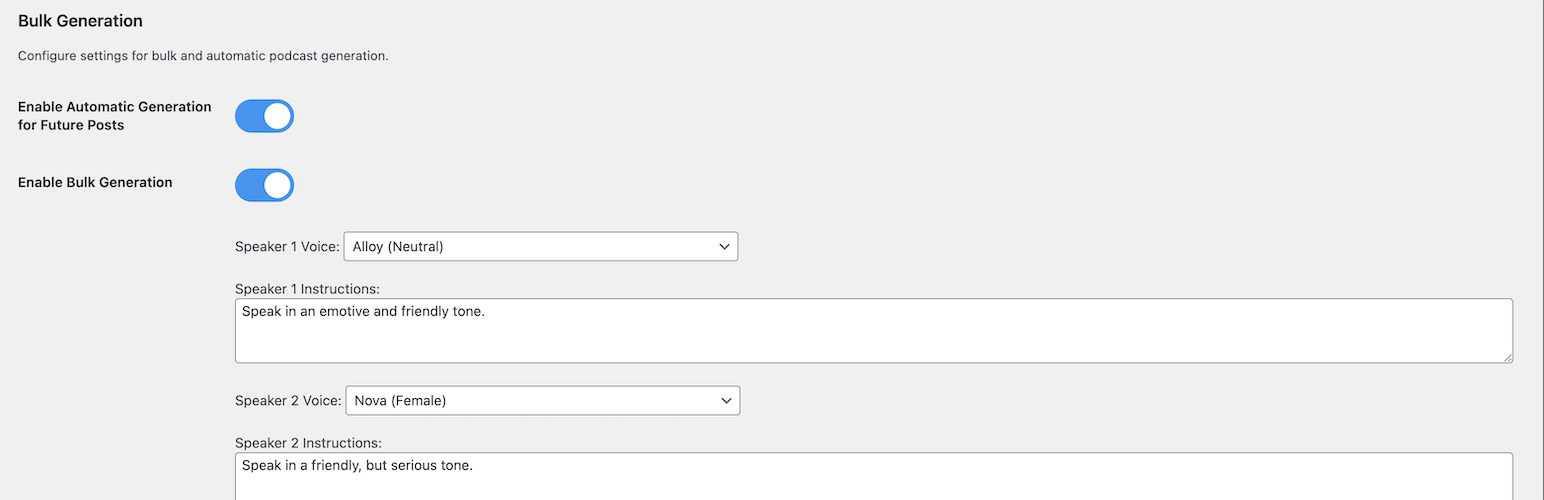
- Speaker 1 Voice: Choose the first speaker’s voice
- Speaker 1 Instructions: Define their personality (e.g., “Speak in an enthusiastic and friendly tone”)
- Speaker 2 Voice: Choose the second speaker’s voice
- Speaker 2 Instructions: Define their style (e.g., “Speak in a professional, analytical tone”)
-
Generate Audio
- Click “Generate Audio”
- Watch real-time progress updates
- Preview the generated podcast
- Download or regenerate if needed
-
Publish and Share
- The audio player is automatically embedded in your post
- Visitors can listen directly on your site
- Share your audio-enhanced content
Advanced Features
Bulk Generation
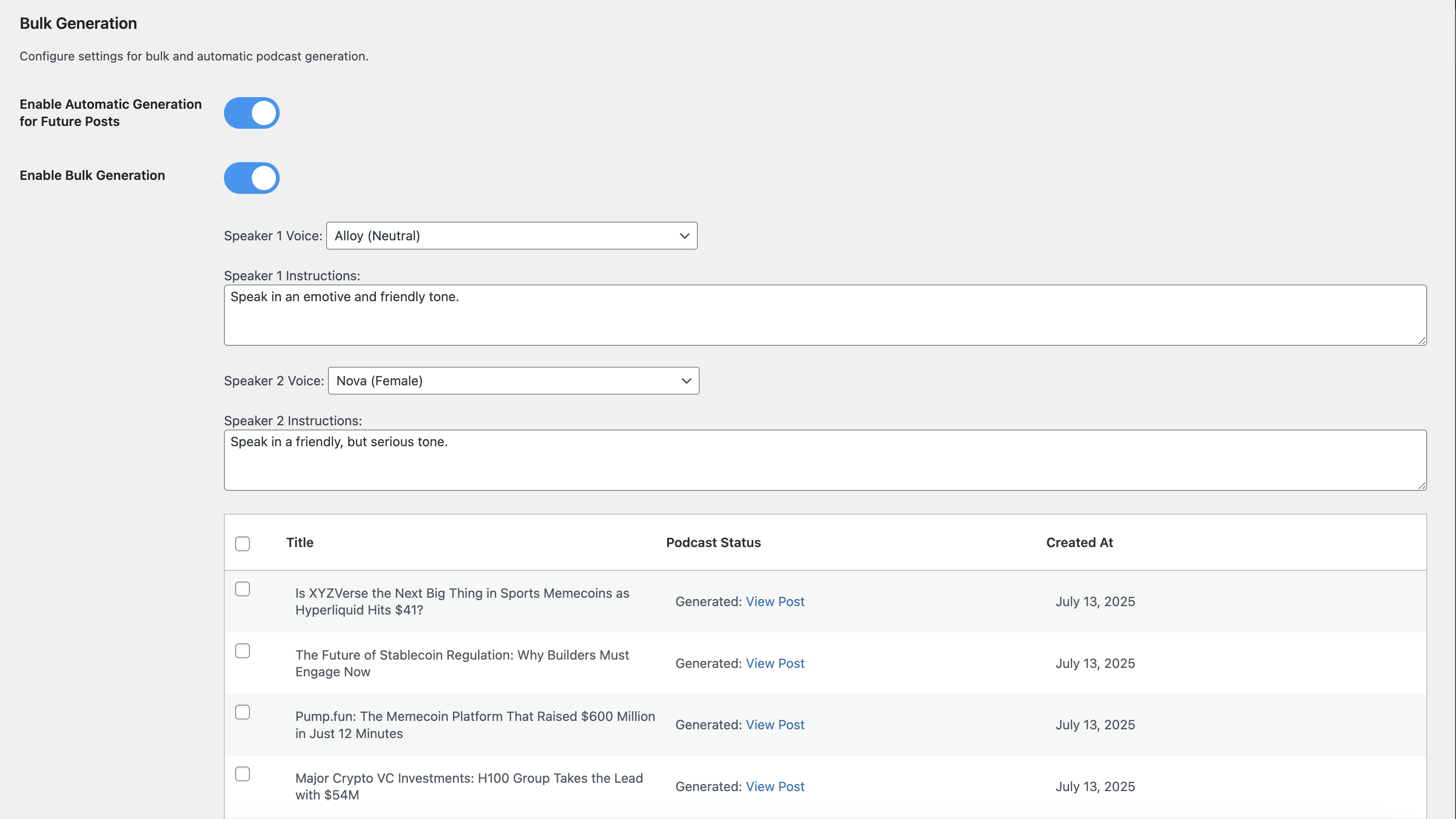
1. Go to Post-to-Podcast Bulk Generation
2. Select posts to convert
3. Configure default voice settings
4. Start bulk generation process
5. Monitor progress in real-time
Auto-Generation
1. Enable “Automatic Generation for Future Posts”
2. New posts will automatically generate podcasts
3. Uses your default voice settings
4. Runs in background after publishing
Custom Voice Instructions
Create unique speaker personalities:
* Professional: “Speak in a clear, authoritative tone with technical expertise”
* Conversational: “Use a friendly, casual tone like talking to a friend”
* Educational: “Explain concepts clearly with enthusiasm for learning”
* Dramatic: “Use expressive, engaging delivery with emotional emphasis”
Pricing & Credits
Understanding Credits
- 1 Credit = 1 Podcast Generation (regardless of length on PRO plan)
- Free Plan: 10 generations total, max 2 minutes each
- PRO Plan: 300 generations per month, unlimited length
Subscription Management
- Upgrade or downgrade anytime
- Cancel without penalties
- Credits refresh monthly on PRO plan
- Free credits never expire until used
Cost Comparison
- Free: $0 (perfect for testing)
- PRO: €19.90/month
Privacy & Security
Data Handling
- Content Processing: Blog content is temporarily sent to AI servers for processing
- No Content Storage: Original content is not permanently stored on external servers
- Audio Storage: Generated audio files are stored on your WordPress server
- Account Data: Subscription and usage data securely managed
Security Features
- Application Password Authentication: Secure WordPress-native authentication
- HTTPS Required: All API communications use encrypted connections
- Regular Updates: Security patches and improvements
- Data Protection: Your content is processed securely and not stored permanently
Support & Community
Getting Help
- Documentation: Visit our WordPress plugin page
- Issues: Report bugs and request features on our WordPress plugin page
- PRO Support: Priority email support included with PRO subscriptions
Credits & Acknowledgments
Developed by: Samuel Bezerra
Powered by:
* Advanced AI text-to-speech technology
* WordPress REST API
* Modern web technologies
* Cloud infrastructure
Special Thanks:
* WordPress community for feedback and testing
* AI technology providers for enabling high-quality voice synthesis
* Early adopters and beta testers
Ready to transform your blog into a podcast? Install Post2Podcast today and start reaching audio-first audiences with professional-quality podcast episodes generated from your existing content.
For more information, visit our official website: https://post2podcast.xyz/