

PolyTranslate AI for Polylang
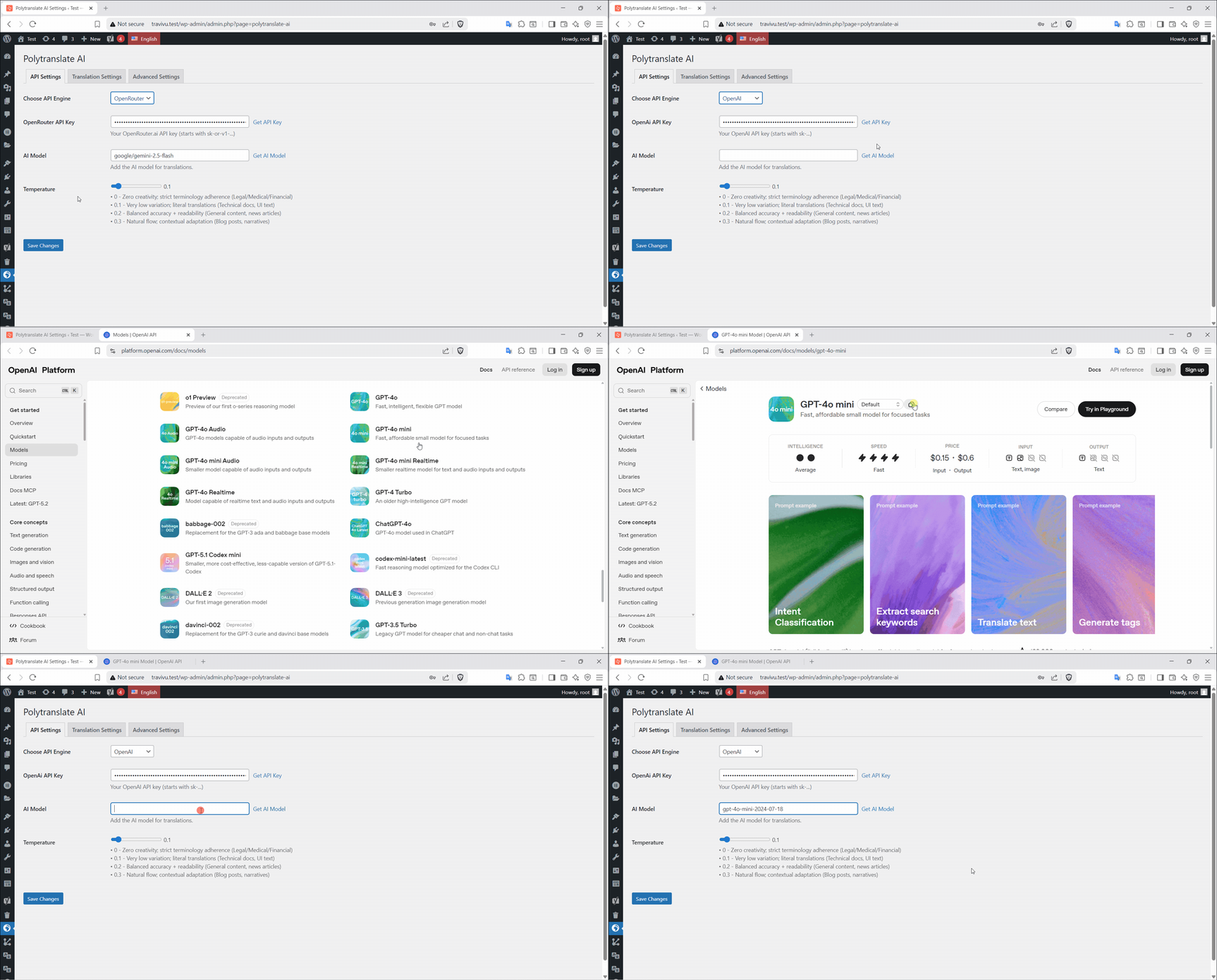
OpenAI API Settings.
AI automatic translation for Polylang. Translate posts, pages, WooCommerce, ACF, SEO meta & custom fields using OpenAI, DeepL, Google or OpenRouter.
With one click, you can automatically translate:
- Posts and Pages
- Custom Post Types
- WooCommerce Products, Categories, Tags, Attributes & Brands
- Categories and Tags
- Custom Taxonomies
- Custom Fields (ACF, Meta Box, etc.)
- SEO meta data (Yoast, Rank Math, SEOPress, AIOSEO)
- Elementor pages
- Gutenberg block content
- Polylang Strings
This plugin enhances Polylang by adding professional AI translation capabilities directly inside the WordPress admin.
This is NOT a standalone translation plugin – it works exclusively with Polylang to add automatic translation capabilities.
How It Works
- Install and configure Polylang.
- Install PolyTranslate AI.
- Add your preferred AI provider API key.
- Click the Translate button inside the editor.
Your translated content is generated and saved as a normal Polylang translation.
Key Features
- Posts & Pages Translation – Translate any content instantly
- Custom Post Types Translation – Works with any custom post type
- WooCommerce Products Translation – Product titles, descriptions, and short descriptions
- WooCommerce Product Variations & Attributes Sync Product Variations & Attributes
- Advanced Custom Fields (ACF) Support – All field types including repeaters
- Meta Box Fields – Complete Meta Box plugin support
- Any Custom Fields – Universal custom field translation
- Categories & Tags – Translate taxonomies
- Custom Taxonomies – Translate any registered custom taxonomy
- Gutenberg Block Content – Full block editor support
- Elementor Pages – Full page builder support
- Bulk Translation – Translate hundreds of posts at once
- Bulk Polylang Strings Translation – Translate all registered strings in bulk
- Complete SEO Meta Translation – (Yoast, Rank Math, SEOPress, All in One SEO Pack)
- Multiple AI Services – OpenAI, DeepL, Google Translate, OpenRouter
- Smart Language Detection – Automatically detects source language
- Translate Link Targets – Automatically update post links to point to translated versions.
- Preserve Original Publish Date – Keep the original post date on translations
- Preserve Original Author – Keep the original post author on translations
- API Connection Test – Test your API key directly from the settings page
FREE vs Premium
The Free version includes:
✅ Posts & Pages Translation
✅ Custom Post Types Translation
✅ WooCommerce Products Translation
✅ WooCommerce Categories, Tags, Attributes & Brands
✅ Categories, Tags & Custom Taxonomies Translation
✅ Gutenberg Block Content Translation
✅ Translate Link Targets
✅ Preserve Original Publish Date
✅ Preserve Original Author
✅ Register Polylang Strings
✅ Unlimited Translations
✅ Multiple AI Services (OpenAI, DeepL, Google, OpenRouter)
✅ Language Auto-Detection
The Premium version includes:
✨ Everything in Free, plus:
✨ Bulk Translation
✨ Bulk Polylang Strings Auto Translation
✨ Custom Fields Translation (ACF, Meta Box, etc.)
✨ SEO Meta Translation
✨ Elementor Pages Support
✨ Priority Support
✨ Automatic Retranslation Detection
Translate ACF & Custom Meta Fields in WordPress
External Services
PolyTranslate AI connects to third-party translation APIs when you trigger translations. You control your data and costs by providing your own API keys:
-
OpenAI
-
DeepL Pro
-
Google Translate API
-
OpenRouter.ai
This is a third-party addon for Polylang – not affiliated with or endorsed by Polylang.