

Points and Rewards for WooCommerce – Create Loyalty Programs, Reward Customer Purchases, Referral Points, User Badges, and Gamification
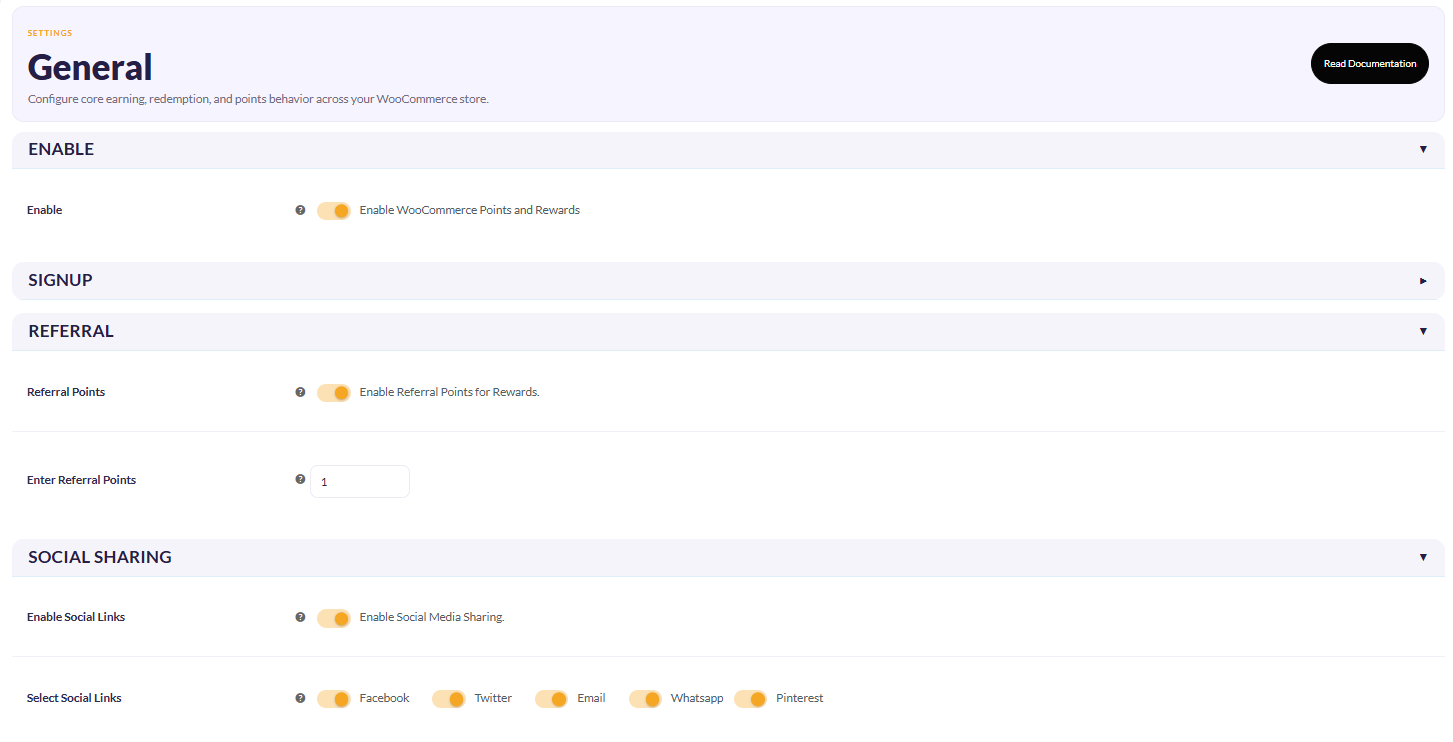
Referral Setting
Points and Rewards for WooCommerce goes beyond purchase rewards. Make every customer interaction matter. Reward them for shopping, referring friends, spinning the wheel, sharing feedback, logging in daily, and much more.
Turn points that customers earn into reasons they shop again. With the free WooCommerce Loyalty plugin, let your customers redeem rewards for discounts, create exclusive membership tiers with benefits, or introduce gamified loyalty campaigns that will make their shopping experience more engaging.
Store owners can customize redemption and point-earning rules to match the changing needs of their business, encourage referrals to turn customers into loyal advocates for your brand, and award unique badges to recognize customers’ spending.
If you’re a store owner, whether you want to boost repeat sales, improve conversions, increase customer lifetime value (CLV), or attract new customers through referrals, the Points and Rewards System gives you access to tools to build a loyalty program aligned with your business goals.
Demo | Documentation | Contact Us
HOW DOES THE BEST REWARDS PLUGIN FOR WORDPRESS BENEFIT YOU?
- Reward customers for purchases, sign-ups, referrals, reviews, and more to encourage repeat purchases.
- The Points and Rewards system helps store owners create membership tiers with exclusive benefits that reward customers as they progress through your loyalty program.
- Turn customers into your brand’s loyal advocates by rewarding them with points on referrals.
- Every business has unique requirements; flexible pricing and redemption rules help you customize your loyalty program accordingly.
- WooCommerce Gamification loyalty programs to boost engagement include elements such as spin-the-wheel and interactive campaigns to make earning rewards enjoyable.
- Celebrate your customers’ spending by rewarding them with unique user levels and badges.
- Track and Monitor earned, redeemed, expired, and outstanding points to make informed decisions.
- Keep customers informed about their points through WhatsApp/Emails/SMSs
KEY FEATURES OF POINTS AND REWARDS FOR WOOCOMMERCE
1) Membership System For Exclusive Offers
Create an in-house WooCommerce membership system with the WooCommerce Points and Rewards plugin. Store owners can set exclusive discounts and rewards for different membership levels, offer discounts on selected products and categories, and set points conversion rules based on order value for each tier. Customers can access these exclusive benefits by subscribing to a membership plan using their reward points. Start with up to two membership levels in the free version, and upgrade to the premium version whenever you’re ready to introduce more tiers.
2) Gamified Loyalty Program
Are you ready to make your ordinary loyalty program more engaging with our WooCommerce gamification plugin? Include elements such as spin-the-wheel, referral rewards, quizzes, birthday rewards, and comment-based points, displayed through customizable pop-ups.
Store owners can also highlight earned points and referral counts, add dynamic images, or choose from 5+ ready-made templates for upcoming festivals. You can also select specific pages where pop-ups appear and keep customers informed about their earned points through email notifications.
Start engaging shoppers with the available gamification features, and explore additional features such as birthday rewards, points on first orders, and multiple quizzes with the Pro version of the plugin.
Note: The features included in the premium version of the Points and Rewards plugin, such as birthday rewards, points on first orders, or multiple quizzes, will only work if you have the pro version installed
3) Points for Every Purchase
Reward your customers for every dollar they spend! With the Points for Every Purchase feature, customers earn points proportional to their spending — for example, 1 point for every $1 spent. This makes every purchase more rewarding, encourages repeat purchases, and helps boost customer loyalty. Points can be redeemed for discounts, free products, or special rewards, turning every transaction into a valuable engagement
4) Referral Points
You can offer rewards to the referrer for every unique referral. Customers can also share their referral links with other users via social media platforms such as Pinterest, Facebook, Twitter, email, and WhatsApp. The customer will only earn points and rewards if someone uses their shared referral link.
5) Notifications Via WhatsApp / SMS/ Email
Customers will receive notifications Via WhatsApp, text messages, and email about the points they have earned and redeemed on the WooCommerce platform. This helps them to keep track of the overall accumulated points.
6) Reward Points For Guest Users
With the Best Rewards plugin for WordPress, merchants can reward guest visitors for their purchases. But there’s a catch here — they can only redeem these points after successfully registering for your WooCommerce store. So, it’s a win-win.
7) User Level & Badges
Encourage customers to earn WooCommerce loyalty points through various activities by rewarding them with unique user badges. Customize badge positions and level names, set milestone thresholds, and assign points required for customers to reach their desired levels. Start by creating up to two user levels in the free version, and explore unlimited user levels and badge types with the Pro version for greater flexibility.
Want to know more about the working of this feature? Check out the User Badges & Level Documentation
8) User Points Report
With this feature of the Best WooCommerce Rewards plugin, you can get a clear overview of the points customers have earned and redeemed through the Points Table feature. This helps admins track customer activity, understand how points are being earned and spent, and monitor the overall performance of their loyalty program.
9) Assign Woo Points On Previous Orders
With the Points and Rewards system, assign loyalty points to customers for their previous orders. This allows store owners to reward existing customers for past purchases, recognize their existing loyalty, and encourage them to return to the store and redeem their points on future orders.
10) Flexible Admin Controls & Reward Restrictions
With this feature, prevent customers from earning additional points on products purchased using previously redeemed reward points. For example, if a customer uses 100 reward points to get a discount on a product, the store owner can prevent them from earning new points on that same purchase. This helps merchants control reward costs and avoid giving points on purchases already paid for with rewards.
11) WooCommerce Rewards Points On Actions
Customers have the opportunity to earn points for rewards through various activities, like:
- Every unique sign-up
- Sharing referral links through Facebook, Twitter, email, and WhatsApp to attract new shoppers.
- Reward customers based on their spending by setting up conversion rules
- Offer different point rewards based on specific order value ranges.
- Reward customers for activities such as product reviews, daily logins, and more.
- Encourage repeat purchases by allowing customers to redeem their earned points for discounts.
LIVE DEMO OF POINTS AND REWARDS FOR WOOCOMMERCE PLUGIN
Points And Rewards For WooCommerce Compatibilities
-
Compatibility with Klaviyo enables merchants to sync their customer points-related data to their respective profiles on Klaviyo
-
Compatibility with Gutenberg Block allows the merchants to seamlessly utilize the shortcodes to add different elements to different pages.
-
The rewards plugin works seamlessly with the Smart Coupons Plugin. Customers can redeem their points and utilize smart coupon discounts.
-
Points and Rewards is compatible with WooCommerce Subscription. This functionality allows customers to earn points on the renewal of subscription products.
-
Compatible with MultiVendorX Marketplace and MultiVendorX, enables the vendors to earn points and rewards on purchases made in their stores
- Compatible with Membership with WooCommerce and Membership for WooCommerce Pro. Allows the admins to award a specific set of points, after the successful completion of a Membership Plan
- Compatible with Ultimate Gift Cards for WooCommerce and Gift Cards for WooCommerce Pro Plugin. Allows the merchants to give a specific set of points on the purchase of gift card products.
- Compatible with Wallet System for WooCommerce and WooCommerce Wallet System Pro plugin. Allows you to convert your earned points and rewards into wallet credit based on a specific conversion rate. We have also integrated the gamification feature with this compatibility.
- Compatible with Currency Switcher for WooCommerce. Allows your customers to select the currency unit for their purchase.
- The WooCommerce loyalty points plugin is compatible with WooCommerce PayPal Payment for operating secure online payments.
- Elementor Page Builder is compatible with the Points and Rewards plugin. Lets you use to add “apply points” snippets to the cart page and checkout page efficiently.
- WooCommerce Points and Rewards Plugin is compatible with WPML multilingual support
- The WooCommerce Points and Rewards Plugin is compatible with Subscriptions For WooCommerce Free and Subscriptions For WooCommerce Pro allowing the users to get points on subscription products.
- Our WooCommerce Referral Program plugin is Compatibility with Dokan Plugin
WHAT THE PREMIUM VERSION OF THE WOOCOMMERCE REWARDS PROGRAM OFFERS
1) Allow Purchase Through Points Only: The Purchase Through Points feature allows customers to make purchases through points.
2) Assign Product Points: Assign points to the products as well as different categories using Points and Rewards for WooCommerce.
3) Setup Multi-Level Membership: Create multiple membership tiers and add the required number of rewards to join them.
4) Reward Points For Referral Signup And Purchase: Assign reward points to the users who have signed up or made a purchase using the referral link.
5) AI Churn Detection and Analytics: Store owners can benefit from AI churn detection and analytics to understand which loyalty programs are working and which are worth optimizing to improve customer retention.
6) Setup Points Expiration: Set the expiration period for points customers earn to encourage them to redeem their points before they expire.
TAKE ADVANTAGE OF EXCLUSIVE FEATURES OF WOOCOMMERCE LOYALTY POINTS AND REWARD PLUGIN
Are you ready to take your store’s loyalty program further with more ways to reward customer activities, customize loyalty campaigns, and encourage repeat purchases? Discover additional features that help you create a more engaging and rewarding shopping experience.
Note: Get Points and Rewards for WooCommerce Pro
SUPPORT
If you need support or have questions, kindly use our online chat window here or connect with us then Generate a ticket
Create and Revamp your eCommerce store with WooCommerce Services
If our documentation doesn’t contain the solution to your problem, you can visit the WP Swings Forums Community or Generate a ticket
External Services
Klaviyo (Email Marketing & Data Sync)
Used to sync customer loyalty data for marketing automation.
Data sent: Customer email address and loyalty points data
When: When admin enables integration and customer data is updated
Endpoint: https://a.klaviyo.com/api/identify
Terms: https://www.klaviyo.com/legal/terms-of-service
Privacy: https://www.klaviyo.com/legal/privacy-policy
WP Swings Support Service
Used to submit support requests.
Data sent: Name, email, and message (user input)
When: When user submits a support query
Endpoint: https://wpswings.com/submit-query/
Terms: https://wpswings.com/terms-and-conditions/
Privacy: https://wpswings.com/privacy-policy/
HubSpot Forms
Used for onboarding and feedback collection.
Data sent: Name, email, website URL, and feedback
When: When forms are submitted
Endpoint: https://api.hsforms.com/
Terms: https://legal.hubspot.com/terms-of-service
Privacy: https://legal.hubspot.com/privacy-policy
Twilio / WhatsApp / Meta Setup Links
Used for configuring messaging services.
Data sent: The plugin does not directly send data
When: Admin uses external setup links
Endpoints: https://console.twilio.com/, https://business.facebook.com/
Terms: https://www.twilio.com/legal/tos, https://www.facebook.com/terms.php
Privacy: https://www.twilio.com/legal/privacy, https://www.facebook.com/privacy/policy
YouTube (Tutorials)
Used to display help videos.
Data sent: IP address and device data (by YouTube)
When: When videos are loaded or played
Terms: https://www.youtube.com/t/terms
Privacy: https://policies.google.com/privacy
WP Swings Client Notification Service
Used to fetch plugin update notifications displayed in the admin panel.
Data sent: Plugin slug and version number
When: When the admin visits the plugin dashboard
Endpoint: https://demo.wpswings.com/client-notification/points-and-rewards-for-woocommerce/wps-client-notify.php
Terms: https://wpswings.com/terms-and-conditions/
Privacy: https://wpswings.com/privacy-policy/
Facebook Graph API (WhatsApp Business)
Used to send WhatsApp messages to customers via the WhatsApp Business API.
Data sent: Customer phone number and points-related message
When: When points are awarded and WhatsApp notification is enabled
Endpoint: https://graph.facebook.com/v21.0/{PHONE_NUMBER_ID}/messages
Terms: https://www.facebook.com/terms.php
Privacy: https://www.facebook.com/privacy/policy
Facebook SDK (Social Sharing)
Used to render Facebook share buttons for referral sharing.
Data sent: IP address and device data (by Facebook)
When: When the points/referral page is loaded
Endpoint: https://connect.facebook.net/en_GB/sdk.js
Terms: https://www.facebook.com/terms.php
Privacy: https://www.facebook.com/privacy/policy
Pinterest (Social Sharing)
Used to open Pinterest pin creation for referral sharing.
Data sent: The plugin does not directly send data; user is redirected to Pinterest
When: When user clicks the Pinterest share button
Endpoint: https://pinterest.com/pin/create/link/
Terms: https://policy.pinterest.com/en/terms-of-service
Privacy: https://policy.pinterest.com/en/privacy-policy