

PlugeTune – Automatic YouTube Post Importer
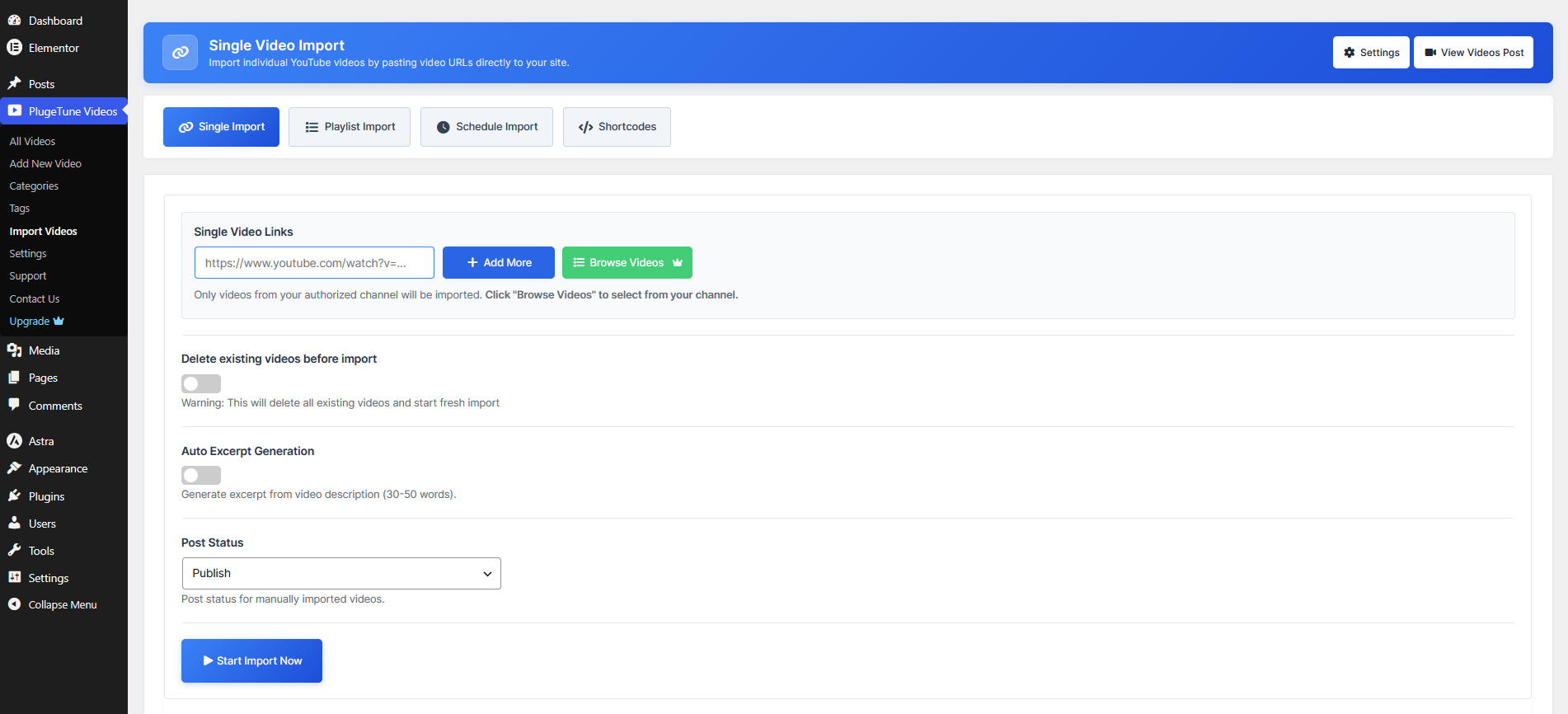
Single Video Import — paste a YouTube video URL to create a video post.
PlugeTune turn your YouTube embedded Videos into WordPress dedicated posts. Add a YouTube video URL or browse your YouTube channel and import videos with a single click.
PlugeTune uses the YouTube Data API to retrieve video details and thumbnails, then adds them to your video posts automatically.
PlugeTune video posts work with your theme and SEO plugins, and support categories, tags, and featured images so they fit naturally alongside the rest of your website content.
Whether you run a video blog, podcast, tutorial site, or magazine-style website, PlugeTune makes it easy to build a searchable library of video posts with clean URLs and organized content.
Key Features
- Import unlimited YouTube videos and playlists as posts
- Import videos from your connected YouTube channel using the YouTube Data API
- Automatically set the YouTube thumbnail as the post’s featured image
- Use the YouTube video title and description as the post title and content
- Auto-generate an excerpt from the video description
- Choose the post status for imported video posts (published, draft, etc.)
- Optionally delete existing post before a fresh import
- Send email notifications with import reports at a chosen frequency
- Display imported video posts with the [plugetune_grid] shortcode
- Use the PlugeTune Video Grid widget in Elementor
- Works with the Gutenberg block editor and the Classic Editor
- Manage imported videos in the dedicated PlugeTune Videos custom post type
- Schedule Import — one-time import in Free; Daily, Weekly and Automatic Import in Pro
- Modern Slider widget and shortcode (Pro)
- Play videos in a popup (Pro)
- Play videos in the thumbnail (Pro)
How It Works
- Install and activate PlugeTune.
- Run the setup wizard — enter your YouTube API key and Channel ID(s).
- Go to the PlugeTune menu and click “Import Videos”.
- Paste a YouTube link, or click “Browse Videos” to pick from your channel.
- Choose your import settings and click “Start Import”.
- Display your videos with the [plugetune_grid] shortcode or the Elementor widget.
External Services
This plugin uses the following external services:
YouTube Data API / Google APIs
- What is it used for? The YouTube Data API is used to fetch information about your YouTube channel, its videos, and playlists. This allows the plugin to display a list of your video posts for you to select for import.
- What data is sent? The plugin sends your YouTube API Key, Channel ID(s), and Playlist/Video IDs to the API. No user-specific data from your site is transmitted.
- When is data sent? Data is sent when you interact with the plugin to fetch your playlists or videos (e.g., in the setup wizard or import screen).
- What data is retrieved? The API returns publicly available data about your YouTube videos, including titles, descriptions, publication dates, thumbnails, and IDs.
- How is it used? This data is used to create and update “PlugeTune Videos” custom post type entries on your site. It is also used to set featured images.
- Is it required? Yes. The YouTube Data API is required for the plugin’s core functionality.
- Links:
YouTube Thumbnails (i.ytimg.com)
- What is it used for? YouTube thumbnail images are downloaded and stored as featured images when a video is imported.
- What data is sent? Only the request for the image URL. No user data is transmitted.
- When is data sent? When a YouTube video is imported.
- Links:
Additional Information
Shortcodes
PlugeTune provides the [plugetune_grid] shortcode for displaying imported videos on your site.
Free shortcode examples:
[plugetune_grid]— responsive video grid with default settings[plugetune_grid posts_per_page="6" show_pagination="yes" pagination_type="load_more"]— grid with load more pagination[plugetune_grid card_layout="list" columns="1" posts_per_page="5"]— list layout[plugetune_grid category="tutorials" posts_per_page="6"]— filter by category[plugetune_grid posts_per_page="6" show_pagination="yes" pagination_type="numbers" pagination_range="3"]— numbered pagination[plugetune_grid orderby="rand" posts_per_page="8"]— random videos[plugetune_grid show_excerpt="no" show_date="no" show_read_more="no" columns="4"]— minimal layout
Supported attributes: card_layout, posts_per_page, columns, category, orderby, order, show_title, show_excerpt, show_date, show_thumbnail, show_read_more, play_behavior, show_play_icon, show_pagination, and pagination_type.
How to Display Video Posts
You can display your imported video posts in two ways:
Option 1: Shortcode — Copy any shortcode from the “Shortcodes” tab on the Import Videos page and paste it into any page, post, or widget area.
Option 2: Elementor Widget — In the Elementor editor, search for “PlugeTune” and drag the “PlugeTune Video Grid” widget onto your page.
Editor Support
PlugeTune works with both the Gutenberg block editor and the Classic Editor.
Gutenberg — When editing a PlugeTune Video, a sidebar panel appears where you can set the YouTube URL, select a video from the Media Library, and auto-fetch video metadata.
Classic Editor — The YouTube URL and video meta fields are also available in the Classic Editor sidebar.
Note: PlugeTune does not add a custom Gutenberg block. To display videos on your site, use the [plugetune_grid] shortcode or the Elementor widget.