


Waitlist – Back in Stock for WooCommerce
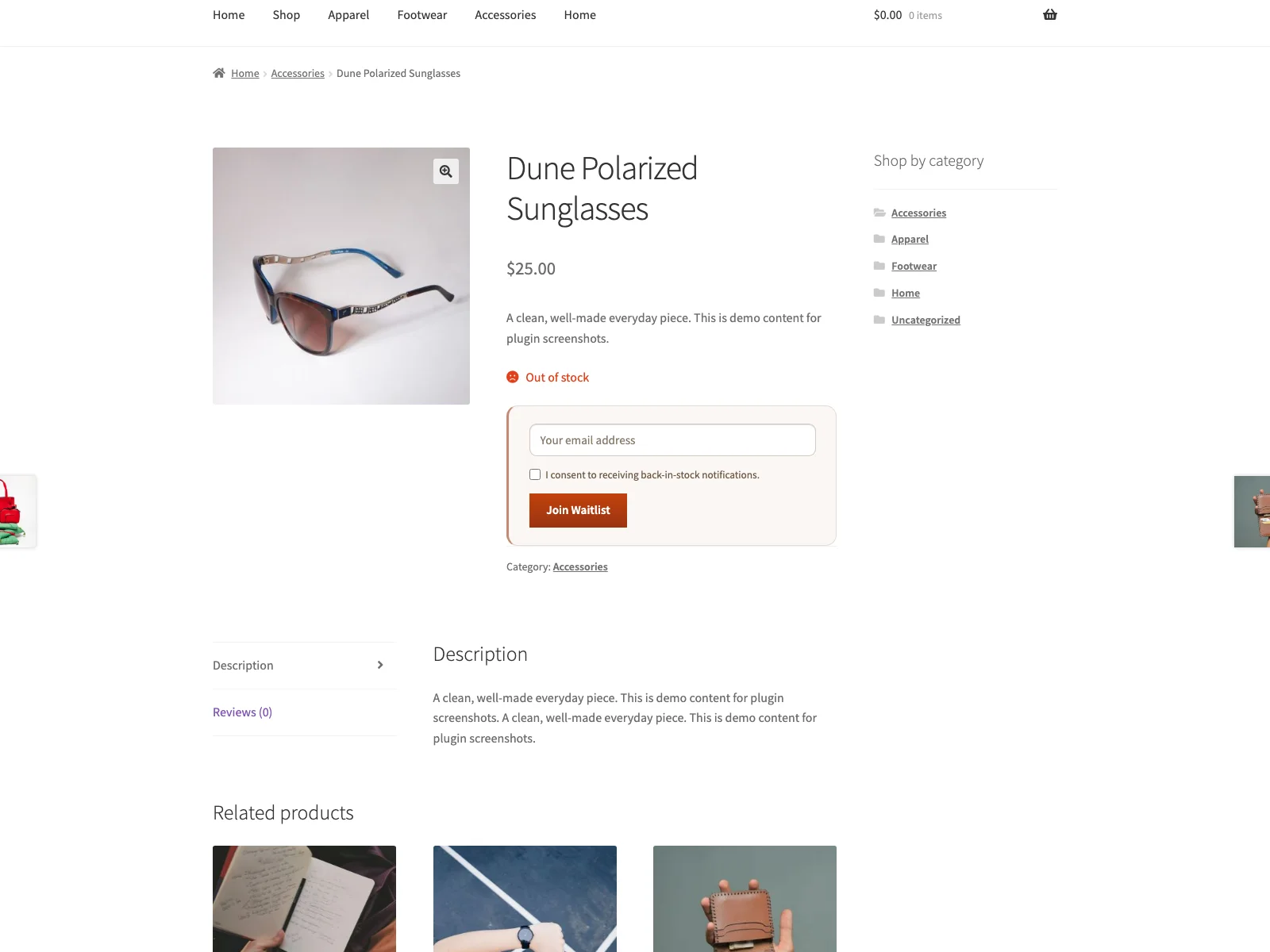
The waitlist form on an out-of-stock product, where a shopper leaves their email and ticks the required consent box to be notified when it returns.
Plogins Waitlist adds a waitlist form to out-of-stock WooCommerce products. A shopper enters their email, and when you set the product back to “In stock”, Plogins Waitlist emails everyone waiting through your site’s own WordPress mailer. There is no external service, no account to sign up for, and nothing leaves your database.
The form is rendered in PHP on the single-product summary, where it sits in the normal page flow rather than being injected after load, so it does not shift surrounding content. Submitting it runs a small vanilla-JavaScript fetch request loaded with defer in the footer; the plugin adds no jQuery of its own. On variable products it hooks into WooCommerce’s existing variation script so the form only appears once an unavailable variation is selected.
Accessibility was a first-class concern rather than an afterthought. The email field carries a visually hidden label, consent is a real required checkbox, and the success/error message is announced through an aria-live region while the form reports aria-busy during submission.
Subscriber data lives in a single {prefix}_restock_waitlist table that the plugin creates and version-tracks. A restock queues the mailing and sends it in batches on WordPress’s own cron, so the request that changed the stock is not held open while the emails go out. Uninstalling drops the table, removes the plugin’s options and unschedules any batch still waiting, leaving nothing behind.
Source and issues: github.com/wppoland/plogins-waitlist . Patches and bug reports are welcome there.
Features
- Waitlist form shown automatically on out-of-stock and backorder (“on backorder”) product pages
- Variable products: form appears after the shopper selects an unavailable variation
- WooCommerce My Account > Waitlists tab for logged-in customers (review lists, leave waitlist)
- Asynchronous submit with a vanilla-JavaScript fetch call, so the page does not reload
- Email field pre-filled for logged-in customers
- Required consent checkbox for every signup
- Automatic plain-text email notification on restock, sent via
wp_mail - Optional heading and intro text shown above the form
- Customisable form labels, button text, on-screen submit messages, and notification email subject/intro/closing text
- Place the form with the
[restock_waitlist]shortcode or the Elementor “Back-in-Stock Waitlist” widget - Toggle guest (not-logged-in) subscriptions on or off
- Social-proof “N shoppers are already waiting” line above the form (optional, customisable, singular/plural aware)
- Admin subscriber list with per-product filter, CSV export, and one-click remove
- Theme-overridable form template (
yourtheme/restock/single-product/waitlist-form.php) - Compatible with WooCommerce HPOS (Custom Order Tables) and Cart/Checkout Blocks
You may also like these plugins
More free WooCommerce plugins from WPPoland:
- Plogins Tiers – quantity and volume pricing tiers with a server-rendered price table.
- Sieve – Search & Filter – fast AJAX product search and filtering for WooCommerce, with no jQuery.
- Polski for WooCommerce – Polish-market compliance: GPSR, Omnibus, GDPR, invoices and storefront modules.
Browse the full catalogue at plogins.com/ .
Reporting a security issue: email [email protected], and under our coordinated disclosure policy we confirm within two business days, assess within five, and patch a critical issue within seven days of confirming it.
Plogins Waitlist PRO
The free edition is the complete back-in-stock waitlist. Plogins Waitlist PRO adds demand insight and automation:
- Demand analytics – see what shoppers are waiting for and prioritise restocks
- Double opt-in – confirmed, consent-friendly signups
- Scheduled and batched sends – stagger notifications by batch size and interval
- Category segmentation – include and exclude rules per product category
Everything in the free edition stays free and open. Plogins Waitlist PRO starts at 29 EUR per year, billed in EUR.
Compare editions and pricing: plogins.com/plogins-waitlist-pro/pricing/
External Services
Plogins Waitlist does not connect to any external services. Back-in-stock notification emails are sent through your own site’s WordPress mailer (wp_mail); subscriber data stays in your WordPress database.
Translations
Plogins Waitlist is fully translatable and ships the plogins-waitlist.pot template. Translations are delivered by WordPress.org language packs from translate.wordpress.org, which is where Polish, German and Spanish are being contributed; the package itself carries no compiled translation files.