

Website Optimization – Plerdy

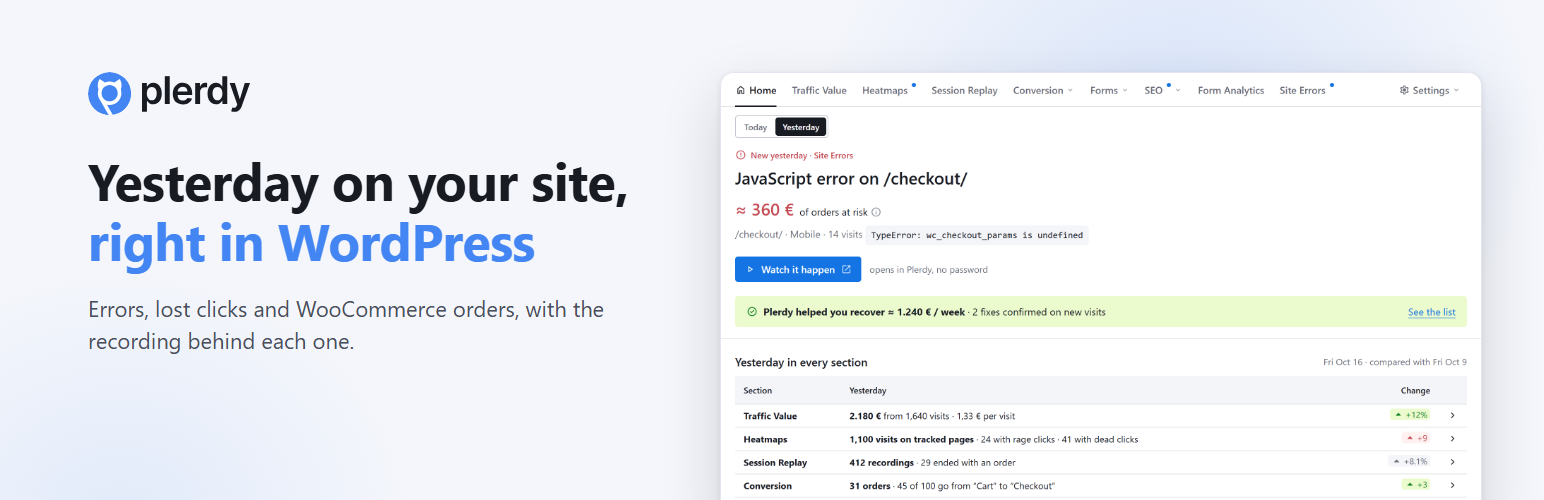
The Plerdy page in WordPress: the most important problem of the day, what it costs and the recording behind it, plus every section of Plerdy with yesterday's numbers.
Plerdy shows you, right in WordPress, what happened on your site today and yesterday: visits, orders, a JavaScript error on the checkout, a button people click again and again, a form field where visitors give up, a campaign that brings people who leave at once. The page follows the menu of your Plerdy account, with the numbers of the day in each section, so a daily look takes seconds. Each problem comes with how many visitors it hit, the recordings to watch and, on WooCommerce stores, how much in orders passed through those sessions.
Fix it, mark it as fixed, and Plerdy checks the next sessions and tells you whether it really helped.
What you get in WordPress
- Today and yesterday — every section with the numbers of the day, compared with the same weekday last week: Home, Traffic Value, Heatmaps, Session Replay, Conversion (events, funnels, A/B tests), Forms (pop-ups), SEO, Form Analytics and Site Errors.
- Plerdy helped you recover — fixes Plerdy confirmed on new sessions.
- WooCommerce in your store’s currency — orders of the day, how each one reached Plerdy, and whether any is missing.
- Your plan and limits — what is used and where to upgrade. Payment happens only in your Plerdy account.
- A Support window — write to us from WordPress and continue in the support chat of your Plerdy account.
- A morning email — “Yesterday on your site” at 08:00. Off until you turn it on.
- A Dashboard widget with the verdict of the day.
- Tracking that does not break quietly — the plugin warns you when the code stopped sending data, when the code is on the page twice or when a cache plugin delays it.
Setup in one click
Click “Connect to Plerdy, free”, enter your email (we sign you in or create a free account), confirm the site, and the plugin adds the tracking code for you — nothing to copy. A goal, a purchase funnel and heatmaps of your most visited pages are set up automatically. WP Rocket, LiteSpeed Cache, Autoptimize, SiteGround Optimizer and Perfmatters are told not to delay Plerdy.
WooCommerce
Every paid order reaches Plerdy with its products, currency and the visit it came from — classic and block checkout, HPOS. If an ad blocker stopped the browser from sending an order, your server sends it a few minutes later, never twice. Such an order is counted in revenue, but when the blocker also stopped the Plerdy tracker it has no visit attached: no recording, no traffic source (it shows as direct) and the device is taken from the order’s browser. The plugin compares the paid orders in WooCommerce with the orders Plerdy received, so you can see that none is missing.
Everything else in Plerdy
Heatmaps, session recordings, funnels, form analytics, pop-up forms, A/B tests, SEO checks and the AI UX Assistant are in your Plerdy account. “Open Plerdy” signs in the person who connected the site without a password, to view reports; creating or changing anything there asks for your Plerdy password.
Privacy
The plugin sends data to Plerdy (plerdy.com) only for the site you connected, and only while the tracking code is on:
- Visits — pages viewed, where the visitor came from (referrer, campaign), device type, browser and country.
- Clicks and scroll depth on the pages, for heatmaps and problem detection.
- Session recordings — what happens on the page. What visitors type in form fields is masked.
- WooCommerce orders — order number, total, currency and the items (name, SKU, category, brand, price, quantity), linked to the visit when the visit is known. No names, addresses, emails or payment data. Orders that are not paid (failed, cancelled, pending) are not sent.
- Morning email — only if you turn it on: Plerdy sends a summary of the day to the address of your Plerdy account.
- About the site — the site and admin address, WordPress, WooCommerce, PHP and plugin versions, language, time zone, the names of form, cache and consent plugins it detected (for the automatic setup) and how many paid orders WooCommerce counted (to check that none is missing).
Logged-in users of excluded roles (administrators and shop managers by default) are not tracked. With “Track only after cookie consent” on, nothing is sent until the visitor allows statistics cookies, including orders: an order of a visitor who did not allow them does not reach Plerdy. The plugin itself sets one cookie, plerdy_ses (2 hours), on the WooCommerce cart and checkout, to link the order to the visit.
Plerdy processes this data under its Privacy Policy and Terms. As the site owner, mention Plerdy in your own privacy policy.
External services
This plugin connects to Plerdy (https://www.plerdy.com), a third-party web analytics service. Nothing is sent before you connect the site or paste a tracking code.
- Plerdy tracker (
a.plerdy.comord.plerdy.com, the server of your Plerdy account) — the tracking script loaded on your pages sends visits, clicks, scroll depth and recordings, as described under Privacy. With “Track only after cookie consent” it starts only after the visitor allows statistics cookies. - Plerdy API (
https://a.plerdy.com; tokens throughhttps://mcp.plerdy.com) — when you connect, once a day while connected (heartbeat) and when you open the Plerdy pages in WordPress: sign-in (OAuth), your reports for today and yesterday, the morning email switch, marking problems as fixed, one-time sign-in links for “Open Plerdy”, and the request you write in the Support window (subject, message and the plugin page you were on; sent only when you press “Send request”). It receives the site and admin address, WordPress, WooCommerce, PHP and plugin versions, language, time zone, the names of detected form, cache and consent plugins, the number of Plerdy codes found on the home page and the number of paid WooCommerce orders. - Plerdy account (
https://app.plerdy.com) — “Connect”, “Open Plerdy” and the report buttons open your Plerdy account in your browser, in a new tab. Payment happens only there. - Morning email — only if you turn it on. Plerdy sends it, not your site: a summary of the day to the address of your Plerdy account.
- WooCommerce orders from your server (the Plerdy tracker server) — only when “Also send from the server” is on, the browser did not send the order and, with “Track only after cookie consent” on, the visitor allowed statistics cookies: order number, total, currency, items (name, SKU, category, brand, price, quantity), the address of the order-received page without its query string, the visit id from the
plerdy_sescookie when there is one, and the device type. No customer names, addresses, emails or payment data. - Duplicate check of your own home page — once a day and on connect the plugin loads your home page (a request to your own site, not to Plerdy) to count Plerdy codes on it; only the count and the likely source are sent with the heartbeat.
Plerdy Terms of Service · Privacy Policy.