


PixelSync – Pixel & Conversions API for TikTok
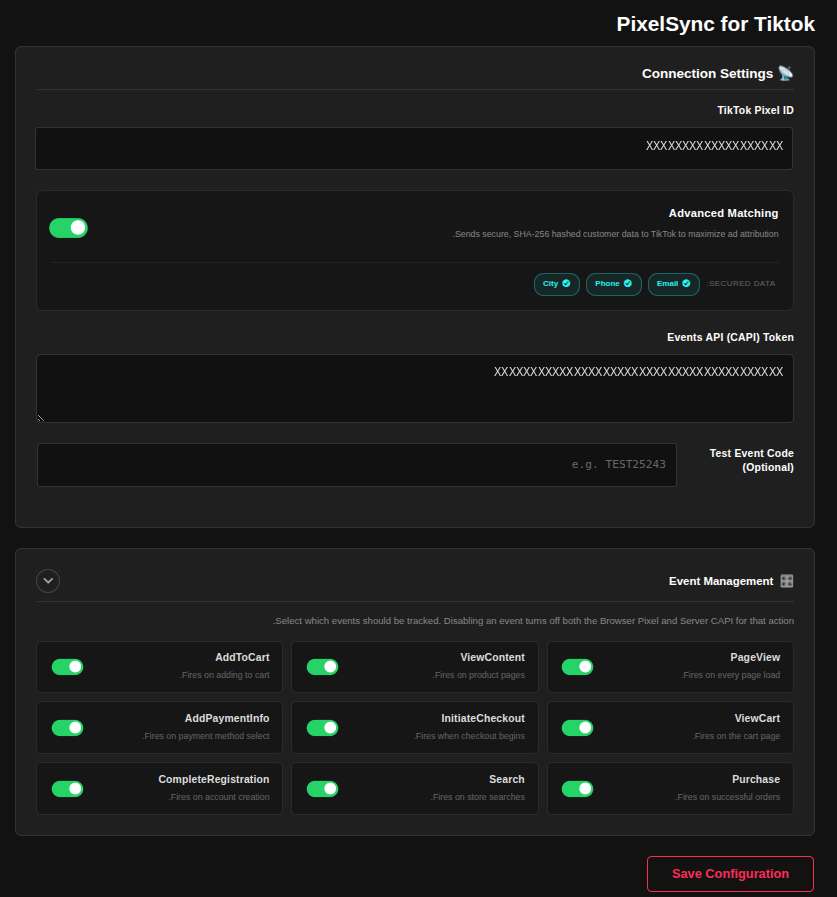
Settings dashboard: Pixel ID, access token, Advanced Matching and event toggles.
PixelSync connects your WooCommerce store to TikTok Ads. It sends events from the visitor’s browser (TikTok Pixel) and from your server (TikTok Events API / Conversions API), and gives each pair of events the same event_id so TikTok counts every action once.
Key features
- Pixel and Conversions API together: Browser and server events share one deterministic
event_id, so TikTok can merge them into a single event. - Standard and same-page checkouts: Purchases are tracked on the normal WooCommerce thank-you page, and also when an order is placed from a single-page form with no redirect. Several orders placed on the same page without reloading are each tracked.
- Standard e-commerce events: PageView, ViewContent, Search, AddToCart, InitiateCheckout, AddPaymentInfo, CompletePayment and CompleteRegistration. Each one can be switched on or off.
- Advanced Matching (optional): Email, phone number and city are hashed with SHA-256 before they are sent, which can improve event match quality.
- Duplicate protection: Each order is flagged when its Purchase event is sent, so refreshing the thank-you page does not send it again.
- Live Diagnostic Feed (beta): An optional log in your admin that shows the events being sent, so you can check deduplication.
- Product catalogue feed: A private feed URL you can give to TikTok Catalog.
External Services
This plugin sends tracking and conversion data to TikTok. It only does so after you enter your Pixel ID, and server events are sent only when you also enter an access token.
TikTok Pixel (browser)
* Service: TikTok Pixel SDK, loaded from https://analytics.tiktok.com/i18n/pixel/events.js.
* Used for: sending events from the visitor’s browser to TikTok Ads.
* Data sent: page views, product views, add to cart, checkout, payment and purchase events with product and order details (IDs, names, prices, currency, quantity), and, when Advanced Matching is on, hashed email, phone and city. TikTok’s script also receives the visitor’s IP address and browser information.
TikTok Events API / Conversions API (server)
* Service: https://business-api.tiktok.com/open_api/v1.3/pixel/track/.
* Used for: sending the same events from your server, so they are not lost to browser restrictions.
* Data sent: the event name and ID, the same event details as above, the visitor’s IP address and user agent, the TikTok cookie and click ID (ttp, ttclid) when present, and SHA-256 hashed email and phone number when available.
Your Pixel ID and access token stay on your site and are used to authorise the requests.
- TikTok Privacy Policy: https://www.tiktok.com/legal/page/row/privacy-policy/en
- TikTok Business Products Terms: https://ads.tiktok.com/i18n/official/policy/business-products-terms
You are responsible for informing your visitors and getting any consent that the law requires in your country.