


Pixalty Media Explorer
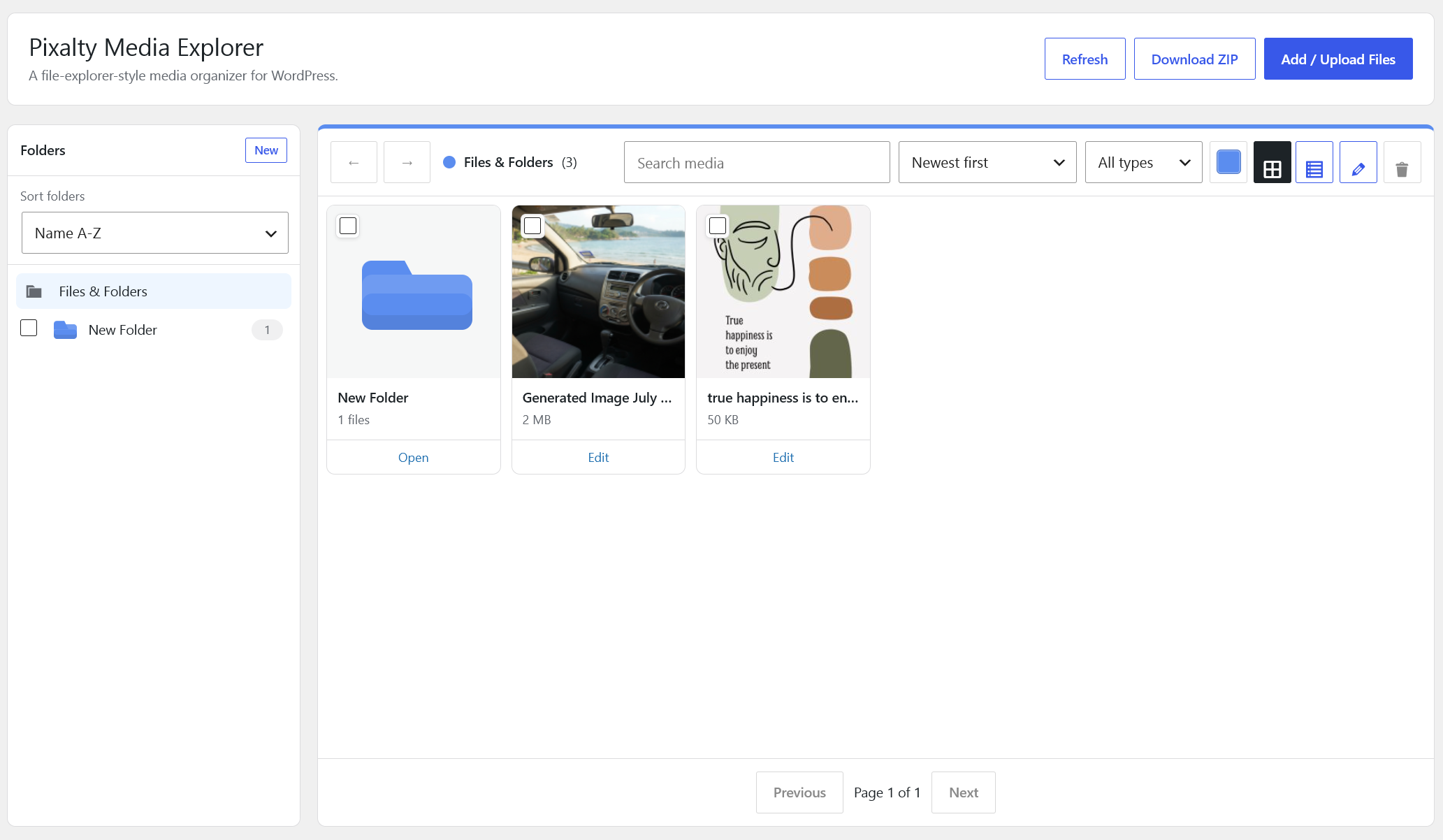
Pixalty Media Explorer adds a virtual folder layer to the WordPress media library. It keeps files in their normal WordPress upload locations while giving administrators a faster way to organize, search, move, and reuse media.
Current features:
- Hierarchical virtual folders for media attachments.
- Dedicated manager under the WordPress Media menu.
- Drag files into folders.
- Drag local files into the manager to upload them into the current folder.
- Drag one or many folders into another folder.
- Folder colors.
- Create, rename, delete, and move folders.
- Folders-first explorer view, with subfolders shown in the main file area.
- Back and forward folder navigation.
- Gallery view and list view.
- Click and Ctrl-click selection in the sidebar and main window.
- Sort folders and files inside the manager.
- Filter the manager by file type.
- Right-click context menu in the sidebar and main window with New Folder, Rename, Cut, Paste, Delete, Change color, and Download.
- Built-in attachment editor for title, alt text, caption, description, and folder assignment.
- Assign files through the WordPress media modal.
- Media Library list filter and folder column.
- Media modal folder filter for WooCommerce product editors and page builders that use the WordPress media modal.
- Folder selector on attachment edit screens.
- Download a folder as a ZIP file when ZipArchive is available.
- SVG upload support for administrators with in-place sanitization.
- Front-end gallery shortcode with local lightbox: [pixalty_gallery folder=”123″ columns=”3″].
- Front-end document library shortcode: [pixalty_document_library folder=”123″].
- Best-effort folder sync for translated media attachments in WPML and Polylang.
Pixalty Media Explorer is an original implementation by Pixalty. It is designed to solve the same broad media-organization problem as popular folder plugins while avoiding proprietary code, copied assets, copied UI artwork, or third-party branding.
Shortcode
Use this shortcode to display image files from a folder:
[pixalty_gallery folder="123" columns="3" size="medium_large" link="file" limit="60"]
Attributes:
folder: Required folder term ID.columns: Number of columns from 1 to 8.size: WordPress image size.link:fileorattachment.limit: Maximum number of images, up to 100.
Use this shortcode to display a browsable document library:
[pixalty_document_library folder="123" limit="100" include_children="yes" show_images="no" order="title_asc"]
Attributes:
folder: Required folder term ID.limit: Maximum number of documents, up to 300.include_children:yesorno.show_images:yesorno.order:title_asc,title_desc,date_asc, ordate_desc.
Compatibility
Pixalty Media Explorer stores folders as a private attachment taxonomy and does not move physical upload files. Existing URLs, WooCommerce product images, Elementor media selections, Divi media selections, and normal WordPress content references continue to use the standard WordPress attachment system.
The plugin adds a media folder filter to the WordPress media modal. Page builders and WooCommerce screens that use the standard media modal can browse by folder.
For multilingual sites, Pixalty Media Explorer attempts to sync folder assignment across translated attachment records when WPML or Polylang APIs are available.
Privacy
Pixalty Media Explorer does not contact external services, load third-party assets, or track users. All folder, gallery, document library, SVG sanitization, and ZIP download features run locally inside WordPress.
Notes
Folders are virtual. Moving files between folders does not move files on disk and does not change existing media URLs.
ZIP export requires PHP’s ZipArchive extension.
SVG uploads are restricted to administrators by default and are sanitized before storage. Sites can change the capability with the pixalty_media_explorer_svg_upload_capability filter.