

PitchPrint
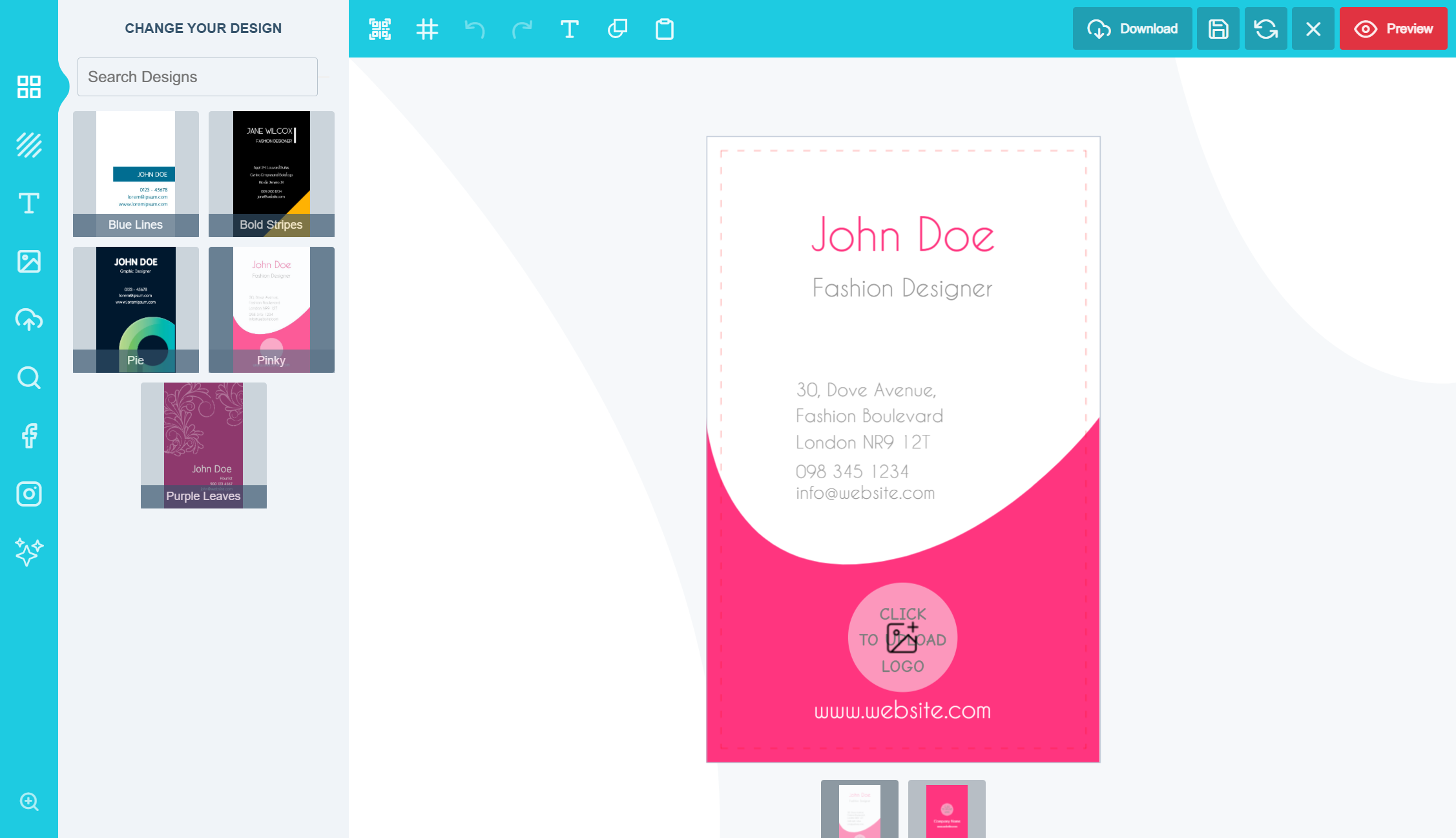
Editor Application
Our web-to-print solution is designed to transform your online print store across a wide range of product categories—including stationery, large prints/canvas, promotional items, photo prints, product casings, apparel, and more. It enhances your customers’ online experience by enabling them to quickly personalize products and preview the final result in real time with dynamic 3D visuals.
The platform integrates seamlessly with WordPress + WooCommerce, Shopify, OpenCart, PrestaShop, Wix, Odoo, and more. It can also be integrated into custom-built stores for maximum flexibility.
Now your customers can personalize their Business Cards, T-shirts, Greeting Cards, Wedding Invitations, Direct Mail, Mugs, Banners, Wall Papers, Signage, Billboard, Labels, Stickers, Gift Bags and many print products with easy to use templates and resources.
Benefits of a Web-to-Print Plugin for Your Customers
-
Convenience – Design and order prints from anywhere, avoiding physical store visits or designer meetings.
-
Time Savings – Intuitive interface speeds up design creation, reducing traditional design method time.
-
Control and Personalisation – Full design process control for personalised, unique prints.
-
No Design Experience Required – User-friendly for all, regardless of design knowledge.
-
Real-Time Preview – View designs before ordering for satisfaction assurance.
-
Cost-Effective – Experiment without added costs, exploring design options.
-
Access to Templates – Start with diverse templates for added convenience.
-
Flexibility in Ordering – Order anytime, day or night, without business hour constraints.
-
Reduced Errors – User-friendly interface minimises design mistakes.
-
Easy Reordering – Conveniently reorder past designs.Using a web2print plugin empowers customers with convenience, customization, and control, elevating their print ordering process.
Benefits for Print Store Merchants
With its array of powerful features, PitchPrint product customiser can revolutionise your printing services and help you stand out from your competitors while driving revenue growth. Here’s how PitchPrint can benefit your business:·
-
Streamlined Design Process: With PitchPrint, users can design and customize their prints online, reducing the need for back-and-forth communication between clients and designers.
-
Increased Efficiency: Automate design and print processes for quicker turnaround and improved productivity.
-
Enhanced Customer Experience: Interactive design experience for custom creations, allowing them to create custom designs that reflect their unique style and preferences. This will foster customer satisfaction and loyalty.
-
Cost-Effective Solution: Offer custom printing without costly equipment or software investments.
-
Accessible Design: User-friendly interface enables easy navigation even for those with limited design experience, making custom printing accessible to all.
-
Customizable: Seamlessly integrate the plugin with existing branding and website for enhanced brand identity.
Features and Functionality of PitchPrint
-
Design Assets – Create your own templates or import some from our store. Design resources such as images, backgrounds, colours, text arts, fonts etc.
-
Data Form Module – Displays a Quick-edit Form where your customers can simply type in their details and be done with. It is suitable for quick edits without having to manipulate directly on the canvas.
-
Template Colour Module – Change the template image colour of a design product without going outside of the editor.
-
Page Loader – Load additional pages into designs from an assigned source design. Perfect for Magazines, Menu, Programmes, Business Cards, Swatch Cards, Direct Mail Marketing, Brochures etc.
-
Display Modes – Configure how the application appears in your product page with our 3 different display mode options to suit any of your product needs.
-
Layouts – Enabling users to create different layout and assign them to different sets of designs based on your unique website need basis.
-
Canvas Adjuster – Large prints come in different shapes and sizes, with this module you can adjust the canvas dimensions before or during designing. You can opt for custom dimensions or pick from a list of pre-set values.
-
Smart Sizes – Create multiple variations of a single design by varying the canvas size and elements’ properties to come up with entirely different looking layouts. i.e. Landscape, Portrait, Square in seconds saving you time to focus on what matters, the customers!
-
High Res – You get high resolution print-ready PDF with crisp, clean vector elements in either CMYK with SPOT colors or RGB format. In addition, you can download files as JPEG or PNG.
-
Variable Data – An API that allows you to programmatically create multiple print-ready PDF files without launching the design editor. Perfect for business cards, direct mail marketing etc.
-
Styling – From the language to the themes and layout, you can customize the app to blend right into your store’s look and feel. Include your own CSS or Custom JavaScript code to add functionalities. More so, you can edit the HTML to remove features you don’t need.
-
Google Fonts – Search and use Google Fonts directly in the design editor. Add Google fonts or upload your own TTF or OTF, the choice is all yours!!!
-
Pixabay – We have also integrated Pixabay which is a collection of royalty free photos and illustrations. And so much more!!!
Please learn more about this service from our site: PitchPrint.com
11.3.0
Improved user identification for customization data isolation
Improved session handling reliability
Replaced deprecated wc_enqueue_js with wp_add_inline_script
11.2.0
Fixed a vulnerability issue confined to uploads the plugin folder
11.1.2
Minor fix to Refactor sanitization callbacks for API key and secret key to only trim whitespace
11.1.1
Minor fix to skip clearing customization if the call is an ajax with ppc-simulate-cart
11.1.0
Fixed an issue where the editor class is duplicated when a variable product is set
Fixed issue with the Stripe Button clearing the customization session before customer adds to cart
11.0.11
Minor fix to order details reporting
11.0.10
Minor fix for warning when starting a session
11.0.9
Fixed HTML Styling for order emails
Included a check to verify location of the upload folder
11.0.8
Tested with latest version of WordPress
Fixed Email Download Link issue
11.0.7
Added session as backup for saving and retrieving customizations for sites where other plugins resets transient data
SVN now includes functions/general/email.php file
11.0.6
Fixed Issue with Webhooks
11.0.5
Plugin reports and updates orderId against a PitchPrint project
Updates the userId, if a user was a guest when an order was placed
11.0.4
Removed customizations from email and added it as an option
Limited previews in admin order details to 4
Moved the Uploads folder outside the of plugin into WordPress root for easy access
Fixed an issue with File Uploads not registering
11.0.3
Fixed issue with legacy orders
11.0.2
Minor release update
11.0.0
Major upgrade.
We implemented WordPress Transients API for saving and retrieving customizations with browser localstorage fallback
Tested up to WordPress 6.7
10.3.1
Split core functions into separate folders
Updated support for WooCommerce High-Performance order storage feature
Update to the database table field for storing customizations
10.2.2
Tested up to WordPress 6.3
10.2.2
Minor release bug fix
10.2.1
Tested up to WordPress 6.3
10.2.1
Updated to using adminUrl in non-product pages.
10.2.0
Tested up to WordPress 6.3
10.2.0
Added compatibility for WooCommerce High Performance Order Storage Upgrade
Tested up to WooCommerce 8.0.2
10.1.9
Tested up to WordPress 6.3
10.1.8
Updates made to project preview in cart.
10.1.7
Decoding process improved.
10.1.6
Fixed session bug.
10.1.5
Fixed session bug.
10.1.4
Now using admin-ajax to save and reset project.
10.1.2
Added a new workflow
10.0.28
Cleared a few warning logs by checking post keys are set.
10.0.27
Storing customer project against customer id, if project was created as guest, then customer registered when placing order.
10.0.25
Now attaching order ID to project.
10.0.24
Tested upto WordPress 6.2 and WooCommerce 7.5.1
10.0.23
Fixed glue and pieces implode warning
10.0.22
Cart image fix.
10.0.20
Improved metadata display.
It is now possible to change the initialization designId via a filter: set_pitchprint_design_id
10.0.19
Display pitchprint meta data in cart for newer cart items in later versions of woocommerce.
10.0.18
Add plugin links
10.0.17
Category customization added.
10.0.16
Minor update – initiation.
10.0.14
Improved saveproject – permissions.
10.0.13
You can now allow the PitchPrint design preview to act as a product image.
10.0.12
Made uploaded file names unqiue
10.0.11
Fixed an issue with WC 5.6
10.0.9
Checking array offset exists on uploadhandler
10.0.8
Only showing the duplicate design button on the cart page.
10.0.7
Tested up to WP 5.7
10.0.6
Displaying warning message to switch browser if IE browser is detected.
10.0.5
Displaying warning message to switch browser if IE browser is detected.
10.0.4
Minor bug fix relating to session and cookies
10.0.3
Minor bug fix relating to cloned projects
10.0.2
If cookies are not allowed, we use session.
10.0.1
Fixed WC 5.2 compatibility issue.
10.0.0
No longer using session to store projects. Now storing projects in WP database.
9.0.33
Tested WP up to 4.3.2
9.0.31
Updated tested up to 5.4
9.0.30
Check session on init hook
9.0.29
Checked headers before session start
9.0.28
Changed the way session is used, to prevent site health errors.
9.0.27
Update to make PitchPrint compatible with WordPress version 5.4
9.0.26
Forced hiding of pp data in item meta
9.0.25
Fix for Divi theme
9.0.24
We tested Woocommerce compatibility up to version 3.6.5
9.0.22
Set browser valid to true.
9.0.21
Fixed some minor issue.
9.0.20
Individually set product to require customization & pdf download.
9.0.19
Check item empty more better for webhook to proceed.
9.0.17
Addedd billing address and billing name to webhooks.
9.0.16
Prevented error on empty post.
9.0.15
Fixed underfined property ‘pp_projects’ notice on line 296 of pitchprint.php file near add to car.
9.0.14
Fixed intval issue on line 341 of uploadHandler.php
9.0.13
Fixed underfined property ‘pp_projects’ notice on line 330 of pitchprint.php file.
9.0.12
Added Order Processing Webhook
9.0.11
Added Mini Display Mode, please see documentation here:
https://docs.pitchprint.com/article/107-display-modes
9.0.10
Attach Pitchprint main buttons only once when before add to cart button.
9.0.9
- Bug fix – related to old php version – more shorthand code .
9.0.8
- More bug fixes – shorthand code was not compatibable with older php versions.
9.0.7
- Bug fixes.
9.0.6
Made sure order-complete webhook only triggers if an order contains a PitchPrint project.
9.0.5
Added order-completed webhook.
9.0.3
Added utils folder for checking non-supported browsers.
9.0.2
Added warning message for non-supported browsers like IE 11.
7.1 – 26/08/2014
- Included file upload feature. With this, customers can upload and attach their files to the product instead of using the design app
- Customers can view their recent designs in account page
- Click to duplicate and re-order designs
- Minor bug fixes
7.1.1 – 26/08/2014
- Added design thumbnails in cart and recent designs
- Added Duplicate Design into custom designed items in shopping cart
7.2.0 – 20/03/2015
- Major upgrade on both server side and client app which includes:
- Setting loaded Image as Bakcground
- New Nginx and NodeJS based servers for faster scaling
- Variable Data plugin to allow for CSV / Excel sheet uploads which generates products based on the number of rows in the file
- Canvas Adjuster gives customers ability to adjust the canvas at design time or before design
- Color Templates module makes users change template images like TShirt colors within a project design
- Global Instagram App without need for registering your own Instagram App
- Design based default text color
- Create multiple layouts and assign layouts based on designs
- Custom PDF Rendering based on requests
- New Image editor from Adobe Creative Cloud
- Security fixes limiting files that can be uploaded to non-executables
- Streamlined Image Tab with Customer Uploads on a separate tab and option to select default Image tab. This is useful for designs that by default requires users to upload their pictures. So the first tab they get to see is Upload your Picture
- Pixabay Image library search
- Javascripts and stylesheets now loads from Amazon cloud CDN for faster edge delivery
- Free anual premium license for Charities and NGOs
- Ability to add custom JS codes straight from the admin panel
Minor modifications
=
* Render PDF, Render Raster has been removed. By default, all projects have PDFs rendered while Raster PNG images are generated off the PDF at high resolution based on demand (i.e when you click to download Raster).
7.2.1 – 23/03/2015
- Fixed conflict issues with WooCommerce PDF Invoices & Packing Slips plugin
7.2.2 – 28/03/2015
- Fixed a security bug that allows image files uploaded as scripts to run on the server. It’s important that .htaccess is enabled on your site. A .htaccess file is included in pitchprint/uploader/files/ directory that prevents PHP from running any uploaded file, no matter the extension but to simply allow file downloads.
7.2.4 – 09/04/2015
- Minor bug fixes
8.0.0 – 12/09/2015
- New App build based on Box’ T3 Framework (http://t3js.org), so your old layout files will automatically be replaced, but all project and designs will load seamlessly well.
- Added TextBox element
- New Text-Styles feature that allows grouped text and shapes to be added and edited by customers.
- Help system
- Customer can now add their own custom colors
- App loads inline within the page, and of course you still have the option to pop it on a modal window.
- App can load on startup
- Ability to create your own modules and attach to the App using events
- New Form Data module
- In-Context text editor
- App loads way faster with improved caching
- Theme caching is improved so them changes are reflected instantly
- We migrated a lot of static files to CDN, notably the language files
- Improved and Faster PDF generation using more primed servers
- PDF cut lines are now rendered correctly, far off the bleed area
- Lots of bug fixes and optimizations
8.0.1 – 01/10/2015
- Minor fix for Notice warnings
8.2.0 – 01/03/2016
- Upgrade to new and faster API 8.2.0
- Fixed bug with preview thumbnails not showing
- Other minor bug fixes
8.2.1 – 03/04/2016
- Escape slashes for names and addresses with aprostophes
- Expanded user data to include addresses and full name
- Other minor bug fixes
8.3.0 – 31/01/2017
- New features such as Mobile layout, Item hooks, Thumbnail Navigation, Remix etc
- Kindly note, the custom JavaScript and other options in the plugin page have been moved to PitchPrint settings page: https://admin.pitchprint.io/settings
- Other minor bug fixes
- Kindly read more here: http://docs.pitchprint.com/release-8-3/
8.3.1 – 31/01/2017
- Minor bug fix
8.3.2 – 31/01/2017
- Fixes issue with url pointing to PitchPrint domains
8.3.3 – 01/02/2017
- Minor bug fixes
8.3.4 – 08/04/2017
- Minor fixes to work with WooCommerce 3.0
- Integration with upcoming Zapier integration and Projects page
8.3.6 – 10/06/2017
- Minor bug fixes
- After this update, settings are stored in WordPress and will no longer need to re-enter Api & Secret keys. But you need to provide them again just this last time.
8.3.8 – 09/10/2017
- Updated for WooCommerce 3.1+
- Fixed issue with Zapier integration
- Minor bug fixes