


Picture Gallery – Frontend Uploads & Image Editor
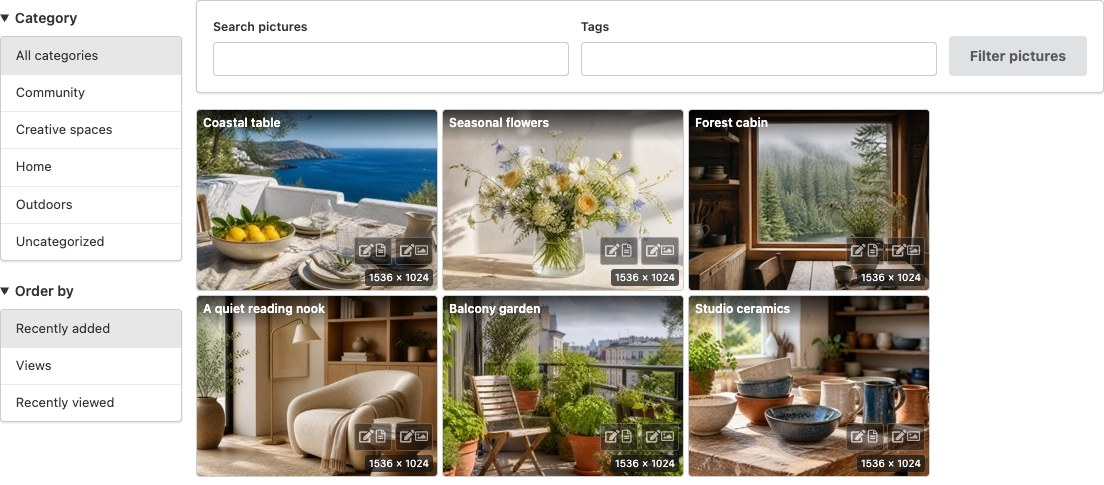
Styled Tiles with a filter menu, resolution labels and matching owner editing buttons.
Optional member release-date hints
With a compatible MicroPayments release, new picture drafts can select site plans and an optional calendar release date in the native Site membership access box. Picture cards display the configured site-plan date. Gallery viewing, approval, independent purchases and retained originals remain native. The gallery still works on its own without membership features.
Plugin home and guest-upload guidance | Live pictures demo
Turn visitor photos into a gallery worth exploring. Picture Gallery adds picture posts, searchable image listings, frontend uploads and a My Pictures workspace to WordPress. Use it for creator portfolios, community photo submissions, member galleries, event pictures or visual collections alongside your videos and live channels.
Visitors can browse a compact grid, open pictures in a full-screen PhotoSwipe viewer, or read more in picture cards. Contributors can upload and edit their own pictures from the frontend. You control who can upload, who can publish directly and which submissions need review.
Start with community uploads or a portfolio from your existing Media Library using Quick setup. Presets fill presentation fields; preview the concrete changes before saving. Your roles, access rules, storage and existing pages stay in place. Keep original attachments and copy their titles, captions and alternative text into independent Picture posts. Repeat imports safely without overwriting later Picture edits.
The gallery, viewer and image editor are included free. Image processing runs on your WordPress hosting using its available image editor; no external editor account or image-processing subscription is required.
Make your pictures easy to discover
- Native gallery block: add a gallery in the WordPress editor, select existing Pictures or import Media Library images, and reorder your selection without writing a shortcode.
- Four distinct layouts: Styled Tiles for a compact traditional gallery, a dense Responsive grid, Picture cards with titles and descriptions, and Justified rows that preserve portrait and landscape compositions.
- Optional layout buttons: let visitors compare all four layouts, or choose a fixed layout under Display and hide the selector.
- Menu or dropdown filters: let visitors search by name or tags, select a category and sort pictures. Each listing can use its own layout and filters.
- PhotoSwipe browsing: zoom, swipe and move through authorized nearby pictures, with larger previous/next previews, an optional thumbnail strip and a visible button to open the picture post.
- Clean presentation: thumbnail-aware sizing, small resolution labels, subtle hover effects and matching management buttons. FansPaysite light/dark mode and palette changes apply without reloading.
- Useful without JavaScript: grid/cards and PhotoSwipe-enabled tiles start with real images, picture-post links and page navigation; enhancement adds AJAX filtering and the viewer.
Let contributors manage their pictures
- Webcam photos and screenshots: optionally add the VideoWhisper Recorder creator-media workflow. New captures and workflow image uploads become destination-owned Gallery drafts, using native validation, image processing and media relationships. Retain the original WordPress attachment and files. Review in the native picture editor before publishing; administrators can explicitly select direct publication for creators who already have native publishing permission.
- Frontend uploads: select multiple JPG, PNG or GIF pictures, or drag and drop them onto the member uploader. Compatible mobile browsers can choose camera or photo-library images.
- My Pictures: give each logged-in contributor a personal workspace for images, titles, captions, descriptions, alternative text and existing categories/tags. Review submissions before changing public content.
- Simple image tools: choose Crop, Resize, Rotate or Flip, then expand just that tool’s controls. Preview changes, undo/redo and save without opening the dashboard. JPEG and PNG editing is supported.
- Review and restore: edits can await approval while the existing public image remains available. Restore original composition creates a fresh generation; the original and normalized master are retained.
- Guest contributions: optional guest upload form with moderation, rate limits, notification email and optional Google reCAPTCHA v3.
Practical tools for site owners
- Quick setup with review: choose a presentation or capture preset, preview current and selected values, then save those exact choices. Review is the default for new creator captures; direct publication remains a separate administrator choice and does not grant publishing capabilities. Advanced settings and standalone upload pages remain available.
- Reuse existing images: import selected Media Library images with optional initial titles, captions and alternative text, while retaining original files and later Picture edits.
- Optional AI-agent inspection: on WordPress 6.9+, let authenticated tools find authorized pictures missing alternative text or captions and inspect their current details. Read-only abilities cannot change content or files; no AI service is bundled or required.
- Eleven included interface languages: Romanian (ro_RO), Spanish (es_ES), German (de_DE), French (fr_FR), Brazilian Portuguese (pt_BR), Japanese (ja), Italian (it_IT), Dutch (nl_NL), Polish (pl_PL), Turkish (tr_TR) and Arabic (ar), including the block editor and frontend tools.
- Picture posts with gallery taxonomy, categories, tags and WordPress Media Library integration.
- Role-based upload/publish rules and gallery access settings.
- EXIF orientation correction and WordPress image-editor thumbnail generation, with bounded processing checks.
- Automatic queued refresh when displayed thumbnails no longer match configured sizes, plus a bounded administrator thumbnail tool.
- On-demand import of existing Picture Gallery media relationships when pictures are listed, viewed or edited; existing posts, authors and URLs are preserved.
- Durable upload identities, upload journal inspection and pending-only recovery after interrupted requests.
- Image Edit Journals for inspected save recovery and explicit cleanup of proven unused edit files after a retention period.
- Conservative shared-media checks and retention by default, including after deactivation or uninstall.
Extend your community
Optional integrations add more ways to use your gallery:
- Recorder optionally adds a shared upload/capture entry with webcam photos and screenshots. Its compatible creator-media workflow hands owned image attachments to Gallery for a draft-first review. Gallery uploads, imports and editors work independently when Recorder is absent.
- MicroPayments / FansPaysite adds content monetization and frontend content management. Picture Gallery checks supported membership and purchase entitlements before including images in its modern galleries/viewer.
- Rate Star Review adds independently selectable star ratings and provider-controlled likes/votes to all four listing layouts. Enable either or both under Display; the provider still controls allowed categories, visitor permissions and paid voting.
- Video Share VOD and Broadcast Live Video complement pictures with recorded or live video.
- Paid VideoChat integrates pictures with performer profiles.
These integrations are optional. Publicly reachable image files are not protected downloads: restricting gallery access does not make an existing public file URL private.
Picture Gallery is provided by VideoWhisper. For optional installation help, custom development or suitable hosting, contact VideoWhisper. No service purchase is required for the included gallery and editing features. If the plugin helps your website, share your experience.
Third-party UI assets
Bundled Fomantic UI code is MIT licensed. Human-readable upstream source, reproducible distribution/build instructions, the exact local patch and font notices are in scripts/semantic/README.txt and scripts/semantic/asset-provenance.txt. Fonts retain their separately stated licenses. Build tools are not required on WordPress hosting.