

Picqlo Image Converter
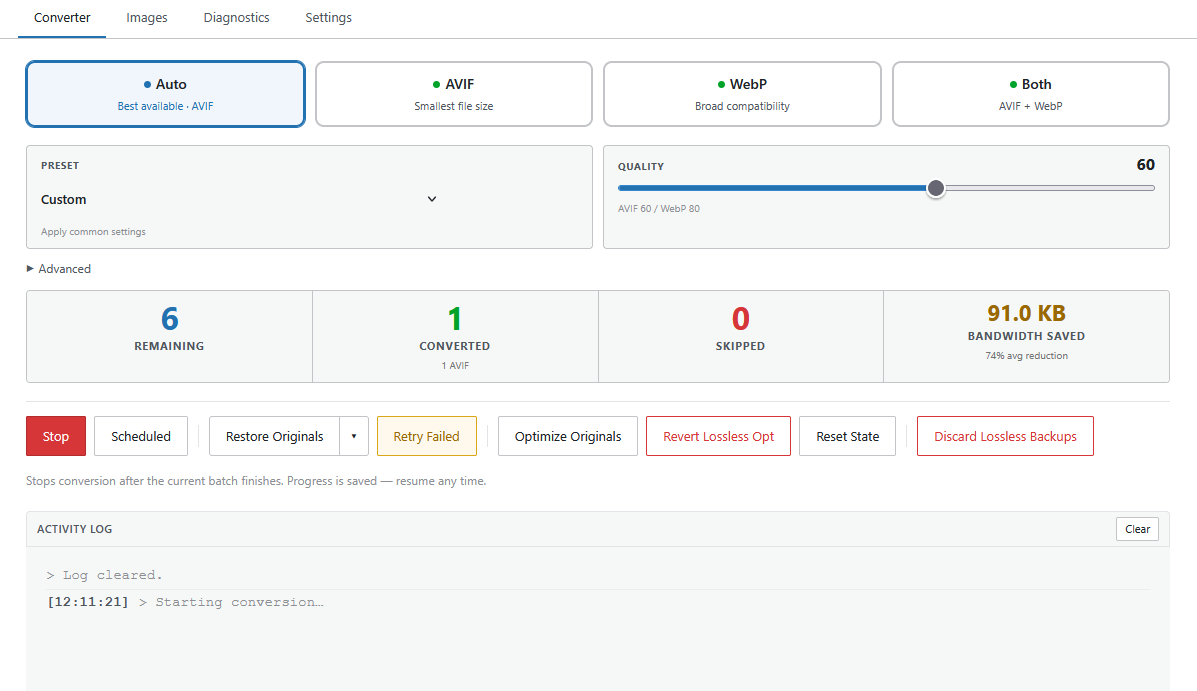
Converter tab — format selector, quality slider, live stats (remaining, converted, skipped, bandwidth saved), and activity log.
Free image optimizer for WordPress — every feature included, no subscription, no monthly image limits. Compress your JPEG and PNG images into next-gen AVIF and WebP formats and cut page weight without paying a recurring fee. Local conversion is unlimited and free; optional Cloud API credits are only used when your host can’t encode AVIF locally.
Picqlo Image Converter converts your existing WordPress media library from JPEG and PNG to modern formats (AVIF, WebP) for faster page loads and better Core Web Vitals scores — without touching your content or changing any image URLs.
Key features:
- Bulk conversion — convert your entire media library in one click
- AVIF + WebP — AVIF where your server supports it, WebP as a reliable fallback
- Auto mode — uses AVIF if available locally, WebP otherwise; no manual configuration needed
- Non-destructive by default — AVIF and WebP conversion never modifies your originals; companion files are placed alongside them and deleted on revert. Lossless Optimize is the exception — it rewrites originals in place but creates a
.lossless-bakbackup first; reverting restores from the backup - Real-time progress log — live streaming log with encoder badges (
[GD],[Imagick],[exec],[API]) and a progress bar - Per-image controls — convert, reconvert, revert, or force-cloud on individual images from the Images tab
- Diagnostics tab — see which encoders are available on your server before you start
- Cloud API — guaranteed AVIF encoding on any host via the Picqlo Cloud API, even on shared hosting without local AVIF support (requires credits from picqlo.com)
Encoders used (in priority order):
AVIF:
1. GD library (imageavif)
2. ImageMagick (via the Imagick PHP extension)
3. cavif-rs or avifenc binary (via exec, if pre-installed on your server)
4. Picqlo Cloud API — remote AVIF encoder, works on any host (requires API key at picqlo.com)
5. WebP fallback — if AVIF fails on all local encoders, falls back to WebP automatically
WebP:
1. ImageMagick (better quality, ICC profile preserved)
2. cwebp binary (via exec, if pre-installed on your server)
3. GD library (imagewebp)
Cloud API:
The Cloud API is an optional external service for guaranteed AVIF encoding on hosts where no local AVIF encoder is available (e.g. old shared hosting). It requires an API key from picqlo.com. Credits are consumed only when the cloud encoder is actually used; if your server handles AVIF locally, no credits are spent and no data is sent externally.
Privacy: All local processing is entirely local — no data leaves your server. Cloud API processing is in-memory only; images are deleted immediately after conversion. See picqlo.com/privacy.
External Services
This plugin optionally connects to the Picqlo Cloud API (api.picqlo.com), a remote AVIF encoding service. The Cloud API is only used when:
- An API key has been entered in the plugin settings, AND
- A conversion is initiated that uses the cloud encoder
No data is sent to external servers during free local conversion. When the Cloud API is used, images are transmitted over TLS 1.2+, processed in-memory, and deleted immediately after conversion. Nothing is stored.
- Service: Picqlo Cloud API
- Privacy Policy: https://picqlo.com/privacy
- Data Processing Agreement: https://picqlo.com/dpa
- Terms of Service: https://picqlo.com/terms
- Account & Credits Portal: app.picqlo.com — account registration, API key management, and credit purchases. No image data is sent to this service. Links to this portal are shown only when the official Picqlo API key is configured.
Administrators may configure a custom AVIF API endpoint in the plugin settings. When a custom endpoint is configured, image data and the API key are transmitted to that endpoint instead of api.picqlo.com. Custom endpoints must use HTTPS; the plugin rejects HTTP and private/internal addresses.
Privacy Policy
When the Cloud API is used, source images are transmitted to api.picqlo.com over TLS 1.2+. Images are processed in-memory and deleted immediately after conversion — nothing is stored. No data is sent to external servers during free local conversion.
- Privacy Policy: https://picqlo.com/privacy
- Data Processing Agreement: https://picqlo.com/dpa
AI Disclosure
Portions of this plugin’s code were developed with the assistance of AI tools. All code has been reviewed, tested, and is fully understood by the plugin author. No AI-generated code was included without human review and verification.