


Payment Gateway GiveWP Asoriba BusinessPay
0/5 (0 ratings) — active installs Updated Jul 6, 2023
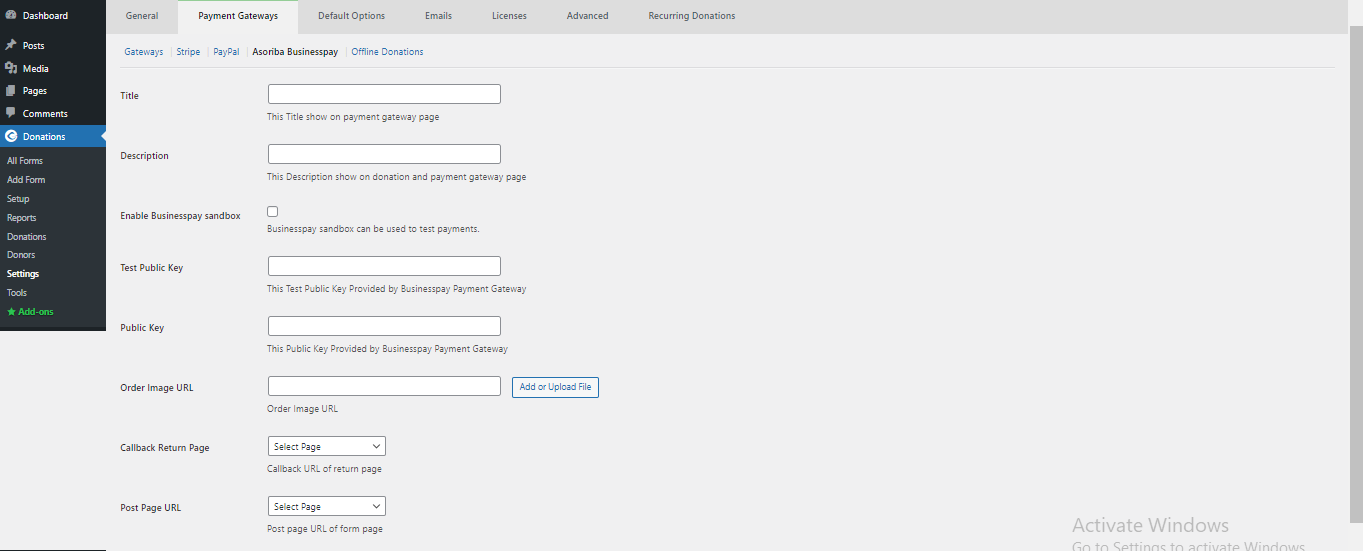
<p>Asoriba Businesspay Payment Gateway Account configuration page #1</p>
This is the BusinessPay payment gateway for GiveWP. Allows you to use Asoriba BusinessPay payment gateway for the GiveWP plugin. BusinessPay is a Ghanaian Payment Gateway.
Configuration
- Visit the Donations settings page, and click on the Payment Gateways tab.
- Click on BusinessPay to edit the settings. If you do not see BusinessPay in the list at the top of the screen make sure you have activated the plugin in the WordPress Plugin Manager.
- Enable the Payment Method, name it BusinessPay, add in your public key and sandbox enable/disable Click Save.