


Pay-To-View Lite
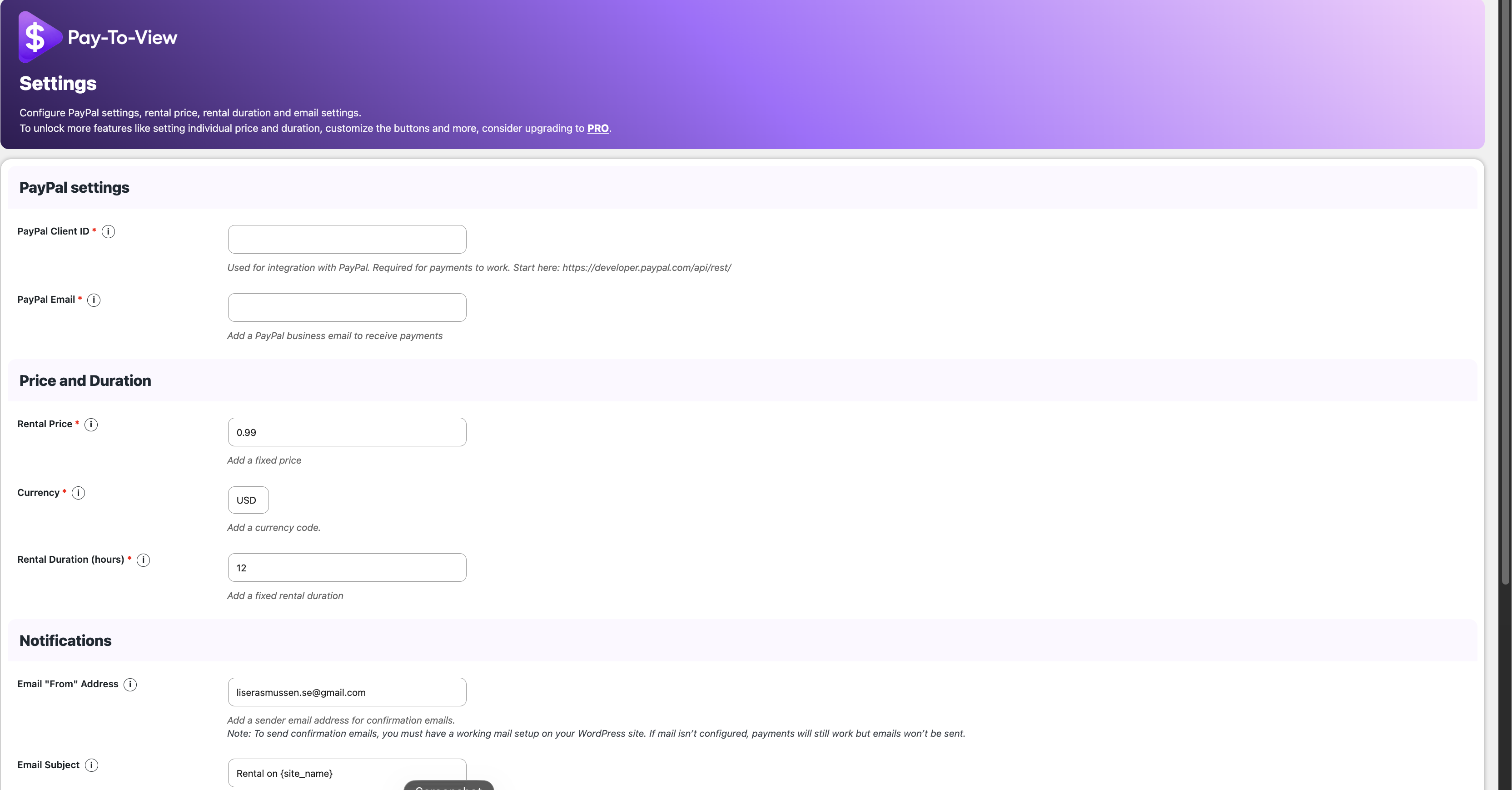
Pay-To-View Lite settings for PayPal, currency, rental price, and rental duration.
IMPORTANT UPGRADE INFORMATION:
After updating to version 1.3.2, you MUST ADD A PAYPAL CLIENT SECRET ID OR PAY-TO-VIEW LITE MIGHT STOP WORKING! Open Pay-To-View > Settings, add the Client Secret from your PayPal Developer Dashboard, and save the settings.
Pay-To-View is a lightweight WordPress video paywall plugin for selling time-limited access to videos and premium media. Accept PayPal and supported card payments directly from your website without memberships, subscriptions, shopping carts, or customer accounts.
Visitors complete payment and receive immediate access for the rental period you define. When the rental expires, access is removed automatically.
Use Pay-To-View Lite to monetize:
- Independent films and documentaries
- Any video content
- Short films and festival screenings
- Tutorials and educational videos
- Training, coaching, and fitness content
- Webinars and conference recordings
- Concerts, presentations, and event replays
- Premium videos and protected media
- Small streaming libraries and niche video platforms
See Pay-To-View Lite in Action
Watch the short demonstration video:
No Memberships. No Subscriptions. No User Accounts.
Pay-To-View Lite provides a simple pay-per-view workflow:
- Add a video or media item to a WordPress post or page.
- Create a rental shortcode with a unique Rental ID.
- Set your fixed rental price and rental duration.
- Let visitors pay securely with PayPal or card.
- Unlock the protected content immediately after payment.
- Automatically expire access when the rental period ends.
- All rentals stored in a log accessed from the admin panel
It is a practical alternative to large membership, LMS, and e-commerce systems when you only need to sell individual videos or time-limited media access.
Sell Videos Directly from WordPress
Create a video rental website, add a paywall to premium content, or sell access to individual videos without requiring customers to register.
Version 1.3.0 supports all video players, allowing you to place the Pay-To-View shortcode around the video or media content you already use on your website.
You control the currency, fixed rental price, rental duration, payment settings, confirmation email, and the protected content displayed after purchase.
Built for Simple Pay-Per-View Sales
Pay-To-View Lite is designed for creators who want to:
- Sell videos directly from WordPress
- Rent movies or documentaries online
- Add a payment wall to premium videos
- Sell tutorials and training content
- Monetize webinars and recorded events
- Protect media until payment is completed
- Accept PayPal and supported card payments
- Avoid subscriptions and recurring billing
- Avoid customer registration and account management
- Track completed rentals from WordPress
Ready to Start Selling Videos?
Install Pay-To-View Lite, configure your PayPal settings, create your first rental shortcode, and start selling time-limited video access from your WordPress website.
Tutorial
Watch the complete setup tutorial:
The tutorial covers the plugin settings, shortcode generator, payment process, and unlocked media experience.
Pay-To-View Lite Features
- Create a WordPress video paywall
- Sell time-limited access to videos and premium media
- Accept PayPal and supported card payments
- Support all video players
- Use one fixed rental price for all media
- Use one fixed rental duration for all media
- Choose your preferred currency
- Generate rental shortcodes from the WordPress admin area
- Assign a unique Rental ID to each protected media item
- Protect content until payment is completed
- Unlock content immediately after successful payment
- Automatically expire access after the rental period
- Record completed rentals in the WordPress admin area
- Send configurable confirmation emails to buyers
- Configure the email sender name, subject, and message
- Publish rental buttons in WordPress posts and pages
- Work without WooCommerce
- Work without customer registration
- Work without subscriptions
- Work without a membership plugin
Pay-To-View PRO Features
Pay-To-View PRO includes all Lite features plus:
- Set a different price for each media item
- Set a different rental duration for each media item
- Customize rental button colors, text, labels, and hover effects
- Preview button changes live
- Choose whether administrators receive rental notifications
- Choose whether buyers receive confirmation emails
- Customize the buyer email sender, subject, and message
- Export rental records to CSV
- Store generated shortcodes in a reusable list
- Receive automatic plugin updates
- Receive priority support
Upgrade to Pay-To-View PRO
View pricing and upgrade options:
https://theappmill.com/paytoview/pricing_plans.html
Pay-To-View PRO is designed for creators who need individual pricing, individual rental durations, custom button styling, advanced notifications, CSV export, automatic updates, and easier management of larger video libraries.
How It Works
- Install and activate Pay-To-View Lite.
- Open the Pay-To-View Lite settings page.
- Add your PayPal REST API Client ID.
- Add your PayPal Client Secret from the same PayPal REST app.
- Add your PayPal business email.
- Select a currency.
- Set the fixed rental price.
- Set the fixed rental duration.
- Add your video or media content to a WordPress post or page.
- Open the shortcode generator.
- Enter a unique Rental ID.
- Generate the rental shortcode.
- Add the shortcode to the post or page containing your protected content.
- Publish the page.
- Visitors can pay and receive immediate time-limited access.
- Completed rentals are stored in the rental log.
Full installation instructions:
https://theappmill.com/paytoview/installation.html
Use Cases
Online Movie Rentals
Sell time-limited access to independent films, documentaries, short films, festival screenings, or archived productions directly from your WordPress website.
Paid Tutorials
Monetize individual tutorials and lessons without building a complete course platform or membership system.
Training and Coaching Videos
Sell access to business training, coaching sessions, fitness videos, workshops, or professional instruction.
Premium Video Content
Place selected videos behind a payment wall while keeping the rest of your website publicly available.
Webinars and Recorded Events
Sell temporary access to recorded webinars, conferences, concerts, presentations, and event replays.
Membership-Free Video Sales
Offer individual video rentals without subscriptions, recurring payments, customer accounts, or WooCommerce.
External Services
Pay-To-View Lite connects to PayPal to display payment buttons and process transactions.
The plugin uses the official PayPal JavaScript SDK. PayPal may receive information required to display payment options and process transactions according to PayPal’s terms and privacy policy.
PayPal User Agreement:
https://www.paypal.com/us/webapps/mpp/ua/useragreement-full
PayPal Privacy Statement:
https://www.paypal.com/us/legalhub/privacy-full
A PayPal REST API Client ID and Client Secret are required. They are used to display PayPal buttons and verify completed payments before rental access is unlocked. You can create both values in the PayPal Developer Dashboard:
https://developer.paypal.com/api/rest/
The plugin also includes links to product information, documentation, pricing, terms, privacy information, and the Pay-To-View PRO upgrade page hosted on TheAppMill.com.
Product website:
https://theappmill.com/paytoview/index.html
Pricing:
https://theappmill.com/paytoview/pricing_plans.html
Terms:
https://theappmill.com/paytoview/terms.html
Privacy Policy:
https://theappmill.com/paytoview/privacy.html
Pay-To-View Lite does not send WordPress user data or customer data to TheAppMill.com.
PayPal Integration
- Uses the official PayPal JavaScript SDK
- Displays PayPal and supported card payment options
- Requires a PayPal REST API Client ID
- Requires a PayPal REST API Client Secret for server-side payment verification
- Uses a PayPal business email to receive payments
- Does not use PayPal IPN
- Does not require customers to register in WordPress
- Does not send customer data to TheAppMill.com
Payment Verification and Access Protection
Pay-To-View Lite verifies completed PayPal payments on the server before granting rental access. The PayPal Client Secret is used only by the WordPress site to confirm that the PayPal order was completed for the configured rental price and currency.
After a verified payment, Pay-To-View stores rental access data for the configured rental period and records the completed rental in the WordPress admin rental log. Access expires automatically when the rental duration has passed.
The plugin is designed for simple pay-per-view workflows where visitors do not need WordPress accounts, memberships, subscriptions, or WooCommerce checkout.
Important payment verification update
Pay-To-View Lite 1.3.2 strengthens payment verification and rental-access protection.
After updating, open Pay-To-View > Settings and add the private PayPal Client Secret from your PayPal developer dashboard. This one-time action is required to continue accepting rentals. The secret is stored in WordPress and is never sent to visitors.
License
Pay-To-View Lite is licensed under GPL-2.0-or-later.
https://www.gnu.org/licenses/gpl-2.0.html