

Panorama – Turn Photos into Immersive Virtual Tours
Gutenberg block
The plugin is very easy to use and anyone can use the plugin easily without any technical knowledge.
Panorama Viewer | Documentation | Pricing | Support | Demo
You can embed any panoramic photos, or videos in Posts, Pages, Widget areas and WooCommerce product pages. It comes with everything you need to make the most of your panoramic pictures.
This WordPress plugin enables seamless display of 360° images, 3D images, videos, and panoramic galleries. With dedicated Gutenberg blocks, shortcodes, and WooCommerce integration, you can display immersive media on any page, post, widget area, or product page.
The Free version comes with fully functional blocks for all media types, including 360° virtual tours (up to 6 scenes and 6 hotspots per scene), interactive product hotspots (up to 3 spots), basic Google Street View embedding, Device Orientation (Gyroscope) navigation, custom Initial View & FOV/Zoom controls, WooCommerce integration for 360° images and product spots, and a 360° Interaction Analytics Dashboard (7-Day Overview).
Upgrade to the Pro version to unlock unlimited scenes, unlimited product hotspots, full WooCommerce video integration, advanced viewer customization (inactivity delay auto-rotation, custom navigation controls), galleries with load-more pagination, title/author overlays, virtual compass guides, and advanced analytics tracking.
Free Features
- 360° Interaction Analytics Dashboard (7-Day Overview): Monitor viewer impressions, hotspot click counts, and active view duration directly from your WordPress dashboard.
- Multi-Scene Virtual Tours (Free): Connect up to 6 scenes per tour with up to 6 hotspots per scene (Info, Scene, and Link hotspots) and smooth transitions.
- Cubemap / 6-Cube Face Format: Upload 6 individual cube face images (Front, Back, Left, Right, Up, Down) for high-performance 360° scenes and WooCommerce product panoramas.
- Cylindrical Smartphone Panoramas: Full support for partial panoramas with custom HAOV, VAOV, and vOffset controls on virtual tours and WooCommerce product pages.
- WooCommerce Product Panorama Embed: Display 360° images on your single product page (top, bottom, replace main image, or a dedicated “360° View” tab) with auto-rotate — no coding required.
- Interactive Product Spot: Highlight physical product details with interactive hotspot markers (up to 3 spots).
- Device Orientation (Gyroscope): Enable mobile and tablet visitors to explore 360° panoramas and virtual tours naturally by tilting and moving their physical device.
- Initial View & FOV / Zoom Control: Customize and lock the starting camera angle (Pitch, Yaw, HFOV) with a single click using the “Set as Initial View” button.
- 360° Image & Video Viewers: Embed panoramic photos and 360-degree videos with full player navigation.
- Google Street View Integration: Easily embed interactive Google Street View locations by simply entering a Panorama ID.
- Auto Rotate Controls: Keep the viewing experience active with smooth auto-rotation and customizable speeds.
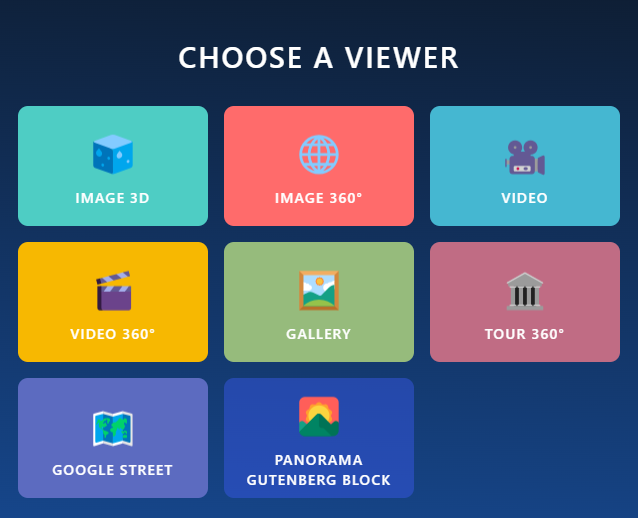
- 8 Dedicated Gutenberg Blocks: Specialized blocks for Image 360°, Image 3D, Video, Video 360°, Google Street View, Gallery, Virtual Tour, and Product Spot.
- Developer Shortcode API & Embed URLs: Universal shortcodes
[panorama id="123"],[virtual-tour id="456"],[panorama_product_viewer],[product_spot id="789"], and shareable iframe embed URLs. - Seamless Elementor Integration: Easily embed any 360° photo, video, or virtual tour into Elementor pages using generated shortcodes (e.g.
[panorama id="123"]) via Elementor’s native Shortcode Widget — no complex configuration needed.
Pro Features
- Advanced 360° Interaction Analytics Dashboard: Track extended lifetime analytics data, WooCommerce sales conversions, custom date range filters, and live activity streams.
- Interactive WooCommerce Product Hotspots: Connect 360° hotspots directly to WooCommerce products, display live price badges, and enable instant Add to Cart buttons.
- WooCommerce Product Video & Advanced Controls: Add 360° product videos, custom initial view angle, playback controls, and title/author overlays to your product panorama.
- Virtual Tour Pro (Unlimited): Connect unlimited scenes and unlimited hotspots per scene without any restrictions.
- Rich Image & Video Hotspots: Display interactive Image popups and Video modal popups directly inside virtual tour scenes.
- Preview Cover Image & Custom Load Button: Display a lightweight preview cover image with a customizable load button (e.g., “Click to Explore 360°”) to maximize page loading speed.
- Inactivity Delay Auto-Rotate Resume: Automatically pause rotation when a user drags, and resume auto-rotation after a customizable inactivity delay.
- Panorama Gallery: Build responsive column and grid layouts of multiple panoramas with Load More pagination.
- Panorama Gallery Title, Description & Read More: Display custom item titles and descriptions with typography controls, color customization, text truncation (Ellipsis), and custom-colored “Read More / Read Less” expand buttons.
- Interactive Compass Overlay: Keep users oriented in 360° spaces by enabling a native directional compass guide.
- Custom Player & Navigation Controls: Add custom UI buttons for Pan Up, Down, Left, Right, Zoom, Fullscreen, and Video Playback Speed (0.5x, 1x, 1.5x, 2x) with Picture-in-Picture mode.
- Kiosk & Exhibition Interaction Lock: Option to disable keyboard navigation and double-click zoom for museum and showroom displays.
- External Media CDN / URL Support: Use direct third-party CDN or external URLs for images and videos.
Who Should Use Panorama Viewer Plugin?
- Stores
- Schools
- Museums
- Car and other vehicle Showrooms
- Travel Agency
- Art Galleries
- Real Estate Agency
- Physical Products Stores
Video tutorial
Source Code
You can find the source code, report bugs, and contribute to the development of this plugin on our GitHub repository:
Panorama on GitHub
Third-Party Libraries
This plugin bundles the following third-party JavaScript/PHP libraries.
Codestar Framework
- Source: http://codestarframework.com/
- GitHub: https://github.com/Codestar/codestar-framework
- License: GPLv2 or later – https://github.com/Codestar/codestar-framework/blob/master/LICENSE.md
- Purpose: Provides the options framework for the plugin’s settings and shortcode generator.
Freemius SDK
- Source: https://freemius.com/
- GitHub: https://github.com/Freemius/wordpress-sdk
- License: GPLv3 – https://github.com/Freemius/wordpress-sdk/blob/master/LICENSE.txt
- Purpose: Provides opt-in usage tracking and analytics to help improve the plugin.
bpl-tools
- Source / GitHub: https://github.com/bPlugins/bpl-tools
- License: GPL-2.0-or-later – https://www.gnu.org/licenses/gpl-2.0.html
- Purpose: Shared utility library providing admin dashboard components and common Gutenberg editor controls.
- External Services: The library may connect to bPlugins, WordPress.org, and Freemius services for product data and checkout functionality. See full details: https://github.com/bPlugins/bpl-tools#external-requests–why-they-are-made
User Feedback
⭐⭐⭐⭐⭐ Great even on iOS
❛❛Im Happy very happy with this Plug-in. The only one which works fine with iphone❜❜
– Did you like this plugin? Dislike it? Have a feature request? Please share your feedback with us
How to use
Follow the steps below to embed a panoramic image.
- Go to -> Panorama Viewer from Dashboard menu -> Add New Panorama.
- Configure the viewer from Panorama Settings with your preference.
- Click the Save button
- Copy Generated ShortCode (See below the Panorama title ) and paste it where you like to embed the Panorama Viewer.
Where do I report security bugs found in this plugin?
Please report security bugs found in the source code of the Panorama Viewer – 360 Degree Image + Video Viewer plugin through the Patchstack Vulnerability Disclosure Program. The Patchstack team will assist you with verification, CVE assignment, and notify the developers of this plugin.
⭐ Checkout our other WordPress Plugins-
🔥 Html5 Audio Player – Best audio player plugin for WordPress.
🔥 Html5 Video Player – Best video player plugin for WordPress.
🔥 StreamCast – A fully-featured Radio Player Plugin for WordPresss.
🔥 PDF Poster – A fully-featured PDF Viewer Plugin for WordPresss.
🔥 3D Viewer – Display interactive 3D models on the webs.