


Paidcheck – Find Orders Paid with Stripe but Stuck in Pending for WooCommerce
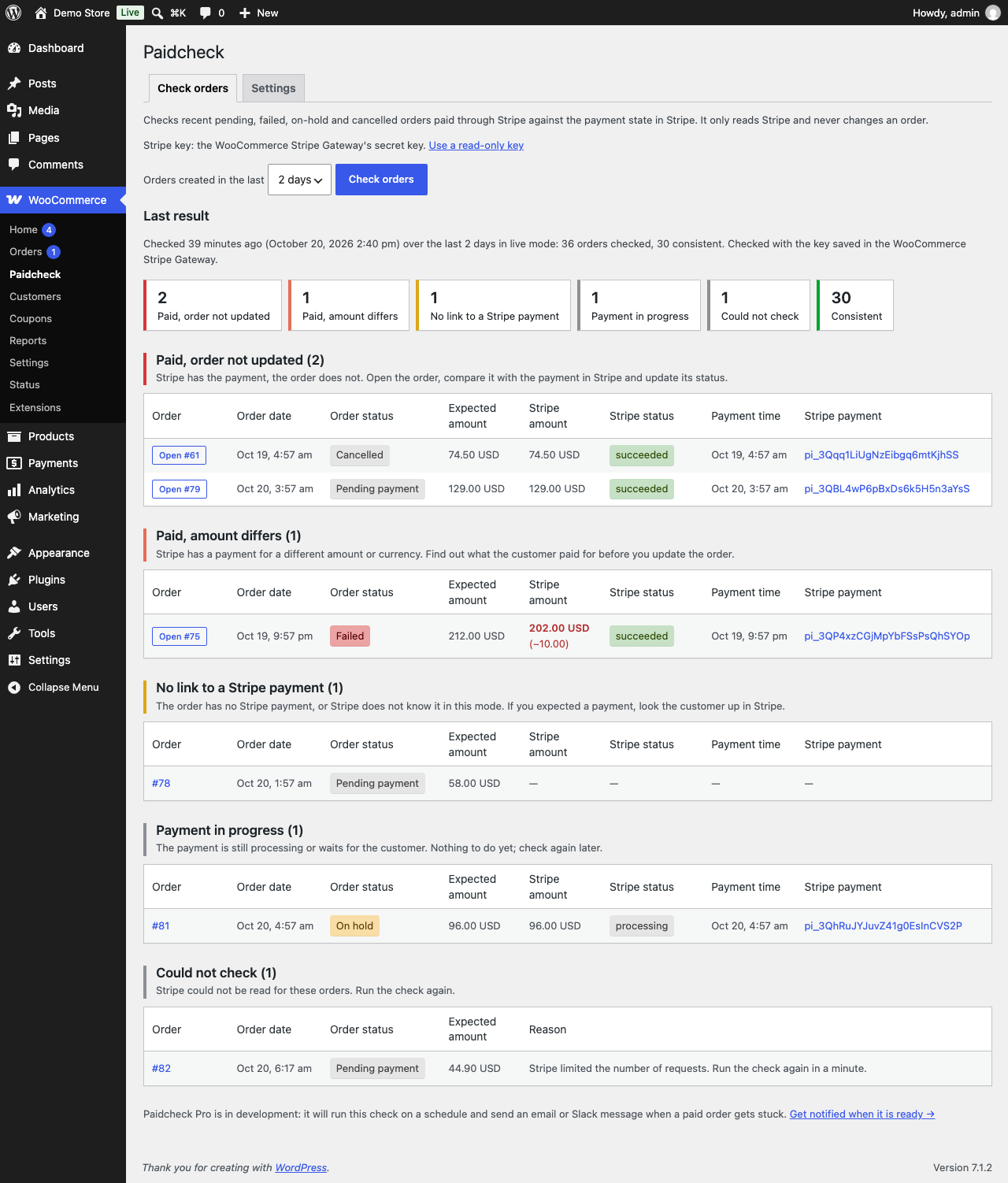
Findings grouped by result, with both amounts, both statuses and a link to each payment in the Stripe Dashboard.
Sometimes a customer pays with Stripe, but the WooCommerce order never hears about it: the Stripe webhook fails or is missed, the customer closes the tab before the redirect back, or a confirmation gets lost. The money is in your Stripe account, but the order status is not updated after the payment and the order sits in “Pending payment”, “Failed”, “On hold” or even “Cancelled”, and the customer waits for goods that never ship.
Paidcheck finds those orders. Open WooCommerce > Paidcheck, choose how far back to look (1, 2 or 7 days) and press Check orders. Paidcheck reads each recent unpaid Stripe order’s payment from Stripe and sorts the results:
- Paid, order not updated: Stripe has the full payment (or an uncaptured authorization on a pending or failed order), the order does not.
- Paid, amount differs: Stripe has a payment, but for a different amount or currency.
- No link to a Stripe payment: the order has no Stripe payment recorded, or Stripe does not know it.
- Payment in progress: the payment is still processing or waits for the customer.
- Could not check: Stripe could not be reached for that order; the reason is shown.
Each finding shows the order with a link to edit it, both amounts, both statuses, the payment time and the Stripe payment ID linked to your Stripe Dashboard, so you can fix the order by hand.
Read-only. Paidcheck never changes an order, never adds an order note and never creates, changes or cancels anything in Stripe. Orders created in the last 15 minutes are skipped, so payments still being confirmed are not reported.
Supported gateway. Paidcheck works with the official WooCommerce Stripe Gateway plugin, including its card, wallet and local payment methods. WooPayments is not supported: it does not give the store a Stripe key to read with. Other Stripe plugins are not supported either.
Where the Stripe key comes from. You choose on WooCommerce > Paidcheck > Settings. By default nothing is configured: Paidcheck uses the secret key that the WooCommerce Stripe Gateway has saved for its current mode (the test key in test mode, the live key otherwise), and does not store, display or log it. Optionally you can save your own restricted key with read access only, one for test mode and one for live mode, so that Stripe itself enforces that Paidcheck cannot change anything. A restricted key is stored in your site’s database, as the gateway stores its own keys, and is never shown again after you save it. When a restricted key is chosen, the gateway’s key is never used. The key is used only for the requests below.
The last result stays on the screen until the next check and holds order numbers, statuses, amounts and Stripe payment IDs only, no customer names, emails or addresses. Paidcheck supports High-Performance Order Storage.
External services
Paidcheck connects to the Stripe API (api.stripe.com), provided by Stripe, to read the payment state of your orders.
- When: while a shop manager runs a check on the WooCommerce > Paidcheck screen, and once when a shop manager saves a restricted key for the gateway’s current mode, to confirm that it sees this store’s payments. Nothing is sent in the background.
- What is sent: for each checked order, a read request for the PaymentIntent or Checkout Session ID that the WooCommerce Stripe Gateway recorded on the order, authenticated with the key you chose (the gateway’s secret key or your restricted key). When a restricted key is saved, up to three such read requests for the most recent orders’ PaymentIntents and one for the most recent order that recorded only a Checkout Session. No customer data is sent.
- What is received: Stripe returns the full payment object, which includes the latest charge and, for a Checkout Session, the session. These can contain the customer’s billing name, email and address as Stripe recorded them. Paidcheck uses only the payment’s ID, status, amount, currency, creation time and refund flag; it stores and shows nothing else, and keeps no customer details.
Stripe Services Agreement and Privacy Policy.