

Pagora AI – AI Page Builder

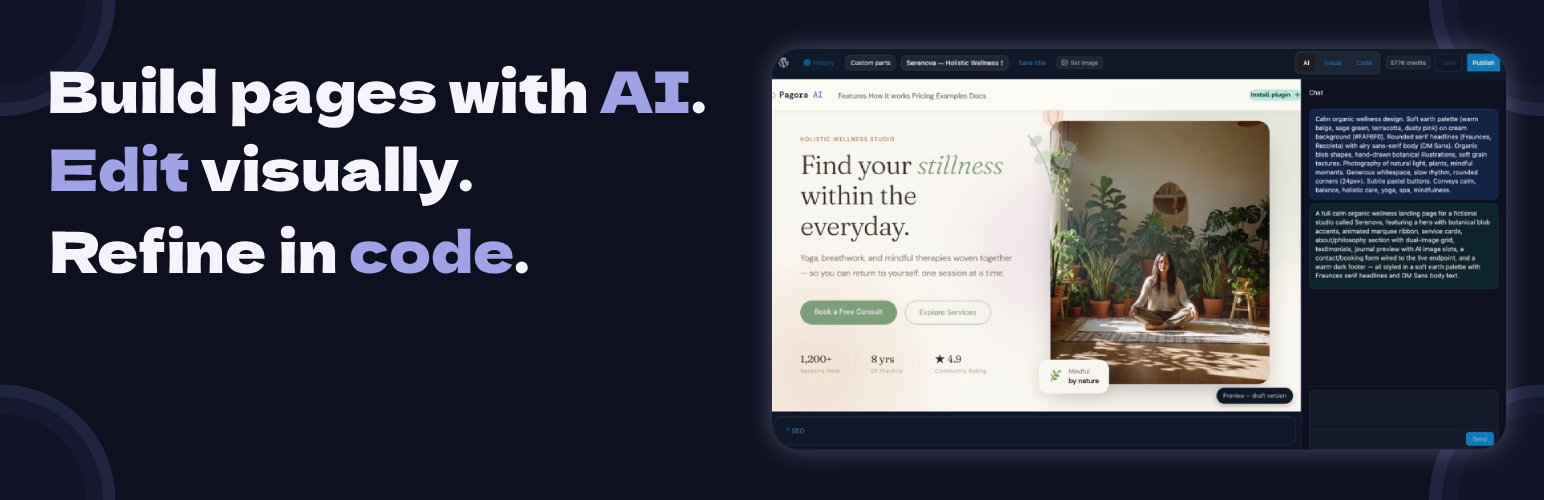
The Pagora AI page builder — chat panel on the left, live preview in the center, HTML/CSS/JS code editor on the right.
Pagora AI is an AI page builder for WordPress. Instead of dragging blocks around, you describe the page you want in plain language and the AI generates a complete, ready-to-publish page — layout, copy, styling, and interactivity included. Need a landing page, a product page, a coming-soon page, or a full homepage? Describe it, review it, publish it.
Not happy with a detail? Keep chatting to refine it — or open the built-in code editor and adjust the HTML, CSS, and JavaScript yourself. That’s what makes Pagora AI different: beginners get a no-code, chat-driven page builder, and developers get full control of the generated code. No black box, no lock-in.
Why people use Pagora AI
- Build landing pages fast — turn a one-line description into a finished page in minutes instead of hours.
- Stay in control — every page is real HTML/CSS/JS you can read, edit, and own.
- Skip the block wrestling — no complex block editor, no page-builder learning curve. Just describe and publish.
- Iterate by chatting — “make the hero darker”, “add a pricing table”, “shorten the intro” — the AI updates the page for you.
Key features
- AI chat page generation — describe your page in natural language; the AI produces a complete page with animations and UnoCSS utility styling (Tailwind-style classes).
- Built-in code editor — a Cursor-style editor (CodeMirror) with HTML/CSS/JS syntax highlighting, auto-formatting, and keyboard shortcuts for full manual control.
- Live preview — an isolated preview that updates instantly after every AI response or edit.
- Version history — every save creates a snapshot; restore any previous version in one click.
- AI image generation — generate and insert images directly from the editor.
- Built-in SEO panel — set the title, meta description, and featured image for each page.
- Reusable templates — save any page as a template and reuse it across your site.
- Modern interactivity bundled — Alpine.js and Motion One ship with generated pages for smooth animations and declarative behaviour, with no extra plugins to install.
Free trial and pricing
The plugin is free to install. Page generation is powered by the Pagora AI cloud service, which you connect from the plugin settings. New accounts start with a free trial so you can create your first pages before committing, then continue on a paid Pagora AI plan. Full pricing is available at pagora-ai.com.
How it works
This plugin is a client for the Pagora AI service. No AI model runs on your server.
- Install and activate the plugin.
- Create an account at pagora-ai.com and connect it from Settings Pagora AI.
- Open any WordPress page and click Edit with Pagora AI.
- Describe the page you want in the chat, refine it, and publish.
Data and privacy
This plugin connects exclusively to the Pagora AI service (https://api.pagora-ai.com) to process your prompts and generate page code. No data is sent to any other third party.
- Prompts and generated code transit through our servers for processing.
- See our Privacy Policy and Terms of Service.
- The plugin collects no telemetry of its own.
For developers
Pagora AI generates standalone pages that only override theme rendering where you explicitly activate them. Under the hood: page content is stored in post meta with separated HTML/CSS/JS for draft and published states, compiled assets are written with hashed filenames to wp-content/uploads/pagora-ai/, and header/footer/custom template parts are inserted via named placeholders. The plugin includes cache-purge integrations for WP Rocket, W3 Total Cache, and LiteSpeed Cache.
Bundled libraries
All bundled libraries are GPL-compatible:
- UnoCSS Runtime — MIT
- Alpine.js — MIT
- Motion One — MIT
- CodeMirror — MIT
- Symfony DomCrawler / CssSelector — MIT (isolated via php-scoper)
- Masterminds HTML5-PHP — LGPL-2.1
Source code and build instructions
The JavaScript and CSS bundles are compiled from TypeScript/TSX source. The full, unminified source is public at:
https://github.com/Enkic/pagora-ai-plugin
To build from source:
- Clone the repository.
- Run
npm install. - Run
npm run buildto compile bundles intoassets/build/andassets/editor/build/.
Build tool: Webpack (via @wordpress/scripts). Node 18+ required.