

Order Delivery Date for WooCommerce
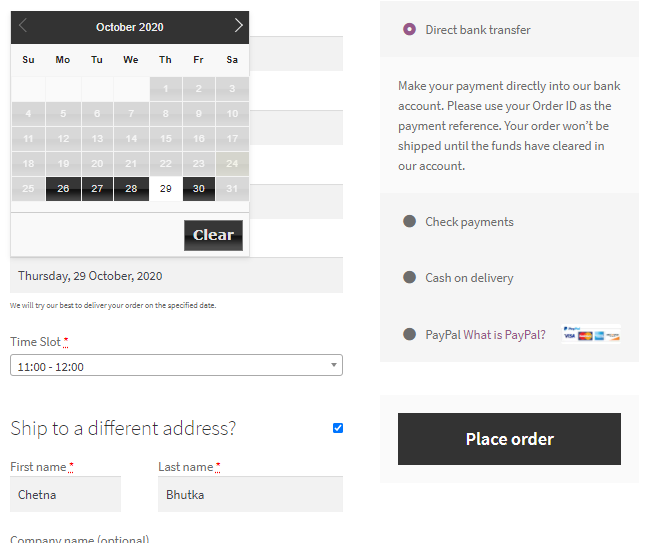
<p>The Delivery date field will be visible on checkout page, according to the settings</p>
Order Delivery Date for WooCommerce adds a delivery date picker to your WooCommerce checkout, allowing customers to select their preferred delivery date and time slot. You can define delivery weekdays, block holidays, set preparation time, limit daily deliveries, and manage delivery schedules from your WooCommerce dashboard. The plugin supports both the classic Cart and Checkout pages as well as the WooCommerce Cart and Checkout Blocks, allowing customers to schedule deliveries regardless of the checkout experience your store uses.
Whether you run a bakery, florist, grocery store, meal delivery service, gift shop, or any business that relies on scheduled deliveries, the plugin helps you organize deliveries while providing a better checkout experience.
Key Features
Let Customers Choose Their Delivery Date
- Allow customers to choose their preferred delivery date during WooCommerce checkout.
- Make the delivery date field mandatory when required.
- Automatically select the first available delivery date.
- Set preparation time (lead time) before the next available delivery.
- Customize the delivery date field label to match your checkout.
- Disable delivery date selection for virtual and featured products.
Manage Your Delivery Schedule
- Choose the weekdays when deliveries are available.
- Block holidays and other non-delivery dates.
- Limit the number of deliveries accepted each day.
Offer Delivery Time Slots
- Let customers choose a delivery time along with their delivery date.
- Create individual delivery time slots.
- Generate multiple time slots in bulk using fixed durations and intervals.
- Block specific time slots for selected weekdays or dates.
Manage Deliveries from WooCommerce
- Display the selected delivery date and time in WooCommerce orders.
- Edit delivery dates from the admin dashboard and notify customers.
- Capture delivery date and time on both the Cart and Checkout pages.
- Compatible with WooCommerce High-Performance Order Storage (HPOS).
Want to show the delivery dates on the product page? The Product Delivery Date LITE plugin allows the customer to choose a delivery date right within the product page and add the product to the cart.
Common Use Cases
Order Delivery Date for WooCommerce works well for businesses where customers expect to receive their orders on a specific date. Common examples include:
* Florists accepting deliveries for birthdays, anniversaries, and special occasions.
* Grocery stores offering scheduled local deliveries.
* Bakeries preparing cakes and custom orders for selected dates.
* Meal delivery businesses managing daily delivery capacity.
* Gift stores allowing customers to schedule deliveries in advance.
* Local retailers delivering products within defined service areas.
Documentation & Support
Need help getting started?
* Visit the WordPress support forums
* Check the documentation for common answers
* Try the live demo to see how the plugin works on the storefront.
If the plugin helps your business, consider leaving a ⭐⭐⭐⭐⭐ review. Your feedback helps other WooCommerce merchants discover the plugin.
Looking for More Advanced Delivery Scheduling?
The Lite version includes the essential features for offering delivery date and time selection in WooCommerce.
If your business requires more advanced delivery workflows, Order Delivery Date Pro for WooCommerce adds features such as:
* Google Calendar synchronization for managing deliveries.
* Delivery schedules based on shipping methods, product categories, shipping classes, user roles, and pickup locations.
* Same-day and next-day deliveries with configurable cut-off times.
* Recurring deliveries with WooCommerce Subscriptions compatibility.
* Delivery charges based on delivery urgency or selected dates.
* Customers can update their delivery date from My Account.
* Delivery date information in the WooCommerce mobile app.
* Additional integrations with popular WooCommerce shipping and marketplace plugins.
See the complete Lite vs Pro comparison: https://www.tychesoftwares.com/differences-pro-lite-versions-order-delivery-date-woocommerce-plugin/
About Tyche Softwares
Tyche Softwares has been building WooCommerce plugins since 2012, helping merchants manage deliveries, pricing, bookings, checkout customization, and other essential store operations. Our plugins are actively maintained and regularly updated to stay compatible with the latest versions of WordPress and WooCommerce.
Explore More WooCommerce Plugins
Tyche Softwares also develops plugins for abandoned cart recovery, order delivery scheduling, bookings, invoices and packing slips, custom order numbers, product input fields, BOGO offers, payment gateway fees, call for price, role-based pricing, currency management, and other WooCommerce enhancements.
Some of our Pro plugins:
Some of our other free plugins:
External Services
This plugin communicates with our tracking server to send usage data only if the user has explicitly opted in to usage tracking. For detailed information about what is tracked, please refer to our usage tracking documentation.