
Optimized Dropdown Menus
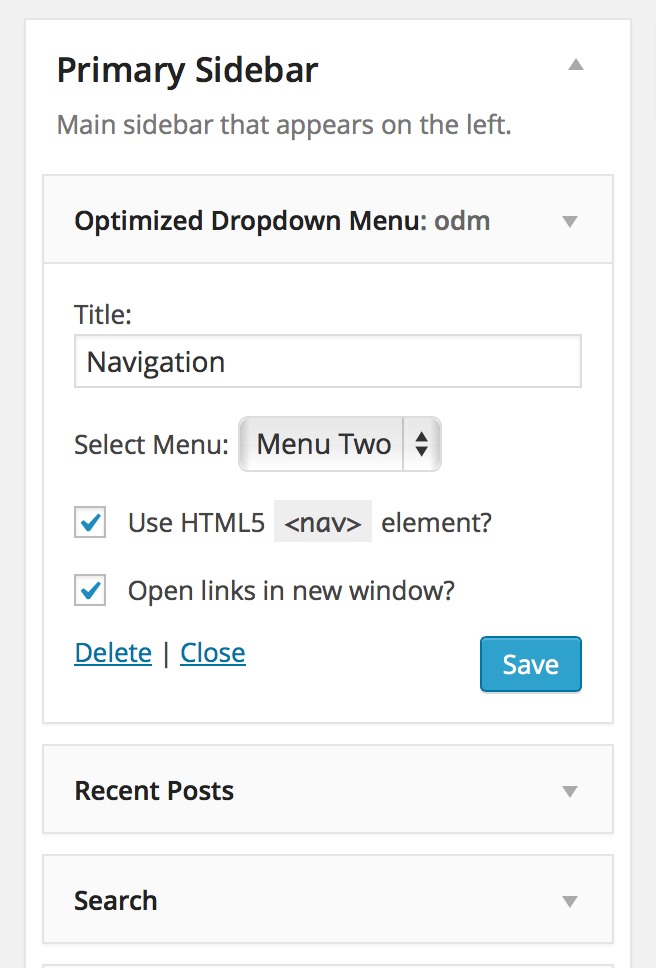
Widget Settings
By using Optimized Dropdown Menus Widget, you’ll be able to create dropdown menus that are searchable or “spiderable” by search engine bots.
So how does it work?
Basically, it works like this:
The menu’s markup code is being printed as an ordinary nested menu. e.g.
<ul>
    <li><a href="http://example.com/page">Some Random Page</a></li>
    <li><a href="http://example.com/page-another">Another Page</a></li>
    <li><a href="http://example.com/yao">Yet Another One</a></li>
</ul>
Since most browsers support JavaScript, using the widget, the markup would be translated into something like this
<select>
    <option value="http://example.com/page">Some Random Page</option>
    ...
    <option value="http://example.com/page">Something else</option>
</select>
The tricky part here is, that search engines do not usually interpret JavaScript, all they will be able to scan is the nested menu. That way they will reach out for those pages, and most probably will crawl those pages as well.
ODM also supports a range of per-widget settings:
- Control whether links will be open in new window or in the same window
- Choose to use HTML5/XHTML markup for the menu
Features set for the next versions
Soon there will be an option for developers to use the same functionality via the code. e.g.
Translations
Currently, these translations are available:
- Spanish (es_ES) – in courtesy of Ognjen Djuraskovic
- Serbian (sr_RS) – in courtesy of Ognjen Djuraskovic