

Open Source Event Calendar
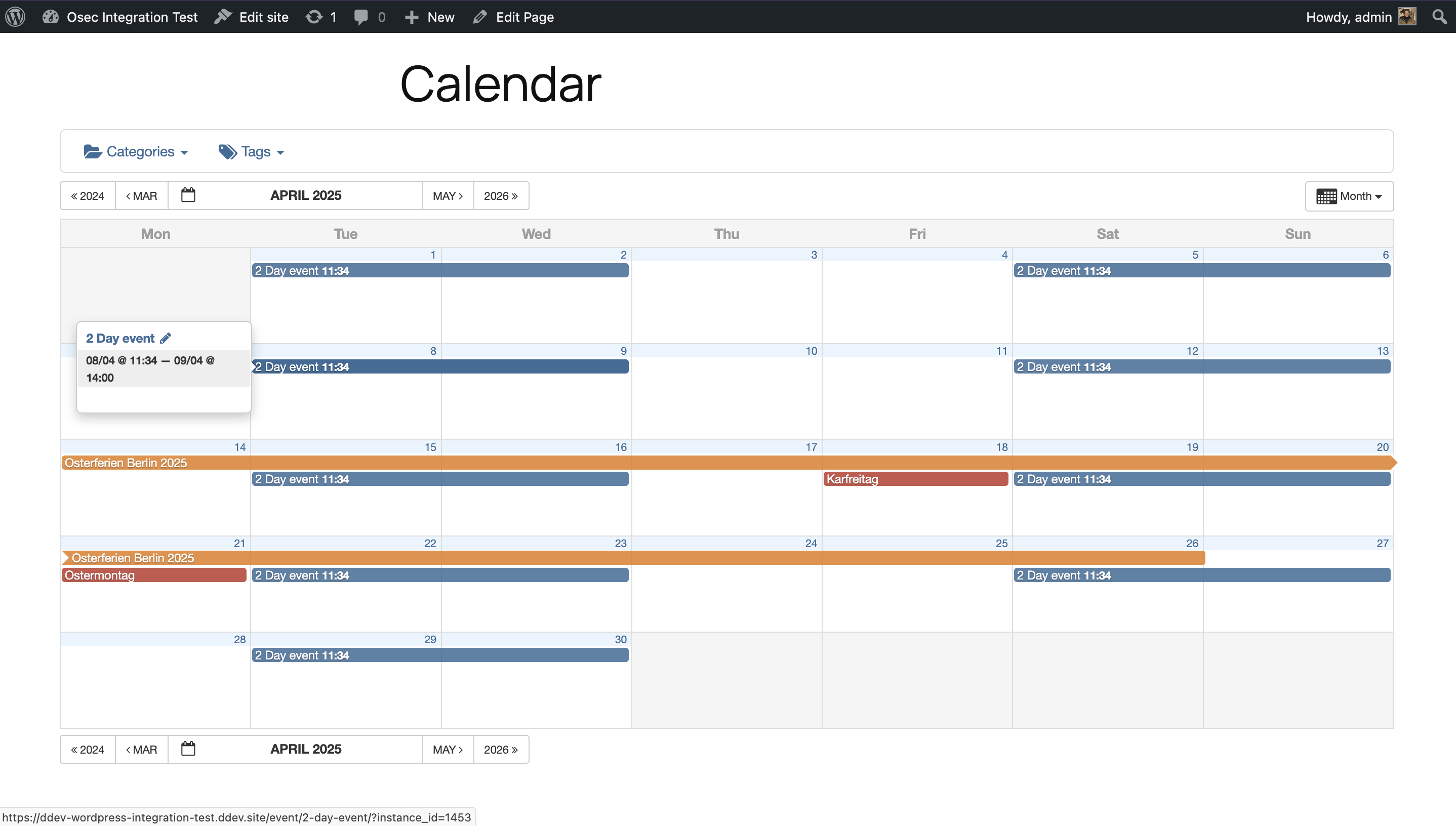
Month view
An event calendar with native iCal / ICS import and export
Features
All features are provided in their entirety. No features are locked behind any add-ons.
- Full iCal / ICS import & export
- Automatically import external calendars
- Categorize and tag imported feeds
- Recurring events, including complex recurrence rules (RFC 5545)
- Filtering by category and tag
- Calendar sharing with Google Calendar, Apple iCal, Outlook, and any other system that accepts iCalendar (.ics) feeds
- Month, week, day, and agenda views
- Upcoming Events Gutenberg block
- Direct links to filtered calendar views
- Color-coded events by category
- Featured event images and category images
- SEO-optimized event pages
- Mobile-friendly and responsive layouts
- Embedded OpenStreetMap
- Theme options to customize your calendar appearence
- Your calendar can be embedded into a WordPress page without needing to create template files or modify the theme.
Import events from other calendars and offer users the ability to subscribe to your calendar.
Importing and exporting iCalendar (.ics) feeds is one of the strongest features of the Event Calendar system. This allows you to manage your websites calendar by providing a public calendar from your Google, Apple or other calendar management software.
Blocks
You can embed the calendar by adding a OSEC Calendar Block to any page or post. Alternatively there is a shortcode available.
[!WARNING]
At this time, only one calendar per page or post is supported.
On the long run it’s planned to have a Rest API to allow the calendar being rendered with more modern frontend tools than the current, outdated, but nice old Bootstrap 3 stuff.
Shortcodes
Calendar Views
[osec]                       // Default view per settings
[osec view="monthly"]
[osec view="weekly"]
[osec view="agenda"]
[osec view="daily"]
Filtering
By category
[osec cat_name="Holidays"]
[osec cat_name="Lunar Cycles,zodia-date-ranges"]
[osec cat_id="1"]
[osec cat_id="1,2"]
By tag
[osec tag_name="tips-and-tricks"]
[osec tag_name="creative writing,performing arts"]
[osec tag_id="1"]
[osec tag_id="1,2"]
By post ID
[osec post_id="1"]
[osec post_id="1,2"]
Requirements
- WordPress: 6.7 or newer
- PHP:
- PHP 8.2+ required for development
- PHP 8.1 may work for production builds when installed with
composer install --no-dev
WP-CLI
Rebuild recurring event instances. Instances are only written when an event is saved. After an update that fixes recurrence, regenerate them. Rows left behind by deleted event posts are removed along the way.
wp osec event regenerate --dry-run              # what would happen
wp osec event regenerate --yes                  # all events
wp osec event regenerate 123 456                # some events
wp osec event regenerate --feed=3               # events of one feed
wp osec event regenerate --yes --resave         # save like the editor does, firing all save hooks
wp osec event regenerate --yes --start-after=4711   # resume an interrupted run
Events are processed in batches (--batch-size, default 500). Every batch line prints the --start-after value to resume with, so any number of events can be processed.
Update feeds now, instead of waiting for the scheduled import. Problems are printed to the console instead of being stored as admin notices.
wp osec feed list
wp osec feed update --yes                       # all feeds
wp osec feed update 3                           # one feed
wp osec feed update 3 --force                   # break the lock a crashed import left behind
Only use --force when no other import of that feed is running, or events may be imported twice. A feed is imported in one go: a feed of 10,000 events needs about 150 MB of PHP memory (php -d memory_limit=256M $(which wp) osec feed update 3).
To give a slow feed server more time than the default 120 seconds, use WordPress’ http_request_args filter:
`php
add_filter(‘http_request_args’, function ($args, $url) {
if (str_starts_with($url, ‘https://slow.example.org/’)) {
$args[‘timeout’] = 300;
}
return $args;
}, 10, 2);
`
The commands run per site. On multisite, loop over the sites:
wp site list --field=url | xargs -I{} wp --url={} osec event regenerate --yes
Exit code is 1 if any event or feed failed.
Languages
OSEC supports multiple languages
This Is a Fork
OSEC is a fork of the GPL licensed plugin All-in-one-Event-Calendar by Timely. At it’s time a great plugin with a solid but unmaintainable codebase (not all required developer tools where opensourced).
If you love truly open source software and don’t mind to get your hands dirty you should join here. Free people need free software to manage and share events in a selfhosted manner.
External services
OSEC may connect to OpenStreetMap to render maps. If you using maps feature make sure you agree with Terms of Service
OSEC may connect to OpenStreetMap Nominatim geocoding API. Terms of Service.
You may need to switch the servive on a heavy traffic site as Nominatim allows an absolute maximum of 1 request per second.
Leaflet and leaflet-control-geocoder are bundled with the plugin, so rendering a map does not request
them from a third party.
You can load them from elsewhere, for example a CDN, using the hooks osec_leaflet_library_alter and
osec_leaflet_geocoder_library_alter.
Migration Notes
Database structure is not fully compatible with All-in-One Event Calendar v2.3.4
Migration may be possible with manual effort
A standardized upgrade path may be developed if there is demand and contributions
See this wiki for currently known information on migrating.
Development & Support
The principle behind this plugin is to be Open Source. Get in touch on GitHub to report issues, propose feature enhancements, and get general guidance for contributing.
Writing this fork was a huge effort.
Digitaldonkey believes everybody should be able to set up and manage public calendars.
If you are implementing this plugin for others you should support ongoing development with a donation or contribution.
Those wishing to contribute to the development of this project, please see the Development Guide for more information.