


OnCue Liveblogging
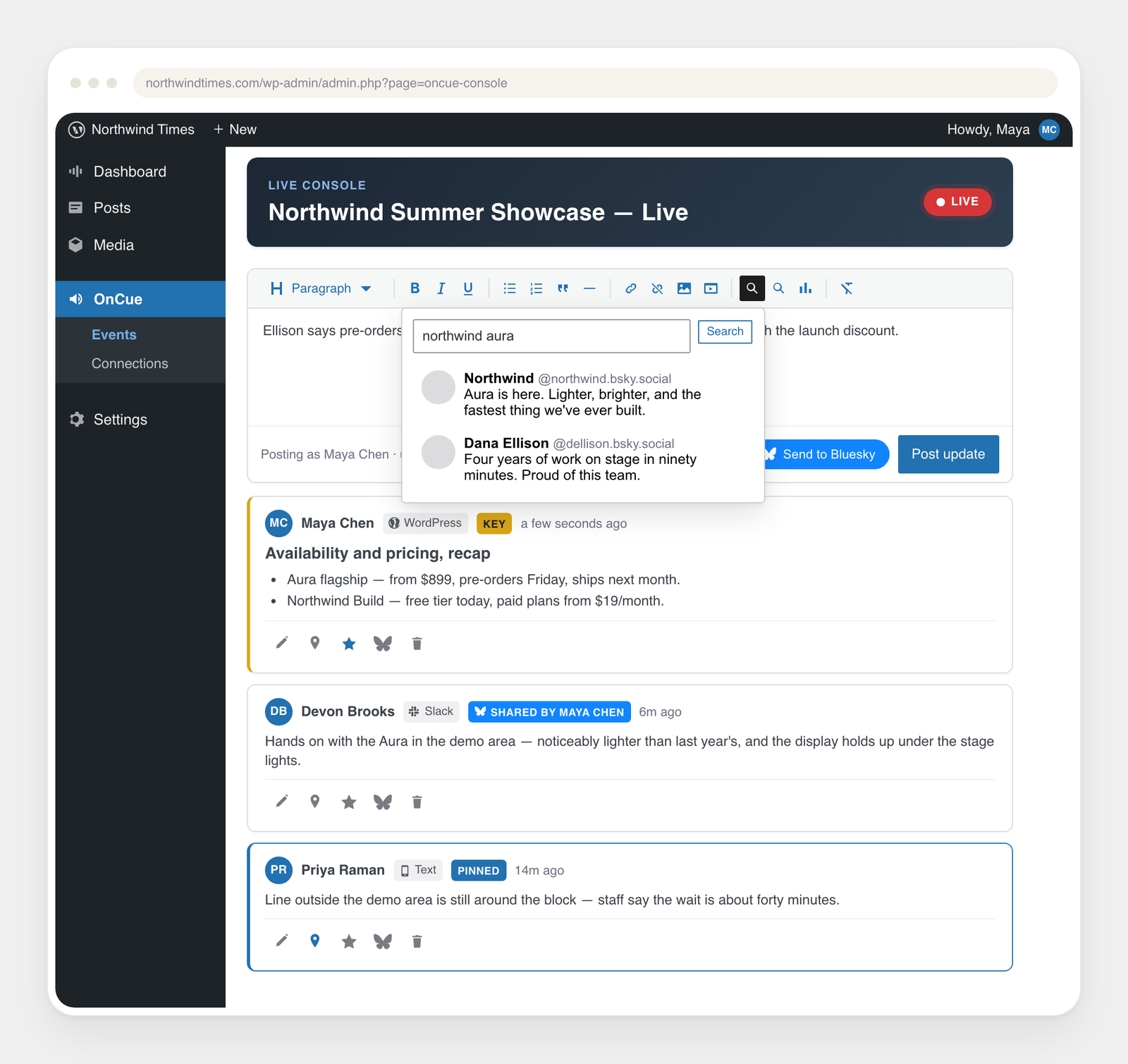
The live console: post, edit, and pin updates while the event runs.
OnCue’s core is a real-time liveblog posted from the WordPress admin: create an
event, drop the OnCue block into a post, and post updates from the live console.
Everything beyond the core is an opt-in module, off by default:
- Slack ingestion — a dedicated channel becomes the liveblog feed.
- Telegram ingestion — a bot in a group (or DM) posts every message.
- More Coverage — a linked-headline list of the publication’s own articles for the event.
- Reader share cards — per-entry share row posting rich Open Graph cards.
- Moderation gate — per-event approval queue for contributors’ posts.
A disabled module registers no REST routes and schedules no jobs; the attack
surface is exactly the set of enabled features.
Security note on stored secrets
OnCue encrypts stored channel credentials (Slack/Telegram tokens and secrets)
at rest with libsodium, on by default. The encryption key never lives in the
database, so a database dump alone cannot decrypt them. Key source:
ONCUE_ENCRYPTION_KEYinwp-config.php(a 32+ char random string) if you
set one — preferred, because you can rotate it independently of WordPress; or- your existing WordPress security keys (AUTH_KEY etc.), which are already in
wp-config.php — so encryption works with no extra setup on any properly
installed site.
Only a site with neither (no real salts and no dedicated key) falls back to
plaintext, and the Connections screen flags that loudly.
What is not encrypted, by design: liveblog entries and other public content
(they are served to readers; encrypting them would break the live stream), and
non-secret identifiers like the house-account user ID or the public Slack
client ID. Encrypting the whole database or disk is the host’s responsibility
(encrypted volumes / MySQL TDE), not a plugin’s.
Changing the key source (e.g. rotating WordPress salts without setting a
dedicated key) makes previously stored credentials undecryptable — re-enter
them under Connections if that happens.
Typography
The reader inherits the host theme’s fonts throughout, including buttons and
form controls. The generated share-card image uses the site’s own typeface
too: OnCue resolves the theme’s body font (theme.json / Font Library) to a
local TTF/OTF file for GD. If the theme ships fonts only as woff2 (which GD
cannot read), upload a TTF of the same family to the Font Library, or point
the oncue_card_font filter at a font file; otherwise the card falls back to
GD’s built-in font.
External services
OnCue does not phone home and ships with every integration off. It contacts a
third-party service only when you enable that integration and provide your own
account or API key, and only to deliver the feature you turned on. Nothing is
sent to OnCue’s authors. The services, what triggers a request, and what data
leaves your site:
When you save a connection’s keys on the Connections screen, OnCue also makes
one small request to that service to confirm they work — a sign-in, an account
or model lookup, or, for Microsoft Teams and Google Chat webhooks (which can’t be
checked any other way), a one-line test message into the channel you connected.
These checks send your keys to the service they belong to and no liveblog
content.
- Slack (ingestion / relay) — only if you connect Slack. Sends liveblog entries
you relay out, and receives messages from a channel you designate. Terms:
https://slack.com/legal — Privacy:
https://slack.com/trust/privacy/privacy-policy - Telegram (ingestion / relay / contributor sign-in) — only if you connect a
Telegram bot. Sends relayed entries and receives messages from the bot’s chat.
Separately, once a bot is connected, OnCue loads Telegram’s official login
widget script (https://telegram.org/js/telegram-widget.js) inside wp-admin so
contributors can link their Telegram account in one click; Telegram receives
the request for that script and the sign-in it performs. That script is never
loaded on the public side of your site, and never loaded at all until you
connect a bot. Contributors who prefer not to use it can link by opening the
bot in the Telegram app instead. Terms: https://telegram.org/tos — Privacy:
https://telegram.org/privacy - Twilio (SMS relay) — only if you connect Twilio. Sends entry text to the
numbers you configure. Terms: https://www.twilio.com/en-us/legal/tos —
Privacy: https://www.twilio.com/en-us/legal/privacy - Facebook Messenger / Meta (ingestion) — only if you connect a Facebook Page.
Receives messages sent to your Page through the webhook you register with
Meta; when you save the Page token, OnCue looks up the Page’s name
(graph.facebook.com) to confirm it works. Terms:
https://www.facebook.com/legal/terms — Privacy:
https://www.facebook.com/privacy/policy - Microsoft Teams / Google Chat / Signal (relay) — only if you connect them.
Sends relayed entry text to the webhook/space you configure. Microsoft:
https://www.microsoft.com/servicesagreement — Google:
https://policies.google.com/terms — Signal: https://signal.org/legal/ - Bluesky / ATProto (curation / relay) — only if you connect a Bluesky account.
Searches public posts and, if enabled, mirrors marked entries out. Terms:
https://bsky.social/about/support/tos — Privacy:
https://bsky.social/about/support/privacy-policy - Threads / Meta (relay) — only if you connect a Threads account by pasting a
long-lived access token. Publishes the entries you mark into one thread on
that account (via graph.threads.net) and periodically refreshes the token.
Nothing is sent unless you enable Threads for an event and mark a post. Terms:
https://www.facebook.com/legal/terms — Privacy:
https://privacycenter.instagram.com/policy - YouTube Data API (coverage) — only if you add a YouTube API key. Sends search
queries for the event’s coverage. Terms: https://www.youtube.com/t/terms —
Google Privacy: https://policies.google.com/privacy - Google Analytics (Stats) — only if you enable the analytics bridge and/or add
a GA4 service-account key. Reader interactions flow through the Google tag
already on your pages (your tag’s consent tooling governs them); Stats reads
aggregate figures back from your own GA4 property. Terms:
https://marketingplatform.google.com/about/analytics/terms/us/ — Privacy:
https://policies.google.com/privacy - AI providers for the “Key highlights” summary (Crawler) — only if you choose a
provider and add your own key. The chosen event’s own updates and coverage are
sent to generate the summary. Anthropic:
https://www.anthropic.com/legal/consumer-terms /
https://www.anthropic.com/legal/privacy — OpenAI:
https://openai.com/policies/terms-of-use /
https://openai.com/policies/privacy-policy — Google Gemini:
https://ai.google.dev/gemini-api/terms /
https://policies.google.com/privacy — Self-hosted / OpenAI-compatible: governed
by the endpoint you point it at.
Development
The complete, unminified sources for the block editor and console bundles ship
in src/ inside this plugin, alongside the webpack.config.js used to build
them.
npm install && npm run buildbuilds the block editor and console bundles.npm run env:startboots a local WordPress with the plugin active (requires Docker).