

Oasis Workflow
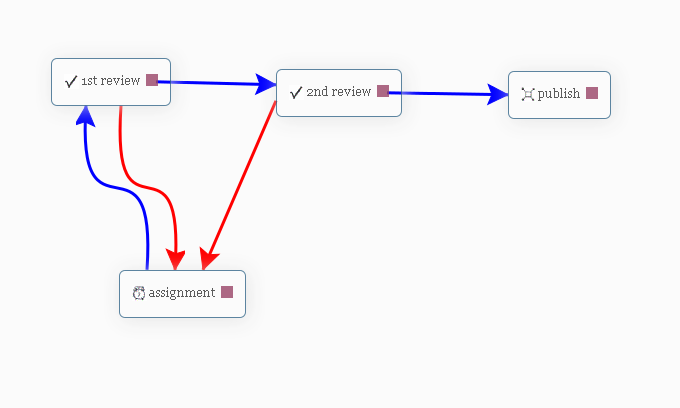
Visual Work flow designer - 2 step review process
Oasis Workflow is a powerful feature rich plugin designed to automate any editorial workflow process using a simple, intuitive drag and drop interface.
Typical users/audience for Oasis Workflow
- WordPress sites with multiple authors that are looking to manage their content review and publication process more efficiently.
- Industries like healthcare, law firms, financial firms, universities, CPA firms, non-profits, news outlets and blogs, that publish articles regularly and need a formal review process.
- Industries with strict auditing requirements where they need to track who made the change, when was the change made and what was changed.
The plugin provides three simple process/task templates:
- Assignment – represents task related to content generation.
- Review – represents task related to content review.
- Publish – represents the actual “publish” or “review and publish” task.
Visual Work flow Designer
– Configure your workflow using our easy drag and drop designer interface. See screen shots for more detail.
Role-Based routing definitions allow you to assign tasks dynamically
– By using role-based routing, you can ensure that your process moves forward as quickly as possible without sacrificing accountability.
Inbox
– Users can view their current assignments and sign off their tasks once it’s completed.
Custom Statuses
– Define custom statuses for your editorial workflow. With custom statuses you can define your own post statuses and assign it to the success or failure path of the workflow.
Process history lets users retrace their steps
– For auditing purposes a record is created every time an article is routed through a workflow process. The process history also captures the comments added by the user during task sign off.
Reassign – How to pass the buck?
– What if you have been assigned a workflow task, but you feel you are not the appropriate person to complete it? No worry, you can use the re-assign feature to pass the task to another person.
Due Date and Email reminders help you to publish your articles on time.
Out of the box workflow
– To get you started, the plugin comes with two out of the box workflow – Single Level Review Workflow, and Multi Level Review Workflow. You can modify the workflow to suit your needs.
If you are looking for additional functionality, check out our “Pro” version – Oasis Workflow Pro: https://www.oasisworkflow.com/pricing-purchase
It comes with additional features like,
- Revise published content and add workflow support to revised content – Use workflow to edit your published content while keeping the published article online.
- Auto Submit – Allows you to automatically submit to workflow(s) with certain conditions.
- And add-ons, like “Editorial Contextual Comments”, “Editorial Checklist”, “Teams”, “Front End shortcodes”, “Groups”
- And much more..
If you want to try out the “Pro” features, send us a message at Request a Demo Site and we will setup a demo site for you to try out the “Pro” features. As a bonus, we will also add our add-ons to the demo site.
More details for each feature, screenshots and documentation can be found on our website.
AI-Powered Workflow Management (WordPress 6.9+)
Oasis Workflow integrates with the WordPress Abilities API, allowing AI assistants like Claude, ChatGPT, or Gemini to manage your entire editorial workflow through natural language. Ask your AI to submit posts, check inboxes, sign off tasks, build workflows, and generate analytics — all without touching the admin panel.
Requirements:
- WordPress 6.9 or later (Abilities API support)
- An MCP-compatible AI tool (Claude Desktop, VS Code with Claude, Cursor, Windsurf, etc.)
- A WordPress MCP server connection (e.g., WP MCP Ultimate plugin, official WordPress MCP adapter, or any compatible MCP server)
What you can do with AI:
-
Query & Inbox
- Get inbox tasks and counts for any user
- Check workflow status of any post
- List unsubmitted posts ready for workflow
- View available workflows and their steps
-
Workflow Actions
- Submit posts to workflow with assignees and due dates
- Sign off, approve, or reject tasks
- Complete workflows (publish)
- Abort, claim, or reassign tasks
- Bulk submit and bulk sign-off multiple posts at once
-
Workflow Builder
- Create workflows from natural language descriptions
- Add, update, or remove steps
- Configure connections and routing
- Validate, duplicate, or delete workflows
- Export and import workflow definitions as JSON
-
Analytics & History
- View post sign-off history and audit trail
- Get workflow throughput statistics
- Analyze step duration and bottlenecks
- Check user workload distribution
- Generate activity summaries
-
Configuration
- View and update step email templates
- Check plugin settings and claim status
Registered Abilities (36 total):
oasis-workflow/get-valid-workflows · `oasis-workflow/get-first-step` · `oasis-workflow/get-inbox` · `oasis-workflow/get-inbox-count` · `oasis-workflow/get-post-workflow-status` · `oasis-workflow/get-signoff-next-steps` · `oasis-workflow/get-step-users` · `oasis-workflow/get-post-history` · `oasis-workflow/list-workflows` · `oasis-workflow/check-claim-status` · `oasis-workflow/get-settings` · `oasis-workflow/get-unsubmitted-posts` · `oasis-workflow/submit-to-workflow` · `oasis-workflow/sign-off` · `oasis-workflow/workflow-complete` · `oasis-workflow/abort-workflow` · `oasis-workflow/claim-task` · `oasis-workflow/reassign-task` · `oasis-workflow/create-workflow-from-template` · `oasis-workflow/update-workflow-step` · `oasis-workflow/add-workflow-step` · `oasis-workflow/remove-workflow-step` · `oasis-workflow/update-workflow-connections` · `oasis-workflow/validate-workflow` · `oasis-workflow/delete-workflow` · `oasis-workflow/duplicate-workflow` · `oasis-workflow/get-workflow-throughput` · `oasis-workflow/get-step-duration-stats` · `oasis-workflow/get-user-workload` · `oasis-workflow/get-workflow-activity-summary` · `oasis-workflow/get-step-email-templates` · `oasis-workflow/update-step-email-templates` · `oasis-workflow/bulk-submit-to-workflow` · `oasis-workflow/bulk-sign-off` · `oasis-workflow/export-workflow` · `oasis-workflow/import-workflow`
Quick Setup:
- Connect your WordPress site to an MCP server using any compatible plugin — for example, WordPress MCP Adapter, WP MCP Ultimate, or any other plugin that provides MCP server support
- Add the MCP server configuration to your AI tool (Claude Desktop, VS Code, etc.)
- Start asking your AI to manage workflows using natural language prompts like the examples below
Example Prompts:
- “Create a 3-step editorial workflow for blog posts: Author writes draft, Editor reviews, then Publisher approves and publishes”
- “Build a product catalog workflow with Content Writer, SEO Reviewer, and Marketing Manager approval before publishing”
- “Show my inbox — what tasks are waiting for me?”
- “Sign off all pending review tasks in my inbox as approved”
- “Complete all tasks that are on the last step and ready to publish”
- “What’s the average time posts spend in the Review step? Show me bottleneck analysis”
- “Give me a workload summary — how many tasks does each team member have right now?”
- “Export our Editorial Review workflow as JSON so I can import it on the staging site”
Supported languages
- English
- Spanish
- French
- Italian
- Swedish
- Ukrainian
- Russian
Translators
- French (fr_FR) – Baptiste Rieg
- Italian (it_IT) – Martino Stenta
- Swedish (sv_SE) – Norbert Kustra
- Ukrainian (uk) – Andy Prokopchuk
If you need help setting up the roles, we recommend Capability Manager Enhanced plugin OR User Role Editor plugin.
Oasis Workflow adds a few custom capabilities to manage your workflows. Check out Oasis Workflow Custom Capabilities
Videos to help you get started with Oasis Workflow
Creating and Editing a workflow
How it works? See the workflow in action.
Modify a workflow which has posts/pages currently in progress
How to manage published content via workflow – revise published content (applicable to “Pro” version only)