

Nubivio Security Headers, security.txt & NIS2 Compliance for Healthcare
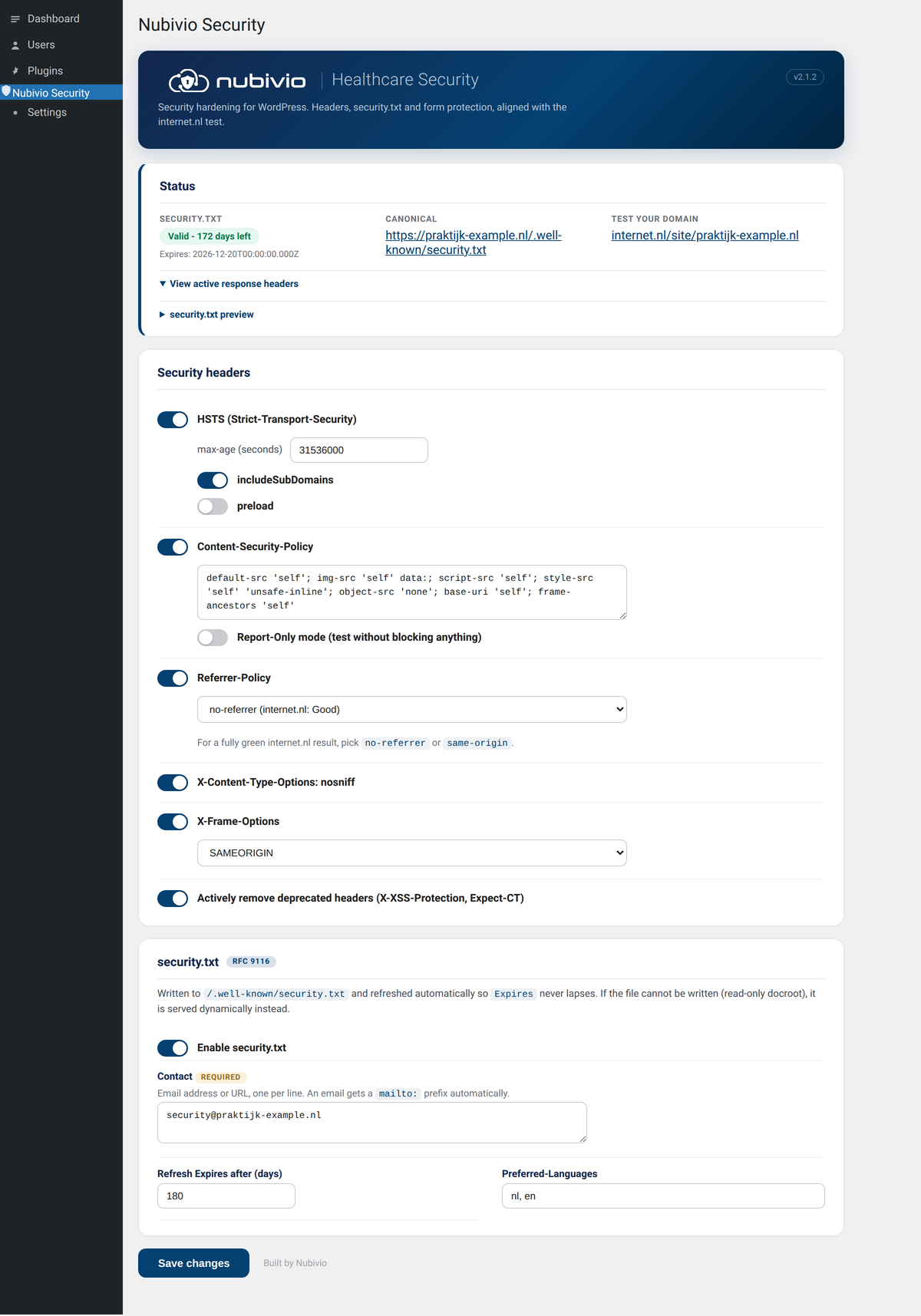
The Nubivio Security settings page: header status card with the live security.txt state, the security headers section with per-header toggles, and the RFC 9116 security.txt fields.
Set the security headers that matter, publish a self-renewing security.txt (RFC 9116), and check your site against NIS2, the EU Cyber Resilience Act (CRA), GDPR and NEN 7510, all from one settings page. Built for general practitioners, psychologists and other healthcare professionals who need a defensible security baseline without a consultant.
The defaults are safe to ship on a live site, and the plugin is built to move your score on the internet.nl test in the right direction. The compliance features are optional and read-only: they verify and document what you already have, and never change your hardening.
PHP2Shell check (new in 2.6.0)
PHP2Shell is the name for two critical PHP vulnerabilities, CVE-2026-109618 and CVE-2026-109619 (CVSS 9.2), that allow remote code execution without logging in. The plugin checks the version of the PHP process that actually serves your site, not a guess from response headers.
- PHP 8.2.35, 8.3.36, 8.4.27 and 8.5.12 (21 October 2026) contain the fix. Older versions in those branches are reported as vulnerable.
- PHP 8.1 and older are no longer supported by the PHP project and have no official release with the fix. The plugin reports them as vulnerable unless the host confirms a backport, and advises an upgrade.
- Distribution builds (for example Ubuntu or Debian) may carry a backported fix under an older version number. The plugin then reports “verify with host” and asks you to compare the package version with the distribution advisory, instead of calling the site vulnerable.
- It also checks
session.upload_progress.enabled. If it is on, the plugin advises setting it to 0, as PHP recommends. That is a temporary measure and does not replace the update. - The result appears on the Compliance tab and in WordPress Site Health (Tools, Site Health).
- The check only reads version and ini values, makes no network requests and changes nothing. A plugin cannot change PHP: the update has to be done by your hosting provider or server administrator.
- Sources: NCSC-NL (https://github.com/NCSC-NL/php2shell) and the PHP security advisories GHSA-w8hw-w9fx-j79w and GHSA-6wmf-4rv5-p3rp.
Why healthcare sites use this
- One click to a strong header set and a valid security.txt, the two things the internet.nl test and most security reviews check first.
- An optional Compliance tab that turns those headers and your security.txt into evidence, mapped to NIS2 Art. 21, CRA Art. 14 and GDPR clauses.
- A compliance score with a plain-language breakdown, so you know where you stand and what to fix next.
- Available in English and Dutch.
It covers four areas:
Security headers
- Strict-Transport-Security (HSTS) with configurable max-age, includeSubDomains and preload
- Content-Security-Policy with an internet.nl compliant baseline and a Report-Only test mode
- Referrer-Policy with the internet.nl rating shown per value
- X-Content-Type-Options (nosniff)
- X-Frame-Options
- Permissions-Policy
- Active removal of the deprecated X-XSS-Protection and Expect-CT headers
- Optional COOP, COEP credentialless, CORP and an extended Permissions-Policy
security.txt (RFC 9116)
- Writes /.well-known/security.txt and serves it dynamically when the docroot is read-only
- Refreshes the Expires field automatically so it never lapses and stays under one year
- Fields for Contact, Encryption, Policy, Acknowledgments, Hiring (careers), CSAF, Preferred-Languages and Canonical
- Paste your PGP public key and the plugin hosts it at /.well-known/openpgp-key.txt and links it as Encryption automatically
- A free-text message to researchers and an optional signature line
- CRLF line endings and a valid Canonical URL, exactly as the internet.nl test expects
Compliance scanner (optional, new in 2.2.0)
- A Compliance tab with a single compliance score and a red / amber / green band
- CRA plugin readiness: checks each active plugin against the WordPress.org directory for update currency, compatibility and abandonment
- GDPR checks: detects third-party scripts, forms and consent tooling, and cross-references your Content-Security-Policy
- NIS2 Art. 21 signals: encryption in transit, MFA, backups, WAF, activity logging and auto-updates
- Site health checks: security.txt validity, live header verification, WordPress and PHP currency, TLS, debug mode, XML-RPC and REST user exposure
- WordPress core integrity: verifies your core files against the official WordPress.org checksums and reports modified or missing files (new in 2.3.0)
- Access and integrity: an approved administrator baseline, recently created admins, roles and users with unexpected administrator capabilities, an application password audit, a must-use plugin audit and a siteurl sanity check (new in 2.3.0)
- Live verification that your configured security headers are actually being sent, not just set
- Security headers and security.txt shown as compliance evidence, mapped to the relevant NIS2, CRA and GDPR clauses
- HSTS preload readiness, DNS health (SPF, DMARC, DKIM, CAA, MTA-STS, DNSSEC and AAAA), CSP report-only inventory and violation viewer, SRI detector, and TLS certificate overview (new in 2.4.0)
- One-click documents generated from your own settings: a Vulnerability Disclosure Policy, a CycloneDX SBOM, an EU and NEN 7510 conformity declaration, and a printable compliance report
- Exposure scan: checks your own site for publicly reachable files and listings such as /.git, /.env, wp-config backups, debug.log, an open uploads directory and user enumeration (new in 2.6.0)
- Redirect chain check: follows the http, https and www variants of your domain and reports chains that skip HTTPS or HSTS (new in 2.6.0)
- Domain registration check via RDAP (opt-in): expiry date, transfer lock and DNSSEC delegation of your domain (new in 2.6.0)
- Certificate Transparency check via crt.sh (opt-in): lists the issuers of certificates for your domain and warns about new issuers or issuers outside your CAA record (new in 2.6.0)
- Risk scenarios: combines signals from the scan into a short list of attack scenarios, each with the underlying signals and a first step. Scenarios are based on signals, not confirmed vulnerabilities or intrusions (new in 2.6.0)
Gravity Forms (optional)
- Block submissions from one or more email domains, with a custom error message
- The section only appears when Gravity Forms is active
This plugin configures headers and a security.txt and helps you document your posture. It is one building block toward NIS2, CRA, GDPR and NEN 7510, not a full compliance programme, and the generated documents are self-assessment starting points, not certifications. It cannot change DNS or server level items such as IPv6, the CAA record, the TLS key-exchange hash or DANE. Those are handled at your host or DNS provider.
External Services
The core hardening features (security headers and security.txt) make no external requests. The optional Compliance tab, introduced in 2.2.0, uses the following external services only when you run a scan (manually or via the optional scheduled scan). Nothing here runs on normal front-end page loads.
WordPress.org Plugins API
When a compliance scan runs, the plugin looks up each active plugin in the WordPress.org Plugins directory to check update currency and compatibility.
- What is sent: the public plugin slug only (for example, “akismet”). No personal data, no site data.
- When: only during a manual or scheduled compliance scan.
- Endpoint: https://api.wordpress.org/plugins/info/1.0/{slug}.json and https://api.wordpress.org/core/version-check/1.7/
- Caching: results are cached in a transient for 12 hours.
- This is a first-party WordPress.org endpoint. Terms: https://wordpress.org/about/privacy/
WordPress.org Checksums API
When a compliance scan runs, the plugin retrieves the published MD5 checksums for your WordPress version so it can verify that your core files have not been altered.
- What is sent: your WordPress version and site locale (for example, “6.8” and “nl_NL”). No personal data, no site data, no file contents. Files are hashed locally and only the hashes are compared.
- When: only during a manual or scheduled compliance scan.
- Endpoint: https://api.wordpress.org/core/checksums/1.0/
- Caching: the checksum list is cached in a transient for 12 hours (1 hour if the request fails).
- This is a first-party WordPress.org endpoint. Terms: https://wordpress.org/about/privacy/
Loopback self-request (header and REST probe)
When a compliance scan runs, the plugin makes a request to its own home URL to verify that the configured security headers are actually being sent and to check whether the REST users endpoint exposes user data.
- What is sent: a normal HTTP GET to the site’s own home URL. No third-party service is contacted.
- When: only during a manual or scheduled compliance scan, or admin/cron context. Never on normal front-end page loads.
- Timeout: short (8 seconds). Result cached in a transient for 10 minutes.
- If the request fails (some hardened hosts block self-requests), the plugin falls back to showing configured values and reports that live verification was unavailable.
- Since 2.6.0 the exposure scan and the redirect chain check also send a small number of GET requests to your own domain (the http, https and www variants and a fixed list of paths such as /.git/HEAD and /.env). Only the status code and a yes/no result are kept. No third-party service is contacted.
RDAP domain registration lookup (optional, off by default)
When you turn on “Domain registration check via RDAP”, the plugin looks up the registration of your domain with RDAP, the successor of Whois.
- What is sent: your registered domain name only (for example, “example.nl”). No personal data, no site content.
- Step 1: the IANA RDAP bootstrap file is downloaded to find the RDAP server for your top-level domain. Endpoint: https://data.iana.org/rdap/dns.json. The IANA website is operated by Public Technical Identifiers (PTI), an affiliate of ICANN. Privacy policy: https://www.icann.org/privacy/policy. Terms of service: https://www.icann.org/privacy/tos
- Step 2: your domain name is sent to the RDAP server of your domain’s registry, as listed in that bootstrap file. For .nl this is SIDN (https://rdap.sidn.nl/), privacy information: https://www.sidn.nl/en/nl-domain-name/sidn-and-privacy and https://www.sidn.nl/en/about-sidn/privacy. For .com this is Verisign (https://rdap.verisign.com/com/v1/), terms of service: https://www.verisign.com/domain-names/registration-data-access-protocol/terms-service/index.xhtml. Other registries publish their own terms, usually linked in the RDAP response.
- When: only during a manual or scheduled compliance scan, and only when the setting is on. Never on normal page loads.
- Caching: the bootstrap file is cached for 7 days, the domain result for 24 hours (1 hour after a failed request). Timeout 10 seconds.
- How to turn it off: Settings, Nubivio Security, External sources (opt-in), untick “Domain registration check via RDAP”. When it is off, no request is made.
crt.sh Certificate Transparency search by Sectigo (optional, off by default)
When you turn on “Certificate Transparency check via crt.sh”, the plugin asks crt.sh which certificates have been issued for your domain, using the public Certificate Transparency logs.
- What is sent: your registered domain name only (for example, “example.nl”), in two queries: the domain itself and its subdomains. No personal data, no site content. The plugin makes no requests to the subdomains it finds.
- Endpoint: https://crt.sh/?q={domain}&output=json and https://crt.sh/?q=%25.{domain}&output=json
- crt.sh is operated by Sectigo Limited. Terms of use (crt.sh is listed as a Sectigo site): https://www.sectigo.com/terms-of-use. Privacy policy: https://www.sectigo.com/privacy-policy
- When: only during a manual or scheduled compliance scan, and only when the setting is on. Never on normal page loads.
- Caching: results are cached for 24 hours (1 hour after a failed request). Timeout 10 seconds, response limited to 2 MB and 500 certificates. If crt.sh is unavailable, the scan continues without it.
- How to turn it off: Settings, Nubivio Security, External sources (opt-in), untick “Certificate Transparency check via crt.sh”. When it is off, no request is made.
Cloudflare DNS over HTTPS (optional)
When you opt in to DNSSEC validation through Cloudflare DoH, the plugin sends only the site hostname to Cloudflare’s DNS resolver.
- What is sent: the site hostname. No personal data or site content.
- When: only during a manual or scheduled compliance scan, and only when the optional DNSSEC DoH setting is enabled.
- Endpoint: https://cloudflare-dns.com/dns-query
- Caching: response is cached in a transient for 6 hours.
Local CSP report endpoint
When CSP report-only is enabled, browsers may POST reports to the local endpoint /wp-json/nubivio-hsh/v1/csp-report. This is not an outbound or third-party service call. Reports are rate-limited and stored as a rolling local option buffer.