

NotifReach: Push Notifications
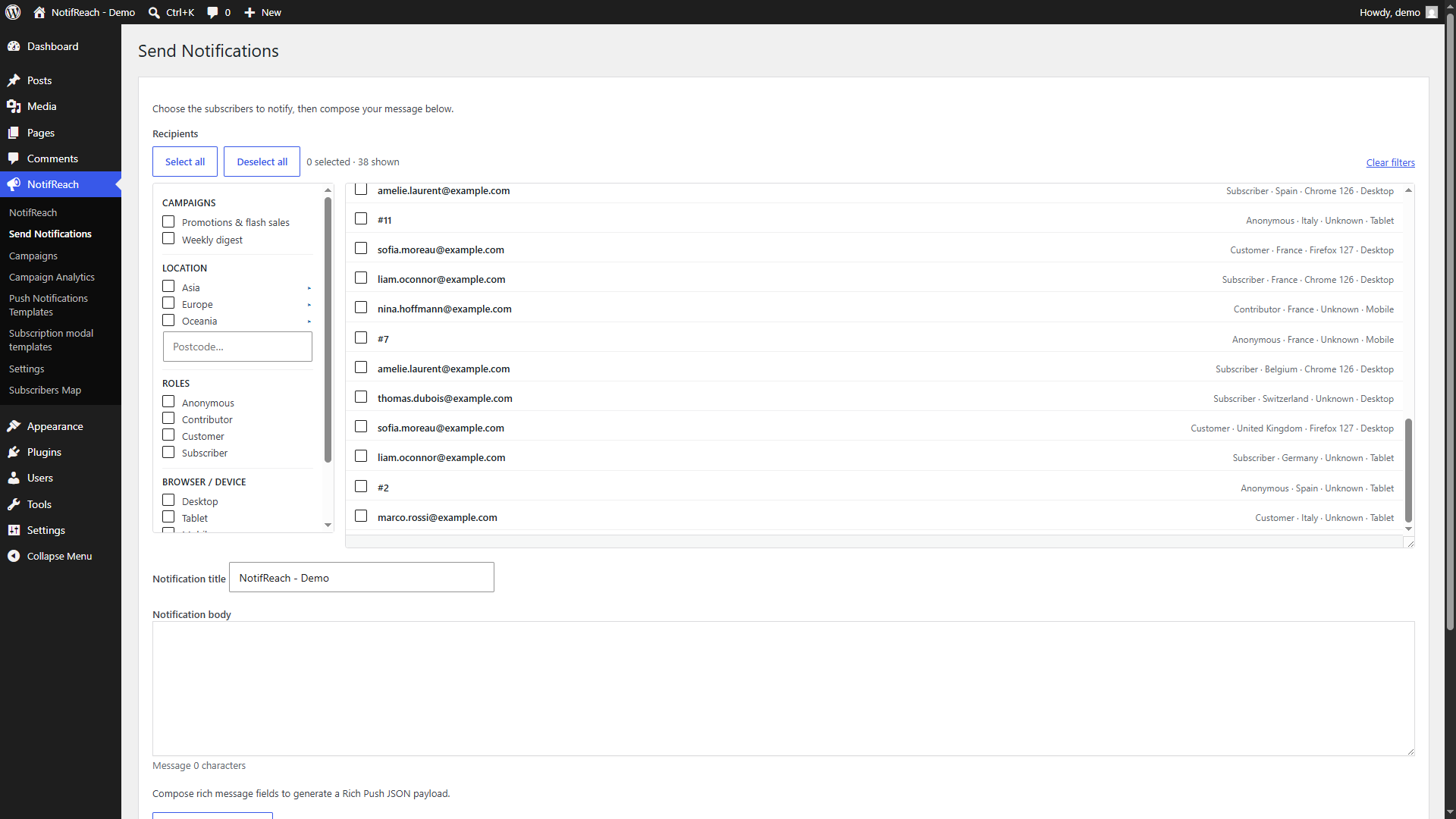
Send screen: filter your subscribers by campaign, location, role or device, select the recipients, and compose a rich notification.
Send web push notifications to your visitors’ browsers and devices using Firebase Cloud Messaging (FCM HTTP v1). Visitors opt in from the frontend with a single toggle button; from there you can notify them manually, automatically in response to any WordPress or plugin event, or through scheduled and recurring campaigns with click and conversion analytics. There is no limit on how many subscribers you collect.
Two ways to connect
- Managed notification service — get a free NotifReach license in one click from the plugin settings and start sending straight away: no Google Cloud project, no Firebase project, no OAuth setup. A free license covers 5,000 notifications per calendar month, on one site.
- Your own Firebase project — connect your Google OAuth2 client and your Firebase credentials, and your site talks to FCM directly, with no volume limit and no third-party service in between.
You pick one in Settings Connection and can switch at any time. The managed service is preselected on a new install, but it stays entirely inactive until you ask for a license: nothing leaves your site before you click.
Collecting subscribers
- Subscribe/unsubscribe toggle button via shortcode, reflecting its state with
subscribed/unsubscribedCSS classes. - Subscription modal whose content comes from a dedicated, translatable custom post type (“Subscription modal templates”) edited with the native WordPress editor — not indexed on the frontend.
- All subscription fields are optional and selectable (phone, email, first name, last name). Only the device token is required; an email is needed only if you want to create or link a WordPress user account.
- Decoupled feedback messages: a feedback shortcode you can place anywhere, rendered inline, as native WordPress (Gutenberg) snackbar toasts, or both. A JavaScript event is also dispatched for fully custom rendering.
- Placement and styling presets for the button and the modal (inline or fixed corners, accent colour, custom classes), with a shortcode builder and live preview in the settings.
- Works with any form plugin or custom UI: bind the plugin to your own selectors, or trigger a subscription by dispatching the
icfp:external-subscribeJavaScript event. - Resilient subscriptions: device tokens are refreshed automatically when they rotate, renewed subscriptions are recovered by the service worker, and dead tokens are pruned.
Sending notifications
- Send screen with a filterable, paginated recipient selector (filter by campaign, location, role, browser/device; select across the whole filtered list) and a rich message composer: title, body, click URL with a page/post picker, icon, badge, hero image, media pickers, live preview, and action buttons that each open their own URL.
- Hook-triggered notifications: build notification templates (custom post type) bound to any WordPress or plugin action hook, with dynamic placeholders resolved from the hook arguments. A hook knowledge base and a plugin hook scanner help you find the right event.
- Ready-made templates are bundled with the plugin and installed on activation. You can also import a template from a
.jsonfile (file picker or drag & drop) from the Push Templates screen; duplicate and near-duplicate templates are detected on import. - Multilingual routing: the subscriber’s language is stored and matched to the template language (Polylang / WPML aware).
Campaigns
- Three campaign types: permanent (send on demand), scheduled (one-off, with optional daily/weekly/monthly recurrence), or triggered by a WordPress event.
- Audience targeting by user role, by anonymous visitors (subscribers with no account), by language, or by an explicit list of subscribers.
- A/B testing: two variants, a configurable audience split, and optional auto-send of the higher-CTR variant to the rest of the audience.
- UTM parameters and conversion goals on the click URL, with click and conversion tracking.
- Frequency capping: cap how many pushes a subscriber can receive within a rolling window.
- Test send to your own devices before sending to the full audience.
Measuring and managing
- Campaign Analytics: subscribers, active devices, sent, failed, clicks, CTR, conversions, CVR and unsubscribes, filterable by period, granularity, role and campaign, with CSV export.
- Subscribers Map: an optional geolocation captured at subscription time, reverse-geocoded via OpenStreetMap, shown on a map with cascading filters (continent, country, region, postcode, role, browser, device) and a synchronised table.
- Subscriber preference center: a frontend page where visitors opt in or out of individual campaigns, subscribe on the spot, or unsubscribe.
- Passwordless account link: subscribers with a linked account receive a login link by push (delivered instantly) and, optionally, by email.
Reliable scheduling
Scheduled and recurring campaigns run through WP-Cron, a server crontab, or an external service such as cron-job.org calling the plugin’s cron endpoint.
GDPR-ready
- Consent banner: a first-visit banner (on/off, with fully editable and translatable text) asking visitors to accept or decline non-essential campaign-tracking cookies and geolocation capture. Declining never blocks the subscription itself.
- Built into WordPress’s own privacy tools: subscriber data is exportable and erasable from Tools Export/Erase Personal Data like any other personal data on your site — no separate privacy plugin required.
- Self-service data requests: visitors can request an export or deletion of their own data straight from the subscriber preference center, without needing site-admin access.
- Subscribers screen: search any subscriber by phone, email or linked account name and erase them on demand, with the option to also remove their linked WordPress user account.
Developer-friendly
No coding required for the core experience — shortcodes, visual template editors and point-and-click settings get you running. For teams who want to go further:
- A public PHP API (
ICodePlugins\FirebasePush\API) for sending, managing subscribers and reading metrics. - Authenticated REST routes under
icfp/v1(usable with WordPress Application Passwords) to send notifications, run campaigns, read metrics and manage subscribers. - Actions and filters throughout —
icfp_subscriber_recorded,icfp_save_subscriber,icfp_delete_subscriber,icfp_rest_capability,icfp_webpush_urgency, and more. - Fully translatable (text domain matches the plugin slug; an up-to-date
.potis included in/languages; translations are provided via translate.wordpress.org).
Shortcodes
[icodeplugins_firebase_subscribe_btn]— the subscribe/unsubscribe toggle button. Optional attributes:label,class,parent(CSS selector to move the button into),modal(target a specific modal template by ID or slug).[icodeplugins_firebase_subscribe_feedback]— the feedback region. Optional attributes:class,parent,display=inline(default),toast, orboth.[icodeplugins_firebase_subscribe_assets]— loads the subscription assets on a page that renders its own custom subscribe UI.[icodeplugins_notification_preferences]— the subscriber preference center.
How it works
Subscriptions are created in the browser using the Firebase JavaScript SDK and a Web Push VAPID key; the resulting FCM device token is stored in your site database, together with whichever optional fields you chose to collect.
Delivery then follows whichever connection method you chose. In managed mode the site forwards the message to the NotifReach service, which delivers it to FCM on your behalf using its own Google account — so you never create one. In self-hosted mode the site authenticates to Google with your own OAuth2 client and calls the FCM HTTP v1 API directly, and no other service is involved at any point.
External services
Web push cannot work without a push service: the browser vendors require one, and this plugin uses Google Firebase Cloud Messaging (FCM) — through the Firebase project you own and configure, or, if you choose the managed connection method, through the one operated by ICodePlugins. Two further services (OpenStreetMap) are used only by the optional Subscribers Map.
This plugin connects to the following third-party services.
1. Firebase Cloud Messaging — HTTP v1 API (Google)
Hosts: https://fcm.googleapis.com
What it is / why: the push service that actually delivers notifications to your subscribers’ browsers. It is required for the plugin to send anything at all.
Data sent, and when: every time a notification is sent (manually, by a campaign, or by a hook-triggered template), the plugin sends the message content (title, body, icon/badge/image URLs, click URL, action buttons) together with the recipient’s FCM device token. No other subscriber data (email, phone, name, coordinates) is ever sent.
Terms of service: https://firebase.google.com/terms/ — Privacy policy: https://policies.google.com/privacy
2. Google OAuth 2.0 / Google APIs (Google)
Hosts: https://accounts.google.com, https://oauth2.googleapis.com, https://www.googleapis.com
What it is / why: authenticates your site to your own Firebase project, so it can call the FCM API above.
Data sent, and when: when the administrator clicks “Connect Google Account” (browser redirect to Google), then whenever an access token must be issued or refreshed before a send, and once more if the administrator clicks “Disconnect” (token revocation). Only your own OAuth client ID/secret and the authorization/refresh tokens are exchanged. No subscriber data is involved.
Terms of service: https://policies.google.com/terms — Privacy policy: https://policies.google.com/privacy
3. Firebase JavaScript SDK (Google)
Hosts: https://firebaseinstallations.googleapis.com, https://fcmregistrations.googleapis.com (contacted by the SDK; the SDK files themselves are bundled with the plugin and served from your own domain).
What it is / why: runs in the visitor’s browser and in the service worker to register the browser with FCM and obtain the device token that identifies it.
Data sent, and when: only when a visitor chooses to subscribe (and afterwards, if the browser rotates the token). The browser sends your Firebase project identifiers, your Web Push VAPID public key and the browser’s push subscription details to Google. Nothing is sent for visitors who never subscribe.
Terms of service: https://firebase.google.com/terms/ — Privacy policy: https://policies.google.com/privacy
4. Nominatim — reverse geocoding (OpenStreetMap Foundation)
Host: https://nominatim.openstreetmap.org
What it is / why: turns the coordinates a subscriber agreed to share into a readable address (country, region, postcode) for the optional Subscribers Map.
Data sent, and when: only if a visitor explicitly grants the browser’s location permission when subscribing. The plugin then sends those coordinates (latitude/longitude) and an identifying User-Agent, once per subscriber. If permission is denied — or the browser prompt is dismissed — nothing is collected and nothing is sent. No personal detail (email, phone, name, device token) is sent.
Terms of service: https://osmfoundation.org/wiki/Terms_of_Use — Nominatim usage policy: https://operations.osmfoundation.org/policies/nominatim/ — Privacy policy: https://osmfoundation.org/wiki/Privacy_Policy
5. OpenStreetMap map tiles (OpenStreetMap Foundation)
Host: https://tile.openstreetmap.org
What it is / why: supplies the background map images of the Subscribers Map screen. (The map library, Leaflet, is bundled with the plugin — it is not loaded from a CDN.)
Data sent, and when: only when an administrator opens the Subscribers Map admin screen, and only what any image request carries — the administrator’s IP address and browser user-agent. No visitor or subscriber data is sent. No tile is requested on the front end.
Tile usage policy: https://operations.osmfoundation.org/policies/tiles/ — Privacy policy: https://osmfoundation.org/wiki/Privacy_Policy
6. NotifReach notification service (ICodePlugins) — managed connection method only
Host: https://wpwpnpluginserver.icodeplugins.com
What it is / why: the optional managed sending service operated by ICodePlugins, which delivers your notifications to FCM on your behalf so you do not have to create a Google Cloud project or a Firebase project. It is used only if you select the managed connection method in Settings Connection.
Data sent, and when:
* when the administrator clicks “Get my free license” — this site’s address, the email address the administrator typed in that form, and a random secret generated by this site to prove later requests come from it;
* when the administrator clicks “Connect to service” — this site’s address and the license key;
* every time a notification is sent while the managed method is active — the message content (title, body, icon/badge/image URLs, click URL, action buttons) and the recipient’s FCM device token. No other subscriber data (email, phone, name, coordinates) is ever sent;
* on a periodic service health check — only the access token the service issued to this site.
No request is made to this service unless the administrator selects the managed method and clicks one of those buttons. In self-hosted mode the plugin never contacts it, and disconnecting stops it entirely.
Terms of service: https://icodeplugins.com/en/terms/ — Privacy policy: https://icodeplugins.com/en/privacy-policy/
Privacy and consent
- The plugin does not track visitors, does not profile them and contains no analytics. Nothing is collected from a visitor who does not subscribe.
- Subscribing is always an explicit action: the visitor clicks the subscribe button and then grants the browser’s own notification permission.
- Geolocation is opt-in twice: the feature is optional for you, and the visitor must grant the browser’s location permission. Refusing changes nothing else — the subscription still works.
- The subscriber’s browser/device (from the user-agent) is recorded on your own server to display it in the Subscribers Map. It is never sent to a third party.
- Subscriber details (email, phone, name, coordinates, addresses) are stored on your own site only, in your own database, and are deleted with the plugin’s data when you uninstall it.
- Clicks and conversions are counted per campaign for your analytics; they are stored on your site only.
Please make sure your site’s privacy policy reflects the use of Firebase/Google (and OpenStreetMap, if you enable the Subscribers Map).
Included in the Pro version:
- Unlimited sending through the managed service — no monthly quota
- Real Linux CRON jobs for reliable delivery in a couple clicks
- Download and share push notification templates from the premium catalog
- Multi-site licenses